
SDMtune provides a user-friendly framework that enables the training and the evaluation of species distribution models (SDMs). The package implements functions for data driven variable selection and model tuning and includes numerous utilities to display the results. All the functions used to select variables or to tune model hyperparameters have an interactive real-time chart displayed in the RStudio viewer pane during their execution. Visit thepackage website and learn how to useSDMtune starting from the first articlePrepare data for the analysis.
Installation
You can install the latest release version from CRAN:
install.packages("SDMtune")Or the development version from GitHub:
devtools::install_github("ConsBiol-unibern/SDMtune")Hyperparameters tuning & real-time charts
SDMtune implements three functions for hyperparameters tuning:
gridSearch: runs all the possible combinations of predefined hyperparameters’ values;randomSearch: randomly selects a fraction of the possible combinations of predefined hyperparameters’ values;optimizeModel: uses agenetic algorithm that aims to optimize the given evaluation metric by combining the predefined hyperparameters’ values.
When the amount of hyperparameters’ combinations is high, the computation time necessary to train all the defined models could be very long. The functionoptimizeModel offers a valid alternative that reduces computation time thanks to an implementedgenetic algorithm. This function seeks the best combination of hyperparameters reaching a near optimal or optimal solution in a reduced amount of time compared togridSearch. The following code shows an example using a simulated dataset. First a model is trained using theMaxnet algorithm implemented in themaxnet package with default hyperparameters’ values. After the model is trained, both thegridSearch andoptimizeModel functions are executed to compare the execution time and model performance evaluated with the AUC metric. If the following code is not clear, please check the articles in thewebsite.
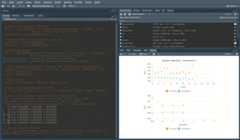
library(SDMtune)# Acquire environmental variablesfiles<-list.files(path=file.path(system.file(package="dismo"),"ex"), pattern="grd", full.names=TRUE)predictors<-terra::rast(files)# Prepare presence and background locationsp_coords<-virtualSp$presencebg_coords<-virtualSp$background# Create SWD objectdata<-prepareSWD(species="Virtual species", p=p_coords, a=bg_coords, env=predictors, categorical="biome")# Split presence locations in training (80%) and testing (20%) datasetsdatasets<-trainValTest(data, test=0.2, only_presence=TRUE, seed=25)train<-datasets[[1]]test<-datasets[[2]]# Train a Maxnet modelmodel<-train(method="Maxnet", data=train)# Define the hyperparameters to testh<-list(reg=seq(0.1,3,0.1), fc=c("lq","lh","lqp","lqph","lqpht"))# Test all the possible combinations with gridSearchgs<-gridSearch(model, hypers=h, metric="auc", test=test)head(gs@results[order(-gs@results$test_AUC),])# Best combinations# Use the genetic algorithm instead with optimizeModelom<-optimizeModel(model, hypers=h, metric="auc", test=test, seed=4)head(om@results)# Best combinationsDuring the execution of “tuning” and “variable selection” functions, real-time charts displaying training and validation metrics are displayed in the RStudio viewer pane (below is a screencast of the previous executedoptimizeModel function).
Speed test
In the following example we train aMaxent model:
# Train a Maxent modelsdmtune_model<-train(method="Maxent", data=data)We compare the execution time of thepredict function betweenSDMtune that uses its own algorithm anddismo (Hijmans et al. 2017) that calls the MaxEnt Java software (Phillips, Anderson, and Schapire 2006). We first convert the objectsdmtune_model in a object that is accepted bydismo:
maxent_model<-SDMmodel2MaxEnt(sdmtune_model)Next is a function used below to test if the results are equal, with a tolerance of1e-7:
Now we test the execution time using themicrobenckmark package:
bench<-microbenchmark::microbenchmark( SDMtune=predict(sdmtune_model, data=data, type="cloglog"), dismo=predict(maxent_model,data@data), check=my_check)and plot the output:
library(ggplot2)ggplot(bench,aes(x=expr, y=time/1000000, fill=expr))+geom_boxplot()+labs(fill="", x="Package", y="time (milliseconds)")+theme_minimal()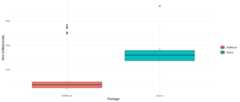
Set working environment
To train aMaxent model using the Java implementation you need that:
- theJava JDK software is installed
- the packagerJava is installed
You can check the version of MaxEnt used bydismo with the following command:
dismo::maxent()The MaxEntjar file used bydismo is located in the folder returned by the following command:
system.file(package="dismo")In case you want to upgrade to a newer version of MaxEnt (if available), download the filemaxent.jarhere and replace the file already present in the previous folder.
The functioncheckMaxentInstallation checks that Java JDK and rJava are installed, and that the file maxent.jar is in the correct folder.
If everything is correctly configured fordismo, the commanddismo::maxent() will return the new MaxEnt version.
Code of conduct
Please note that this project follows aContributor Code of Conduct. By contributing to this project, you agree to abide by its terms.