


Windsurf
Windsurf is Codeium's code editor designed for AI-assisteddevelopment.
Follow this guide to use Windsurf to access your Coder workspaces.
If your team uses Windsurf regularly, ask your Coder administrator to add Windsurf as a workspace application in your template.You can also use theWindsurf module to easily add Windsurf to your Coder templates.
Install Windsurf
Windsurf can connect to your Coder workspaces via SSH:
Install Windsurf on your local machine.
Open Windsurf and selectGet started.
Import your settings from another IDE, or selectStart fresh.
Complete the setup flow and log in orcreate a Codeium accountif you don't have one already.
Install the Coder extension
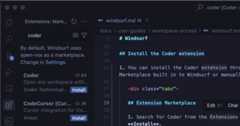
You can install the Coder extension through the Marketplace built in to Windsurf or manually.
Search for Coder from the Extensions Pane and selectInstall.
Open a workspace in Windsurf
From the Windsurf Command Palette (
Ctrl +Shift +P orCmd +Shift +P ),entercoderand selectCoder: Login.Follow the prompts to login and copy your session token.
Paste the session token in theCoder API Key dialogue in Windsurf.
Windsurf prompts you to open a workspace, or you can use the Command Palette to runCoder: Open Workspace.