


Build Parameters
A template can prompt the user for additional information when creatingworkspaces withparameters.
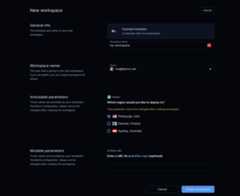
The user can set parameters in the dashboard UI and CLI.
You'll likely want to hardcode certain template properties for workspaces, suchas security group. But you can let developers specify other properties withparameters like instance size, geographical location, repository URL, etc.
This example lets a developer choose a Docker host for the workspace:
data "coder_parameter" "docker_host" { name = "Region" description = "Which region would you like to deploy to?" icon = "/emojis/1f30f.png" type = "string" default = "tcp://100.94.74.63:2375" option { name = "Pittsburgh, USA" value = "tcp://100.94.74.63:2375" icon = "/emojis/1f1fa-1f1f8.png" } option { name = "Helsinki, Finland" value = "tcp://100.117.102.81:2375" icon = "/emojis/1f1eb-1f1ee.png" } option { name = "Sydney, Australia" value = "tcp://100.127.2.1:2375" icon = "/emojis/1f1e6-1f1f9.png" }}From there, a template can refer to a parameter's value:
provider "docker" { host = data.coder_parameter.docker_host.value}Types
A Coder parameter can have one of these types:
stringboolnumberlist(string)
To specify a default value for a parameter with thelist(string) type, use aJSON array and the Terraformjsonencodefunction. For example:
data "coder_parameter" "security_groups" { name = "Security groups" icon = "/icon/aws.png" type = "list(string)" description = "Select appropriate security groups." mutable = true default = jsonencode([ "Web Server Security Group", "Database Security Group", "Backend Security Group" ])}Note
Overriding alist(string) on the CLI is tricky because:
--parameter "parameter_name=parameter_value"is parsed as CSV.parameter_valueis parsed as JSON.
So, to properly specify alist(string) with the--parameter CLI argument,you will need to take care of both CSV quoting and shell quoting.
For the above example, to override the default values of thesecurity_groupsparameter, you will need to pass the following argument tocoder create:
--parameter "\"security_groups=[\"\"DevOps Security Group\"\",\"\"Backend Security Group\"\"]\""Alternatively, you can use--rich-parameter-file to work around the aboveissues. This allows you to specify parameters as YAML. An equivalent parameterfile for the above--parameter is provided below:
security_groups: - DevOps Security Group - Backend Security GroupOptions
Astring parameter can provide a set of options to limit the user's choices:
data "coder_parameter" "docker_host" { name = "Region" description = "Which region would you like to deploy to?" type = "string" default = "tcp://100.94.74.63:2375" option { name = "Pittsburgh, USA" value = "tcp://100.94.74.63:2375" icon = "/emojis/1f1fa-1f1f8.png" } option { name = "Helsinki, Finland" value = "tcp://100.117.102.81:2375" icon = "/emojis/1f1eb-1f1ee.png" } option { name = "Sydney, Australia" value = "tcp://100.127.2.1:2375" icon = "/emojis/1f1e6-1f1f9.png" }}Incompatibility in Parameter Options for Workspace Builds
When creating Coder templates, authors have the flexibility to modify parameteroptions associated with rich parameters. Such modifications can involve adding,substituting, or removing a parameter option. It's important to note that makingthese changes can lead to discrepancies in parameter values utilized by ongoingworkspace builds.
Consequently, workspace users will be prompted to select the new value from apop-up window or by using the command-line interface. While this additionalinteractive step might seem like an interruption, it serves a crucial purpose.It prevents workspace users from becoming trapped with outdated templateversions, ensuring they can smoothly update their workspace without anyhindrances.
Example:
- Bob creates a workspace using the
python-devtemplate. This template has aparameterimage_tag, and Bob selects1.12. - Later, the template author Alice is notified of a critical vulnerability in apackage installed in the
python-devtemplate, which affects the image tag1.12. - Alice remediates this vulnerability, and pushes an updated template versionthat replaces option
1.12with1.13for theimage_tagparameter. Shethen notifies all users of that template to update their workspaceimmediately. - Bob saves their work, and selects the
Updateoption in the UI. As theirworkspace uses the now-invalid option1.12, for theimage_tagparameter,they are prompted to select a new value forimage_tag.
Required and optional parameters
A parameter isrequired if it doesn't have thedefault property. The usermust provide a value to this parameter before creating a workspace:
data "coder_parameter" "account_name" { name = "Account name" description = "Cloud account name" mutable = true}If a parameter contains thedefault property, Coder will use this value if theuser does not specify any:
data "coder_parameter" "base_image" { name = "Base image" description = "Base machine image to download" default = "ubuntu:latest"}Admins can also set thedefault property to an empty value so that theparameter field can remain empty:
data "coder_parameter" "dotfiles_url" { name = "dotfiles URL" description = "Git repository with dotfiles" mutable = true default = ""}Mutability
Immutable parameters can only be set in these situations:
- Creating a workspace for the first time.
- Updating a workspace to a new template version.This sets the initial value for required parameters.
The idea is to prevent users from modifying fragile or persistent workspaceresources like volumes, regions, and so on.
Example:
data "coder_parameter" "region" { name = "Region" description = "Region where the workspace is hosted" mutable = false default = "us-east-1"}If a required parameter is empty or if the workspace creation page detects an incompatibility between selectedparameters, theCreate workspace button is disabled until the issues are resolved.
Ephemeral parameters
Ephemeral parameters are introduced to users in order to model specificbehaviors in a Coder workspace, such as reverting to a previous image, restoringfrom a volume snapshot, or building a project without using cache. Theseparameters are only settable when starting, updating, or restarting a workspaceand do not persist after the workspace is stopped.
Since these parameters are ephemeral in nature, subsequent builds proceed in thestandard manner:
data "coder_parameter" "force_rebuild" { name = "force_rebuild" type = "bool" description = "Rebuild the Docker image rather than use the cached one." mutable = true default = false ephemeral = true}Validating parameters
Coder supports parameters with multiple validation modes: min, max,monotonic numbers, and regular expressions.
Number
You can limit anumber parameter tomin andmax boundaries.
You can also specify its monotonicity asincreasing ordecreasing to verifythe current and new values. Use themonotonic attribute for resources thatcan't be shrunk or grown without implications, like disk volume size.
data "coder_parameter" "instances" { name = "Instances" type = "number" description = "Number of compute instances" validation { min = 1 max = 8 monotonic = "increasing" }}It is possible to override the defaulterror message for anumber parameter,along with its associatedmin and/ormax properties. The following messageplaceholders are available{min},{max}, and{value}.
data "coder_parameter" "instances" { name = "Instances" type = "number" description = "Number of compute instances" validation { min = 1 max = 4 error = "Sorry, we can't provision too many instances - maximum limit: {max}, wanted: {value}." }}Note
As ofterraform-provider-coder v0.19.0,options can be specified innumber parameters; this also works withvalidations such asmonotonic.
String
You can validate astring parameter to match a regular expression. Theregexproperty requires a correspondingerror property.
data "coder_parameter" "project_id" { name = "Project ID" description = "Alpha-numeric project ID" validation { regex = "^[a-z0-9]+$" error = "Unfortunately, this isn't a valid project ID" }}Workspace presets
Workspace presets allow you to configure commonly used combinations of parametersinto a single option, which makes it easier for developers to pick one that fitstheir needs.

Use thecoder_workspace_presetdata source to define the preset parameters. After you save the template file,the presets will be available for all new workspace deployments.
Optional preset fields
In addition to the requiredname andparameters fields, you can enhance yourworkspace presets with optionaldescription andicon fields:
- description: A helpful text description that provides additional contextabout the preset. This helps users understand what the preset is for and whento use it.
- icon: A visual icon displayed alongside the preset name in the UI. Useemoji icons with the format
/emojis/{code}.png(e.g.,/emojis/1f1fa-1f1f8.pngfor the US flag emoji 🇺🇸).
For a complete list of all available fields, see theTerraform provider documentation.
Expand for an example
data "coder_workspace_preset" "goland-gpu" { name = "GoLand with GPU" description = "Development workspace with GPU acceleration for GoLand IDE" icon = "/emojis/1f680.png" parameters = { "machine_type" = "n1-standard-1" "attach_gpu" = "true" "gcp_region" = "europe-west4-c" "jetbrains_ide" = "GO" }}data "coder_workspace_preset" "pittsburgh" { name = "Pittsburgh" description = "Development workspace hosted in United States" icon = "/emojis/1f1fa-1f1f8.png" parameters = { "region" = "us-pittsburgh" "machine_type" = "n1-standard-2" }}data "coder_parameter" "machine_type" { name = "machine_type" display_name = "Machine Type" type = "string" default = "n1-standard-2"}data "coder_parameter" "attach_gpu" { name = "attach_gpu" display_name = "Attach GPU?" type = "bool" default = "false"}data "coder_parameter" "gcp_region" { name = "gcp_region" display_name = "GCP Region" type = "string" default = "us-central1-a"}data "coder_parameter" "jetbrains_ide" { name = "jetbrains_ide" display_name = "JetBrains IDE" type = "string" default = "IU"}data "coder_parameter" "region" { name = "region" display_name = "Region" type = "string" default = "us-east-1"}Create Autofill
When the template doesn't specify default values, Coder may still autofillparameters in one of two ways:
Coder will look for URL query parameters with form
param.<name>=<value>.This feature enables platform teams to create pre-filled template creation links.
Coder can populate recently used parameter key-value pairs for the user.This feature helps reduce repetition when filling common parameters such as
dotfiles_urlorregion.To enable this feature, you need to set the
auto-fill-parametersexperiment flag:coder server --experiments=auto-fill-parametersOr set theenvironment variable,
CODER_EXPERIMENTS=auto-fill-parameters
Dynamic Parameters
Coder v2.24.0 introducesDynamic Parameters to extend the existing parameter system withconditional form controls, enriched input types, and user identity awareness.This feature allows template authors to create interactive workspace creation forms, meaning more environmentcustomization and fewer templates to maintain.
You can read more in theDynamic Parameters documentation and try it out in theParameters Playground.