January 2025 (version 1.97)
Update 1.97.1: The update addresses thesesecurity issues.
Update 1.97.2: The update addresses theseissues.
Downloads: Windows:x64Arm64 | Mac:UniversalIntelsilicon | Linux:debrpmtarballArmsnap
Welcome to the January 2025 release of Visual Studio Code. There are many updates in this version that we hope you'll like, some of the key highlights include:
- Next Edit Suggestions (preview) - Copilot predicts the next edit you are likely to make.
- Reposition Command Palette - Drag the Command Palette and Quick Inputs to a new position.
- Auto accept edits - Automatically accept edits from Copilot after a configurable timeout.
- Extension publisher trust - Keep your environment secure with extension publisher trust.
- Compound logs - Combine multiple logs into a single, aggregated log view.
- Filter output logs - Filter the contents of the Output panel.
- Git blame information - Rich git blame information and open on GitHub.
- Search values in debug variables - Filter and search for specific values in debug variables.
- Notebook inline values - View inline values for code cell variables in notebooks.
- Python no-config debug - Quickly debug a Python script or module without setup.
If you'd like to read these release notes online, go toUpdates oncode.visualstudio.com.Insiders: Want to try new features as soon as possible? You can download the nightlyInsiders build and try the latest updates as soon as they are available.
GitHub Copilot
Copilot Next Edit Suggestions (Preview)
Setting:github.copilot.nextEditSuggestions.enabled
GitHub Copilot code completions are great at autocomplete, but since most coding activity is editing existing code, it's a natural evolution of completions to also help with edits. So, we're excited to release a new preview feature,Copilot Next Edit Suggestions (Copilot NES).
Based on the edits you're making, Copilot NES both predicts the location of the next edit you'll want to make and what that edit should be. NES suggests future changes relevant to your current work, and you can simplyTab to quickly navigate and accept suggestions.
Notice in the following example that changing a variable triggers an edit suggestion further down the file. Just use theTab key to navigate and accept the suggestion. The gutter indicator will guide you to your next edit suggestion.
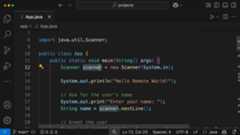
Enable Copilot NES via the VS Code settinggithub.copilot.nextEditSuggestions.enabled.
Based on the size and type of edit, the rendering of the suggestion might change dynamically from side-by-side to below the current line. Configure theeditor.inlineSuggest.edits.renderSideBySide setting to always render suggestions below the current line.
Copilot NES is rapidly evolving, and we can't wait to get your feedback via issues inour repo. You can read our fullCopilot NES docs for more information and scenarios as we expand the NES experience.
Note: If you are a Copilot Business or Enterprise user, an administrator of your organizationmust opt in to the use of Copilot "Editor Preview Features," in addition to you settinggithub.copilot.nextEditSuggestions.enabled in your editor.
Copilot Edits
Copilot Edits general availability
In our VS Code October release, we announced the preview of Copilot Edits. Today, we're now announcing the general availability of Copilot Edits! Copilot Edits is optimized for code editing and enables you to make code changes across multiple files in your workspace, directly from chat.
Improved editor controls
Edits can now be accepted and discarded individually, giving you more control. Also new is that the editor controls for edits remain visible when switching to the side-by-side view. This is useful for understanding larger changes.
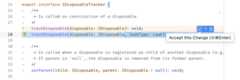 Theme:GitHub Light Colorblind (Beta) (preview onvscode.dev)
Lastly, we have added a new setting for automatically accepting edit suggestions after a configurable timeout. The setting for that ischat.editing.autoAcceptDelay, which specifies the number of seconds after which changes are accepted. The countdown stops when you interact with the accept button or when you start to review changes. This should be familiar to anyone who binge-watches on the weekends.
Theme:GitHub Light Colorblind (Beta) (preview onvscode.dev)
Apply in editor
In Copilot Chat, any code block can be applied to a file in the workspace by using theApply to Editor action in the toolbar of the code block.We made several improvements to this experience:
The hover of the action now shows the file the code block was generated for.
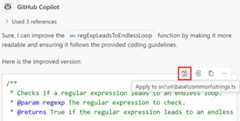
If the code block is for a non-existent file, you are prompted where to create the file. This can be at a file path suggested by Copilot, in an untitled editor, or in the currently active editor.
When the changes are computed and applied, the same flow and UI as for Copilot Edits are used. You can review, improve, or discard each change individually.
Temporal context
Temporal context helps when editing or generating code by informing the language model about files that you have recently interacted with. We are experimenting and measuring its effectiveness but it can also be enabled manually,github.copilot.chat.editor.temporalContext.enabled for Inline Chat andgithub.copilot.chat.edits.temporalContext.enabled for Copilot Edits.
Workspace index status UI
When you ask Copilot a question about the code in your project by using@workspace or#codebase, we use an index to quickly and accurately search your codebase for relevant code snippets to include as context. This index can either be aremote index managed by GitHub,a locally stored index, ora basic index used as a fallback for large projects that can't use a remote index.
This iteration, we've added the new workspace index to the language status indicator in the Status Bar that shows the type of index being used by Copilot and related information, such as the number of files being reindexed. To see this, just select the{} icon in the VS Code Status Bar.
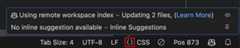
Check out theCopilot workspace docs for more info about the types of workspace indexes and how you can switch between them.
Build a remote workspace index
Remote workspace indexes are managed by GitHub. A remote index can provide high-quality results quickly, even for large projects. They also only have to be built once per GitHub project, instead of once per user.
Given all these advantages, we have added several new ways to upgrade a project to a remote index:
Run the newGitHub Copilot: Build Remote Index command.
Select the Build Index button in theworkspace index status UI. This only shows up if your project is eligible for remote indexing.
Select the Build Index button in the first
@workspaceresponse you see. This only shows up if your project is eligible and also only shows once per workspace.
Keep in mind that only projects with a GitHub remote can currently use a remote index. It may also take some time to build up the remote index, especially if your project is large. Check theWorkspace index status UI to see if remote indexing has completed.
Workspace search improvements
We've also continued optimizing code search for@workspace and#codebase. Highlights include:
Improved tracking and handling of locally changed files when using aremote index.
Added background updating of changed files in thelocal index, so that
@workspacequestions don't have to wait for them to be updated.Optimized thebasic index for large projects.
Git changes context variable
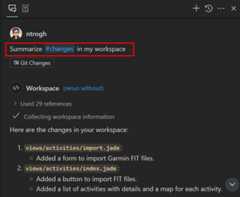
When writing queries for Chat or Edits, you can now reference files that were modified in Git source control by using the#changes context variable. For example, you could prompt forsummarize the #changes in my workspace.
Model availability
You now have even more models to choose from when using Copilot. The following models are now available in the model picker in Visual Studio Code and github.com chat:
OpenAI’s o3-mini: OpenAI’s newest reasoning model to your coding workflow, is rolling out gradually and will be available to GitHub Copilot Pro, Business, and Enterprise users. Learn more about the o3-mini model availability in theGitHub blog post.
Gemini 2.0 Flash: Google’s latest model shows high capabilities for code suggestions, documentation, and explaining code. This model is now available to all GitHub Copilot customers, including Copilot Free. Learn more about the Gemini 2.0 Flash model availability in theGitHub blog post.
Accessibility
Enhanced accessibility sounds
We've refined several accessibility sounds based on user feedback to improve clarity and distinction. The following sounds have been updated:
- accessibility.signals.save
- accessibility.signals.lineHasFoldedArea
- accessibility.signals.terminalQuickFix
- accessibility.signals.lineHasInlineSuggestion
You can preview these updates by running the commandHelp: List Signal Sounds from the Command Palette.
Copilot Edits Accessibility Help dialog
Screen reader users can now access guidance on interacting with Copilot Edits by invoking:⌥F1 (WindowsAlt+F1, LinuxShift+Alt+F1) within the input box.
Additionally, when an editor contains pending Copilot edits, this status is now indicated in the editor help dialog. We've also introduced keyboard shortcuts for navigating next⌥F5 (Windows, LinuxAlt+F5) / previous⇧⌥F5 (Windows, LinuxShift+Alt+F5), accepting⌘Y (Windows, LinuxCtrl+Y), discarding⌘N (Windows, LinuxCtrl+N), and toggling the diff view.
Source Control Accessibility Help dialog
If you invoke theShow Accessibility Help command while the Source Control view is focused, it opens the Source Control Accessibility Help dialog to provide important information for screen reader users. The dialog contains the summary of the current source control state and general information about the views and how to navigate them.
Improved screen reader notifications
When a screen reader is detected, related notifications now include a link to learn more, providing additional context and resources.
Ignore code blocks in text to speech
Previously, when you used text-to-speech to read out a Copilot response, code blocks were also read out loud. You can ignore code blocks from text-to-speech sessions by using theaccessibility.voice.ignoreCodeBlocks setting.
Workbench
Move the Command Palette and Quick Inputs
You can now move the Command Palette and other Quick Inputs to a new position, instead of having it fixed at the top of the window.
Features:
- Drag and drop the Command Palette or any other Quick Input with snapping to center and top
- Persisted position across reloads, allowing you to set a new permanent position for Quick Inputs
- Preset positions are available in the Customize Layout picker
Trusting extension publishers
When you install an extension from a publisher for the first time you will now see a dialog to help you assess the trustworthiness of the extension publisher. This feature helps ensure that you only install extensions from trusted sources, enhancing the security of your development environment.
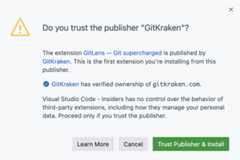
If you install an extension pack or an extension with dependencies, trusting the publisher will also implicitly trust the publishers of the extensions that get installed along with it.
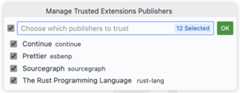
When you update to the VS Code 1.97 release, the publishers of currently installed extensions are automatically trusted. You can manage the trusted extension publishers with theExtensions: Manage Trusted Extensions Publishers command. This command allows you to reset or revoke trust for publishers you have previously trusted.
Note: When no VS Code window is open and you install an extension from the CLI (code-insiders --install-extension pub.name), the extension is installed, but the publisher is not added to the trusted list.
For more information, you can visit thelearn more link.
Output panel filtering
You can now filter the contents of the Output panel, which can greatly improve managing and analyzing logs, especially when you have to deal with large volumes of log data.
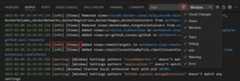
- Filter by Log Level: Filter logs based on their severity level (for example, Error, Warning, Info). This helps you focus on the most critical issues first.
- Filter by Category: Narrow down logs by specific categories, allowing you to isolate logs from particular sources or components. The categories are picked up automatically from the log data.
- Filter by Text: Search for specific text within the logs to quickly locate relevant entries.
Compound logs
Sometimes you find that information is spread across multiple logs, and you need to view them together to get a complete picture. You can now view multiple logs in a single compound log view. Combine this with the newfiltering functionality and analyzing logs has just become much better!
To create a custom compound log, use theCreate Compound Log... action in the overflow menu of the Output panel.
You can also open compound logs in an editor or a new VS Code window for flexible monitoring and analysis. This feature improves your ability to diagnose issues by providing a consolidated view of related logs.
Note: Compound log views are currently not persisted across VS Code restarts.
Export and import logs
You can now export and import logs using the actions in the overflow menu of the Output view. This feature enhances collaboration and log management by making it easy to share and review logs.
Select the correspondingExport Logs orImport Log action in the overflow menu of the Output panel to export or import logs.
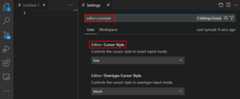
Settings editor search fixes
This iteration, we fixed a regression where search queries with missing letters were not showing expected results. For example, the Settings editor was not finding theeditor.formatOnPaste setting when you searched for "editor formonpast".
We also fixed an issue where the Settings editor would reveal the table of contents during a search even when it was in a narrow editor group.
Theme:Light Pink (preview onvscode.dev)
Extension filter enhancements
To help you keep track of extensions that have updates available and to find extensions that were recently updated, you now have two new filter options in the Extensions view:@outdated and@recentlyUpdated.

SVG image preview support
The built-in image preview now has basic support for previewing SVG files.
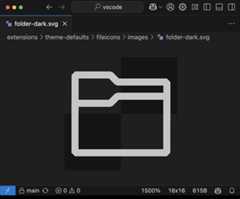
Check out theVisual Studio Marketplace for more advanced SVG preview extensions.
Remove a root folder from a workspace from the CLI
Previously, you could already add a root folder to amulti-root workspace by using the--addcommand-line option.
We've now also added the ability to remove a root folder from a multi-root workspace with the new--remove command-line option.
code --remove /path/to/rootfolderEditor
Persist find and replace history
Last milestone, we introduced history persistence to the editor find control. In this milestone, we are extending that further to the replace input control, so that you can maintain both separately across multiple sessions. The replace history is stored per workspace and can be disabled via theeditor.find.replaceHistory setting.
Comments
Confirmation when closing an un-submitted comment
A confirmation dialog will show when youesc or otherwise close a comment control that has un-submitted comments. You can disable this confirmation with the settingcomments.thread.confirmOnCollapse.
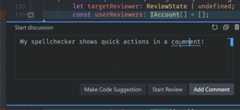
Quick actions in the comment editor
Quick actions can be used from the comments editor.
Source Control
Git blame information
This milestone, we continued to polish the feature to display git blame information in the editor and in the Status Bar. We have also improved the information that is shown when you hover over the editor decoration or the Status Bar item.
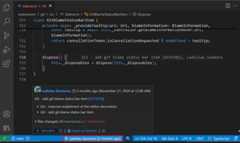
The git blame Status Bar item is now enabled by default, and you can disable it by using thegit.blame.statusBarItem.enabled setting. Enable the git blame editor decoration with thegit.blame.editorDecoration.enabled setting.
We have also added commands to easily toggle the git blame information by using the Command Palette or by using keybindings:Git: Toggle Git Blame Editor Decoration andGit: Toggle Git Blame Status Bar Item.
GitHub repositories
For repositories that are hosted on GitHub, we have added a new command,Open on GitHub, to the timeline context menu and hover, the Source Control Graph context menu and hover, and the git blame editor decoration and Status Bar item hover.
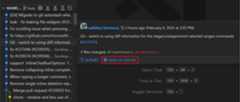
GitHub issue and pull request references are rendered as links in the timeline, Source Control Graph, and git blame editor decoration and Status Bar item hovers, so that they can be easily opened in a browser.
Last but not least, we also added the GitHub avatar in the timeline, Source Control Graph, and git blame editor decoration and Status Bar item hovers. Disable the rendering of the GitHub avatar by using thegithub.showAvatar setting.
Source Control Graph actions
We have expanded the functionality of the Source Control Graph view by adding actions scoped to a history item reference (for example, branch tag) to the context menu. The first actions that we added areCheckout,Delete Branch, andDelete Tag that allow you to easily check out a branch/tag, delete a branch, and delete a tag directly from the Source Control Graph view.
We are planning to add more actions in the upcoming milestones.
Notebooks
Inline values upon cell execution
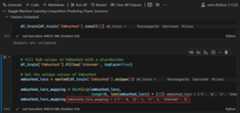
The notebook editor now supports showing inline values after cell execution with the settingnotebook.inlineValues. When enabled, after a successful cell execution, inline values are displayed according to the results of a registeredInlineValueProvider.
If there's no provider, the fallback approach matches values found in the kernel against the cell document via simple regex matching. It's recommended to use a provider from a language extension to ensure more accurate results.
Custom font family for Markdown cells
The notebook editor now supports setting a custom font family for rendered Markdown cells. This can be controlled with thenotebook.markup.fontFamily setting. When left blank, the default workbench font family is used.

Terminal
Ligature support
This feature is now considered stable. Here is a summary of the changes since the last version:
- The enablement setting changed from
terminal.integrated.fontLigaturestoterminal.integrated.fontLigatures.enabled. - Ligatures are now temporarily disabled while the cursor or the selection is within the ligature.
- Useterminal.integrated.fontLigatures.featureSettings to set ligature sets and variants. This is passed on to the
font-feature-settingsCSS property behind the scenes. - Useterminal.integrated.fontLigatures.fallbackLigatures to set ligature sequences manually when the library that we use to parse ligatures is not supported.
Support for ConEmu's progress escape sequences
TheESC ] 9 ; 4 escape sequence pioneered by ConEmu that reports progress in the terminal is now supported. This is used by some CLI tools such aswinget to report progress. To view the progress in terminal tabs, add${progress} to eitherterminal.integrated.tabs.title orterminal.integrated.tabs.description. This typically shows as a progress spinner or as a percentage.
Sticky Scroll for truncated commands
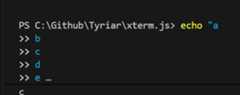
Sticky Scroll in the terminal (terminal.integrated.stickyScroll.enabled) now shows when a command is truncated with an ellipsis at the end:
Configure the behavior when the last terminal closes
The newterminal.integrated.hideOnLastClosed setting allows configuring whether the panel will be closed when the last terminal has been closed. Along with this, the experience when there is no terminal open has been improved.
Tasks
Column number variable
The new${columnNumber} variable can be used intasks.json andlaunch.json to refer to the column number of the cursor position. See the full list ofvariables in the VS Code documentation.
Debug
Filter and search on values
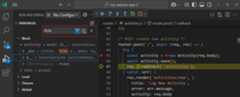
You can now search within a view (⌥⌘F (Windows, LinuxCtrl+Alt+F)) in the Variables and Watch views to filter on variable and expression values, rather than just names.
Select in the Debug Console
The Debug Console now supports longer and more reliable content selection, allowing easier copy and paste.
JavaScript debugger
Scripts can now bepretty printed by using theDebug: Pretty print for debugging command from the command palette or editor actions, even when they are not the source the debugger is currently paused in.
Languages
TypeScript 5.7.3
This release includes theTypeScript 5.7.3 recovery release. This minor update fixes a few import bugs and regressions.
Right click to open images from the Markdown preview
You can now right click on a workspace image in the Markdown preview and selectOpen Image to open it in a new editor.
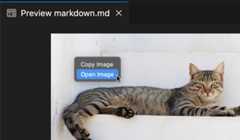
This is supported for any images that are part of the current workspace.
Markdown link validation status item
VS Code's built-in Markdown features support automaticallyvalidating local links to files and images. This is a great way to catch common mistakes, such as linking to a header that was renamed or to a file that no longer exists on disk.
To help you discover this feature, we've added a new language status item for link validation:
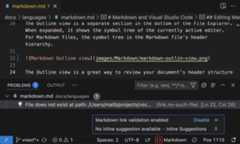
With a Markdown file open, select the{} in the Status Bar to view the link validation status. You can also use the status item to quickly toggle link validation off and on.
New Ruby syntax highlighting grammar
We've moved away from the old, unmaintained, Ruby grammar fromtextmate/ruby.tmbundle and now get our Ruby grammar fromShopify/ruby-lsp.
Remote Development
TheRemote Development extensions allow you to use aDev Container, remote machine via SSH orRemote Tunnels, or theWindows Subsystem for Linux (WSL) as a full-featured development environment.
Highlights include:
- Migration path for connecting to Linux legacy servers
- SSH Chat participant improvements
- SSH configuration improvements
- Default remote extensions for SSH
You can learn more about these features in theRemote Development release notes.
Contributions to extensions
Microsoft Account
Microsoft Account now uses MSAL (with WAM support on Windows)
NOTE: Last month's rollout of an MSAL-based authentication for Microsoft needed to be rolled back due to a critical bug. This bug has been squashed and we are proceeding with the rollout.
In order to ensure a strong security baseline for Microsoft authentication, we've adopted theMicrosoft Authentication Library in the Microsoft Account extension.
One of the stand out features of this work is WAM (Web Account Manager... also known asBroker) integration. Put simply, rather than going to the browser for Microsoft authentication flows, we now talk to the OS directly, which is the recommended way of acquiring a Microsoft authentication session. Additionally, it's faster since we're able to leverage the accounts that you're already logged into on the OS.
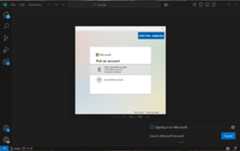
Let us know if you see any issues with this new flow. If you do see a major issue and need to revert back to the old Microsoft authentication behavior, you can do so withmicrosoft-authentication.implementation (setting it toclassic, and restarting VS Code) but do keep in mind that this setting won't be around for much longer. So, open an issue if you are having trouble with the MSAL flow.
Python
Launch native REPL from the terminal
You are now able to launch a VS Code Native REPL from your REPL in the terminal. Settingpython.terminal.shellIntegration.enabled totrue should display a clickable link in the Python REPL in the terminal, allowing you to directly open the VS Code Native REPL from the terminal.
No config debug
You are now able to debug a Python script or module without setup, right from the terminal as part of the new no-config debug feature! Check out thewiki page on the feature for all the details and troubleshooting tips.
Test discovery cancellation
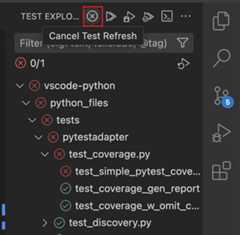
When triggering test discovery from the Test Explorer UI, you can now cancel an ongoing test discovery call. Use the Cancel button, which appears in replacement of the Refresh button during discovery.
Go to Implementation
Pylance now has support forGo to Implementation, which allows you to more quickly navigate to the implementation of a function or method directly from its usage. This is a particularly helpful feature when working with inherited classes.
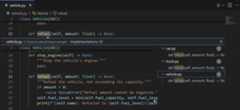
AI Code Action: Generate Symbol (Experimental)
There's a new experimental AI Code Action for generating symbols with Pylance and Copilot. To try it out, you can enable the following setting:
"python.analysis.aiCodeActions": {"generateSymbol": true}Then once you define a new symbol, for example, a class or a function, you can select theGenerate Symbol with Copilot Code Action and let Copilot handle the implementation! If you want, you can then leverage Pylance'sMove Symbol Code Actions to move it to a different file.
GitHub Pull Requests and Issues
There has been more progress on theGitHub Pull Requests extension, which enables you to work on, create, and manage pull requests and issues. New features include:
- Global pull request queries, with a variable to specify a time range relative to today (
${today-7d}). :<emoji-name>:style emojis are now supported in comments.- All non-outdated comments will show in the Comments panel when you open the description of an un-checked out pull request.
Review thechangelog for the 0.104.0 release of the extension to learn about the other highlights.
Preview Features
Agent mode (Experimental)
We've been working on a newagent mode for Copilot Edits. When in agent mode, Copilot can automatically search your workspace for relevant context, edit files, check them for errors, and run terminal commands (with your permission) to complete a task end-to-end.
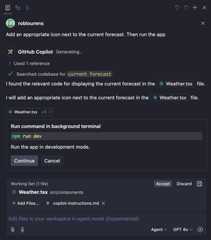
You can switch between the current edit mode that we've had for a few months and agent mode with the dropdown in the Copilot Edits view. To see the dropdown, enable thechat.agent.enabled setting. You can start using agent mode inVS Code Insiders today. We will gradually be rolling it out to VS Code Stable users. If the setting doesn't show up for you in Stable, then it isn't enabled for you yet.

In agent mode, Copilot runs autonomously, but it can only edit files within your current workspace. When it wants to run a terminal command, it shows you the command and waits for you to review it and select Continue before proceeding.
Note: Copilot Edits may use many chat requests in agent mode, so it will periodically pause and ask you whether to continue. You can customize this withchat.agent.maxRequests. This defaults to 15 for Copilot paid users, and 5 for Copilot Free users.
Learn more aboutagent mode in Copilot Edits in the VS Code documentation.
Agentic codebase search (Preview)
You can add#codebase to your query and Copilot Edits will discover relevant files for your task. We've added experimental support for discovering relevant files using additional tools like file and text search, Git repository state, and directory reads. Previously,#codebase only performed semantic search.
You can enable it withgithub.copilot.chat.edits.codesearch.enabled, and pleaseshare any feedback with us.
Copilot Vision in VS Code Insiders (Preview)
We're introducing end-to-end vision support in the pre-release version of GitHub Copilot Chat inVS Code Insiders. This lets you attach images and interact with images in Copilot Chat prompts. For example, if you're encountering an error while debugging, quickly attach a screenshot of VS Code and ask Copilot to help you resolve the issue.
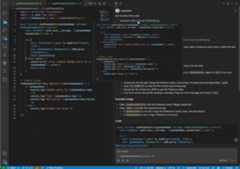
You can now attach images using several methods:
- Drag and drop images from your OS or from the Explorer view
- Paste an image from the clipboard
- Attach a screenshot of the VS Code window (select Attach > Screenshot Window)
A warning is shown if the selected model currently does not have the capability to handle images. The only supported model at the moment will beGPT 4o. Currently, the supported image types areJPEG/JPG,PNG,GIF, andWEBP.
Reusable prompts (Experimental)
This feature lets you build, store, and share reusable prompts. A prompt file is a.prompt.md Markdown file that follows the same format used for writing prompts in Copilot Chat, and it can link to other files or even other prompts. You can attach prompt files for task-specific guidance, aid with code generation, or keep complete prompts for later use.
To enable prompt files, setchat.promptFiles totrue, or use the{ "/path/to/folder": boolean } notation to specify a different path. The.github/prompts folder is used by default to locate prompt files (*.prompt.md), if no other path is specified.
Learn more aboutprompt files in the VS Code documentation.
Custom title bar on Linux (Experimental)
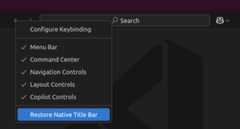
This milestone, we are starting an experiment to enable the custom title bar for a subset of Linux users.

If you are not part of the experiment, you can manually configurewindow.titleBarStyle ascustom to try it out.
You can always revert back to the native title decorations, either from the custom title context menu or by configuringwindow.titleBarStyle tonative.
TypeScript 5.8 beta support
This release includes support for the TypeScript 5.8 beta release. Check out theTypeScript 5.8 blog post for details on what's in store for this release.
To start using preview builds of TypeScript 5.8, install theTypeScript Nightly extension. Share your feedback and let us know if you run into any bugs with TypeScript 5.8.
Terminal completions for more shells
We have iterated on the general terminal completions thatwere introduced in the last version that are built on our new proposed API. Once enabled withterminal.integrated.suggest.enabled, the new completions now replace the previous built-in provider for PowerShell but can now be customized withterminal.integrated.suggest.providers.
Here are the key updates this release:
- Enhanced widget styling and configuration to align with the editor's suggest widget.
- A configurable status bar (terminal.integrated.suggest.showStatusBar) provides contextual actions and information.
- Improved argument awareness for commands, including:
code,code-insiders,cd,ls,rm,echo,mkdir,rmdir,touch. - Displays command or resource paths as additional details.
- Added support for directory navigation shortcuts like
.,.., and../../. - Enabled screen reader usage.
- Entries pulled from the
$PATHwill now only show when they are executable files. Since Windows does not have the concept of an executable bit in file metadata, the list of extensions can be configured withterminal.integrated.suggest.windowsExecutableExtensions. These now also use the actual shell environment when available using an upcoming proposed API. - Enhanced keyboard support to toggle details,⌃Space (Windows, LinuxCtrl+Space) and toggle suggest details focus⌃⌥Space (Windows, LinuxCtrl+Alt+Space).
- Suggestions will now always be on every type, aligning closer to how quick suggestions work in the editor.
- PowerShell-specific global completions such as
Get-ChildItem,Write-Host, etc. will now be suggested.
Tree-Sitter based syntax highlighting for typescript
Since many of our Textmate grammars are no longer maintained, we've been investigating using Tree-Sitter for syntax highlighting. We've started with TypeScript so the team can selfhost it and provide feedback. You can try out an early preview it out with theeditor.experimental.preferTreeSitter setting.
Extension Authoring
Document paste API
The document paste API allows extensions to hook into copy/paste operations in text documents. Using this API, your extension can:
On copy, write data to the clipboard. This includes writing metadata that the can be picked up on paste.
On paste, generate a custom edit that applies the paste. This can change the text content being pasted or make more complex workspace edits, such as creating new files.
Provide multiple ways that content can be pasted. Users can select how content should be pasted using the paste control or with the
editor.pasteAs.preferencessetting.
VS Code uses the document paste API to implement features such asupdating imports on paste for JavaScript and TypeScript andautomatically creating Markdown links when pasting URLs.
To get started with the document paste API, check out thedocument paste extension sample. For a more complex example, check out how the built-in Markdown extensionimplements pasting of image files to insert images into Markdown documents.
FileopenLabel shows in the simple file picker
TheopenLabel property in theOpenDialogOptions is now supported in thesimple file picker (in addition to the system file picker, where it was previously exclusively supported). This allows you to provide a custom label for the button in the file picker.
File-level comments API
The comments API supports making and showing file-level comments. File-level comments show at the top of the file, before the first line. They are not attached to a specific line or range in the file. To show a file-level comment, set therange of the comment toundefined. To support leaving file-level comments from your commenting range provider, set theenableFileComments property on yourCommentingRangeProvider totrue.
Proposed APIs
Terminal completion provider
You can nowregister a terminal completion provider and let us know what you thinkin this GitHub issue.
An example of this can be found in our terminal suggest extension, which provides completions when enabled viaterminal.integrated.suggest.enabled.
Terminal shell type
Extensions will be able toaccess currently active shell type information.TheshellType field will be part ofTerminalState.
Use this shell type information to perform shell-specific operations that you need.
Engineering
Housekeeping
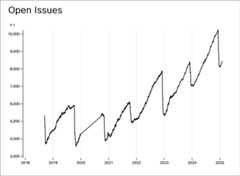
As part of our annual housekeeping efforts in December, we focused on cleaning up our GitHub issues and pull requests across all repositories. This year, we achieved a net reduction of 3,821 issues and pull requests, ensuring that our backlog remains relevant and manageable.
By following our issue cleanup guide, we reviewed and triaged outdated, duplicated, and no longer relevant issues. This helps us maintain an efficient development workflow and focus on improving Visual Studio Code for our users.
We appreciate the community’s continued engagement and feedback — your contributions make VS Code better every day! 🚀
Resource optimization for file watching in TypeScript workspaces
A couple of optimizations have been made to reduce the overhead that file watching has in large TypeScript workspaces (thousands of TypeScript files or projects). Specifically, when opening such a workspace and initializing the watcher, you should no longer see CPU spikes or CPU usage should settle quickly.
See thisVS Code issue for more details.
Notable fixes
- 160325 Suppress terminal launch failure after ctrl+D is pressed
- 230438 Support for code page
1125akacp866u - 238577 Increase default window size
- 197377 workspaceFolder variable substitution in launch.json or tasks.json should use URI for virtual filesystems
- 229857 a11y view is blank after running
focus comment on line
Thank you
Last but certainly not least, a bigThank You to the contributors of VS Code.
Issue tracking
Contributions to our issue tracking:
- @gjsjohnmurray (John Murray)
- @IllusionMH (Andrii Dieiev)
- @RedCMD (RedCMD)
- @albertosantini (Alberto Santini)
- @starball5 (starball)
Pull requests
Contributions tovscode:
- @Abrifq (Arda Aydın): Change
Create New Terminalto focus accordingly to the terminal locationPR #237404 - @adrianstephens: custom editor previewPR #235533
- @andrewsuzuki (Andrew Suzuki): Fix 'new Color' string typo for editorBracketHighlight.unexpectedBracket.foregroundPR #237236
- @aslezar (Shivam Garg)
- Fix incorrect GLIBC version parsingPR #236082
- feat: support custom js switch-case indentationPR #237069
- @atreids (Aaron Donaldson): chore: fix typo in VSIX progress notificationPR #238845
- @BABA983 (BABA): Resolve custom editor with canonical resourcePR #226614
- @congyuandong (scott): fix: remove duplicate
!**/*.mkentry in dependenciesSrcPR #236683 - @DetachHead: remove
javascript.inlayHints.enumMemberValues.enabledbecause javascript does not have enumsPR #236297 - @devm33 (Devraj Mehta): Use Electron fetch or Node fetch for github-authentication to support proxiesPR #238149
- @dmitrysonder (Dmitry Sonder): refactor: use EventType constants for eventsPR #236941
- @fa0311 (ふぁ): Fix ${unixTime} Placeholder to Use Full Millisecond Timestamp in markdown.copyFiles.destinationPR #239061
- @g122622: Scrollbar for File menu is displaying over Open RecentPR #236998
- @gjsjohnmurray (John Murray): Add a Configure option to overflow menu of Open Editors viewPR #237678
- @goodmind (andretshurotshka): Fixes #44237: Add column number in tasksPR #65264
- @HD787 (Henry)
- Add ${unixTime} Placeholder for markdown.copyFiles.destination OptionPR #238027
- enable typescript commands when only config files are openPR #238630
- @iamdereky (Derek Yang): Fix CSS errors when using HTML escaped quotesPR #235367
- @jakebailey (Jake Bailey): Remove paths from tsconfig.base.jsonPR #238475
- @janajar (Jawad Najar): Fix: When no results in search editor it throws an errorPR #235031
- @jaymroy: Issue: #214481 Add Option to Ignore Code Blocks in Text-to-SpeechPR #235697
- @jogibear9988 (Jochen Kühner): support svg's in image previewPR #237217
- @Jules-Bertholet (Jules Bertholet): Support back and forward keys in default shortcutsPR #237701
- @Legend-Master (Tony): Reland fix custom task shell doesn't work without manually passing in "run command" arg/flagPR #236058
- @LemmusLemmus: Add $ to surrounding pairs in markdownPR #233981
- @leopardracer (leopardracer): fix: typos in documentation filesPR #235968
- @misode (Misode): Fix missing uri to file path conversion when loading json schemaPR #237275
- @mohankumarelec (mohanram): Fixes #236973PR #236974
- @notoriousmango (Seong Min Park): Add 'open image' context in markdown previewPR #234649
- @numbermaniac: Fix typo in InlayHintKind docsPR #238032
- @oltolm (oltolm): debug: ignore error when stopping a processPR #236009
- @oxcened (Alen Ajam)
- fix: set _lastFocusedWidget as undefined on widget blurPR #234610
- fix: check whether lastFocusedList is valid when assignedPR #238765
- @pankajk07 (Pankaj Khandelwal): fix: synchronous script loading from web workers of extensionsPR #233175
- @Parasaran-Python (Parasaran)
- fix 227150: Added a recursive git clone buttonPR #232497
- fix 235221: Sanitizing the html content by closing the unclosed tagsPR #236145
- @r3m0t (Tomer Chachamu): Fix revealing a notebook cell from the debugger stopping and revealing active statement (Fixes #225290)PR #225292
- @rcjsuen (Remy Suen): Fix typo in the help text of the icon extension pointPR #238393
- @RedCMD (RedCMD)
- Fix extension preview codeblock language getterPR #235880
- Add
outdatedandrecentlyUpdatedsuggestions to extension filterPR #235884
- @remcohaszing (Remco Haszing)
- Mark bun.lock as jsoncPR #235917
- Allow the .ndjson extension for the jsonl languagePR #235921
- @RiskyMH (Michael H):
bun.lockas package manager lockfilePR #236012 - @sunnylost (sunnylost): fix(settings-editor): ensure the width of the key name does not shrinkPR #229919
- @tcostew: Allow Github Copilot chat to appear in QuickAccessPR #210805
- @tmm1 (Aman Karmani)
- build: update to include more tsc boilerplatePR #238422
- build: switch
build/tsconfig.jsontomodule: nodenextPR #238426
- @tobil4sk: Merge diverging findExecutable functionsPR #228373
- @zWingz (zWing): fix(git-ext): fix limitWarning block the git status progressPR #226577
Contributions tovscode-eslint:
- @ShahinSorkh (Shahin Sorkh): clarify where to set
eslint.runtimeandeslint.execArgvoptionsPR #1973
Contributions tovscode-extension-samples:
Contributions tovscode-js-debug:
- @mdh1418 (Mitchell Hwang): Update BlazorDebugger telemetry report eventPR #2158
Contributions tovscode-jupyter:
- @gy-mate (Máté Gyöngyösi): Capitalize 'URL'PR #16340
- @pwang347 (Paul): Add
waitUntilforonDidStarteventPR #16375
Contributions tovscode-loc:
- @NicoWeio (Nicolai Weitkemper): improve grammar in READMEPR #1367
Contributions tovscode-prompt-tsx:
Contributions tovscode-pull-request-github:
- @mikeseese (Mike Seese): Add opt-in to always prompt for repo for issue creation and add comment to issue file specifying the repoPR #6115
- @NellyWhads (Nelly Whads): Remove the python language user mention exceptionPR #6525
- @Ronny-zzl (Zhang): Don't show hover cards for @-mentioned users in JSDocs in jsx and tsx filesPR #6531
Contributions tovscode-pylint:
- @DetachHead: workaround for memory leak caused by pylint bugPR #585
Contributions tovscode-python-debugger:
Contributions tovscode-ripgrep:
- @fiji-flo (Florian Dieminger): fix long downloadPR #62
- @tmm1 (Aman Karmani): Fix for arm64 windowsPR #63
Contributions tovscode-test:
- @kamaal111 (Kamaal Farah): docs: update Github Actions link to point to samplePR #297
Contributions tolanguage-server-protocol:
- @asukaminato0721 (Asuka Minato): cython-lspPR #2064
- @catwell (Pierre Chapuis): Add Teal LSPPR #2078
- @Enaium (Enaium)
- @g-plane (Pig Fang): New language server: wasm-language-toolsPR #2065
- @jcs090218 (Jen-Chieh Shen): chore(_implementors/servers.md): Update Ellsp linkPR #2073
- @kbwo (Kodai Kabasawa): Add testing-language-server in servers.mdPR #2076
- @kylebonnici (Kyle Micallef Bonnici): Add Devicetree LSP to listPR #2085
- @ribru17 (Riley Bruins): Add ts_query_ls (Tree-sitter query language server)PR #2068