March 2024 (version 1.88)
Update 1.88.1: The update addresses theseissues.
Downloads: Windows:x64Arm64 | Mac:UniversalIntelsilicon | Linux:debrpmtarballArmsnap
Welcome to the March 2024 release of Visual Studio Code. There are many updates in this version that we hope you'll like, some of the key highlights include:
- Apply custom editor labels - Distinguish between editors with same file names.
- Locked scrolling - Compare editors side-by-side with synchronized scrolling.
- Extension update improvements - Restart extensions without reload & update extensions with VS Code releases.
- Test Coverage API - Native code coverage support in VS Code.
- Folding markers in minimap - Easily identify and navigate to code sections from minimap.
- Quick Search improvements - Sticky file path separators and separator buttons.
- Notebook Run cells in section - Quickly run all cells in a notebook section.
- Copilot improvements - Improved inline chat UI, commit messages, and used references.
- Python auto-detect improvements - Detect startup files for Flask & Django, discover Hatch environments.
- Preview: Terminal inline chat - Start a Copilot inline chat conversation directly from the terminal.
If you'd like to read these release notes online, go toUpdates oncode.visualstudio.com.Insiders: Want to try new features as soon as possible? You can download the nightlyInsiders build and try the latest updates as soon as they are available.
Accessibility
Voice recording sounds
We have added new accessibility signal sounds for voice recording:
- Voice recording start - configured with the
accessibility.signals.voiceRecordingStartedsetting - Voice recording end - configured with the
accessibility.signals.voiceRecordingStoppedsetting
Improved diff editor accessibility
If you're using a screen reader, you now get an announcement when a diff editor becomes the active editor. You can disable this behavior with theaccessibility.verbosity.diffEditorActive setting.
We also added information aboutDiff Editor: Switch Side, a helpful command for keyboard users, to theaccessibility help dialog.
Accessibility Signals now work on both sides of the diff editor. Previously, they were only available on the modified side.
Accessible View chat code block commands
When you inspect a chat response in the Accessible View, you can now use the code block commands and keybindings that are available in the Chat view.
These includeChat: Insert at Cursor,Chat: Insert into Terminal andChat: Insert into New File.
Notebook cell aria label updates
Aria labels for notebook cells now update to indicate if the cell is currently executing or pending execution.
Workbench
Custom editor support in floating windows
We expanded support for opening editors intofloating windows to custom editors, and generally all editors that use thewebview API. This includes markdown preview, browser preview, and complex custom editors, such as ourhex editor.
Note: due to a technical limitation, moving a webview-based editor between windows requires the contents of that editor to reload. It is then up to the editor to restore the state you had previously accumulated. In some cases your state might be reset, as if you had opened the editor for the first time.
Custom labels for open editors
We now let you customize the display label for editor tabs and the Open editors view. This functionality can be useful to distinguish between editors for files with the same name.
You can tailor these labels to your preference by adding entries under theworkbench.editor.customLabels.patterns setting. Each entry should include aglob pattern that matches file paths and a template that defines the new name for the editor tab. This customization only applies when a file's path matches the specified pattern. Whether a pattern matches, depends on if it's defined as a relative or absolute file path pattern.
Templates can incorporate variables such as${filename},${extname},${dirname}, and${dirname(N)}, which are dynamically replaced with values from the file's path.
To enable or disable these custom labels, use theworkbench.editor.customLabels.enabled setting. This enables you to switch to the original editor names at any time, without having to remove your custom patterns.
Locked scrolling
You can now synchronize scrolling across all visible editors by using theView: Toggle Locked Scrolling Across Editors command. This means that when you scroll in one editor, all the other editors scroll by the same amount, keeping everything aligned. This feature can be useful if you need to compare files side-by-side.
If you want more control for enabling and disabling locked scrolling, you can choose to only activate the scrolling sync when you're holding down a specific keybinding. Set up a keyboard shortcut for theworkbench.action.holdLockedScrolling command, and you're able to temporarily lock the scrolling across editors whenever you need it.
Activity Bar at the bottom
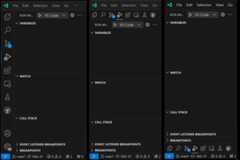
Previously, we introduced the option to move the Activity bar to the top of the Side Bar. We're now enabling you to also move the Activity Bar to the bottom. To do this, change theworkbench.activityBar.location setting tobottom.
We've also improved the look and feel of the Activity Bar when it's positioned at the top, to make sure it fits in nicely with the rest of the interface.
Search Editor single-click behavior
You can now configure thesearch.searchEditor.singleClickBehaviour setting to determine what happens when you single-click on a Search Editor entry. Currently, the setting only supports opening a Peek Definition.
Quick Search improvements
Sticky file paths
In Quick Search, we've made the file name separators sticky to make it clearer which file a search result is associated with. This can be useful when you have many occurrences of a search term in a file.
File path separator buttons
When you hover over the file results of a particular file, or if you arrow down to a result, the buttons (for example, to open the file) also appear for the file path separator.
Quick Pick separator navigation keybindings
We received feedback that it would be nice to be able to navigate between separators in a quick pick. This iteration, we've added a keybinding to do just this. On Windows & Linux, you can useAlt+Up/Down, and on macOS it isCmd+Up/Down. In this example video, you can see the active item moving between:
- The
recently usedandother commandsseparators in the Command Palette - Between the file path separators in Quick Search
Quick Pick disabled checkbox items
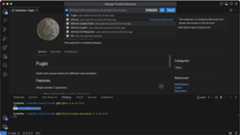
This iteration, we made it clearer when a quick pick displays items that are disabled. An example of this can be found in the "Manage Trusted Extensions" quick pick, which can be accessed for any of the accounts that you're logged in to.
Extensions update improvements
Restart extensions
When an extension is updated, you can now restart extensions instead of having to reload the window.
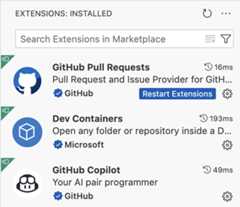
Note: When you are connected to a remote server like WSL or SSH or Dev Container, you still need to reload the window to update extensions.
Update extensions with VS Code updates
When you haveextensions auto update enabled, VS Code now updates the extensions that are compatible with the newer version of VS Code that is available for update. If the newer version of the extension is not compatible with the current version of VS Code, then the newer version of the extension is enabled only after you update VS Code.
Jump to comment reply
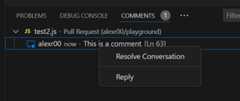
The context menu for a comment thread in the Comments view now includes a "Reply" action when the comment thread allows replies. This enables you to quickly jump to the reply input box and start typing a reply.
Editor
Minimap section headers
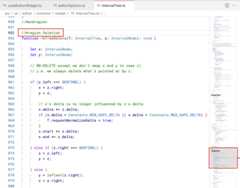
The minimap now recognizes and renders sections defined by folding markers, such as//#region in TypeScript, or comments that useMARK:. This lets you quickly scan and navigate across large files.
Refactor Preview keybindings
We updated the keybinding for previewing edits for the Rename Symbols refactoring (F2) to maintain consistency with previewing refactorings in other contexts, such as Code Actions. You can now preview edits by using⌘Enter (Windows, LinuxCtrl+Enter) (previouslyShift + Enter).
When hovering over a Code Actions,⌘Enter (Windows, LinuxCtrl+Enter) also opens the Refactor Preview panel in the workbench.
Diff Editor Stage/Revert Selection Buttons
The diff editor now has a separate gutter forStage andRevert controls. These actions enable you to stage or revert changed code blocks.
If you perform a text selection of some changes, these buttons let you stage or revert the selected changes (all changed characters within the selection).

You can hide the diff editor gutter by settingdiffEditor.renderGutterMenu tofalse.
Rename suggestions behavior
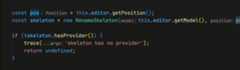
We improved the flow of using rename suggestions to match that of quick picks. When you select a rename suggestion from the list, the input value now updates accordingly, which enables you to further modify the suggestion.
Source Control
Incoming changes file decorations
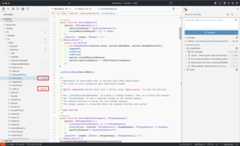
To help avoid potential conflicts when merging/rebasing changes from the remote, we now show file decorations for all files that have incoming changes and which were fetched but not yet merged/rebased. To benefit from this functionality, you should have bothgit.autofetch andgit.decorations.enabled settings enabled.
Theme:GitHub Sharp (preview onvscode.dev)
Terminal
Shell integration in debug terminals
To provide enhanced functionality to the user and extensions,shell integration is now automatically enabled in terminals that are launched when debugging.
Run recent command improvements
The shell integration-poweredRun recent command (⌃⌥R (Windows, LinuxCtrl+Alt+R)) now scrolls to and displays the last time the command was run, where possible. Running the command or canceling the quick pick returns the terminal to its previous state.
Theme:Sapphire (preview onvscode.dev)
Open detected link improvements
TheOpen detected link command (⇧⌘O (Windows, LinuxCtrl+Shift+O)) now previews the link result in the editor and highlights the link source in the terminal.
Additionally, duplicate links are now filtered out of the list and all links are presented in a consistent format.
Additional context for word links
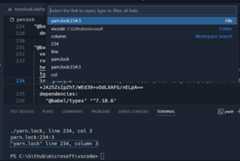
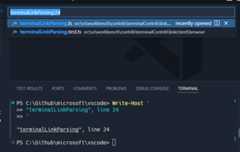
Word links are defined by theterminal.integrated.wordSeparators setting and are the fallback when files/folder/URIs can't be found. When activated, these links now include extra surrounding context to add line and column information for the search that occurs.
Notice in the screenshot that the linkterminalLinkParsing was selected, but the resulting search also includes the line number following the link.
New link formats
The following link format is now detected in terminals, even if the path contains spaces:
FILE path:line:column
Terminal Sticky Scroll transparency support
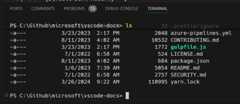
Sticky Scroll in the terminal now supports transparency. A theme can use this by configuring theterminalStickyScroll.background theme color to a transparent value, or by specifying an override in yoursettings.json. For example:
{ "workbench.colorCustomizations": { "[Default Dark Modern]": { "terminalStickyScroll.background":"#181818c0" } }}Which results in a transparent Sticky Scroll background, allowing the text behind to shine through:
Testing
Test Coverage
This iteration, we've finalized our Test Coverage API, bringing native coverage support to VS Code. If your testing system supports it, you can get coverage by using the newRun With Coverage button:
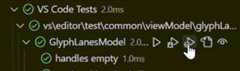
There are similarly new keybindings for running with coverage, such asCtrl+; Ctrl+Shift+A to run all tests with coverage, andCtrl+; Ctrl+Shift+L to run your last set of tests with coverage.
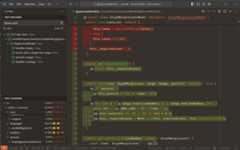
Coverage information is shown as an overlay on line numbers by default, but you canToggle Inline Coverage to see complete detailed information for your source files:
Theme:Codesong (preview onvscode.dev)
Using test coverage requires that your extension implements the new API. Some extensions, such as theTest Runner for Java and thenode:test runner already support it. Learn more about the Test Coverage for Java in the team'sDecember andJanuary updates.
Extension authors can find more details about the Test Coverage API in theTesting API documentation.
Color code support in test messages
We now parse terminal color codes to colorize textual test messages, such as those displayed when a test fails, rather than displaying the raw 'unprintable' data codes.
Languages
TypeScript 5.4
VS Code now includes TypeScript 5.4. This major update brings new improvements to type-checking and IntelliSense, and several bug fixes. See theTypeScript 5.4 release blog post for more details.
Smarter inserting of images and links in Markdown
When you drop or paste an image or file into a Markdown file, VS Code automatically inserts Markdown image or link syntax for it. We now also smartly disable this behavior when you insert into code blocks and other contexts that don't support Markdown syntax:
You can always switch back to inserting the Markdown syntax by using the drop/paste widget. You can configure this behavior by using themarkdown.editor.drop.enabled andmarkdown.editor.filePaste.enabled settings.
Notebooks
Keyboard shortcuts in Notebook outputs
We now support some of the standard keyboard shortcuts in notebook outputs:
- Output can be selected and copied with the keyboard with theCtrl+A andCtrl+C keybindings respectively.
- Scrollable outputs can be scrolled with the keyboard with theUp andDown keybindings respectively.
- Scrolling to the top and bottom of a scrollable output can be achieved with the keyboard with theCtrl+Home andCtrl+End keybindings respectively (Cmd+Up andCmd+Down on macOS).
- Selecting output from the current selection point to the top or bottom of the output, can be achieved with the keyboard with theCtrl+Shift+Up andCtrl+Shift+End keybindings respectively (Shift+Cmd+Up andShift+Cmd+Down on macOS).
Cell error diagnostics
An extension can now provide error details for a failed cell, so that an error diagnostic shows within the cell. While focused on the cell container,notebook.cell.openFailureActions (⌘. (Windows, LinuxCtrl+.)) jumps to the quick actions menu for that error. The diagnostic only shows when a language model is available to provide quick actions.
Run cells in section
To more easily run related cells in a notebook, you can now run cells that are grouped together by a markdown section header with theRun Cells in Section action. This action is available on the notebook Outline view and for Sticky Scroll elements.
Within Sticky Scroll elements, right-click the header of your choice, and run the section via the action in the context menu. Within the Outline view, select the toolbar icon that appears on hover or selection, and then run a single cell or a section of cells via the presented actions.
Filter support in Outline view
You now have filters available in the notebook Outline view, which enable you to control the inclusion of Markdown headers, Code Cells, and Code Cell Symbols. The filters correspond to the following settings:
notebook.outline.showMarkdownHeadersOnlynotebook.outline.showCodeCellsnotebook.outline.showCodeCellSymbols
Prompt to save Interactive Window on close
By enabling theinteractiveWindow.promptToSaveOnClose setting, you are prompted to save the content in an Interactive Window when it is closed, to ensure that you don't lose any work. The only currently supported file format is.ipynb.
Remote Development
TheRemote Development extensions, allow you to use aDev Container, remote machine via SSH orRemote Tunnels, or theWindows Subsystem for Linux (WSL) as a full-featured development environment.
Highlights include:
- Alternate server download for distros with extended support
- Port forwarding based on URI query string
- Dev Containers extension automatically starts Docker
- Restrict access to Dev Tunnels and port forwarding via group policies
You can learn more about these features in theRemote Development release notes.
Contributions to extensions
VS Code Speech
Lazy activation
TheVS Code Speech extension now only activates when voice-to-text services are requested in VS Code. This ensures that the extension is not negatively impacting the extension host startup time.
Use display language as default speech language
By default, the VS Code speech extension now uses the display language of VS Code as the speech language and selects the corresponding model, if that language is supported.
For theaccessibility.voice.speechLanguage setting,auto is the new default.
GitHub Copilot
Inline Chat improvements
Inline Chat now starts as a floating control, making it more lightweight. After the first request, the control expands to take up more space. We have also adjusted the rendering to be more consistent with other chat experiences, such as the Chat view or Quick Chat.
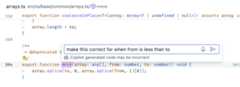 Theme:GitHub Light Colorblind (Beta)
We've repositioned the rerun and feedback controls, and made the toggle control for viewing diffs more prominent alongside the Accept and Discard buttons.
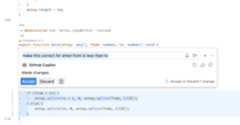 Theme:GitHub Light Colorblind (Beta)
Notebook kernel state as context
When you are in a notebook, the kernel state (for example, variables and available packages) is now automatically included as context in Inline Chat. This lets Copilot use the current state of the notebook to provide more relevant completions.
Theme:GitHub Dark
Commit message generation improvements
To improve the quality of the generated commit messages, we are now also including the commit messages of the 10 most recent commits in the repository, and the commit messages of the 10 most recent commits of the current user as extra context.
Workspace creation improvements
The@workspace /new command now offers sample projects, curated from GitHub repositories, as suggestions when a suitable match is detected for the chat prompt.
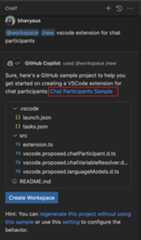
The@workspace /new command has also been enhanced to more effectively manage context and history. This enables you to refine suggested workspaces structure and file contents by asking follow-up queries. For example, "use TypeScript instead of JavaScript" or "also add bootstrap".
@terminal /explain slash command
A new@terminal /explain slash command is available, which is optimized for explaining commands or errors. Without/explain,@terminal is optimized to suggest a fix. This slash command is used in theExplain using Copilot quick fix or theExplain selection actions.
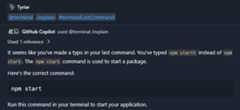
Preview: Terminal Inline Chat
A preview of the terminal Inline Chat is available in this release, which gives convenient access to Copilot's capabilities directly in the terminal.
You can enable terminal Inline Chat with theterminal.integrated.experimentalInlineChat setting. To invoke the inline chat in a terminal, use the⌘I (Windows, LinuxCtrl+I) keybinding.

The terminal Inline Chat uses the@terminal chat participant, which has context about the integrated terminal's shell and its contents.
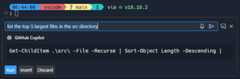
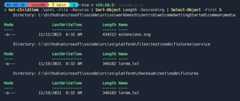
Once a command is suggested, use⌘Enter (Windows, LinuxCtrl+Enter) to run the command in the terminal or⌥Enter (Windows, LinuxAlt+Enter) to insert the command into the terminal. The command can also be edited directly in Copilot's response before running it (currentlyCtrl+down,Tab,Tab on Windows & Linux,Cmd+down,Tab,Tab on macOS).
Clarity on authentication flow
Clarity around authentication is very important. We want to be clear about how we authenticate and what we ask for. If you open a private repository in VS Code, and we don't have the right authentication for this scenario, we present an authentication dialog. The dialog has a description of why authentication is needed, and aLearn more button to find out more about these requirements.
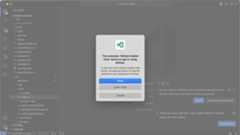
TheLearn more button takes you to ourdocumentation on authentication requirements.
Variable references
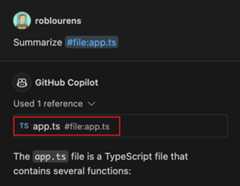
TheUsed references section in a chat response gives information about the context that is used. Previously, this section only showed context that was pulled in implicitly. Now, it also shows variables that you mentioned explicitly in the chat prompt, such as#file or#editor. If a variable is missing from the Used references, it might indicate that it was ignored because it's too large for the context window of the language model.
Secondary chat submit actions
In the Chat view, the chat submit button now has a dropdown for easy access to more actions.
- Send to @workspace submits your query to the
@workspacechat participant, which is useful for questions about the contents of your workspace - Send to New Chat starts a new empty chat, and then submits the query

Scope selection when usingCopilot: Explain This
When you use/explain without a selection in your active editor, and there are multiple scopes of interest, we've added support for prompting to clarify which symbol or block scope to explain.
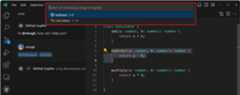
This behavior is currently opt-in, behind thegithub.copilot.chat.scopeSelection setting.
Python
Improved Debug config selection for Flask and Django
Creating launch configurations for Flask and Django apps just got easier! Improvements have been made to detect possible startup files in your workspace when creating alaunch.json for your web app.
For Django, the Python Debugger extension looks formanage.py orapp.py files in the root or a subdirectory one level lower in your workspace. For Flask, the extension looks forwsgi.py,app.py, orinit.py files that contain the declaration of a Flask application (for example,app = Flask()).
If those files are not found in the project, the dropdown shows aDefault option for the corresponding project type, even though that file might not be present.
Hatch environment discovery
Hatch environments are now discovered and activated by default, similar to other common environments, such as Venv, Conda, and Poetry. Furthermore, in the case of Hatch, where an explicit environment identifier is not registered, the extension is able to determine the environment type (Hatch) from the environment locator.
Automatic environment selection for pipenv, pyenv, and Poetry projects
If your workspace contains a pipenv, pyenv, or Poetry environment, the corresponding environment is now automatically selected for your workspace. Previously, the extension correctly discovered these environments, but selected the default global interpreter, which required you to manually select the appropriate environment for your workspace.
Now, the Python extension infers the activated environment based on the presence of the environment and any corresponding configuration files. For example, in the case of pyenv, the extension looks at the.python-version file to automatically select the appropriate interpreter for the workspace.
Report Issue command improvements
ThePython andPython Debugger extensions now make it easier for you to report issues to our repos! If you file an issue with theReport Issue command (workbench.action.openIssueReporter), most of the heavy lifting is already done, and you're only prompted for some additional info so our team can efficiently triage the problem you are encountering.
To file an issue using theHelp: Report Issue command for@vscode-python or@vscode-python-debugger, choosePython orPython Debugger respectively from the extension dropdown.
GitHub Pull Requests
There has been more progress on theGitHub Pull Requests extension, which enables you to work on, create, and manage pull requests and issues. New features include:
- Outdated comments are displayed differently from current comments in the Comments view.
- The new
autovalue forgithubPullRequests.createDefaultBaseBranchuses the upstream's default branch as the base branch for fork repositories. - Comment threads in the Comments view have inline actions (resolve/unresolve and "Diff Comment with HEAD" for outdated comments) and context menu actions.
Review thechangelog for the 0.86.0 release of the extension to learn about the other highlights.
Jupyter
Cell execution analysis improvements
With the latest Pylance prerelease, we have better dependency analysis for Jupyter cells. It now understands module imports, which is especially useful when you have a cell that imports a module that was defined in a previous cell.
To enable this feature, install the latestPylance prerelease in VS Code Insiders, and enable thejupyter.executionAnalysis.enabled andnotebook.consolidatedRunButton settings.
Extension authoring
Use Issue Reporter command for extension bug reporting
Last iteration, we finalized a way for extensions to contribute extra data or templates to fill out when submitting to GitHub via VS Code's Issue Reporter. Extensions can contribute a command, which can be accessed via theHelp: Report Issue... command. Selecting their extension runs their contributed command. Please review ourissue reporting documentation/release notes for more information on how this can work with your extension!
Additionally, all installed extensions can be quickly reported on via Quick Open. By typingissue in Quick Open (⌘P (Windows, LinuxCtrl+P)), you can quickly select or search for an installed extension to report on.
Certain extensions will start moving over to utilizing this new issue reporting flow and will no longer need customReport Issue... commands that are contributed directly into the command palette.
Preview Features
Rescaling overlapping glyph in the terminal
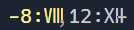
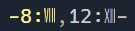
A new settingterminal.integrated.rescaleOverlappingGlyphs is available, which rescales glyphs that overlap following cells. This is intended to cover ambiguous width characters, which might have font glyphs that don't match what the backing pty/unicode version thinks it is. For example, in most fonts the roman numeral unicode characters (U+2160+) typically takes up multiple cells, so they are rescaled horizontally when this setting is enabled.
Without rescaling:
With rescaling:
The rules for when rescaling happens are still being tweaked and we are considering enabling this by default in the future when it's solid. If you try this out and see characters that are being rescaled but should not be, pleasecreate an issue.
Local workspace extensions
We are excited to introduce this new preview feature that allows you to package an extension directly in your workspace. This feature is designed to cater to your specific workspace needs and provide a more tailored development experience.
To use this feature, you need to package your extension in the.vscode/extensions folder within your workspace. VS Code then shows this extension in theWorkspace Recommendations section of the Extensions view from where users can install it. VS Code installs this extension only for that workspace. It also requires the user to trust the workspace before installing and running this extension.
For instance, consider thevscode-selfhost-test-provider extension in theVS Code repository. This extension plugs in test capabilities, enabling contributors to view and run tests directly within the workspace. Following screenshot shows thevscode-selfhost-test-provider extension in the Workspace Recommendations section of the Extensions view and the ability to install it.
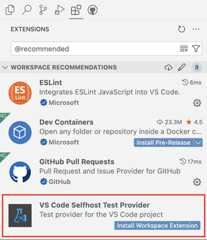
This feature is available for preview in theInsiders release viaextensions.experimental.supportWorkspaceExtensions. Try it out and let us know your feedback by creating issues in theVS Code repository.
Proposed APIs
Terminal shell integration API
A new proposed API that enables accessing some of the information provided by shell integration-activated terminals is now available. With this API, it is possible to listen to the incoming data and exit codes of commands being executed in the terminal. It also introduces a more reliable way to execute commands that wait for the prompt to be available, before sending the command which helps fix some conflicts/race conditions that can occur with various shell set ups.
Here's an example of using theTerminal.shellIntegration.executeCommand proposal:
// Execute a command in a terminal immediately after being createdconst myTerm =window.createTerminal();window.onDidActivateTerminalShellIntegration(async ({terminal,shellIntegration })=> { if (terminal ===myTerm) { const command =shellIntegration.executeCommand('echo "Hello world"'); const code =await command.exitCode; console.log(`Command exited with code${code}`); }}));// Fallback to sendText if there is no shell integration within 3 seconds of launchingsetTimeout(()=> { if (!myTerm.shellIntegration) { myTerm.sendText('echo "Hello world"'); // Without shell integration, we can't know when the command has finished or what the // exit code was. }},3000);Here's an example of listening to the data stream of a command:
// Create a terminal and log all data via console.logconst myTerm =window.createTerminal();window.onDidStartTerminalShellExecution(execution => { if (execution.terminal ===myTerm) { const stream =execution.createDataStream(); for await (const data of stream) { console.log(data); } }});You can review the new APIhere.
Learn More property for authentication API
This iteration, we added a new proposed API that enables you to specify alearnMore property inAuthenticationForceNewSessionOptions. The idea is that if you callgetSession with aforceNewSession property in the options, you can include aURI that would be presented to the user to learn more about why you're asking for authentication. Here's an example of what that looks like:
Here's what that looks like in code:
vscode.authentication.getSession('github', ['repo'], { forceNewSession: { detail: l10n.t('To show you more relevant Copilot Chat results, we need permission to read the contents of your repository on GitHub.'), learnMore: Uri.parse('https://aka.ms/copilotRepoScope') };});You can review the new APIhere.
Outdated comments
The new comment threadapplicability property lets comment threads be marked as outdated in the Comments view:

You can see the API proposalhere.
Comment view menus
ThecommentsView/commentThread/context proposed menu enables actions to be added to the right-click context menu of a comment thread in the Comments view. The usualinline group is also respected, so that actions are shown in the Comments view inline.

Engineering
Electron 28 update
In this iteration, we are promoting the Electron 28 update to users on our stable release. This update comes with Chromium 120.0.6099.291 and Node.js 18.18.2. We want to thank everyone who self-hosted on Insiders builds and provided early feedback.
Notable fixes
- 204886 Opening a file on a different path but with the same name in the simple file picker fails
Thank you
Last but certainly not least, a bigThank You to the contributors of VS Code.
Issue tracking
Contributions to our issue tracking:
- @gjsjohnmurray (John Murray)
- @IllusionMH (Andrii Dieiev)
- @RedCMD (RedCMD)
- @starball5 (starball)
- @the-coder-o (Abdul basit)
- @ArturoDent (ArturoDent)
Pull requests
Contributions tovscode:
- @333fred (Fred Silberberg): Do not trim whitespace when part of strings or regexesPR #198164
- @89netraM (Mårten Åsberg): Render final line number for interval settingPR #207227
- @a-stewart (Anthony Stewart)
- Stop the cursor from jumping when changing prefix in QuickAccess - v2PR #204702
- Export ILocalizedString in nls.mock.tsPR #206449
- @akbyrd (Adam Byrd)
- Implement separate colors for primary and secondary cursors when multiple cursors are presentPR #181991
- Change editor.action.focusNextCursor to reveal the primary cursor instead of all cursorsPR #182148
- @AndreasBackx (Andreas Backx): Fix smooth scrolling Linux Wayland.PR #205122
- @andrewbranch (Andrew Branch): [typescript-language-features] Fix autoImportFileExcludePatterns format to work on WindowsPR #202762
- @andyscho (Andy Schoenberger): Only one subscriber for kernels for onDidChangeSelectedNotebooksPR #204417
- @BABA983 (BABA): Better testing side bar retried colorPR #207949
- @BrandonXLF (Brandon Fowler): Override CSS content for terminal tab image iconsPR #207220
- @BrookMaoDev (Brook Mao): Improved description for editor.useTabStops settingPR #206552
- @btwiuse: cli: add --server-base-path flag to
code serve-webcommandPR #207932 - @BusinessDuck (Dmitriy Yurov): Fix 'e.getModifierState is not a function' error for browser auto filled form eventsPR #206883
- @cchanche (Clément Chanchevrier): Resize terminal directionPR #205015
- @CGNonofr (Loïc Mangeonjean)
- Fix keyboard layout detectionPR #205193
- Fix fullscreen container dimension detection when not directly on bodyPR #205884
- @cpendery (Chapman Pendery)
- fix: terminal suggestions to sort by fuzzy scorePR #208486
- fix: don't show terminal suggestions when keybindings are sent through to shellPR #208523
- fix: suggest widget persisting on completion acceptancePR #208524
- @deyihu (hu de yi): editor paste event result return ClipboardEventPR #192732
- @dgileadi (David Gileadi): Introduce minimap section headers, a la XcodePR #190759
- @futurist (James Yang): feat: add ipcLogger and timeoutDelay for IPCServerPR #193896
- @gjsjohnmurray (John Murray): Make channel log level settable from output viewPR #205159
- @harbin1053020115 (ermin.zem): fix: Select first extension walkthrough for first launch if no built-in walkthroughs present.PR #207303
- @hickford (M Hickford): Sort lines: sort all lines if nothing selected.PR #200325
- @hsfzxjy (Xie Jingyi)
- Fix setting editor list item overflowPR #206681
- Add log point on middle clicking gutterPR #206684
- @IncognitaDev (Luis Sousa): Feat: Add PascalCase to CaseActionsPR #206259
- @its-miroma (Miroma): Change default YAML extensionPR #206447
- @jeanp413 (Jean Pierre): Fixes breadcrumbs widget does not get resized properlyPR #200591
- @jeremy-rifkin (Jeremy Rifkin): Expand monarch functionality to allow state access within rulesPR #183463
- @jhasse (Jan Niklas Hasse): Use indentSize instead of tabSize for LineCommentCommandPR #193811
- @Krzysztof-Cieslak (Krzysztof Cieślak)
- Fix off-by-one error in rendering removals in inline editsPR #205890
- Inline edit - make sure we cancel in-progress request on blurPR #206430
- Inline Edit - make sure we finalize accepting before requesting new editPR #206525
- @lusingander (Kyosuke Fujimoto): Fix broken description of
editor.cursorSurroundingLinesStylesettingPR #201482 - @mahmoudsalah1993 (Mahmoud Salah): for diff editors, resolve the modified editor to allow run tests in c…PR #206026
- @marrej (Marcus Revaj): # Add partial accept kind to inline completion handlePR #202668
- @mkasenberg: searchEditor: Add option to peek with a single clickPR #204413
- @mroch (Marshall Roch): fix "Extension [object Object] is not known"PR #207764
- @NriotHrreion (NoahHrreion): Fix the unexpected position of hover widgetsPR #205502
- @orgads (Orgad Shaneh)
- Tunnel: Extend port mapping lookup also for querystring (take 2)PR #204807
- Tunnel: Re-add unit tests for port mappingPR #207249
- @PmcFizz (Fizz): Update IActionDescriptor.precondition descPR #176124
- @raphaelgpalma (Raphael Palma): Fix grammatical error: 'But allow them if the are made from inside an…'PR #207584
- @rehmsen (Ole): Log
resourcetelemetry also for side-by-side views on browsers.PR #208196 - @russelldavis (Russell Davis): Fix decreaseIndentPattern for javascript and typescriptPR #201425
- @samdenty (Sam Denty): feat(web/lifecycleService): correct startupKindPR #206563
- @Sidebail (VLADIMIR VATSURIN): Fix file relative path linkPR #181475
- @SimonSiefke (Simon Siefke): fix: memory leak in notebook baseCellViewModelPR #205499
- @solimant: Honor GitHub brand name casingPR #208503
- @thegecko (Rob Moran): Update extensionPaths when web extension host startedPR #193849
- @vinistock (Vinicius Stock): Fix accidental dedent for
inandwhendedent in Ruby commentsPR #206132 - @yamachu (Yusuke Yamada): Fixed to show files in deepest directory in search resultsPR #206609
- @Yesterday17 (Yesterday17): Dispatch GestureEvent in node depth orderPR #200612
- @yiliang114 (易良): Fix Copy/Cut command not working in webviewPR #206529
- @yutotnh (yutotnh): Add support for recognizing word locales in word operations (#_50045)PR #203605
Contributions tovscode-css-languageservice:
- @balaji-sivasakthi (Balaji Sivasakthi): feat: support hover tooltip for scssPR #367
Contributions tovscode-eslint:
- @JoshuaKGoldberg (Josh Goldberg ✨): feat: support json, json5, jsonc in eslint.probe settingPR #1787
- @remcohaszing (Remco Haszing)
Contributions tovscode-extension-samples:
- @juliankasimir (Julian Kasimir): feat(lang): replace German with English in showQuickPick functionPR #983
Contributions tovscode-hexeditor:
Contributions tovscode-js-debug:
- @Beanyy: Fix formatting of number 0 in remote object when description is not setPR #1968
- @mdh1418 (Mitchell Hwang): [CDP] Send telemetry for DotnetDebugger error eventPR #1961
- @relief-melone (Relief.Melone): added proxy support for buildPR #1965
Contributions tovscode-json-languageservice:
- @denisw (Denis Washington): Fix sorting error in case of nested trailing commaPR #223
Contributions tovscode-pull-request-github:
- @ipcjs (ipcjs): fix: make
review.openLocalFilesupport triggering from the keyboard.PR #5840 - @mohamedamara1 (Mohamed Amara): fixed ID of IssueOverviewPanelPR #5822
Contributions tovscode-pylint:
- @MGasiewski: Add logic to replace tilde with home environmentPR #524
Contributions tovscode-python-debugger:
- @bersbersbers: Update
launch.jsonschemaPR #243 - @StephanTLavavej (Stephan T. Lavavej): Fix typosPR #217
Contributions todebug-adapter-protocol:
- @andyw8 (Andy Waite): Update adapters list for Ruby LSPPR #471
- @svaante (Daniel Pettersson): Add Emacs dape package to Implementations tools sectionPR #469
Contributions toinno-updater:
- @ChayimFriedman2 (Chayim Refael Friedman): Remove unneeded
unsafe impl SendPR #25
Contributions tolanguage-server-protocol:
- @asukaminato0721 (Asuka Minato)
- @iliaamiri (Ilia Abedianamiri): A small typo in the summary paragraphPR #1903
- @lukaskesch (Lukas Kesch): Updating copyright year to 2024 in footer.htmlPR #1909
- @MariaSolOs (Maria José Solano): Specification for MarkupContent support in diagnostic messagesPR #1905
- @oliviacrain (Olivia Crain): Remove server entry for rnix-lspPR #1902
Contributions tomonaco-editor:
- @jeremy-rifkin (Jeremy Rifkin): Fix bug with highlighting of C++ raw string literalsPR #4436
Contributions tonode-pty: