July 2025 (version 1.103)
Release date: August 7, 2025
Update 1.103.1: The update addsGPT-5 prompt improvements, support forGPT-5 mini, and addresses theseissues.
Update 1.103.2: The update addresses theseissues.
Downloads: Windows:x64Arm64 | Mac:UniversalIntelsilicon | Linux:debrpmtarballArmsnap
Welcome to the July 2025 release of Visual Studio Code. There are many updates in this version that we hope you'll like, some of the key highlights include:
MCP
- Revamped tool picker experience(Show more)
- Enable more than 128 tools per agent request(Show more)
Chat
- Use GPT-5 in VS Code(Show more)
- Restore to a previous good state with chat checkpoints(Show more)
Productivity
- Check out multiple branches simultaneously with Git worktrees(Show more)
- Manage coding agent sessions in a dedicated view(Show more)
If you'd like to read these release notes online, go toUpdates oncode.visualstudio.com.
Insiders: Want to try new features as soon as possible?
You can download the nightly Insiders build and try the latest updates as soon as they are available.
Download Insiders
Chat
GPT 5 availability
Starting today, GPT-5 is rolling out to all paid GitHub Copilot plans. GPT-5 is OpenAI's most capable model yet, bringing new advances in reasoning, coding, and chat. Learn more about the GPT-5 model availability in theGitHub Changelog.
Open the Chat view and choose GPT-5 from the model picker to start using it for your chat conversations in VS Code. Learn more aboutusing language models in VS Code.
Update 1.103.1: This update adds significant prompt improvements to further enhance the quality and performance of the model.
GPT 5 mini availability
Update 1.103.1
Starting from this release, GPT-5 mini is rolling out to all GitHub Copilot plans. GPT-5 mini is OpenAI's faster, more cost-efficient variant of GPT-5. Learn more about the GPT-5 mini model availability in theGitHub Changelog.
Chat checkpoints
Setting:chat.checkpoints.enabled
We've introduced checkpoints that enable you to restore different states of your chat conversations. You can easily revert edits and go back to certain points in your chat conversation. This can be particularly useful if multiple files were changed in a chat session.
When you select a checkpoint, VS Code reverts workspace changes and the chat history to that point. After restoring a checkpoint, you can redo that action as well!
Checkpoints will be enabled by default and can be controlled withchat.checkpoints.enabled.
Tool picker improvements
We've totally revamped the tool picker this iteration and adopted a new component called Quick Tree to display all the tools.
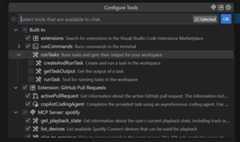
Notable features:
- Expand or collapse
- Configuration options moved to the title bar
- Sticky scrolling
- Icon rendering
Let us know what you think!
Tool grouping (Experimental)
Setting:github.copilot.chat.virtualTools.threshold
The maximum number of tools that you can use for a single chat request is currently 128. Previously, you could quickly reach this limit by installing MCP servers with many tools, requiring you to deselect some tools in order to proceed.
In this release of VS Code, we have enabled an experimental tool-calling mode for when the number of tools exceeds the maximum limit. Tools are automatically grouped and the model is given the ability to activate and call groups of tools.
This behavior, including the threshold, is configurable via the settinggithub.copilot.chat.virtualTools.threshold.
Terminal auto-approve improvements
Setting:chat.tools.terminal.autoApprove
Early terminal auto-approve settings were introduced last month. This release, the feature got many improvements. Learn more aboutterminal auto-approval in our documentation.
We merged the
allowListanddenyListsettings into thechat.tools.terminal.autoApprove setting. If you were using the old settings, you should see a warning asking you to migrate to the new setting.Regular expression matchers now support flags. This allows case insensitivity, for example in PowerShell, where case often doesn't matter:
"chat.tools.terminal.autoApprove": { // Deny any `Remove-Item` command, regardless of case "/^Remove-Item\\b/i":false}There was some confusion around how the sub-command matching works, this is now explained in detail in the setting's description, but we also support matching against the complete command line.
"chat.tools.terminal.autoApprove": { // Deny any _command line_ containing a reference to what is likely a PowerShell script "/\\.ps1\\b/i": {"approve":false,"matchCommandLine":true }}The auto approve reasoning is now logged to the Terminal Output channel. We plan tosurface this in the UI soon.
Input request detection for terminals and tasks
When you run a task or terminal command in agent mode, the agent now detects when the process requests user input. You will be prompted to respond in chat, with the default or first option surfaced as the primary action and other options available in a dropdown. This works for scripts and commands that require multiple confirmations, across all supported shells and both foreground and background terminals. If you type in the terminal while a prompt is present, the prompt will hide automatically. When options and descriptions are provided (such as[Y] Yes [N] No), these are surfaced in the confirmation prompt.
In the below example, a script containing multiple prompts for user input is run via the agent. Confirmation prompts appear and I accept the actions, allowing the terminal script to finish running and the agent to provide a summary of what transpired.
Improved error detection for tasks with problem matchers
For tasks that use problem matchers, the agent now collects and surfaces errors based on the problem matcher results, rather than relying on the language model to evaluate output. Problems are presented in a dropdown within the chat progress message, allowing you to navigate directly to the problem location. This ensures that errors are reported only when relevant to the current task execution.
Compound task support in agent mode
Agent mode now supports running compound tasks. When you run a compound task, the agent indicates progress and output for each dependent task, including any prompts for user input. This enables more complex workflows and better visibility into multi-step task execution.
In the example below, the VS Code - Build task is run. Output is assessed for each dependency task and a problem is surfaced to the user in the response and in the progress message dropdown.
Accessibility: Focus chat confirmation action
We've added a command,Focus Chat Confirmation(kb(workbench.action.chat.focusConfirmation)), which will focus the confirmation dialog, if any, or announce to screen reader users that confirmation is not required.
Track progress with task lists (Experimental)
Setting:chat.todoListTool.enabled
The great thing about agent mode is that you can give it a high-level task and have it implement it. As it plans the work and breaks it down into smaller tasks, it can be overwhelming to track the progress of all these individual tasks.
This milestone, we are introducing the task/todo list feature in chat to better help you see which tasks are completed and which ones are still pending. You can view the task list at the top of the Chat view, so you always have visibility into the progress being made. As the agent progresses through its work, it updates the task list.
Get started by giving the agent a high-level task and ask it to track its work in a todo list!
This feature is still experimental and you can enable it with thechat.todoListTool.enabled setting.
Improved model management experience
This iteration, we've revamped the chat provider API, which is responsible for language model access. Users are now able to select which models appear in their model picker, creating a more personalized and focused experience.
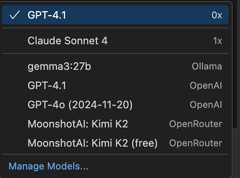
We plan to finalize this new API in the coming months and would appreciate any feedback. Finalization of this API will open up the extension ecosystem to implement their own model providers and further expand the bring your own key offering.
Azure DevOps repos remote index support
The#codebase tool now supports remote indexes for workspaces that are linked to Azure DevOps repos. This enables#codebase to search for relevant snippets almost instantly without any initialization. This even works for larger repos with tens of thousands of indexable files. Previously, this feature only worked with GitHub linked repos.
Remote indexes are used automatically when working in a workspace that is linked to Azure DevOps through git. Make sure you are also logged into VS Code with the Microsoft account you use to access the Azure DevOps repos.
We're gradually rolling out support for this feature on the services side, so not every organization might be able to use it initially. Based on the success of the rollout, we hope to turn on remote indexing for Azure DevOps for as many organizations as possible.
Improved reliability and performance of the run in terminal and task tools
We have migrated the tools for running tasks and commands within the terminal from the Copilot extension into the coremicrosoft/vscode repository. This gives the tools access to lower-level and richer APIs, allowing us to fix many of the terminal hanging issues. This update also comes with the benefit of more easily implementing features going forward, as we're no longer restricted to the capabilities of the extension API, especially any changes that need custom UI within the Chat view.
Output polling for tasks and terminals
The agent now waits for tasks and background terminals to complete before proceeding by using output polling. If a process takes longer than 20 seconds, you are prompted to continue waiting or move on. The agent will monitor the process for up to two minutes, summarizing the current state or reporting if the process is still running. This improves reliability when running long or error-prone commands in chat.
Task awareness improvement
Previously, the agent could only monitor active tasks. Now, it can track and analyze the output of both active and completed tasks, including those that have failed or finished running. This enhancement enables better troubleshooting and more comprehensive insights into task execution history.
Agent awareness of user created terminals
The agent now maintains awareness of all user-created terminals in the workspace. This enables it to track recent commands and access terminal output, providing better context for assisting with terminals and troubleshooting.
Terminal inline chat improvements
Terminal inline chat now better detects your active shell, even when working within subshells (for example, launching Python or Node from PowerShell or zsh). This dynamic shell detection improves the accuracy of inline chat responses by providing more relevant command suggestions for your current shell type.

Improved test runner tool
The test runner tool has been reworked. It now shows progress inline within chat, and numerous bugs in the tool have been fixed.
Edit previous requests
Setting:chat.editRequests
Last iteration, we enabled users to edit previous requests and rolled out a few different access points. This iteration, we've made inline edits the default behavior. Click on the request bubble to begin editing that request. You can modify attachments, change the mode and model, and resend your request with modified text.
You can control the chat editing behavior with thechat.editRequests setting if you prefer editing via the toolbar hovers above each request.
Open chat as maximized
Setting:workbench.secondarySideBar.defaultVisibility
We added two extra options for configuring the default visibility of the Secondary Side Bar to open it as maximized:
maximizedInWorkspace: open the Chat view as maximized when opening a new workspacemaximized: open the Chat view always as maximized, including in empty windows

Pending chat confirmation
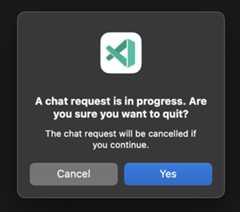
To help prevent accidentally closing a workspace where an agent session is actively changing files or responding to your request, we now show a dialog when you try to quit VS Code or close its window when a chat response is in progress:
OS notification on user action
Setting:chat.notifyWindowOnConfirmation
We now leverage the OS native notification system to show a toast when user confirmation is needed within a chat session. Enable this behavior with thechat.notifyWindowOnConfirmation.
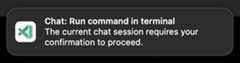
We plan to improve this experience in the future to allow for displaying more information and for allowing you to approve directly from the toast. For now, selecting the toast focuses the window where the confirmation originated from.
Math support in chat (Preview)
Setting:chat.math.enabled
Chats now have initial support for rendering mathematical equations in responses:
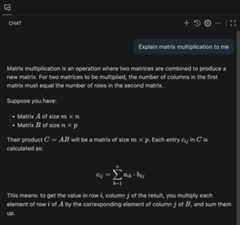
This feature is powered byKaTeX and supports both inline and block math equations. Inline math equations can be written by wrapping the markup in single dollar signs ($...$), while block math equations use two dollar signs ($$...$$).
Math rendering can be enabled usingchat.math.enabled. Currently, it is off by default but we plan to enable it in a future release, after further testing.
Context7 integration for project scaffolding (Experimental)
Setting:github.copilot.chat.newWorkspace.useContext7
When you scaffold a new project with#new in chat, you can now make sure that it uses the latest documentation and APIs fromContext7, if you have already installed the Context7 MCP server.
MCP
Server autostart and trust
Setting:chat.mcp.autostart
Previously, when you added or updated an MCP server configuration, VS Code would show a blue "refresh" icon in the Chat view, enabling you to manually refresh the list of tools. In the milestone, you can now configure the auto-start behavior for MCP servers, so you no longer have to manually restart the MCP server.
Use thechat.mcp.autostart setting to control this behavior. You can also change this setting within the icon's tooltip and see which servers will be started:
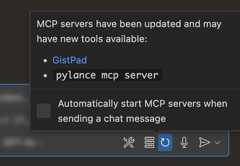
The first time an MCP server is started after being updated or changed, we now show a dialog asking you to trust the server. Giving trust to these servers is particularly important with autostart turned on to prevent running undesirable commands unknowingly.
Learn more aboutusing MCP servers in VS Code in our documentation.
Client credentials flow for remote MCP servers
The ideal flow for a remote MCP server that wants to support authentication is to use an auth provider that supports Dynamic Client Registration (DCR). This enables the client (VS Code) to register itself with that auth provider, so the auth flow is seamless.
However, not every auth provider supports DCR, so we introduced a client-credentials flow that enables you to supply your own client ID and (optionally) client secret that will be used when taking you through the auth provider's auth flow. Here's what that looks like:
Step 1: VS Code detects that DCR can't be used, and asks if you want to do the client credentials flow:

IMPORTANT: At this point, you would go to the auth provider's website and manually create an application registration. There you will put in the redirect URIs mentioned in the modal dialog.
Step 2: From the auth provider's portal, you will get a client ID and maybe a client secret. You'll put the client ID in the input box that appears and hitEnter:
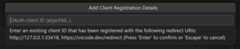
Step 3: Then you'll put in the client secret if you have one, and hitEnter (leave blank if you don't have one)

At that point, you'll be taken through the typical auth flow to authenticate the MCP server you're working with.
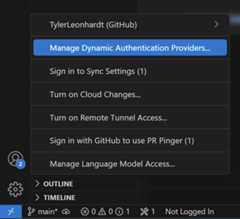
Remove dynamic auth provider from Account menu
Since the addition of remote MCP authentication, there has been a command available in the Command Palette calledAuthentication: Remove Dynamic Authentication Providers, which enables you to remove client credentials (client ID and, if available, a client secret) and all account information associated with that provider.
We've now exposed this command in the Account menu. You can find it inside of an MCP server account:
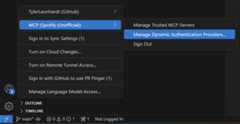
or at the root of the menu if you don't have any MCP server accounts yet:
Support forresource_link and structured output
VS Code now fully supports the latest MCP specification, version2025-06-18, with support forresource_links and structured output in tool results.
Accessibility
Accessible chat elicitations
When the agent prompts for user input, such as whether to keep waiting for a process, the chat elicitation is now accessible to screen readers. You are alerted when the prompt appears, can navigate to it with the keyboard, and can review the message in the accessible view.
Control file opening for chat edits
A new setting,accessibility.openChatEditedFiles, lets you choose whether files are automatically opened as the agent edits them in chat. Enable this setting for more control over which files appear in your editor.
View all and previous edits commands
TheView All Edits andView Previous Edits commands are now available throughout the editor, making it easy to review changes made by the agent. These commands are especially helpful whenaccessibility.openChatEditedFiles is disabled, allowing you to track edits without opening each file.
Side Bar visibility announcements
When the Primary or Secondary Side Bar is shown or hidden, an ARIA announcement now notifies you of this change. This improves accessibility by ensuring screen reader users are aware of Side Bar visibility updates.
Accessibility testing with Playwright
We have added automated accessibility tests for the editor using Playwright. These tests help us continuously validate that Visual Studio Code meets accessibility standards and best practices, ensuring a better experience for all users.
Editor Experience
Settings search suggestions
The AI search results toggle in the search box of the Settings editor, indicated by a sparkle, is now available for all users. The toggle is enabled when AI search results have loaded and are available. Pressing the toggle switches between the AI and non-AI search results.
The AI settings search results are based on semantic similarity instead of string matching. For example,editor.fontSize appears as an AI settings search result when you search for "increase text size".

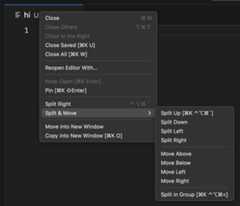
Editor tab context menu
We cleaned up the editor tab context menu to group related options for splitting and moving into a submenu:
AI statistics (Preview)
Setting:editor.aiStats.enabled
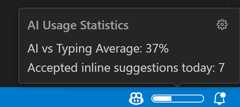
We added an experimental feature for displaying basic AI statistics. Use theeditor.aiStats.enabled to enable this feature, which is disabled by default.
This feature shows you, per project, the percentage of characters that was inserted by AI versus inserted by typing. It also keeps track of how many inline and next edit suggestions you accepted during the current day.
Notebooks
Notebook inline chat with agent tools
Setting:inlineChat.notebookAgent
The notebook inline chat control can now use the full suite of notebook agent tools to enable additional capabilities like running cells and installing packages into the kernel.
To enable agent tools in notebooks, enable the new experimental settinginlineChat.notebookAgent. This also currently requires enabling the setting for inline chat v2inlineChat.enableV2.
Install dependencies in Virtual Environments created with uv
We now support installing required dependencies when you run Jupyter Notebooks against a Virtual Environment created usinguv.
Source Control
Git worktree support
Setting:git.detectWorktrees
To address a long-standingfeature request, this milestone we have added Git worktree support. Worktrees let you check out multiple branches at once, making it easy to test changes or work in parallel without switching contexts.
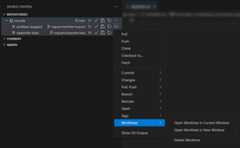
When opening a folder or workspace that contains a git repository, we now automatically detect worktrees and display them in the Source Control Repositories view. You can now view, create, delete, and open worktrees in a new or current window by using commands available from the Command Palette or Source Control Repositories view. You can disable this functionality by toggling thegit.detectWorktrees setting.
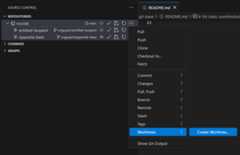
Repositories view
The Source Control Repositories view displays all source control providers that were discovered in the current folder/workspace. This milestone, we have updated the rendering of the view in order to visually distinguish between repositories, submodules, and worktrees. We also show the parent-child relationship between repositories, submodules and worktrees.

Terminal
Documentation support in terminal suggest
Terminal suggestions powered by language servers (LSP) now include inline documentation, similar to what you see in the editor. Starting with the Python REPL, you'll get helpful descriptions and usage details for commands as you type.
You currently need these settings to enable LSP suggestions in the terminal:
Voice dictation
Now that natural language input is supported in terminals, including those enabled by the Gemini and Claude extensions, we have reintroduced voice dictation in the terminal. You can start or stop dictation by using theTerminal: Start Dictation in Terminal andTerminal: Stop Dictation in Terminal commands.
Improved shell integration diagnostics
Shell integration is the foundation that many features in the integrated terminal are built upon such assticky scroll,quick fixes andagent mode's ability to understand what's happening inside the terminal.
This release features some improved diagnostics when you hover the terminal and selectShow Details. You should now see the detected shell type and current working directory:
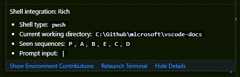
This is one of the first places to look if one of these rich features isn't working as expected.
Languages
Python
Shell integration support for Python 3.13 and above
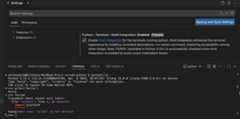
We now support shell integration for Python when using version 3.13 or later. When enabled, PyREPL is automatically disabled to ensure compatibility. You can disable shell integration if you prefer to continue using PyREPL.
Python Environments extension improvements
ThePython Environments Extension continued to receive bug fixes and improvements as part of the controlled roll-out to stable users. To use the Python Environments extension during the roll-out, make sure the extension is installed and add the following to your VS Codesettings.json file:"python.useEnvironmentsExtension": true.
TypeScript 5.9
VS Code now includes TypeScript 5.9.2. This major update brings a few new language improvements, includingsupport for import defer, along with tooling improvements such asimproved docs for many DOM apis.
Check out theTypeScript 5.9 release blog for more details on this update.
Expandable hovers for JavaScript and TypeScript
When you hover over a symbol in JavaScript or TypeScript, VS Code tries to show the most useful IntelliSense type information about that symbol. Types can be very complex, so one challenge for us has been trying to find the right balance between showing enough details to be useful, while not showing so much info that it becomes overwhelming. It's hard to come up with a good one size fits all approach, and also the level of type detail you want might change depending on what you are working on.
That's why this iteration, we've added new UI that gives you more control over how types are shown in hovers. When you hover over a symbol, now you can select the little+ icon on the left side of the hover control to expand the interfaces and complex types in the hover into their components. For example, you can use this to see the properties of an interface directly in the hover:
Hovers can be expanded multiple times, which recursively expands types from the previous expansion. If you ever expand too much, just select the- icon to go back to the previous level. Also keep in mind that not every type is expandable and that we still need some limits on just how much expansion we can support.Let us know if there are any cases where expandable hovers aren't working how you'd like.
Contributions to extensions
GitHub Pull Requests
There has been more progress on theGitHub Pull Requests extension, which enables you to work on, create, and manage pull requests and issues.
Review thechangelog for the 0.116.0 release of the extension to learn about everything in the release.
Pull request header cleanup
We've simplified the button bar in the pull request description header. The copy actions are now in the right-click context menu of the PR link.

Show coding agent PRs in chat
Setting:githubPullRequests.codingAgent.uiIntegration
When you start a coding agent session (via#copilotCodingAgent or with theDelegate to coding agent action), the pull request is rendered as a card in the Chat view.
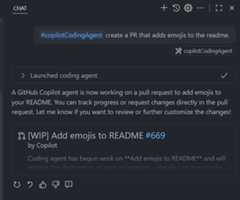
Enable thegithubPullRequests.codingAgent.uiIntegration setting to enable the newDelegate to coding agent button in the Chat view, for repositories that have the agent enabled.
Chat sessions (Experimental)
Coding agent chats
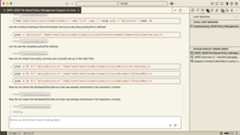
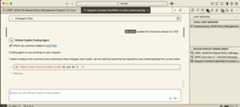
Building offlast iteration's Copilot coding agent integration, you can now manage a coding agent session from a dedicated chat editor. This enables you to follow the progress of the coding agent, provide follow-up instructions, and see the agent's responses in a dedicated chat editor.
Start a coding agent session from VS Code with the
#copilotCodingAgenttool or via theUI controls.Follow the progress of coding agent in an attached chat editor.
Provide follow-up instructions directly from chat.
Chat sessions view
Setting:chat.agentSessionsViewLocation
Enable thechat.agentSessionsViewLocation setting to try this experimental feature.
When set to
view, you will see a newChat Sessions view is shown in the VS Code Side Bar. This view enables you to manage and interact with your local chat sessions, as well as the coding agent sessions.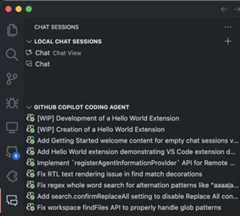
When set to
showChatsMenu, coding agent chat sessions are shown alongside the local chat history.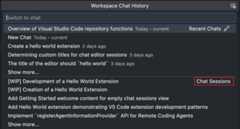
This integration requires the latest GitHub Pull Request extension and a repository open that supports Copilot coding agent. For more information, see the new documentation on how touse coding agent in VS Code.
Theme:Sharp Solarized (preview onvscode.dev)
Extension Authoring
Terminal activation events
Two new activation events are available for extensions:
onTerminal: Triggered when any terminal is opened.onTerminalShellIntegration: Triggered when rich shell integration is activated for a terminal.
You can specify ashellType to target specific shells. For example,onTerminalShellIntegration:bash activates when shell integration is enabled for a Bash terminal.
Proposed APIs
Render custom webviews in chat responses
The Chat Output Renderer API lets extensions take chat responses beyond text and images. With it, your extension can use awebview to render arbitrary HTML content in the chat output. Example use cases include custom visualizations, inline previews, and even interactive controls.
TheChat Output Renderer extension sample shows how this API can be used to renderMermaid diagrams in chat responses. Here's an example of this extension sample in action:
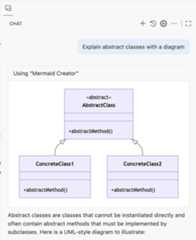
The neat thing is not that VS Code can render Mermaid diagrams, but that this rendering can be contributed entirely by extensions. With it, you can iterate on the custom outputs in chat:
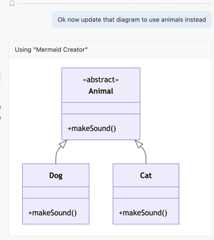
Here's a quick run down of how the API works:
- Register a language model tool that can return custom data as part of its response. We use a mime type to identify this data.
- Register a chat output renderer for this mime type.
- When a language model calls the tool, invoke the chat output renderer to render it into a webview in the response.
Check out theextension sample for a full end-to-end example of this API in action.
This API has the potential to be very powerful and enable some amazing new chat experiences, so give it a try and let us know what you think!
Chat Session Provider API
The new Chat Session Provider API proposal enables extensions to integrate their own chat backend into VS Code's native chat UI. Using it, your extension can open a new chat session, populate the history for that session, and respond to new user prompts.
This API is still in early stages and is likely to change. However we're already using it to power the newGitHub coding agent session flow, which loads chats from GitHub and allows you to chat with an agent that is controlled entirely by GitHub.
Task execution terminal
Extension authors can now access the terminal associated with a running task via the newtaskExecution.terminal property. This makes it easier to identify which terminal is linked to a specific task and interact with it programmatically.
SecretStoragekeys() API
If you have ever wanted to get the list of keys that your extension has stored inSecretStorage, you can now do so with the new proposedkeys() API:
export async function activate(context:ExtensionContext) { await context.secrets.store('mySecret','superSecretValue'); await context.secrets.store('mySecret2','superSecretValue2'); const keys =await context.secrets.keys(); console.log('All secret keys:',keys);// returns ['mySecret', 'mySecret2']}NOTE: This change is dependent on a change to anything that provides an alternative implementation of a Secret Storage, notablyhttps://vscode.dev, which has adopted the new API, andhttps://github.dev, which will adopt the new API soon. In an environment where it is not supported, this API will throw an exception.
Engineering
packages.microsoft.com key update
packages.microsoft.com has updated their signing key and as a result, Linux users on newer distributions should stop seeing key-related warnings or errors while installing VS Code. Debian-based distributions automatically receive the new key, whereas users on other distributions may have to manually remove the old key beforeimporting the new key.
Electron 37 update
In this milestone, we are promoting the Electron 37 update to users on our Stable release. This update comes with Chromium 138.0.7204.100 and Node.js 22.17.0. We want to thank everyone who self-hosted on Insiders builds and provided early feedback.
Notable fixes
- vscode#252384 - Agent Mode pauses when VS Code loses focus
Thank you
Last but certainly not least, a bigThank You to the contributors of VS Code.
Issue tracking
Contributions to our issue tracking:
- @gjsjohnmurray (John Murray)
- @RedCMD (RedCMD)
- @albertosantini (Alberto Santini)
- @IllusionMH (Andrii Dieiev)
Pull Requests
Contributions tovscode:
- @adityavc (Aditya Chittari): #134898 - trimming whitespace when deleting new line characterPR #210870
- @adrianstephens: Add debug/watch/context to list of valid menu extension pointsPR #237751
- @andy0130tw (Andy Pan): Support the locale argument of TypeScript language server on the web version (#_256252)PR #256256
- @Benimautner: Add inertial scrolling to scrollable elementsPR #244034
- @BlackHole1 (Kevin Cui): fix: cannot display MAKR Underlined in minimapPR #226116
- @bytemain (Jiacheng): refactor(terminal): introduce ITerminalLaunchResult interfacePR #256284
- @c-claeys (Cristopher Claeys): Make ServicesAccessor typing more consistent in editor commandsPR #218369
- @CookieeQuinn (Quinn): Fix issue #212484: caretRangeFromPoint was not working when invoked over text which used user-select: none.PR #219819
- @CrazySteve0605 (Wang Chong): fix(gettingStarted): remove duplicated "can be" in hover descriptionPR #254412
- @dbreen (Dan Breen): Use a saner default scrollbar width for the ExplorerPR #199784
- @devlinjunker: Expose undo/redo and canUndo/canRedo methods on model APIPR #213954
- @dibarbet (David Barbet): Enable angle bracket colorization for C#PR #247665
- @duncpro (Duncan): Vertical pipe characters should terminate URLsPR #232460
- @dylanchu: TerminalTaskSystem: Fix addtion arguments for string commandPR #251201
- @estrizhok (Eugene Strizhok): Correct capitalization of 'JetBrains' and 'ReSharper' in settings UIPR #254472
- @firelizzard18 (Ethan Reesor): Context key
availableEditorIdsfor diff editorsPR #250198 - @futurist (James Yang): fix(terminal): getBufferReverseIterator bug after scrollback limit reachedPR #257311
- @g0t4 (Wes Higbee): Add editor option to allow selection highlighting of multiline selections and another option to control max lengthPR #228982
- @gabrielcsapo (Gabriel Csapo): feat: adds (requestTime) logLevel to match tsserver optionsPR #250778
- @gjsjohnmurray (John Murray)
- Add
SecretStorage.keys()as proposed APIPR #252804 - Fix an
@paramtypoPR #257219
- Add
- @hickford (M Hickford): Add editor action 'reverse lines'PR #242926
- @HolgerJeromin (Holger Jeromin): vscode api: Raise compatibility to webview contentPR #253635
- @iann0036 (Ian Mckay): fix: Typo in lm invokeTool descriptionPR #257975
- @jiahaoxiang2000 (isomo): Fix git.diff.stageHunk command to work with keyboard shortcutsPR #254145
- @Jiogo18 (Jérôme Lécuyer): Git - l10n discard changes dialogsPR #254366
- @joelverhagen (Joel Verhagen)
- [WIP] Add support for NuGet as an MCP package source (VS Code)PR #254678
- Add experiment flag around NuGet MCP assisted configPR #257463
- @Jose-AE: Fix Jittery editor mouse wheel zoom when setting window.zoomLevel = 1PR #227916
- @joyceerhl (Joyce Er): fix: make chat input placeholder less crypticPR #255601
- @justin39 (Justin Wang)
- Add commit_id option to ServeWebArgs for specific client versionPR #255494
- Fix --commit-id flag for code serve-webPR #258904
- @jwangxx (James Wang): Add the ability to clear a ChatResponseStream, passing in a reason which results in a warning being displayedPR #257271
- @Kaidesuyoo (Kaidesuyo): fix: Incorrect webWorkerExtensionHost startup process on vscode desktopPR #234505
- @madskristensen (Mads Kristensen): Updated references to schemastore.orgPR #254690
- @martijnwalraven (Martijn Walraven): Fix notebook inline values when using language providerPR #254264
- @mortalYoung (野迂迂): feat: editor.minimap.autohide support scrollPR #253868
- @neorth (Joakim Berglund): CamelCase first word if not acronymPR #229797
- @Ninglo (Ninglo): Fix
editor.wordSegmenterLocalesconfiguration don't take effect in simpleWidget editors (like chat or SCM input Editor)PR #223921 - @OfekShilon (Ofek): Fix #4775: Escape user code before incorporating in a regexPR #236809
- @omar-cs (Omar Carrizales): Issue #168531: Cursor HeightPR #211473
- @Q1CHENL (Qichen Liu 刘启辰): Fix: prevent view shift when enable minimap with right-click on the scrollbarPR #210510
- @qirong77: Fix the unexpected console error that occurs when updating the shadow dom selection in monaco-editorPR #215780
- @raffaeu (Raffaele Garofalo): Feature/move editor menuPR #247818
- @RedCMD (RedCMD): Fix empty end bracket errorPR #240609
- @remcohaszing (Remco Haszing)
- Add *.tsbuildinfo to .gitignorePR #254225
- Add RTL support based on decorationsPR #255455
- @rfon6ngy (Griffon Langyer): Allow \n to trigger a softwrapPR #231120
- @Rishi-infy47 (Saptarshi Chakraborty): fix: changed the node js version for devcontainerPR #257400
- @sahin52 (Sahin Kasap): fix: Quick search does not retain search termPR #234368
- @Schpoone (Jason Kuo)
- Use preserveFocus when focusing stack framesPR #251964
- Fix popup message when hovering over an instruction breakpointPR #254925
- @SimonSiefke (Simon Siefke)
- fix: memory leak in extension features tabPR #256887
- fix: memory leak in editor edit contextPR #256957
- fix: set edit context to undefined in disposePR #256965
- fix: memory leak in ChatInputPartPR #257082
- fix: memory leak in context keyPR #258206
- @Skn0tt (Simon Knott): Fix testFailure stringifyPR #258463
- @timheuer (Tim Heuer): Adds support for proper localhost loopback on RFC 6761PR #256617
- @tmm1 (Aman Karmani)
- [engineering] add testSplit option to unit-test runnerPR #253049
- [dev] shortcut to open devtools attached to exthostPR #253139
- [engineering] ensure typescript integration tests emit junit reportsPR #253528
- [engineering] add label to packageTaskPR #253779
- [engineering] parallelize unzip in product-build-darwin-universal.ymlPR #257775
- @ttttotem (ttttotem): Horizontal dragging auto-scrollPR #235174
- @turansky (Victor Turansky): fix:
EvaluatableExpressionproperties jsdocPR #257930 - @yamachu (Yusuke Yamada)
- Fix invalid settings keysPR #254609
- Revert "refactor: remove redundant actionRunner override in ChatEditorOverlayWidget"PR #255456
- @yutotnh (yutotnh): Fix the editor.wordSegmenterLocales description in the settingsPR #210305
Contributions tovscode-codicons:
- @desean1625 (Sean Sullivan): Add link in readme to where you can easily preview and search for icons.PR #295
Contributions tovscode-copilot-chat:
- @24anisha
- @danilofalcao (Danilo Falcão): list all openrouter models without category but tools supportPR #208
- @devm33 (Devraj Mehta): Remove unused fields from Completion response interfacePR #123
- @johnmog (John Mogensen): Git LFS instructions to CONTRIBUTING.mdPR #156
- @jwangxx (James Wang): When rendering the prompts, exclude turns from the history that errored due to prompt filtrationPR #399
- @shsuman (Shantnu Suman): Print Error literal at the start of all error messages for better parsing from the logsPR #260
- @srilovesflutter (Sri): corrected typoPR #129
- @trycatchkamal (Kamal Raj Sekar): Removed unused code from testsPR #207
- @vritant24 (Vritant Bhardwaj)
Contributions tovscode-eslint:
- @noritaka1166 (Noritaka Kobayashi): chore: fix typo in comment-outPR #2031
Contributions tovscode-js-debug:
Contributions tovscode-json-languageservice:
- @fengzilong (MO): feat: allow format range to be undefinedPR #272
Contributions tovscode-vsce:
- @Adjective-Object (Max): add
commonjsannotation to package.jsonPR #1179
Contributions todebug-adapter-protocol:
- @osiewicz (Piotr Osiewicz): chore: Add Zed to the list of tools supporting DAPPR #548
Contributions tolanguage-server-protocol:
- @Leonidas-from-XIV (Marek Kubica): ocaml-language-server does not exist anymorePR #2165
- @osiewicz (Piotr Osiewicz): chore: Add Zed to the list of implementorsPR #2164
Contributions topython-environment-tools:
- @renan-r-santos (Renan Santos): Exclude Pixi environments from the Conda locatorPR #234