

View Vertex AI TensorBoard data
The Vertex AI TensorBoard web app provides a visualization oflogs associated with a Vertex AI TensorBoard experiment.This web application offers several tools and dashboards to visualize andcompare data across experiment runs, and toprofile model training performance.
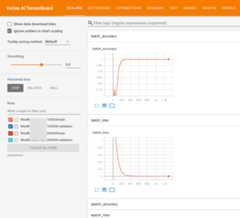
To learn more about each dashboard, see theREADMEfor "The Visualization".
Access a Vertex AI TensorBoard web app
The Vertex AI TensorBoard web app is accessed using thefollowing address format:
https://REGION.tensorboard.googleusercontent.com/experiment/projects+PROJECT_NAME_OR_ID+locations+REGION+tensorboards+TENSORBOARD_ID+experiments+EXPERIMENT_NAME
REGION: the region your TensorBoard is located inPROJECT_ID: the project your TensorBoard was createdinTENSORBOARD_ID: theTensorBoard IDEXPERIMENT_NAME: the name of the TensorBoardexperiment
This link can be shared and used by anyone who has permission.
You can navigate here directly by inserting the appropriate values,or by following a link available in the following ways.
gcloud CLI and Vertex AI SDK for Python
When creating or uploading logs to a Vertex AI TensorBoard, thegcloud CLI and SDK output a link to the Vertex AI TensorBoardinstance.
Google Cloud console
You can access the TensorBoard web app using the Google Cloud console.
Experiments
If your Vertex AI TensorBoard is associated with a Vertex AI Experiment, which is automatic when adefault instance is involved, you can access the TensorBoard web app directly from the Experiments page.
Custom training
If you used Vertex AI TensorBoard withcustom training you can access the TensorBoard web app directly from the custom training job.
- In the Vertex AI section of the Google Cloud console, go to theTraining page.Go to Training
- ClickCustom Jobs tab.
- Select your training job from the list of training runs. The details page appears
- Click theOpen TensorBoard button.

Vertex AI Pipelines
If you used Vertex AI TensorBoard withVertex AI Pipelines, the TensorBoard web app can be accessed directly from the component information display.
- In the Vertex AI section of the Google Cloud console, go to thePipelines page.Go to Pipelines
- From the pipelines tab, scroll or filter the pipeline list to find your pipeline.
- On the pipeline display select the component where TensorBoard metrics are captured, typically the training component.
- Select theOpen TensorBoard button in the upper right.

Visualize Vertex AI TensorBoard metrics in the Google Cloud console
If your TensorBoard instance is associated with aVertex AI Experiments, which is automatic when using adefault TensorBoard instance, certainmetrics can be visualized directly in the Google Cloud console, without usingthe web application.
TheCompare and analyze runsdocument describes how to view details of your experiment runs and comparethe experiment runs to each other in the Google Cloud console.TensorBoard timeseries metrics appear under theCharts tab in the navigationbar of the Vertex AI Experiments console.

Except as otherwise noted, the content of this page is licensed under theCreative Commons Attribution 4.0 License, and code samples are licensed under theApache 2.0 License. For details, see theGoogle Developers Site Policies. Java is a registered trademark of Oracle and/or its affiliates.
Last updated 2026-02-18 UTC.