

Deploy and manage endpoints
Preview
This feature is subject to the "Pre-GA Offerings Terms" in the General Service Terms section of theService Specific Terms. Pre-GA features are available "as is" and might have limited support. For more information, see thelaunch stage descriptions.
Use a trained Custom Speech-to-Text model in your productionapplication or benchmarking workflows. You must deploy and expose the modelthrough a dedicated endpoint, created in part to deploy the model in your chosenregion. You automatically get programmatic access through a recognizer object.It is used directly through the V2 API or in the Google Cloud console. You candeploy your model in a region different from where it was trained, but a copy ofthe model is created in the region specified by the endpoint.
To use a custom speech model, you need to deploy and expose it through adedicated endpoint. By creating an endpoint, you're deploying the model in theregion of your choice. You're automatically granted programmatic access througha recognizer object to be used directly through the V2 API for inference or inthe Google Cloud console.
Before you begin
Ensure you have signed up for a Google Cloud account, created a project, andtrained a custom speech model.
- Go toSpeech in the Google Cloud console, and navigate to Cloud Speech-to-Text.
- Navigate within theCustom Models section of the navigation bar on theleft.
Create an endpoint
- Navigate to theEndpoints tab of theCustom Models section.
- ClickNew Endpoint.
- Define a name for your endpoint. This acts as a unique identifier for yourendpoint resource and is used to invoke your custom speech model forinference.
- Define the region where you want your custom speech model to be deployed. Ifthe model was trained in a different region than the one defined in theendpoint configuration, a new model copy is created automatically.
- Select the trained custom speech model from the list that you want to exposethrough the endpoint.
- ClickCreate and after a few moments your custom speech model isdeployed in your endpoint, ready to be used for inference and benchmarking.

List your endpoints
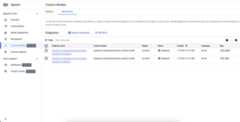
You can manage the associated endpoints in the console by selecting theEndpoints tab under the Custom Models section. You can also list the endpointsthat you created in the console, along with their current state and associatedcustom Cloud Speech-to-Text model.
Delete an endpoint
Before you start, make sure that there is no traffic routed through yourendpoint, because deleting it will stop it from serving any requests.
- Navigate to theEndpoints tab of theCustom Models section.
- Under theEndpoints tab, click to expand options and then clickDelete. In a few moments, the endpoint is deleted and no longer servesany traffic.
Benchmark the model
Using the Custom Speech-to-Text model and your benchmarkingdataset to assess the accuracy of your model, follow theMeasure and improveaccuracy guide.
Except as otherwise noted, the content of this page is licensed under theCreative Commons Attribution 4.0 License, and code samples are licensed under theApache 2.0 License. For details, see theGoogle Developers Site Policies. Java is a registered trademark of Oracle and/or its affiliates.
Last updated 2025-12-15 UTC.