

Manage the query optimizer
This page describes how to manage the query optimizer in Spanner forGoogleSQL-dialect databases and PostgreSQL-dialect databases.
The Spanner query optimizer determines the most efficient way toexecute a SQL query. However, the query plan determined by the optimizer mightchange slightly when the query optimizer itself evolves, or when the databasestatistics are updated. To minimize any potential for performance regressionwhen the query optimizer or statistics change, Spanner providesthe following query options.
optimizer_version: Changes to the query optimizer are bundled andreleased as optimizer versions. Spanner starts using thelatest version of the optimizer as the default at least 30 days after thatversion is released. You can use the query optimizer version option to runqueries against an older version of the optimizer.
optimizer_statistics_package: Spanner updates optimizerstatistics regularly. New statistics are made available as a package. Thisquery option specifies a statistics package for the query optimizer to usewhen compiling a SQL query. The specified package must have garbagecollection disabled:
GoogleSQL
ALTERSTATISTICS<package_name>SETOPTIONS(allow_gc=false)
PostgreSQL
ALTERSTATISTICSspanner."<package_name>"SETOPTIONS(allow_gc=false)
This guide shows how to set these individual options at different scopesin Spanner.
List query optimizer options
Spanner stores information about the available optimizer versionsand statistics packages that you can select.
Optimizer versions
The query optimizer version is an integer value, incremented by 1 with eachupdate. The latest version of the query optimizer is8.
Execute the following SQL statement to return a list of all supported optimizerversions, along with their corresponding release dates and whether that versionis the default. The largest version number returned is the latest supportedversion of the optimizer.
SELECT*FROMSPANNER_SYS.SUPPORTED_OPTIMIZER_VERSIONS;Default version
By default, Spanner starts using the latest version of the optimizer atleast 30 days after that version is released. During the 30+ day period betweena new release and that release becoming the default, you're encouraged to testqueries against the new version to detect any regression.
To find the default version, execute the following SQL statement:
SELECT*FROMSPANNER_SYS.SUPPORTED_OPTIMIZER_VERSIONS;The query returns a list of all supported optimizer versions. TheIS_DEFAULT column specifies which version is the current default.
For details about each version, seeQuery optimizer version history.
Optimizer statistics packages
Each new optimizer statistics package that Spanner creates isassigned a package name that's guaranteed to be unique within the givendatabase.
The format of the package name isauto_{PACKAGE_TIMESTAMP}UTC.In GoogleSQL, theANALYZEstatement triggers the creation of the statistics package name. InPostgreSQL, theANALYZEstatement performs this task. The format of the statistics package name isanalyze_{PACKAGE_TIMESTAMP}UTC, where{PACKAGE_TIMESTAMP} is the timestamp, in UTC timezone, of when thestatistics construction started. Execute the following SQL statement to return alist of all available optimizer statistics packages.
SELECT*FROMINFORMATION_SCHEMA.SPANNER_STATISTICS;By default, Spanner uses the latest optimizer statistics packageunless the database or query is pinned to an older package using one of themethods described on this page.
Option override precedence
If you're using a GoogleSQL-dialect database, Spanner offers multiple ways tochange the optimizer options. For example, you can set the option(s) for aspecific query or configure the option in the client library at the process orquery level. When an option is set in multiple ways, the following precedenceorder applies. (Select a link to jump to that section in this document).
Spanner default ←database option ←client app ←environment variable←client query ←statement hint
For example, here's how to interpret the order of precedence when setting thequery optimizer version:
When you create a database, it uses the Spannerdefault optimizer version.Setting the optimizer version using one of the methods listed previously takesprecedence over anything to the left of it. For example, setting the optimizerfor an app using anenvironment variable takesprecedence over any value you set for the database using thedatabase option.Setting the optimizer version through astatement hint hasthe highest precedence for the given query, taking precedence over the value setusing any other method.
The following sections provided more details about each method.
Set optimizer options
You can set the default optimizer option through the following methods:
- At the database level
- For a query using a statement hint
- With client libraries
- Using the Spanner JDBC driver
In some cases, Spanner might use an older query optimizer versionfor a specific query shape, even if you have pinned a newer version. This is anexpected internal behavior to ensure query stability and performance. You canidentify the optimizer version that was used for a particular query by examiningthequery execution plan.
Set optimizer options at the database level
To set the default optimizer version on a database, use the followingALTERDATABASE DDL command. Setting this option doesn't require all queries torun that version. Instead, it sets an upper bound on the QO version used forqueries. Its intended use is to mitigate regressions that occur after a newversion of the optimizer is released.
GoogleSQL
ALTERDATABASEMyDatabaseSETOPTIONS(optimizer_version=8);PostgreSQL
ALTERDATABASEMyDatabaseSETspanner.optimizer_version=5;You can set the statistics package similarly, as shown in the followingexample.
GoogleSQL
ALTERDATABASEMyDatabaseSETOPTIONS(optimizer_statistics_package="auto_20191128_14_47_22UTC");PostgreSQL
ALTERDATABASEMyDatabaseSETspanner.optimizer_statistics_package="auto_20191128_14_47_22UTC";You can also set more than one option at the same time, as shown in thefollowing DDL command.
GoogleSQL
ALTERDATABASEMyDatabaseSETOPTIONS(optimizer_version=8,optimizer_statistics_package="auto_20191128_14_47_22UTC");You can runALTER DATABASE in gcloud CLI with thegcloud CLI databases ddl update command as follows.
GoogleSQL
gcloudspannerdatabasesddlupdateMyDatabase--instance=test-instance\--ddl='ALTER DATABASE MyDatabase SET OPTIONS ( optimizer_version = 8 )'PostgreSQL
gcloudspannerdatabasesddlupdateMyDatabase--instance=test-instance\--ddl='ALTER DATABASE MyDatabase SET spanner.optimizer_version = 8'Setting a database option toNULL (in GoogleSQL) orDEFAULT (inPostgreSQL) clears it so that the default value is used.
To see the current value of these options for a database, query theINFORMATION_SCHEMA.DATABASE_OPTIONS view for GoogleSQL, or theinformation_schema database_options table for PostgreSQL, as follows.
GoogleSQL
SELECTs.OPTION_NAME,s.OPTION_VALUEFROMINFORMATION_SCHEMA.DATABASE_OPTIONSsWHEREs.SCHEMA_NAME=""ANDs.OPTION_NAMEIN('optimizer_version','optimizer_statistics_package')PostgreSQL
SELECTs.option_name,s.option_valueFROMinformation_schema.database_optionssWHEREs.schema_name='public'ANDs.option_nameIN('optimizer_version','optimizer_statistics_package')Set optimizer options for a query using a statement hint
Astatement hint is a hint on a query statement that changes the executionof the query from the default behavior. Setting theOPTIMIZER_VERSION hint ona statement forces that query to run using the specified query optimizerversion.
TheOPTIMIZER_VERSION hint has the highest optimizer version precedence. Ifthe statement hint is specified, it's used regardless of all otheroptimizer version settings.
GoogleSQL
@{OPTIMIZER_VERSION=8}SELECT*FROMMyTable;PostgreSQL
/*@OPTIMIZER_VERSION=8*/SELECT*FROMMyTable;You can also use thelatest_version literal to set the optimizer version fora query to the latest version as shown here.
GoogleSQL
@{OPTIMIZER_VERSION=latest_version}SELECT*FROMMyTable;PostgreSQL
/*@OPTIMIZER_VERSION=latest_version*/SELECT*FROMMyTable;Setting theOPTIMIZER_STATISTICS_PACKAGE hint ona statement forces that query to run using the specified query optimizerstatistics package version. The specified packagemust have garbage collection disabled:
GoogleSQL
ALTERSTATISTICS<package_name>SETOPTIONS(allow_gc=false)PostgreSQL
ALTERSTATISTICSspanner."<package_name>"SETOPTIONS(allow_gc=false)TheOPTIMIZER_STATISTICS_PACKAGE hint has the highest optimizer packagesetting precedence. If the statement hint is specified, it's usedregardless of all other optimizer package version settings.
@{OPTIMIZER_STATISTICS_PACKAGE=auto_20191128_14_47_22UTC}SELECT*FROMMyTable;You can also use thelatest literal to use the latest statistics package.
@{OPTIMIZER_STATISTICS_PACKAGE=latest}SELECT*FROMMyTable;Both hints can be set in a single statement as shown in the following example.
Thedefault_version literal sets the optimizer version for a query to thedefault version, which might be different than the latest version. SeeDefault version for details.
GoogleSQL
@{OPTIMIZER_VERSION=default_version,OPTIMIZER_STATISTICS_PACKAGE=auto_20191128_14_47_22UTC}SELECT*FROMMyTable;PostgreSQL
/*@OPTIMIZER_VERSION=default_version, OPTIMIZER_STATISTICS_PACKAGE=auto_20191128_14_47_22UTC*/SELECT*FROMKeyValue;Set optimizer options with client libraries
When you are programmatically interacting with Spanner through clientlibraries, there are a number of ways to change query options for yourclient application.
You must be using the latest versions of the client libraries to set optimizeroptions.
For a database client
An application can set optimizer options globally on the client library byconfiguring the query options property as shown in the following code snippets.The optimizer settings are stored in the clientinstance and are applied to all queries run throughout the lifetime of theclient. Even though the options apply at a database level in the backend, whenthe options are set at a client level, they apply to all databases connected tothat client.
C++
namespacespanner=::google::cloud::spanner;spanner::Clientclient(spanner::MakeConnection(db),google::cloud::Options{}.set<spanner::QueryOptimizerVersionOption>("1").set<spanner::QueryOptimizerStatisticsPackageOption>("auto_20191128_14_47_22UTC"));C#
usingGoogle.Cloud.Spanner.Data;usingSystem.Collections.Generic;usingSystem.Threading.Tasks;publicclassCreateConnectionWithQueryOptionsAsyncSample{publicclassAlbum{publicintAlbumId{get;set;}publicintSingerId{get;set;}publicstringAlbumTitle{get;set;}}publicasyncTask<List<Album>>CreateConnectionWithQueryOptionsAsync(stringprojectId,stringinstanceId,stringdatabaseId){stringconnectionString=$"Data Source=projects/{projectId}/instances/{instanceId}/databases/{databaseId}";usingvarconnection=newSpannerConnection(connectionString){// Set query options on the connection.QueryOptions=QueryOptions.Empty.WithOptimizerVersion("1")// The list of available statistics packages for the database can// be found by querying the "INFORMATION_SCHEMA.SPANNER_STATISTICS"// table..WithOptimizerStatisticsPackage("latest")};varalbums=newList<Album>();varcmd=connection.CreateSelectCommand("SELECT SingerId, AlbumId, AlbumTitle FROM Albums");usingvarreader=awaitcmd.ExecuteReaderAsync();while(awaitreader.ReadAsync()){albums.Add(newAlbum{SingerId=reader.GetFieldValue<int>("SingerId"),AlbumId=reader.GetFieldValue<int>("AlbumId"),AlbumTitle=reader.GetFieldValue<string>("AlbumTitle")});}returnalbums;}}Go
import("context""fmt""io""time""cloud.google.com/go/spanner"sppb"cloud.google.com/go/spanner/apiv1/spannerpb""google.golang.org/api/iterator")funccreateClientWithQueryOptions(wio.Writer,databasestring)error{ctx:=context.Background()queryOptions:=spanner.QueryOptions{Options:&sppb.ExecuteSqlRequest_QueryOptions{OptimizerVersion:"1",// The list of available statistics packages can be found by// querying the "INFORMATION_SCHEMA.SPANNER_STATISTICS" table.OptimizerStatisticsPackage:"latest",},}client,err:=spanner.NewClientWithConfig(ctx,database,spanner.ClientConfig{QueryOptions:queryOptions},)iferr!=nil{returnerr}deferclient.Close()stmt:=spanner.Statement{SQL:`SELECT VenueId, VenueName, LastUpdateTime FROM Venues`}iter:=client.Single().Query(ctx,stmt)deferiter.Stop()for{row,err:=iter.Next()iferr==iterator.Done{returnnil}iferr!=nil{returnerr}varvenueIDint64varvenueNamestringvarlastUpdateTimetime.Timeiferr:=row.Columns(&venueID,&venueName,&lastUpdateTime);err!=nil{returnerr}fmt.Fprintf(w,"%d %s %s\n",venueID,venueName,lastUpdateTime)}}Java
staticvoidclientWithQueryOptions(DatabaseIddb){SpannerOptionsoptions=SpannerOptions.newBuilder().setDefaultQueryOptions(db,QueryOptions.newBuilder().setOptimizerVersion("1")// The list of available statistics packages can be found by querying the// "INFORMATION_SCHEMA.SPANNER_STATISTICS" table..setOptimizerStatisticsPackage("latest").build()).build();Spannerspanner=options.getService();DatabaseClientdbClient=spanner.getDatabaseClient(db);try(ResultSetresultSet=dbClient.singleUse().executeQuery(Statement.of("SELECT SingerId, AlbumId, AlbumTitle FROM Albums"))){while(resultSet.next()){System.out.printf("%d %d %s\n",resultSet.getLong(0),resultSet.getLong(1),resultSet.getString(2));}}}Node.js
// Imports the Google Cloud client libraryconst{Spanner}=require('@google-cloud/spanner');/** * TODO(developer): Uncomment the following lines before running the sample. */// const projectId = 'my-project-id';// const instanceId = 'my-instance';// const databaseId = 'my-database';// Creates a clientconstspanner=newSpanner({projectId:projectId,});// Gets a reference to a Cloud Spanner instance and databaseconstinstance=spanner.instance(instanceId);constdatabase=instance.database(databaseId,{},{optimizerVersion:'1',// The list of available statistics packages can be found by querying the// "INFORMATION_SCHEMA.SPANNER_STATISTICS" table.optimizerStatisticsPackage:'latest',},);constquery={sql:`SELECT AlbumId, AlbumTitle, MarketingBudget FROM Albums ORDER BY AlbumTitle`,};// Queries rows from the Albums tabletry{const[rows]=awaitdatabase.run(query);rows.forEach(row=>{constjson=row.toJSON();constmarketingBudget=json.MarketingBudget?json.MarketingBudget:null;// This value is nullableconsole.log(`AlbumId:${json.AlbumId}, AlbumTitle:${json.AlbumTitle}, MarketingBudget:${marketingBudget}`,);});}catch(err){console.error('ERROR:',err);}finally{// Close the database when finished.database.close();}PHP
use Google\Cloud\Spanner\SpannerClient;use Google\Cloud\Spanner\Database;/** * Create a client with query options. * Example: * ``` * create_client_with_query_options($instanceId, $databaseId); * ``` * * @param string $instanceId The Spanner instance ID. * @param string $databaseId The Spanner database ID. */function create_client_with_query_options(string $instanceId, string $databaseId): void{ $spanner = new SpannerClient([ 'queryOptions' => [ 'optimizerVersion' => '1', // Pin the statistics package used for this client instance to the // latest version. The list of available statistics packages can be // found by querying the "INFORMATION_SCHEMA.SPANNER_STATISTICS" // table. 'optimizerStatisticsPackage' => 'latest' ] ]); $instance = $spanner->instance($instanceId); $database = $instance->database($databaseId); $results = $database->execute( 'SELECT VenueId, VenueName, LastUpdateTime FROM Venues' ); foreach ($results as $row) { printf('VenueId: %s, VenueName: %s, LastUpdateTime: %s' . PHP_EOL, $row['VenueId'], $row['VenueName'], $row['LastUpdateTime']); }}Python
# instance_id = "your-spanner-instance"# database_id = "your-spanner-db-id"spanner_client=spanner.Client(query_options={"optimizer_version":"1","optimizer_statistics_package":"latest",})instance=spanner_client.instance(instance_id)database=instance.database(database_id)withdatabase.snapshot()assnapshot:results=snapshot.execute_sql("SELECT VenueId, VenueName, LastUpdateTime FROM Venues")forrowinresults:print("VenueId:{}, VenueName:{}, LastUpdateTime:{}".format(*row))Ruby
# project_id = "Your Google Cloud project ID"# instance_id = "Your Spanner instance ID"# database_id = "Your Spanner database ID"require"google/cloud/spanner"query_options={optimizer_version:"1",# The list of available statistics packages can be# found by querying the "INFORMATION_SCHEMA.SPANNER_STATISTICS"# table.optimizer_statistics_package:"latest"}spanner=Google::Cloud::Spanner.newproject:project_idclient=spanner.clientinstance_id,database_id,query_options:query_optionssql_query="SELECT VenueId, VenueName, LastUpdateTime FROM Venues"client.execute(sql_query).rows.eachdo|row|puts"#{row[:VenueId]}#{row[:VenueName]}#{row[:LastUpdateTime]}"endWith environment variables
To make it easier to try different optimizer settings without having torecompile your app, you can set theSPANNER_OPTIMIZER_VERSION andSPANNER_OPTIMIZER_STATISTICS_PACKAGE environment variables and run your app,as shown in the following snippet.
Linux / macOS
exportSPANNER_OPTIMIZER_VERSION="8"exportSPANNER_OPTIMIZER_STATISTICS_PACKAGE="auto_20191128_14_47_22UTC"Windows
setSPANNER_OPTIMIZER_VERSION="8"setSPANNER_OPTIMIZER_STATISTICS_PACKAGE="auto_20191128_14_47_22UTC"The specified query optimizer options values are read and stored in the clientinstance at client initialization time and apply to all queries runthroughout the lifetime of the client.
For a client query
You can specify a value for optimizer version or statistics package version atthe query level in your client application by specifying a query optionsproperty when building your query.
C++
voidQueryWithQueryOptions(google::cloud::spanner::Clientclient){namespacespanner=::google::cloud::spanner;autosql=spanner::SqlStatement("SELECT SingerId, FirstName FROM Singers");autoopts=google::cloud::Options{}.set<spanner::QueryOptimizerVersionOption>("1").set<spanner::QueryOptimizerStatisticsPackageOption>("latest");autorows=client.ExecuteQuery(std::move(sql),std::move(opts));usingRowType=std::tuple<std::int64_t,std::string>;for(auto&row:spanner::StreamOf<RowType>(rows)){if(!row)throwstd::move(row).status();std::cout <<"SingerId: " <<std::get<0>(*row) <<"\t";std::cout <<"FirstName: " <<std::get<1>(*row) <<"\n";}std::cout <<"Read completed for [spanner_query_with_query_options]\n";}C#
usingGoogle.Cloud.Spanner.Data;usingSystem.Collections.Generic;usingSystem.Threading.Tasks;publicclassRunCommandWithQueryOptionsAsyncSample{publicclassAlbum{publicintSingerId{get;set;}publicintAlbumId{get;set;}publicstringAlbumTitle{get;set;}}publicasyncTask<List<Album>>RunCommandWithQueryOptionsAsync(stringprojectId,stringinstanceId,stringdatabaseId){varconnectionString=$"Data Source=projects/{projectId}/instances/{instanceId}/databases/{databaseId}";usingvarconnection=newSpannerConnection(connectionString);usingvarcmd=connection.CreateSelectCommand("SELECT SingerId, AlbumId, AlbumTitle FROM Albums");cmd.QueryOptions=QueryOptions.Empty.WithOptimizerVersion("1")// The list of available statistics packages for the database can// be found by querying the "INFORMATION_SCHEMA.SPANNER_STATISTICS"// table..WithOptimizerStatisticsPackage("latest");varalbums=newList<Album>();usingvarreader=awaitcmd.ExecuteReaderAsync();while(awaitreader.ReadAsync()){albums.Add(newAlbum(){AlbumId=reader.GetFieldValue<int>("AlbumId"),SingerId=reader.GetFieldValue<int>("SingerId"),AlbumTitle=reader.GetFieldValue<string>("AlbumTitle")});}returnalbums;}}Go
import("context""fmt""io""time""cloud.google.com/go/spanner"sppb"cloud.google.com/go/spanner/apiv1/spannerpb""google.golang.org/api/iterator")funcqueryWithQueryOptions(wio.Writer,dbstring)error{ctx:=context.Background()client,err:=spanner.NewClient(ctx,db)iferr!=nil{returnerr}deferclient.Close()stmt:=spanner.Statement{SQL:`SELECT VenueId, VenueName, LastUpdateTime FROM Venues`}queryOptions:=spanner.QueryOptions{Options:&sppb.ExecuteSqlRequest_QueryOptions{OptimizerVersion:"1",// The list of available statistics packages can be found by// querying the "INFORMATION_SCHEMA.SPANNER_STATISTICS" table.OptimizerStatisticsPackage:"latest",},}iter:=client.Single().QueryWithOptions(ctx,stmt,queryOptions)deferiter.Stop()for{row,err:=iter.Next()iferr==iterator.Done{returnnil}iferr!=nil{returnerr}varvenueIDint64varvenueNamestringvarlastUpdateTimetime.Timeiferr:=row.Columns(&venueID,&venueName,&lastUpdateTime);err!=nil{returnerr}fmt.Fprintf(w,"%d %s %s\n",venueID,venueName,lastUpdateTime)}}Java
staticvoidqueryWithQueryOptions(DatabaseClientdbClient){try(ResultSetresultSet=dbClient.singleUse().executeQuery(Statement.newBuilder("SELECT SingerId, AlbumId, AlbumTitle FROM Albums").withQueryOptions(QueryOptions.newBuilder().setOptimizerVersion("1")// The list of available statistics packages can be found by querying the// "INFORMATION_SCHEMA.SPANNER_STATISTICS" table..setOptimizerStatisticsPackage("latest").build()).build())){while(resultSet.next()){System.out.printf("%d %d %s\n",resultSet.getLong(0),resultSet.getLong(1),resultSet.getString(2));}}}Node.js
// Imports the Google Cloud client libraryconst{Spanner}=require('@google-cloud/spanner');/** * TODO(developer): Uncomment the following lines before running the sample. */// const projectId = 'my-project-id';// const instanceId = 'my-instance';// const databaseId = 'my-database';// Creates a clientconstspanner=newSpanner({projectId:projectId,});// Gets a reference to a Cloud Spanner instance and databaseconstinstance=spanner.instance(instanceId);constdatabase=instance.database(databaseId);constquery={sql:`SELECT AlbumId, AlbumTitle, MarketingBudget FROM Albums ORDER BY AlbumTitle`,queryOptions:{optimizerVersion:'latest',// The list of available statistics packages can be found by querying the// "INFORMATION_SCHEMA.SPANNER_STATISTICS" table.optimizerStatisticsPackage:'latest',},};// Queries rows from the Albums tabletry{const[rows]=awaitdatabase.run(query);rows.forEach(row=>{constjson=row.toJSON();constmarketingBudget=json.MarketingBudget?json.MarketingBudget:null;// This value is nullableconsole.log(`AlbumId:${json.AlbumId}, AlbumTitle:${json.AlbumTitle}, MarketingBudget:${marketingBudget}`,);});}catch(err){console.error('ERROR:',err);}finally{// Close the database when finished.database.close();}PHP
use Google\Cloud\Spanner\SpannerClient;use Google\Cloud\Spanner\Database;/** * Queries sample data using SQL with query options. * Example: * ``` * query_data_with_query_options($instanceId, $databaseId); * ``` * * @param string $instanceId The Spanner instance ID. * @param string $databaseId The Spanner database ID. */function query_data_with_query_options(string $instanceId, string $databaseId): void{ $spanner = new SpannerClient(); $instance = $spanner->instance($instanceId); $database = $instance->database($databaseId); $results = $database->execute( 'SELECT VenueId, VenueName, LastUpdateTime FROM Venues', [ 'queryOptions' => [ 'optimizerVersion' => '1', // Pin the statistics package to the latest version just for // this query. 'optimizerStatisticsPackage' => 'latest' ] ] ); foreach ($results as $row) { printf('VenueId: %s, VenueName: %s, LastUpdateTime: %s' . PHP_EOL, $row['VenueId'], $row['VenueName'], $row['LastUpdateTime']); }}Python
# instance_id = "your-spanner-instance"# database_id = "your-spanner-db-id"spanner_client=spanner.Client()instance=spanner_client.instance(instance_id)database=instance.database(database_id)withdatabase.snapshot()assnapshot:results=snapshot.execute_sql("SELECT VenueId, VenueName, LastUpdateTime FROM Venues",query_options={"optimizer_version":"1","optimizer_statistics_package":"latest",},)forrowinresults:print("VenueId:{}, VenueName:{}, LastUpdateTime:{}".format(*row))Ruby
# project_id = "Your Google Cloud project ID"# instance_id = "Your Spanner instance ID"# database_id = "Your Spanner database ID"require"google/cloud/spanner"spanner=Google::Cloud::Spanner.newproject:project_idclient=spanner.clientinstance_id,database_idsql_query="SELECT VenueId, VenueName, LastUpdateTime FROM Venues"query_options={optimizer_version:"1",# The list of available statistics packagebs can be# found by querying the "INFORMATION_SCHEMA.SPANNER_STATISTICS"# table.optimizer_statistics_package:"latest"}client.execute(sql_query,query_options:query_options).rows.eachdo|row|puts"#{row[:VenueId]}#{row[:VenueName]}#{row[:LastUpdateTime]}"endSet optimizer options when using the Spanner JDBC driver
You can override the default value of the optimizer version and statisticspackage by specifying options in the JDBC connection string as shown in thefollowing example.
These options are only supported in the latest versions of theSpanner JDBC driver.
importjava.sql.Connection;importjava.sql.DriverManager;importjava.sql.ResultSet;importjava.sql.SQLException;importjava.sql.Statement;classConnectionWithQueryOptionsExample{staticvoidconnectionWithQueryOptions()throwsSQLException{// TODO(developer): Replace these variables before running the sample.StringprojectId="my-project";StringinstanceId="my-instance";StringdatabaseId="my-database";connectionWithQueryOptions(projectId,instanceId,databaseId);}staticvoidconnectionWithQueryOptions(StringprojectId,StringinstanceId,StringdatabaseId)throwsSQLException{StringoptimizerVersion="1";StringconnectionUrl=String.format("jdbc:cloudspanner:/projects/%s/instances/%s/databases/%s?optimizerVersion=%s",projectId,instanceId,databaseId,optimizerVersion);try(Connectionconnection=DriverManager.getConnection(connectionUrl);Statementstatement=connection.createStatement()){// Execute a query using the optimizer version '1'.try(ResultSetrs=statement.executeQuery("SELECT SingerId, FirstName, LastName FROM Singers ORDER BY LastName")){while(rs.next()){System.out.printf("%d %s %s%n",rs.getLong(1),rs.getString(2),rs.getString(3));}}try(ResultSetrs=statement.executeQuery("SHOW VARIABLE OPTIMIZER_VERSION")){while(rs.next()){System.out.printf("Optimizer version: %s%n",rs.getString(1));}}}}}You can also set the query optimizer version using theSET OPTIMIZER_VERSIONstatement as shown in the following example.
importjava.sql.Connection;importjava.sql.DriverManager;importjava.sql.ResultSet;importjava.sql.SQLException;importjava.sql.Statement;classSetQueryOptionsExample{staticvoidsetQueryOptions()throwsSQLException{// TODO(developer): Replace these variables before running the sample.StringprojectId="my-project";StringinstanceId="my-instance";StringdatabaseId="my-database";setQueryOptions(projectId,instanceId,databaseId);}staticvoidsetQueryOptions(StringprojectId,StringinstanceId,StringdatabaseId)throwsSQLException{StringconnectionUrl=String.format("jdbc:cloudspanner:/projects/%s/instances/%s/databases/%s",projectId,instanceId,databaseId);try(Connectionconnection=DriverManager.getConnection(connectionUrl);Statementstatement=connection.createStatement()){// Instruct the JDBC connection to use version '1' of the query optimizer.// NOTE: Use `SET SPANNER.OPTIMIZER_VERSION='1`` when connected to a PostgreSQL database.statement.execute("SET OPTIMIZER_VERSION='1'");// Execute a query using the latest optimizer version.try(ResultSetrs=statement.executeQuery("SELECT SingerId, FirstName, LastName FROM Singers ORDER BY LastName")){while(rs.next()){System.out.printf("%d %s %s%n",rs.getLong(1),rs.getString(2),rs.getString(3));}}// NOTE: Use `SHOW SPANNER.OPTIMIZER_VERSION` when connected to a PostgreSQL database.try(ResultSetrs=statement.executeQuery("SHOW VARIABLE OPTIMIZER_VERSION")){while(rs.next()){System.out.printf("Optimizer version: %s%n",rs.getString(1));}}}}}For more details on using the open source driver, seeUsing the open source JDBC driver.
How invalid optimizer versions are handled
Spanner supports arange of optimizer versions.This range changes over time when the query optimizer is updated. If the versionyou specify is out of range, the query fails. For example, if you attempt to runa query with the statement hint@{OPTIMIZER_VERSION=9},but the most recent optimizer version number is only8, Spanner responds withthis error message:
Query optimizer version: 9 is notsupported
Handle an invalid optimizer statistics package setting
You can pin your database or query to anyavailable statistics packageusing one of the methods described earlier on this page. Aquery fails if an invalid statistics package name is provided. A statisticspackage specified by a query needs to be either:
Determine the query optimizer version used to run a query
The optimizer version used for a query is visible through the Google Cloud consoleand in the Google Cloud CLI.
Google Cloud console
To view the optimizer version used for a query, run your query in theSpanner Studio page of the Google Cloud console, and then select theExplanation tab.You should see a message similar to the following:
Query optimizer version: 8
gcloud CLI
To see the version used when running a query in gcloud CLI, setthe--query-mode flag toPROFILE as shown in the following snippet.
gcloudspannerdatabasesexecute-sqlMyDatabase--instance=test-instance\--query-mode=PROFILE--sql='SELECT * FROM MyTable'Visualize query optimizer version in Metrics Explorer
Cloud Monitoring collects measurements to help you understand how yourapplications and system services are performing. One of the metrics collectedfor Spanner iscount of queries, which measures the numberof queries in an instance, sampled over time. While this metric is very usefulto view queries grouped by error code, we can also use it to see what optimizerversion was used to run each query.
You can useMetrics Explorer inGoogle Cloud console to visualizeCount of queries for your databaseinstance. Figure 1 shows the count of queries for three databases. You cansee which optimizer version is being used in each database.
The table below the chart in this figure shows thatmy-db-1 attempted to runa query with an invalid optimizer version, returning the statusBad usageand resulting in a query count of 0. The other databases ran queries usingversions 1 and 2 of the optimizer respectively.
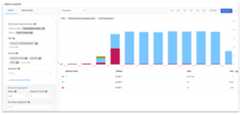
Figure 1.Count of queries displayed in Metrics Explorer with queriesgrouped by optimizer version.
To set up a similar chart for your instance:
- Navigate to theMetrics Explorer in the Google Cloud console.
- In theResource type field, select
Cloud Spanner Instance. - In theMetric field, select
Count of queries. - In theGroup By field, select
database,optimizer_version, andstatus.
Not shown in this example is the case where a different optimizer version isbeing used for different queries in the same database. In that case, the chartwould display a bar segment for each combination of database and optimizerversion.
To learn how to use Cloud Monitoring to monitor your Spannerinstances, seeMonitoring with Cloud Monitoring
Except as otherwise noted, the content of this page is licensed under theCreative Commons Attribution 4.0 License, and code samples are licensed under theApache 2.0 License. For details, see theGoogle Developers Site Policies. Java is a registered trademark of Oracle and/or its affiliates.
Last updated 2025-12-17 UTC.