

Migrate from PostgreSQL to Spanner (GoogleSQL dialect)
This page provides guidance on migrating an open source PostgreSQLdatabase to Spanner.
Migration involves the following tasks:
- Mapping a PostgreSQL schema to a Spanner schema.
- Creating a Spanner instance, database, and schema.
- Refactoring the application to work with your Spanner database.
- Migrating your data.
- Verifying the new system and moving it to production status.
This page also provides some example schemas using tables from theMusicBrainzPostgreSQL database.
Map your PostgreSQL schema to Spanner
Your first step in moving a database from PostgreSQL to Spanner is todetermine what schema changes you must make. Usepg_dumpto create Data Definition Language (DDL) statements that define the objects inyour PostgreSQL database, and then modify the statements as described in thefollowing sections. After you update the DDL statements, use themto create your database in a Spanner instance.
Data types
The following table describes howPostgreSQL data typesmap to Spanner data types. Update the data types in your DDL statementsfrom PostgreSQL data types to Spanner data types.
| PostgreSQL | Spanner |
|---|---|
Bigintint8 | INT64 |
Bigserialserial8 | INT64Note: There is no auto-increment capability in Spanner. |
bit [ (n) ] | ARRAY<BOOL> |
bit varying [ (n) ]varbit [ (n) ] | ARRAY<BOOL> |
Booleanbool | BOOL |
box | ARRAY<FLOAT64> |
bytea | BYTES |
character [ (n) ]char [ (n) ] | STRING |
character varying [ (n) ]varchar [ (n) ] | STRING |
cidr | STRING, using standardCIDR notation. |
circle | ARRAY<FLOAT64> |
date | DATE |
double precisionfloat8 | FLOAT64 |
inet | STRING |
Integerintint4 | INT64 |
interval[ fields ] [ (p) ] | INT64 if storing the value in milliseconds, orSTRING if storing the value in an application-defined interval format. |
json | STRING |
jsonb | JSON |
line | ARRAY<FLOAT64> |
lseg | ARRAY<FLOAT64> |
macaddr | STRING, using standardMAC address notation. |
money | INT64, orSTRING forarbitrary precision numbers. |
numeric [ (p, s) ]decimal [ (p, s) ] | In PostgreSQL, theNUMERIC andDECIMAL data types support up to 217 digits of precision and 214-1 of scale, as defined in the column declaration.The Spanner NUMERIC data type supports up to 38 digits of precision and 9 decimal digits of scale.If you require greater precision, seeStoring arbitrary precision numeric data for alternative mechanisms. |
path | ARRAY<FLOAT64> |
pg_lsn | This data type is PostgreSQL-specific, so there isn't a Spanner equivalent. |
point | ARRAY<FLOAT64> |
polygon | ARRAY<FLOAT64> |
Realfloat4 | FLOAT64 |
Smallintint2 | INT64 |
Smallserialserial2 | INT64 |
Serialserial4 | INT64 |
text | STRING |
time [ (p) ] [ without time zone ] | STRING, usingHH:MM:SS.sss notation. |
time [ (p) ] with time zonetimetz | STRING, usingHH:MM:SS.sss+ZZZZ notation. Alternately, this can be broken up into two columns, one of typeTIMESTAMP and another one holding the timezone. |
timestamp [ (p) ] [ without time zone ] | No equivalent. You may store as aSTRING orTIMESTAMP at your discretion. |
timestamp [ (p) ] with time zonetimestamptz | TIMESTAMP |
tsquery | No equivalent. Define a storage mechanism in your application instead. |
tsvector | No equivalent. Define a storage mechanism in your application instead. |
txid_snapshot | No equivalent. Define a storage mechanism in your application instead. |
uuid | STRING orBYTES |
xml | STRING |
Primary keys
For tables in your Spanner database that you frequently append to, avoidusing primary keys that monotonically increase or decrease, as this approachcauses hotspots during writes. Instead, modify the DDLCREATE TABLE statementsso that they usesupported primary key strategies. If you are usinga PostgreSQL feature such as aUUID data type or function,SERIAL datatypes,IDENTITY column, or sequence, you can use theauto-generated key migration strategies that we recommend.
Note that after you designate your primary key, you can't add or remove aprimary key column, or change a primary key value later without deleting andrecreating the table. For more information on how to designate your primary key,seeSchema and data model - primarykeys.
During migration, you might need to keep some existing monotonically increasinginteger keys. If you need to keep these kinds of keys on a frequently updatedtable with a lot of operations on these keys, you can avoid creating hotspots byprefixing the existing key with a pseudo-random number. This technique causesSpanner to redistribute the rows. SeeWhat DBAs need to know about Spanner, part 1: Keys and indexesfor more information on using this approach.
Foreign keys and referential integrity
Learn aboutforeign keys support in Spanner.
Indexes
PostgreSQLb-tree indexesare similar tosecondary indexes inSpanner. In a Spanner database you use secondary indexes toindex commonly searched columns for better performance, and to replace anyUNIQUE constraints specified in your tables. For example, if your PostgreSQL DDLhas this statement:
CREATETABLEcustomer(idCHAR(5)PRIMARYKEY,first_nameVARCHAR(50),last_nameVARCHAR(50),emailVARCHAR(50)UNIQUE);You would use this statement in your Spanner DDL:
CREATETABLEcustomer(idSTRING(5),first_nameSTRING(50),last_nameSTRING(50),emailSTRING(50))PRIMARYKEY(id);CREATEUNIQUEINDEXcustomer_emailsONcustomer(email);You can find the indexes for any of your PostgreSQL tables by running the\dimeta-command inpsql.
After you determine the indexes that you need, addCREATE INDEX statementsto create them. Follow the guidance atCreating indexes.
Spanner implements indexes as tables, so indexing monotonicallyincreasing columns (like those containingTIMESTAMP data) can cause a hotspot.SeeWhat DBAs need to know about Spanner, part 1: Keys and indexesfor more information on methods to avoid hotspots.
Check constraints
Learn aboutCHECK constraint support in Spanner.
Other database objects
You must create the functionality of the following objects in your applicationlogic:
- Views
- Triggers
- Stored procedures
- User-defined functions (UDFs)
- Columns that use
serialdata types as sequence generators
Keep the following tips in mind when migrating this functionality intoapplication logic:
- You must migrate any SQL statements that you use from the PostgreSQL SQL dialectto theGoogleSQL dialect.
- If you usecursors,you can rework the query to useoffsets and limits.
Create your Spanner instance
After you update your DDL statements to conform to Spanner schemarequirements, use it to create your database in Spanner.
Create a Spanner instance.Follow the guidance inInstances to determine thecorrect regional configuration and compute capacity to support yourperformance goals.
Create the database by using either the Google Cloud console or the
gcloudcommand-line tool:
Console
- Go to the instances page
- Click on the name of the instance that you want to create the exampledatabase in to open theInstance details page.
- ClickCreate Database.
- Type a name for the database and clickContinue.
- In theDefine your database schema section, toggle theEdit astext control.
- Copy and paste your DDL statements into theDDL statements field.
- ClickCreate.
gcloud
- Install thegcloud CLI.
- Use the
gcloud spanner databases createcommand tocreate the database:gcloudspannerdatabasescreateDATABASE_NAME--instance=INSTANCE_NAME--ddl='DDL1'--ddl='DDL2'
- DATABASE_NAME is the name of your database.
- INSTANCE_NAME is the Spanner instance that you created.
- DDLn are your modified DDL statements.
After you create the database, follow the instructions inApply IAM roles to create user accountsand grant permissions to the Spanner instance and database.
Refactor the applications and data access layers
In addition to the code needed to replace thepreceding database objects, you must add applicationlogic to handle the following functionality:
- Hashing primary keys for writes, for tables that have high write rates tosequential keys.
- Validating data, not already covered by
CHECKconstraints. - Referential integrity checks not already covered by foreign keys, tableinterleaving or application logic, including functionality handled bytriggers in the PostgreSQL schema.
We recommend using the following process when refactoring:
- Find all of your application code that accesses the database, and refactor itinto a single module or library. That way, you know exactly what codeaccesses to the database, and therefore exactly what code needs to bemodified.
- Write code that performs reads and writes on the Spanner instance,providing parallel functionality to the original code that reads and writesto PostgreSQL. During writes, update the entire row, not just the columnsthat have been changed, to ensure that the data in Spanner isidentical to that in PostgreSQL.
- Write code that replaces the functionality of the database objects andfunctions that aren't available in Spanner.
Migrate data
After you create your Spanner database and refactor your applicationcode, you can migrate your data to Spanner.
- Use the PostgreSQL
COPYcommand to dump data to .csv files. Upload the .csv files to Cloud Storage.
- Create a Cloud Storage bucket.
- In the Cloud Storage console, click on the bucket name to openthe bucket browser.
- ClickUpload Files.
- Navigate to the directory containing the .csv files and select them.
- ClickOpen.
Create an application to import data into Spanner. This applicationcould useDataflowor it could use theclient librariesdirectly. Make sure to follow the guidance inBulk data loading best practices to get thebest performance.
Tests
Test all application functions against the Spanner instance to verifythat they work as expected. Run production-level workloads to ensure theperformance meets your needs.Update the compute capacityas needed to meet your performance goals.
Move to the new system
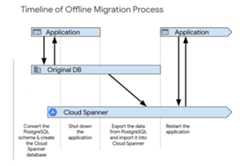
After you complete the initial application testing, turn up the new system usingone of the following processes. Offline migration is the simplest way tomigrate. However, this approach makes your application unavailable for a periodof time, and it provides no rollback path if you find data issues later on. Toperform an offline migration:
- Delete all the data in the Spanner database.
- Shut down the application that targets the PostgreSQL database.
- Export all data from the PostgreSQL database and import it into theSpanner database as described inMigration overview.
Start up the application that targets the Spanner database.
Live migration is possible and requires extensive changes to your application tosupport the migration.
Schema migration examples
These examples show theCREATE TABLE statements for several tables in theMusicBrainz PostgreSQL databaseschema.Each example includes both the PostgreSQL schema and the Spanner schema.
artist_credit table
GoogleSQL
CREATETABLEartist_credit(hashed_idSTRING(4),idINT64,nameSTRING(MAX)NOTNULL,artist_countINT64NOTNULL,ref_countINT64,createdTIMESTAMPOPTIONS(allow_commit_timestamp=true),)PRIMARYKEY(hashed_id,id);PostgreSQL
CREATETABLEartist_credit(idSERIAL,nameVARCHARNOTNULL,artist_countSMALLINTNOTNULL,ref_countINTEGERDEFAULT0,createdTIMESTAMPWITH TIME ZONEDEFAULTNOW());recording table
GoogleSQL
CREATETABLErecording(hashed_idSTRING(36),idINT64,gidSTRING(36)NOTNULL,nameSTRING(MAX)NOTNULL,artist_credit_hidSTRING(36)NOTNULL,artist_credit_idINT64NOTNULL,lengthINT64,commentSTRING(255)NOTNULL,edits_pendingINT64NOTNULL,last_updatedTIMESTAMPOPTIONS(allow_commit_timestamp=true),videoBOOLNOTNULL,)PRIMARYKEY(hashed_id,id);PostgreSQL
CREATETABLErecording(idSERIAL,gidUUIDNOTNULL,nameVARCHARNOTNULL,artist_creditINTEGERNOTNULL,-- references artist_credit.idlengthINTEGERCHECK(lengthISNULLORlength >0),commentVARCHAR(255)NOTNULLDEFAULT'',edits_pendingINTEGERNOTNULLDEFAULT0CHECK(edits_pending>=0),last_updatedTIMESTAMPWITH TIME ZONEDEFAULTNOW(),videoBOOLEANNOTNULLDEFAULTFALSE);recording-alias table
GoogleSQL
CREATETABLErecording_alias(hashed_idSTRING(36)NOTNULL,idINT64NOTNULL,alias_idINT64,nameSTRING(MAX)NOTNULL,localeSTRING(MAX),edits_pendingINT64NOTNULL,last_updatedTIMESTAMPNOTNULLOPTIONS(allow_commit_timestamp=true),typeINT64,sort_nameSTRING(MAX)NOTNULL,begin_date_yearINT64,begin_date_monthINT64,begin_date_dayINT64,end_date_yearINT64,end_date_monthINT64,end_date_dayINT64,primary_for_localeBOOLNOTNULL,endedBOOLNOTNULL,)PRIMARYKEY(hashed_id,id,alias_id),INTERLEAVEINPARENTrecordingONDELETENOACTION;PostgreSQL
CREATETABLErecording_alias(idSERIAL,--PKrecordingINTEGERNOTNULL,-- references recording.idnameVARCHARNOTNULL,localeTEXT,edits_pendingINTEGERNOTNULLDEFAULT0CHECK(edits_pending>=0),last_updatedTIMESTAMPWITH TIME ZONEDEFAULTNOW(),typeINTEGER,-- references recording_alias_type.idsort_nameVARCHARNOTNULL,begin_date_yearSMALLINT,begin_date_monthSMALLINT,begin_date_daySMALLINT,end_date_yearSMALLINT,end_date_monthSMALLINT,end_date_daySMALLINT,primary_for_localeBOOLEANNOTNULLDEFAULTfalse,endedBOOLEANNOTNULLDEFAULTFALSE-- CHECK constraint skipped for brevity);Except as otherwise noted, the content of this page is licensed under theCreative Commons Attribution 4.0 License, and code samples are licensed under theApache 2.0 License. For details, see theGoogle Developers Site Policies. Java is a registered trademark of Oracle and/or its affiliates.
Last updated 2025-12-17 UTC.