

Cloud Monitoring metric export
This document describes a solution for exporting Cloud Monitoring metrics forlong-term analysis. Cloud Monitoring provides a monitoring solution forGoogle Cloud.Cloud Monitoring maintains metrics for six weeks because the value inmonitoring metrics is often time-bound. Therefore, the value of historicalmetrics decreases over time. After the six-week window, aggregated metrics mightstill hold value for long-term analysis of trends that might not be apparentwith short-term analysis.
This solution provides a guide to understanding the metric details for exportand a serverlessreference implementation for metric export to BigQuery.
TheState of DevOpsreports identified capabilities that drive software delivery performance. Thissolution will help you with the following capabilities:
- Monitoring and observability
- Monitoring systems to inform business decisions
- Visual management capabilities
Exporting metrics use cases
Cloud Monitoring collects metrics and metadata from Google Cloud and appinstrumentation. Monitoring metrics provide deep observability intoperformance, uptime, and overall health of cloud apps through an API,dashboards, and a metrics explorer. These tools provide a way to review theprevious 6 weeks of metric values for analysis. If you have long-term metricanalysis requirements, use the Cloud Monitoring API to export the metrics forlong-term storage.
Cloud Monitoring maintains the latest 6 weeks of metrics. It is frequentlyused for operational purposes such as monitoring virtual machine infrastructure(CPU, memory, network metrics) and application performance metrics (request orresponse latency). When these metrics exceed preset thresholds, an operationalprocess is triggered through alerting.
The captured metrics might also be useful for long-term analysis. For example,you might want to compare app performance metrics from Cyber Monday or otherhigh-traffic events against metrics from the previous year to plan for the nexthigh-traffic event. Another use case is to look at Google Cloud serviceusage over a quarter or year to better forecast cost. There might also be appperformance metrics that you want to view across months or years.
In these examples, maintaining the metrics for analysis over a long-termtimeframe is required. Exporting these metrics to BigQueryprovides the necessary analytical capabilities to address these examples.
Requirements
To perform long-term analysis on Monitoring metric data, thereare 3 main requirements:
- Export the data from Cloud Monitoring. You need to exportthe Cloud Monitoring metric data as an aggregated metric value.Metric aggregation is required because storing raw
timeseriesdata points,while technically feasible, doesn't add value. Most long-termanalysis is performed at the aggregate level over a longer timeframe. Thegranularity of the aggregation is unique to your use case, but we recommenda minimum of 1 hour aggregation. - Ingest the data for analysis. You need to import the exportedCloud Monitoring metrics to an analytics engine for analysis.
- Write queries and build dashboards against the data. You needdashboards and standard SQL access to query, analyze, and visualize thedata.
Functional steps
- Build a list of metrics to include in the export.
- Read metrics from the Monitoring API.
- Map the metrics from the exported JSON output from theMonitoring API to the BigQuery table format.
- Write the metrics to BigQuery.
- Create a programmatic schedule to regularly export the metrics.
Architecture
The design of this architecture leverages managed services to simplify youroperations and management effort, reduces costs, and provides the ability toscale as required.

The diagram shows the following architecture implementation:
- Build metric list: Export metric data from the Cloud Monitoring API and build a list of metricsby using the
project.metricsDescriptors.list()method. Exclude metrics list byusing configurations. Schedule the task to run periodically (for example,once per hour). - Get
timeseries: Use theproject.timeseries.list()method to extract each metric from theMonitoring API. Aggregate to a 1-hour level by using API aggregation. - Store metrics: App Engine writes each metric to BigQuery.
- Aggregate metrics: Query the aggregated metrics by using BigQuery.
- Report metrics: Use Looker Studio for long-term analysis.
The following technologies are used in the architecture:
- App Engine - Scalable platform as a service (PaaS) solution used tocall the Monitoring API and write to BigQuery.
- BigQuery - A fully-managed analytics engine used toingest and analyze the
timeseriesdata. - Pub/Sub - A fully-managed real-time messaging service used toprovide scalable asynchronous processing.
- Cloud Storage - A unified object storage for developers andenterprises used to store the metadata about the export state.
- Cloud Scheduler - A cron-style scheduler used to execute the exportprocess.
Understanding Cloud Monitoring metrics details
To understand how to best export metrics from Cloud Monitoring, it'simportant to understand how it stores metrics.
Types of metrics
There are 4 main types ofmetrics in Cloud Monitoring that you can export.
- Google Cloud metrics list are metrics from Google Cloud services, such as Compute Engine andBigQuery.
- Agent metrics list are metrics from VM instances running the Cloud Monitoring agents.
- Metrics from external sources are metrics from third-party applications, and user-defined metrics, includingcustom metrics.
Each of these metric types have ametric descriptor,which includes the metric type, as well as other metric metadata. The followingmetric is an example listing of the metric descriptors from theMonitoring APIprojects.metricDescriptors.list method.
{ "metricDescriptors": [ { "name": "projects/sage-facet-201016/metricDescriptors/pubsub.googleapis.com/subscription/push_request_count", "labels": [ { "key": "response_class", "description": "A classification group for the response code. It can be one of ['ack', 'deadline_exceeded', 'internal', 'invalid', 'remote_server_4xx', 'remote_server_5xx', 'unreachable']." }, { "key": "response_code", "description": "Operation response code string, derived as a string representation of a status code (e.g., 'success', 'not_found', 'unavailable')." }, { "key": "delivery_type", "description": "Push delivery mechanism." } ], "metricKind": "DELTA", "valueType": "INT64", "unit": "1", "description": "Cumulative count of push attempts, grouped by result. Unlike pulls, the push server implementation does not batch user messages. So each request only contains one user message. The push server retries on errors, so a given user message can appear multiple times.", "displayName": "Push requests", "type": "pubsub.googleapis.com/subscription/push_request_count", "metadata": { "launchStage": "GA", "samplePeriod": "60s", "ingestDelay": "120s" } } ]}The important values to understand from the metric descriptor are thetype,valueType, andmetricKind fields. These fields identify the metric andimpact the aggregation that is possible for a metric descriptor.
Kinds of metrics
Each metric has a metric kind and a value type. For more information, readValue types and metric kinds.The metric kind and the associated value type are important because theircombination affects the way the metrics are aggregated.
In the preceding example, thepubsub.googleapis.com/subscription/push_request_count metric metric type has aDELTA metric kind and anINT64 value type.
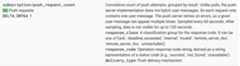
In Cloud Monitoring, the metric kind and value types are stored inmetricsDescriptors, which are available in the Monitoring API.
Timeseries
timeseries are regular measurements for each metric type stored over timethat contain the metric type, metadata, labels and the individual measured datapoints. Metrics collected automatically by Monitoring, such asGoogle Cloud metrics, are collected regularly. As an example, theappengine.googleapis.com/http/server/response_latencies metric is collected every 60 seconds.
A collected set of points for a giventimeseries might grow over time, basedon the frequency of the data reported and any labels associated with the metrictype. If you export the rawtimeseries data points, this might result in alarge export. To reduce the number oftimeseries data points returned, you canaggregate the metrics over a given alignment period. For example, by usingaggregation you can return one data point per hour for a given metrictimeseries that has one data point per minute. This reduces the number ofexported data points and reduces the analytical processing required in theanalytics engine. In this article,timeseries are returned for each metrictype selected.
Metric aggregation
You can use aggregation to combine data from severaltimeseries into a singletimeseries. The Monitoring API provides powerful alignment andaggregation functions so that you don't have to perform the aggregationyourself, passing the alignment and aggregation parameters to the API call. Formore details about how aggregation works for the Monitoring API,readFiltering and aggregation and thisblog post.
You mapmetric typetoaggregation type to ensure that the metrics arealigned and that thetimeseries is reduced to meet your analytical needs.There are lists ofaligners andreducers,that you can use to aggregate thetimeseries. Aligners and reducers have a setof metrics that you can use to align or reduce based on the metric kindsand value types. As an example, if you aggregate over 1 hour, then the result ofthe aggregation is 1 point returned per hour for thetimeseries.
Another way to fine-tune your aggregation is to use theGroup By function,which lets you group the aggregated values into lists of aggregatedtimeseries. For example, you can choose to group App Engine metricsbased on the App Engine module. Grouping by the App Enginemodule in combination with the aligners and reducers aggregating to 1 hour,produces 1 data point per App Engine module per hour.
Metric aggregation balances the increased cost of recording individual datapoints against the need to retain enough data for a detailed long-term analysis.
Reference implementation details
The reference implementation contains the same components as described in theArchitecture design diagram.The functional and relevant implementation detailsin each step are described in the following sections.
Build metric list
Cloud Monitoring defines over a thousand metric types to help youmonitor Google Cloud and third-party software. TheMonitoring API provides theprojects.metricDescriptors.list method, which returns a list of metrics available to a Google Cloudproject. The Monitoring API provides a filtering mechanism so that youcan filter to a list of metrics that you want to export for long-term storageand analysis.
The reference implementation in GitHub uses a Python App Engine app toget a list of metrics and then writes each message to a Pub/Subtopic separately. The export is initiated by a Cloud Scheduler thatgenerates a Pub/Sub notification to run the app.
There are many ways to call the Monitoring API and in this case, theCloud Monitoring and Pub/Sub APIs are called by using theGoogle API Client Library for Python because of its flexible access to the Google APIs.
Get timeseries
You extract thetimeseries for the metric and then write eachtimeseries toPub/Sub. With the Monitoring API you can aggregate themetric values across a given alignment period by using theproject.timeseries.list method. Aggregating data reduces your processing load, storage requirements,query times, and analysis costs. Data aggregation is a best practice forefficiently conducting long-term metric analysis.
The reference implementation in GitHub uses a Python App Engine app tosubscribe to the topic, where each metric for export is sent as a separatemessage. For each message that is received, Pub/Sub pushes themessage to the App Engine app. The app gets thetimeseries for a givenmetric aggregated based on the input configuration. In this case, theCloud Monitoring and Pub/Sub APIs are called by using theGoogle API Client Library.
Each metric can return 1 or moretimeseries. Each metric is sent by a separatePub/Sub message to insert into BigQuery. Themetrictype-to-aligner and metrictype-to-reducer mapping is built into thereference implementation. The following table captures the mapping used in thereference implementation based on the classes of metric kinds and value typessupported by the aligners and reducers.
| Value type | GAUGE | Aligner | Reducer | DELTA | Aligner | Reducer | CUMULATIVE2 | Aligner | Reducer |
|---|---|---|---|---|---|---|---|---|---|
BOOL | yes | ALIGN_FRACTION_TRUE | none | no | N/A | N/A | no | N/A | N/A |
INT64 | yes | ALIGN_SUM | none | yes | ALIGN_SUM | none | yes | none | none |
DOUBLE | yes | ALIGN_SUM | none | yes | ALIGN_SUM | none | yes | none | none |
STRING | yes | excluded | excluded | no | N/A | N/A | no | N/A | N/A |
DISTRIBUTION | yes | ALIGN_SUM | none | yes | ALIGN_SUM | none | yes | none | none |
MONEY | no | N/A | N/A | no | N/A | N/A | no | N/A | N/A |
It's important to consider the mapping ofvalueType to aligners and reducersbecause aggregation is only possible for specificvalueTypes andmetricKindsfor each aligner and reducer.
For example, consider thepubsub.googleapis.com/subscription/push_request_count metric type. Based on theDELTA metric kind andINT64 value type, one way that youcan aggregate the metric is:
- Alignment Period - 3600s (1 hour)
Aligner = ALIGN_SUM- The resulting data point in the alignment periodis the sum of all data points in the alignment period.Reducer = REDUCE_SUM- Reduce by computing the sum across atimeseriesfor each alignment period.
Along with the alignment period, aligner, and reducer values, theproject.timeseries.list method requires several other inputs:
filter- Select the metric to return.startTime- Select the starting point in time for which to returntimeseries.endTime- Select the last time point in time for which to returntimeseries.groupBy- Enter the fields upon which to group thetimeseriesresponse.alignmentPeriod- Enter the periods of time into which you want themetrics aligned.perSeriesAligner- Align the points into even time intervals definedby analignmentPeriod.crossSeriesReducer- Combine multiple points with different labelvalues down to one point per time interval.
The GET request to the API includes all the parameters described in thepreceding list.
https://monitoring.googleapis.com/v3/projects/sage-facet-201016/timeSeries?interval.startTime=START_TIME_VALUE&interval.endTime=END_TIME_VALUE&aggregation.alignmentPeriod=ALIGNMENT_VALUE&aggregation.perSeriesAligner=ALIGNER_VALUE&aggregation.crossSeriesReducer=REDUCER_VALUE&filter=FILTER_VALUE&aggregation.groupByFields=GROUP_BY_VALUEThe followingHTTP GET provides an example call to theprojects.timeseries.list API method by using the input parameters:
https://monitoring.googleapis.com/v3/projects/sage-facet-201016/timeSeries?interval.startTime=2019-02-19T20%3A00%3A01.593641Z&interval.endTime=2019-02-19T21%3A00%3A00.829121Z&aggregation.alignmentPeriod=3600s&aggregation.perSeriesAligner=ALIGN_SUM&aggregation.crossSeriesReducer=REDUCE_SUM&filter=metric.type%3D%22kubernetes.io%2Fnode_daemon%2Fmemory%2Fused_bytes%22+&aggregation.groupByFields=metric.labels.keyThe preceding Monitoring API call includes acrossSeriesReducer=REDUCE_SUM, which means that the metrics are collapsed andreduced into a single sum as shown in the following example.
{"timeSeries":[{"metric":{"type":"pubsub.googleapis.com/subscription/push_request_count"},"resource":{"type":"pubsub_subscription","labels":{"project_id":"sage-facet-201016"}},"metricKind":"DELTA","valueType":"INT64","points":[{"interval":{"startTime":"2019-02-08T14:00:00.311635Z","endTime":"2019-02-08T15:00:00.311635Z"},"value":{"int64Value":"788"}}]}]}This level of aggregation aggregates data into a single data point, making itan ideal metric for your overall Google Cloud project. However, it doesn'tlet you drill into which resources contributed to the metric. In thepreceding example, you can't tell which Pub/Sub subscriptioncontributed the most to the request count.
If you want to review the details of the individual components generating thetimeseries, you can remove thecrossSeriesReducer parameter.Without thecrossSeriesReducer, the Monitoring API doesn't combinethe varioustimeseries to create a single value.
The followingHTTP GET provides an example call to theprojects.timeseries.list API method by using the input parameters. ThecrossSeriesReducer isn't included.
https://monitoring.googleapis.com/v3/projects/sage-facet-201016/timeSeries?interval.startTime=2019-02-19T20%3A00%3A01.593641Z&interval.endTime=2019-02-19T21%3A00%3A00.829121Zaggregation.alignmentPeriod=3600s&aggregation.perSeriesAligner=ALIGN_SUM&filter=metric.type%3D%22kubernetes.io%2Fnode_daemon%2Fmemory%2Fused_bytes%22+In the following JSON response, themetric.labels.keys are the same acrossboth of the results because thetimeseries is grouped. Separate points arereturned for each of theresource.labels.subscription_ids values. Review themetric_export_init_pub andmetrics_list values in the followingJSON. This level of aggregation is recommended because it allows you to useGoogle Cloud products, included as resource labels, in yourBigQuery queries.
{"timeSeries":[{"metric":{"labels":{"delivery_type":"gae","response_class":"ack","response_code":"success"},"type":"pubsub.googleapis.com/subscription/push_request_count"},"metricKind":"DELTA","points":[{"interval":{"endTime":"2019-02-19T21:00:00.829121Z","startTime":"2019-02-19T20:00:00.829121Z"},"value":{"int64Value":"1"}}],"resource":{"labels":{"project_id":"sage-facet-201016","subscription_id":"metric_export_init_pub"},"type":"pubsub_subscription"},"valueType":"INT64"},{"metric":{"labels":{"delivery_type":"gae","response_class":"ack","response_code":"success"},"type":"pubsub.googleapis.com/subscription/push_request_count"},"metricKind":"DELTA","points":[{"interval":{"endTime":"2019-02-19T21:00:00.829121Z","startTime":"2019-02-19T20:00:00.829121Z"},"value":{"int64Value":"803"}}],"resource":{"labels":{"project_id":"sage-facet-201016","subscription_id":"metrics_list"},"type":"pubsub_subscription"},"valueType":"INT64"}]}Each metric in the JSON output of theprojects.timeseries.list API call iswritten directly to Pub/Sub as a separate message. There is apotential fan-out where 1 input metric generates 1 or moretimeseries.Pub/Sub provides the ability to absorb a potentially large fan-outwithout exceeding timeouts.
The alignment period provided as input means that the values over thattimeframe are aggregated into a single value as shown in the preceding exampleresponse. The alignment period also defines how often to run the export. Forexample, if your alignment period is 3600s, or 1 hour, then the export runsevery hour to regularly export thetimeseries.
Store metrics
The reference implementation in GitHub uses a Python App Engine app toread eachtimeseries and then insert the records into theBigQuery table. For each message that is received,Pub/Sub pushes the message to the App Engine app. ThePub/Sub message contains metric data exported from theMonitoring API in a JSON format and needs to be mapped to a tablestructure in BigQuery. In this case, the BigQuery APIs arecalled using the Google API Client Library..
The BigQuery schema is designed to map closely to the JSONexported from the Monitoring API. When building theBigQuery table schema, one consideration is the scale of the datasizes as they grow over time.
In BigQuery, we recommend that you partition the table based ona date field because it can make queries more efficient by selecting date rangeswithout incurring a full table scan. If you plan to run the export regularly,you can safely use the default partition based on ingestion date.
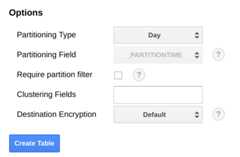
If you plan to upload metrics in bulk or don't run the export periodically,partition on theend_time, which does require changes to theBigQuery schema. You can either move theend_time to atop-level field in the schema, where you can use it for partitioning, or add anew field to the schema. Moving theend_time field is required because thefield is contained in a BigQuery record andpartitioning must be done on a top-level field. For more information, read theBigQuery partitioning documentation.
BigQuery also provides the ability to expire datasets, tables,and table partitions after an amount of time.
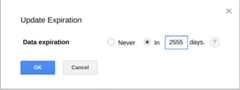
Using this feature is a useful way to purge older data when the data is nolonger useful. For example, if your analysis covers a 3-year time period, youcan add a policy to delete data older than 3 years old.
Schedule export
Cloud Scheduler is a fully-managed cron job scheduler. Cloud Scheduler lets you use thestandard cron schedule format to trigger an App Engine app, send amessage by using Pub/Sub, or send a message to an arbitrary HTTPendpoint.
In the reference implementation in GitHub, Cloud Scheduler triggersthelist-metrics App Engine app every hour by sending aPub/Sub message with a token that matches the App Engine'sconfiguration. The default aggregation period in the app configuration is 3600s,or 1 hour, which correlates to how often the app is triggered. A minimum of 1hour aggregation is recommended because it provides a balance between reducingdata volumes and still retaining high fidelity data. If you use a differentalignment period, change the frequency of the export to correspond to thealignment period. The reference implementation stores the lastend_time valuein Cloud Storage and uses that value as the subsequentstart_timeunless astart_time is passed as a parameter.
The following screenshot from Cloud Scheduler demonstrates how you canuse the Google Cloud console to configure the Cloud Scheduler toinvoke thelist-metrics App Engine app every hour.
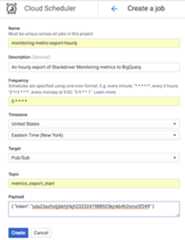
TheFrequency field uses the cron-style syntax to tellCloud Scheduler how frequently to execute the app. TheTargetspecifies a Pub/Sub message that is generated, and thePayloadfield contains the data contained in the Pub/Sub message.
Using the exported metrics
With the exported data in BigQuery, you can now use standard SQLto query the data or build dashboards to visualize trends in your metrics overtime.
Sample query: App Engine latencies
The following query finds the minimum, maximum, and average of the mean latencymetric values for an App Engine app. Themetric.type identifies theApp Engine metric, and the labels identify the App Engine appbased on theproject_id label value. Thepoint.value.distribution_value.meanis used because this metric is aDISTRIBUTION value in theMonitoring API, which is mapped to thedistribution_value fieldobject in BigQuery. Theend_time field looks back over thevalues for the past 30 days.
SELECTmetric.typeASmetric_type,EXTRACT(DATEFROMpoint.INTERVAL.start_time)ASextract_date,MAX(point.value.distribution_value.mean)ASmax_mean,MIN(point.value.distribution_value.mean)ASmin_mean,AVG(point.value.distribution_value.mean)ASavg_meanFROM`sage-facet-201016.metric_export.sd_metrics_export`CROSSJOINUNNEST(resource.labels)ASresource_labelsWHEREpoint.interval.end_time >TIMESTAMP(DATE_SUB(CURRENT_DATE,INTERVAL30DAY))ANDpoint.interval.end_time<=CURRENT_TIMESTAMPANDmetric.type='appengine.googleapis.com/http/server/response_latencies'ANDresource_labels.key="project_id"ANDresource_labels.value="sage-facet-201016"GROUPBYmetric_type,extract_dateORDERBYextract_dateSample query: BigQuery query counts
The following query returns the number of queries againstBigQuery per day in a project. Theint64_value field is usedbecause this metric is anINT64 value in the Monitoring API, whichis mapped to theint64_value field in BigQuery. Themetric.typeidentifies the BigQuery metric, and the labelsidentify the project based on theproject_id label value. Theend_time fieldlooks back over the values for the past 30 days.
SELECTEXTRACT(DATEFROMpoint.interval.end_time)ASextract_date,sum(point.value.int64_value)asquery_cntFROM`sage-facet-201016.metric_export.sd_metrics_export`CROSSJOINUNNEST(resource.labels)ASresource_labelsWHEREpoint.interval.end_time >TIMESTAMP(DATE_SUB(CURRENT_DATE,INTERVAL30DAY))ANDpoint.interval.end_time<=CURRENT_TIMESTAMPandmetric.type='bigquery.googleapis.com/query/count'ANDresource_labels.key="project_id"ANDresource_labels.value="sage-facet-201016"groupbyextract_dateorderbyextract_dateSample query: Compute Engine instances
The following query finds the weekly minimum, maximum, and average of the CPUusage metric values for Compute Engine instances of a project. Themetric.type identifies the Compute Engine metric, and the labelsidentify the instances based on theproject_id label value. Theend_timefield looks back over the values for the past 30 days.
SELECTEXTRACT(WEEKFROMpoint.interval.end_time)ASextract_date,min(point.value.double_value)asmin_cpu_util,max(point.value.double_value)asmax_cpu_util,avg(point.value.double_value)asavg_cpu_utilFROM`sage-facet-201016.metric_export.sd_metrics_export`WHEREpoint.interval.end_time >TIMESTAMP(DATE_SUB(CURRENT_DATE,INTERVAL30DAY))ANDpoint.interval.end_time<=CURRENT_TIMESTAMPANDmetric.type='compute.googleapis.com/instance/cpu/utilization'groupbyextract_dateorderbyextract_dateData visualization
BigQuery is integrated with many tools that you can use for datavisualization.
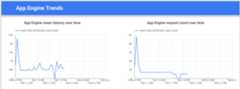
Looker Studio is a free tool built by Google where you can build data charts and dashboards tovisualize the metric data, and then share them with your team. The followingexample shows a trendline chart of the latency and count for theappengine.googleapis.com/http/server/response_latencies metric over time.
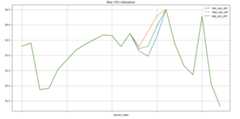
Colaboratory is a research tool for machine learning education and research. It's a hostedJupyter notebook environment that requires no set up to use and access data inBigQuery. Using a Colab notebook, Python commands, and SQLqueries, you can develop detailed analysis and visualizations.
Monitoring the export reference implementation
When the export is running, you need to monitor the export. One way to decidewhich metrics to monitor is to set a Service Level Objective (SLO). An SLO is atarget value or range of values for a service level that is measured by ametric. TheSite reliability engineering book describes 4 main areas for SLOs: availability, throughput, error rate, andlatency. For a data export, throughput and error rate are two majorconsiderations and you can monitor them through the following metrics:
- Throughput -
appengine.googleapis.com/http/server/response_count - Error rate -
logging.googleapis.com/log_entry_count
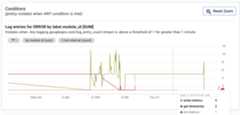
For example, you can monitor the error rate by using thelog_entry_countmetric and filtering it for the App Engine apps (list-metrics,get-timeseries,write-metrics) with a severity ofERROR. You can then use theAlerting policies in Cloud Monitoring to alert you of errors encountered in the exportapp.
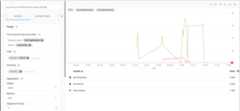
The Alerting UI displays a graph of thelog_entry_count metric as compared tothe threshold for generating the alert.
What's next
- View the reference implementation onGitHub.
- Read theCloud Monitoring docs.
- Explore theCloud Monitoring v3 API docs.
- For more reference architectures, diagrams, and best practices, explore theCloud Architecture Center.
- Read our resources aboutDevOps.
Learn more about the DevOps capabilities related to this solution:
Take theDevOps quick check to understand where you stand in comparison with the rest of the industry.
Except as otherwise noted, the content of this page is licensed under theCreative Commons Attribution 4.0 License, and code samples are licensed under theApache 2.0 License. For details, see theGoogle Developers Site Policies. Java is a registered trademark of Oracle and/or its affiliates.
Last updated 2024-08-14 UTC.