

Mapping custom domains
You can set up a custom domain rather than the default address thatCloud Run provides for a deployed service.
There are a few ways to set up a custom domain for a Cloud Runservice:
- Use aglobal external Application Load Balancer (Recommended)
- UseFirebase Hosting
- UseCloud Run domain mapping (Limited availability and Preview)
You can map multiple custom domains to the same Cloud Run service.
Before you begin
Purchase a new domain, unless you already have one that you want to use. Youcan use any domain name registrar.
Map a custom domain using a global external Application Load Balancer
With this option, you add aglobal external Application Load Balancerin front of your Cloud Run service and configure a custom domain atthe load balancer level.
One advantage of using a global external Application Load Balancer is that it gives you a lot ofcontrol around your custom domain setup.For example, it lets you use your own TLS certificate or routespecific URL paths to the Cloud Run service.It also lets you configureCloud CDN for caching andGoogle Cloud Armorfor additional security.
You can also map multiple services to a dynamic hostname orpath in your custom domain URL pattern for a single load balancer, for example,<service>.example.com,usingURL masks.
Refer to the documentation onsetting up a global external Application Load Balancer with Cloud Run.
Map a custom domain using Firebase Hosting
Note: Firebase Hosting is not covered byGoogle Cloud Terms of Service.SeeTerms of Service for Firebase Services.With this option, you configureFirebase Hostingin front of your Cloud Run service and connect a domain to FirebaseHosting.
Using Firebase Hosting has a low price and optionally lets you host andserve static content alongside the dynamic content served by yourCloud Run service.
To map a custom domain using Firebase Hosting:
- Add Firebase to your Google Cloud project.
- Install the Firebase CLI.
In a folder different from the source code of your service, create a
firebase.jsonfile with the following content:{"hosting":{"rewrites":[{"source":"**","run":{"serviceId":"SERVICE_NAME","region":"REGION"}}]}}ReplaceSERVICE_NAME andREGION with the name andregion of your Cloud Run service.
Deploy the Firebase Hosting configuration:
firebasedeploy--onlyhosting--projectPROJECT_ID
Read more aboutFirebase Hosting and Cloud Run.
Map a custom domain using Cloud Run domain mapping (Limited availability and Preview)
Preview — Cloud Run domain mappings
This feature is subject to the "Pre-GA Offerings Terms" in the General Service Terms section of theService Specific Terms. Pre-GA features are available "as is" and might have limited support. For more information, see thelaunch stage descriptions.
Cloud Run domain mapping limitations
The following considerations apply to Cloud Run domain mappings:
- Cloud Run domain mappings are in thepreview launch stage.Due tolatency issues, they are notproduction-ready and are not supported at General Availability. At the moment,this option is not recommended for production services.
- A Google-managed certificate for HTTPS connections is automatically issued andrenewed when you map a service to a custom domain.
- Provisioning the SSL certificate usually takes about 15 minutes but can takeup to 24 hours.
- You cannot disable TLS 1.0 and 1.1. If this is an issue, you can use FirebaseHosting or Cloud Load Balancing to enable TLS 1.2-only traffic.
- You cannot upload and use your own (self-managed) certificates.
- Cloud Run domain mappings are limited to 64 characters.
- Domain mapping is available in the following regions:
asia-east1asia-northeast1asia-southeast1europe-north1europe-west1europe-west4us-central1us-east1us-east4us-west1
- To map custom domains in other regions, you must use one of theother mapping options.
- When you use Cloud Run domain mappings, you map a custom domain to yourservice, then update your DNS records.
- You can map a domain, such as
example.comor a subdomain, such assubdomain.example.com. - You can only map a domain to
/, not to a specific URL path like/users. - You cannot use wildcard certificates with this feature.
Map a custom domain to a service
You can use the Google Cloud console, gcloud CLI, or Terraform to map acustom domain to a service.
Note: If you have already configured domain forwarding on a third-party load balancer,you don't need to use Cloud Run domain mapping. Ensure that theforwarding settings on the third-party load balancer are set correctly.Console
Open the domain mappings page in the Google Cloud console:
Domain mappings pageClickAdd Mapping.
If your display window is too small, theAdd Mapping button isn'tdisplayed and you must click the three-dot vertical ellipse icon in thecorner of the page.
From the drop-down list, select the service you are mapping the customdomain to.
SelectCloud Run Domain Mappings.
In theAdd mapping form, selectVerify a new domain.
In theBase domain to verify field, you must verify the ownership ofa domain before you can use it, unless you purchased your domainfrom Google.
If you want to map
subdomain.example.comorsubdomain1.subdomain2.example.com, you must verify ownershipofexample.com. For more information on verifying domain ownership, refer toSearch Console help.ClickContinue.
After domain verification is finished, clickContinue verification and close.
Update your DNS records at your domain registrarwebsite using the DNS records displayed in the last step.You can display the records at any time by clickingDNS Records inthe "..." action menu for a domain mapping.
ClickDone.
gcloud
You must verify domain ownership the firsttime you use that domain in the Google Cloud project, unless you purchased yourcustom domain from Google.You can determine whether the custom domain you want to use has beenverified by running the following command:
gclouddomainslist-user-verified
If your ownership of the domain needs to beverified, open the Search Console verification page:
gclouddomainsverifyBASE-DOMAIN
where
BASE-DOMAINis the base domain you wantto verify. For example, if you want to mapsubdomain.example.com, youmust verify the ownership ofexample.com.InSearch Console, complete domain ownership verification. Formore information, refer toSearch Console help.
Map your service to the custom domain:
gcloudbetarundomain-mappingscreate--serviceSERVICE--domainDOMAIN
- Replace
SERVICEwith your service name. - Replace
DOMAINwith your custom domain, for example,example.comorsubdomain.example.com
- Replace
--force-override flagwhen you create the domain mapping. That domain will be removed from theother service to point to this one.Terraform
To learn how to apply or remove a Terraform configuration, seeBasic Terraform commands.
To create a Cloud Run service, add the following to your existingmain.tf file:
resource"google_cloud_run_v2_service""default"{name="custom-domain" # Replace with your service namelocation="us-central1"deletion_protection=false # set to true to prevent destruction of the resourcetemplate{containers{image="us-docker.pkg.dev/cloudrun/container/hello" # Replace with your container image}}}Replace:
custom-domainwith your Cloud Run service name.us-docker.pkg.dev/cloudrun/container/hellowith a reference to your container image. If you use Artifact Registry,therepositoryREPO_NAME mustalready be created. The URL has the shapeLOCATION-docker.pkg.dev/PROJECT_ID/REPO_NAME/PATH:TAG.
Map your Cloud Run service to the custom domain:
data"google_project""project"{}resource"google_cloud_run_domain_mapping""default"{name="verified-domain.com"location=google_cloud_run_v2_service.default.locationmetadata{namespace=data.google_project.project.project_id}spec{route_name=google_cloud_run_v2_service.default.name}}Replaceverified-domain.com with your custom verified domain, for example,example.com orsubdomain.example.com.
Add your DNS records at your domain registrar
After you've mapped your service to a custom domain in Cloud Run,you must update your DNS records at your domain registrar. As a convenience,Cloud Run generates and displays the DNS records you must enter. Youmust add these records that point to the Cloud Run service at yourdomain registrar for the mapping to go into effect.
If you're using Cloud DNS as your DNS provider, seeAdding arecord.
Note: Some third-party CDN providers might inadvertently intercept validationrequests, preventing them from reaching the Cloud Run service and causingthe domain mapping to fail or its certificate to fail to renew. For example,if you are using Cloudflare CDN, you must turn off the "Always use https"option in the "Edge Certificates" tab of theSSL/TLS tab.Retrieve the DNS record information for your domain mappings using the following:
Console
Go to the Cloud Run domain mappings page:
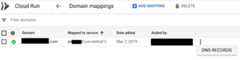
Domain mappings pageClick the three-dot vertical ellipse icon to the right of your service,then clickDNS RECORDS to display all the DNS records:
gcloud
gcloudbetarundomain-mappingsdescribe--domain[DOMAIN]
Replace
[DOMAIN]with your custom domain, for example,example.comorsubdomain.example.com.You need all of the records returned under the heading
resourceRecords.Sign in to your account at your domain registrar and then open the DNSconfiguration page.
Locate the host records section of your domain's configuration page andthen add each of the resource records that you received when you mappedyour domain to your Cloud Run service.
When you add each of the previous DNS records to the account at the DNS provider:
- Select the type returned in the DNS record in the previous step:
A, orAAAA,orCNAME. - Use the name
wwwto map towww.example.com. - Use the name
@to mapexample.com.
- Select the type returned in the DNS record in the previous step:
Save your changes in the DNS configuration page of your domain's account.In most cases, it takes only a few minutes for these changes to take effect, butin some cases it can take up to several hours, depending on the registrar andtheTime-To-Live (TTL) of anyprevious DNS records for your domain. You can use a
digtool, such astheonlinedigversion,to confirm the DNS records have been successfully updated.Test for success by browsing to your service at its new URL, forexample,
https://www.example.com. It can take several minutes forthe managed SSL certificate to be issued.
Add verified domain owners to other users or service accounts
When a user verifies a domain, that domain is only verifiedto that user's account. This means that only that user can add more domainmappings that use that domain. So, to enable other users to add mappings thatuse that domain, you must add them as verified owners.
Note: A verified domain owner can override existing domain mappings fromother projects after confirmation.If you need to add verified owners of your domain to other users orservice accounts, you can add permission through theSearch Console page:
Navigate to the following address in your web browser:
UnderProperties, click the domain that you want to add a user or serviceaccount to.
Go to theVerified owners list, clickAdd an owner, and then enter a Google Account email address or service account ID.
To view a list of your service accounts, open the Service Accounts page in the Google Cloud console:
Delete a Cloud Run domain mapping
You can use the Google Cloud console or the gcloud CLI to deletea domain mapping.
Console
Open the Domain mappings page in the Google Cloud console:
Domain mappings pageIn theDomain mappings page, select the domain mapping that you wantto delete and clickDelete.
gcloud
Delete the domain mapping:
gcloudbetarundomain-mappingsdelete--domainDOMAIN
- Replace
DOMAINwith your custom domain, for example,example.comorsubdomain.example.com.
- Replace
Using custom domains with authenticated services
Authenticated services areprotected by IAM.Such Cloud Run services require client authentication thatdeclares the intended recipient of a request at credential-generation time (theaudience).
Audience is usually the full URL of the target service, which by default forCloud Run services is a generated URL ending inrun.app.
If you use a custom domain, however, you canconfigure a custom audienceso that your service accepts your custom domain as a valid audience.
What's next
- Learn how tosecure your Cloud Run services.
- To set up a custom domain for Cloud Run by using a global external Application Load Balancer,seeSet up a global external Application Load Balancer with Cloud Run.
Except as otherwise noted, the content of this page is licensed under theCreative Commons Attribution 4.0 License, and code samples are licensed under theApache 2.0 License. For details, see theGoogle Developers Site Policies. Java is a registered trademark of Oracle and/or its affiliates.
Last updated 2026-02-18 UTC.