

Configure containers for worker pools
Preview — Cloud Run worker pools
This feature is subject to the "Pre-GA Offerings Terms" in the General Service Terms section of theService Specific Terms. Pre-GA features are available "as is" and might have limited support. For more information, see thelaunch stage descriptions.
This page describes how to configure the entrypoint command, and arguments for a Cloud Runworker pool.
When Cloud Run starts a container, it runs the image's defaultentrypoint command and default command arguments. If you want tooverride the image's default entrypoint and command arguments, you can use thecommand andargs fields in the container configuration. Thecommand fieldspecifies the actual command run by the container. Theargs field specifiesthe arguments passed to that command.
Note that you can have a maximum of1000 arguments per container for eachworker pool.
Required roles
To get the permissions that you need to configure and deploy Cloud Run worker pools, ask your administrator to grant you the following IAM roles:
- Cloud Run Developer (
roles/run.developer) on the Cloud Run worker pool - Service Account User (
roles/iam.serviceAccountUser) on the service identity
For a list of IAM roles and permissions that are associated withCloud Run, seeCloud Run IAM rolesandCloud Run IAM permissions.If your Cloud Run worker pool interfaces withGoogle Cloud APIs, such as Cloud Client Libraries, see theservice identity configuration guide.For more information about granting roles, seedeployment permissionsandmanage access.
Configure entrypoint and arguments
Any configuration change leads to thecreation of a new revision. Subsequent revisions will also automatically getthis configuration setting unless you make explicit updates to change it.
The specified container command and arguments override the default imageENTRYPOINT andCMD.
You can set entrypoint command and arguments for a Cloud Run worker pool using theGoogle Cloud console, the Google Cloud CLI, YAML, or Terraform:
Console
In the Google Cloud console, go to Cloud Run:
SelectWorker pools from the menu, and clickDeploy container toconfigure a new worker pool.If you are configuring an existing worker pool, click theworker pool, then clickEdit and deploy new revision.
If you are configuring a new worker pool, fill out the initial workerpool page, then clickContainer(s), Volumes, Networking, Security to expand theworker pools configuration page.
Click theContainer tab.
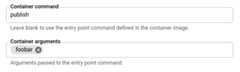
- Specify the command you want the container to runif you don't want to use the entry point command defined in the container image.Optionally, specify the arguments to the entrypoint command.
ClickCreate orDeploy.
gcloud
Toupdate the start command and arguments for an existing service:
gcloudbetarunworker-poolsupdateWORKER_POOL--commandCOMMAND--argsARG1,ARG-N
Replace the following:
- WORKER_POOL: the name of the worker pool.
- COMMAND: the command that the container starts with,if you are not using the default command.
- ARG1: the argument you are sending to the container command.Use a comma-delimited list for more than one argument.
To specify entrypoint and arguments duringdeployment of a new or existing worker pool:
gcloudbetarunworker-poolsdeploy--imageIMAGE_URL--commandCOMMAND--argsARG1,ARG-N
ReplaceIMAGE_URL with a reference to the container image thatcontains the worker pool, such asus-docker.pkg.dev/cloudrun/container/worker-pool:latest.
If you want to restore the container defaults for the entrypoint commandsand arguments, supply empty strings as follows:
gcloudbetarunworker-poolsdeploy--imageIMAGE_URL--command""--args""
YAML
If you are creating a new worker pool, skip this step.If you are updating an existing worker pool, download itsYAML configuration:
gcloudbetarunworker-poolsdescribeWORKER_POOL--formatexport>workerpool.yamlThe following example contains the YAML configuration:
apiVersion:run.googleapis.com/v1kind:WorkerPoolmetadata:name:WORKER_POOLannotations:run.googleapis.com/launch-stage:BETAspec:template:spec:containers:-name:CONTAINER_NAMEimage:IMAGE_URLcommand:-COMMANDargs:-ARG1-ARG-N
Replace the following:
- WORKER_POOL: the name of your Cloud Run worker pool.
- CONTAINER_NAME: the name of the container.
- IMAGE_URL: a reference to the container image thatcontains the worker pool, such as
us-docker.pkg.dev/cloudrun/container/worker-pool:latest - COMMAND: the command that the container is to start up with if you are not using the default command.
- ARG1: the argument you are sending to the container command. If you use multiple arguments, specify each on its own line—for example, as shown,ARG-N.
Create or update the worker pool using the following command:
gcloudbetarunworker-poolsreplaceworkerpool.yaml
Terraform
To learn how to apply or remove a Terraform configuration, seeBasic Terraform commands.
resource"google_cloud_run_v2_worker_pool""default"{name="WORKER_POOL"location="REGION"launch_stage="BETA"template{containers{image="IMAGE_URL"command=["COMMAND"]args=["ARG1", "ARG2"]}}}Replace the following:
- WORKER_POOL: the name of the worker pool.
- REGION: the Google Cloud region—for example,
europe-west1. - IMAGE_URL: a reference to the container image thatcontains the worker pool, such as
us-docker.pkg.dev/cloudrun/container/worker-pool:latest. - COMMAND: the command that the container starts with,if you are not using the default command.
- ARG1,ARG2: the argument(s) you are sending to thecontainer command.
Configure container start order for sidecar deployments
To specify the container start up order in asidecar deployment, use thecontainer dependencies feature. Specify any containers that have dependenciesand list the containers they depend on, so those containers are started first. Thecontainers that don't have any dependencies are always started first andconcurrently.
To use this feature successfully, you must usestartup health check probes. The startup probe enablesCloud Run to inspect the health of a dependent container, making sureit passes successfully before it starts up the next container. If you don't usehealth checks, containers are started in the specified order even if containersthey depend on fail to start.
Note that there is no default startup health check probe for worker pools.
Use the Google Cloud console, Google Cloud CLI, or YAML to specify the startup order:
Console
In the Google Cloud console, go to the Cloud Run page:
- SelectWorker pools from the menu.
- For an existing worker pool, click the worker pool in the list and selectEdit and deploy new revision to display the revision deployment form.
- For a new worker pool, clickDeploy container to display theCreate worker pool form.
For a new worker pool, specify the worker pool name, ingress container URL, CPUallocation, ingress control, and authentication. In theContainer(s), Volumes, Networking, Security tab, do the following:
- Configure the ingress container.
- To add each of the other containers you are deploying, clickAdd container.
- For all containers except the ingress container,configure a startup health check.
- If a container needs to be started after certain othercontainers, select those containers in theContainer startup ordermenu.
For an existing worker pool, follow these steps:
- For all containers except the ingress container,configure a startup health check.
- Each container is shown with its ownContainer startup order menu. If a container needs other containers to startfirst before it can start, use theContainer startup ordermenu to select the containers that must start first.
Finish any other required configurations, then clickCreate for a newworker pool orDeploy for an existing worker pool. Wait for the deployment to finish.
gcloud
Before using the Google Cloud CLI to specify startup order,configure a startup health check.
In the Google Cloud console, activate Cloud Shell.
At the bottom of the Google Cloud console, aCloud Shell session starts and displays a command-line prompt. Cloud Shell is a shell environment with the Google Cloud CLI already installed and with values already set for your current project. It can take a few seconds for the session to initialize.
To deploy multiple containers to a service with a specified startup order,run the command:
gcloudbetarunworker-poolsdeployWORKER_POOL\--containerCONTAINER_1_NAME--image='WORKER_POOL_IMAGE'--containerCONTAINER_2_NAME--image='SIDECAR_IMAGE'--depends-on=CONTAINER_1_NAME\--containerCONTAINER_3_NAME--image='SIDECAR_IMAGE'--depends-on=CONTAINER_1_NAME,CONTAINER_2_NAME
Replace the following:
- WORKER_POOL: the name of the worker pool.
- IMAGE_URL: a reference to the container image thatcontains the worker pool, such as
us-docker.pkg.dev/cloudrun/container/worker-pool:latest. SIDECAR_IMAGE: a reference to the sidecar container image.
If you want to configure each container in the deploy command, supply eachcontainer's configuration after the
containerparameters.
YAML
If you are creating a new worker pool, skip this step.If you are updating an existing worker pool, download itsYAML configuration:
gcloudbetarunworker-poolsdescribeWORKER_POOL--formatexport>workerpool.yamlThe following example contains the YAML configuration:
apiVersion:run.googleapis.com/v1kind:WorkerPoolmetadata:name:WORKER_POOLannotations:run.googleapis.com/launch-stage:BETAspec:template:metadata:annotations:run.googleapis.com/container-dependencies:'{"CONTAINER1":["CONTAINER2"],"CONTAINER3":["CONTAINER1","CONTAINER2"]}'
Replace the following:
- WORKER_POOL: the name of your Cloud Run worker pool.
- CONTAINER1: the name of the first container thatdepends on one or more container. You can set thecontainer name in the YAML; Cloud Run automaticallygenerates a name if one isn't specified.
- CONTAINER2: the name of the container that muststart beforeCONTAINER1.
- CONTAINER3: the name of the second container thatdepends on one or more containers.
In the example shown in the YAML snippet,CONTAINER2starts first,CONTAINER1 starts second, andCONTAINER3 starts last.
Create or update the worker pool using the following command:
gcloudbetarunworker-poolsreplaceworkerpool.yaml
View container configuration for the worker pool
In the Google Cloud console, go to Cloud Run:
ClickWorker pools to display the list of deployed worker pools.
Click the worker pool you want to examine to display its details pane.
Click theContainers tab to display worker pool container configuration.
Except as otherwise noted, the content of this page is licensed under theCreative Commons Attribution 4.0 License, and code samples are licensed under theApache 2.0 License. For details, see theGoogle Developers Site Policies. Java is a registered trademark of Oracle and/or its affiliates.
Last updated 2026-02-19 UTC.