

State handlers
| Term | Definition |
|---|---|
| Handler requirements | These are the requirements that must be satisfiedfor the handler to haveany effect on the session.A handler is said to becalledwhen it satisfies its requirementsand affects the session in some way. |
| Handler fulfillment | If a handler is called,an optionalfulfillmentis used to create responses for end-users.These responses are eitherdefined in static agent dataor retrieved dynamically from yourwebhook service. |
| Handler transition target | If a handler is called,an optional transition target is usedto change the current page.The next page can only be aflow start pageor a page within the currently active flow. |
There are two types of state handlerswith differing handler requirements:
| Term | Definition |
|---|---|
| Routes | Routesare called when an end-user input matches anintentand/or someconditionon the session status is met.A route with an intent requirement is also called anintent route. A route with only a condition requirementis also called acondition route. |
| Event handlers | Event handlersare called when anevent is invoked.Somebuilt-in eventsare triggered when unexpected end-user input is received,or when a webhook error occurs.You can also definecustom eventsthat you invoke when something happens outside the conversation. |
There are three steps to processing a state handler:
| Term | Definition |
|---|---|
| 1. Scope | A handler must be inscope to have any effect on the session. The scope is determined by whether a handler is applied to a flow, a page, or a form parameter; and by whether the associated flow is active, the associated page is active, or the agent is currently attempting to fill the associated form parameter. |
| 2. Evaluation | Each handler in scope isevaluated in order. If a handler's requirements are met, it passes evaluation. |
| 3. Call | If a handler is in scope and passes evaluation, it is called. Any associated fulfillment is called, and any associated transition target is applied to the session. |
Scope
In order for a handler to be evaluated,it must be inscope.Handler scope is an important and powerful toolthat helps you control the conversation.By controlling the scope of a handler, you can control:
| X | Item |
|---|---|
| When an intent can be matched | |
| When a condition should be checked | |
| When a certain event can be handled | |
| When a page transition can occur | |
| When a static fulfillment response is provided | |
| When a webhook-enabled fulfillment is called for dynamic responses |
The scope is determined by whether a handler is applied toa flow, a page, or a form parameter;and by whether the associated flow is active, the associated page is active,or the agent is currently attempting to fill the associated form parameter.
The detailed scoping rules are as follows:
- Routes applied to the active flow:
- If the current page is theflow start page,they are in scope.
- If the current page is not the flow start page,they are only in scope if they have an intent requirement.
- Routes applied to the current page are in scope.
- Event handlers applied to the active flow are in scope.
- Event handlers applied to the current page are in scope.
- Event handlers applied to a form parameterthat the agent is currently attempting to fill are in scope.
Routes
Routes have two requirements, and one or both must be provided.If both requirements are provided,they both must be satisfied in order to call the route:
| Term | Definition |
|---|---|
| Intent requirement | Anintentwhich must be matched to end-user inputfor the current conversational turn.When a route has an intent requirement,it is called anintent route. |
| Condition requirement | Aconditionwhich must be met.When a route has a condition requirement,it is called acondition route. |
You can apply routes to flows (flow-level routes)and pages (page-level routes).For example, you might use routes in the following situations:
| X | Item |
|---|---|
| When end-user input matches an intent,the match should trigger astatic fulfillmentresponse. | |
| When end-user input matches an intent,the match should trigger awebhook-enabled fulfillmentfor a dynamic response. | |
| When end-user input has provided the final requiredform parametera condition check triggers a session transitionto another page. | |
| When end-user input has provided a specificform parametera condition check triggers astatic fulfillmentresponse. | |
A condition check set totruethat forces a page transition. |
Intent propagation
Normally, when a route is called due to a matched intent,the intent isconsumed.A consumed intent cannot be matched again,unless new end-user input triggers a new intent match.However, it is possible to propagate an intent matchfrom one flow to another in the following scenario:
- A route in
flow F1hasintent I1as a requirementandflow F2as a transition target. Flow F2has a route that also hasintent I1as a requirement.
In this case, when the route inflow F1 is called,intent I1 is matched twice for a single end-user input,and both routes are called.
Propagating intents is useful to:
| X | Item |
|---|---|
| Change the current page to a specific pagein another flow(transition target flow's routehas a specific transition target page). | |
| Create an entry message for a flow's start page(transition target flow's route has a fulfillment). |
Route groups
When building an agent,you may find that many pages have a common set of routes.To make routes reusable, you can defineroute groups.You can create these group resources reusable either within the flow orthe entire agent.
For example, you may want your flow to handle end-user inputlike "I want to add a topping to my pizza" and "I want to change my drink size".These inputs should be handledwhen any one of multiple pages of the flow are active.You could define two routes with intents to handle these inputsfor all relevant pages, but this is a lot of duplicated work.Instead, you can define the route group once,and add a reference to the group on all relevant pages.
Flow-level route groups
Flow-level route groups are route group resources that are created with aflow as parent. They are reusable within the flow.
Agent-level route groups
Agent-level route groups are route group resources that are created with anagent as parent. They are reusable within the entire agent, but disallow routesthat transition to a nonsymbolic page as target.
Flow-level routes
Flow-level routes are routes that are applied to a flowby adding them to the flow start page.These types of handlers have the following use cases:
| X | Item |
|---|---|
| Handlers with an intent or condition requirementin scope for theflow start page. | |
| Handlers with an intent requirement in scope forall pages within the flow. |
To create flow-level routes from the console:
- Open the flow start page.
- Click the add buttonin theRoutes heading.
- The route editing panel opens.
- Provide route fields.
- ClickSave.
To reorder flow-level routes from the console:
- Open the flow start page.
- Click theRoutes heading.
- The route list panel opens.
- Drag routes in the desired order.Alternatively, click the option menu,then selectMove To.
To delete flow-level routes from the console:
- Open the flow start page.
- Click theRoutes heading.
- The route list panel opens.
- Click the option menu.
- SelectDelete.
Page-level routes
Page-level routes are routes that are applied to a page.These types of handlers have the following use cases:
| X | Item |
|---|---|
| Handlers with an intent or condition requirementin scope when specific pages are active. |
To create page-level routes from the console:
- Open the page (not the flow start page).
- Click the add buttonin theRoutes heading.
- The route editing panel opens.
- Provide route fields.
- ClickSave.
To reorder page-level routes from the console:
- Open the page (not the flow start page).
- Click theRoutes heading.
- The route list panel opens.
- Drag routes in the desired order.Alternatively, click the option menu,then selectMove To.
To delete page-level routes from the console:
- Open the page (not the flow start page).
- Click theRoutes heading.
- The route list panel opens.
- Click the option menu.
- SelectDelete.
Event handlers
Event handlers have one requirement in order to be called:
| Term | Definition |
|---|---|
| Event requirement | Anevent which must be invoked.Events are identified by their name.Some built-in events are invokedwhen unexpected end-user input is received,or when a webhook error occurs.You can also define custom events that you invokewhen something happens outside of the conversation. |
You can apply event handlers to flows (flow-level event handlers),pages (page-level event handlers),and parameters (parameter-level event handlers).For example, you might use event handlers in the following situations:
| X | Item |
|---|---|
| When end-user input does not match any intents,ano-match event handler provides a specificstatic fulfillmentresponse. | |
| A timer expires in your system,and you want to provide reminder informationto the end-user with a specificstatic fulfillmentresponse. |
Flow-level event handlers
Flow-level event handlers are event handlers that are applied to a flow.These types of handlers have the following use cases:
| X | Item |
|---|---|
| Handlers with an event requirementin scope for theflow start page. | |
| Handlers with an event requirement in scope forall pages within the flow. | |
| Handling unexpected end-user input,shared by all pages in a flow. | |
| Handling webhook errors,shared by all pages in a flow. | |
| Handling custom events invoked by your system,shared by all pages in a flow. |
Every flow has event handlers for theno-match andno-inputbuilt-in events.These event handlers are automatically created when you create a flow,and they cannot be deleted.
To create flow-level event handlers from the console:
- Open the flow start page.
- Click the add buttonin theEvent handlers heading.
- The event handler panel opens.
- Provide event handler fields.
- ClickSave.
To delete flow-level event handlers from the console:
- Open the flow start page.
- Click theEvent handlers heading.
- The event handler list panel opens.
- Hover your mouse over an event handler,then click the delete button.
Page-level event handlers
Page-level event handlers are event handlers that are applied to a page.These types of handlers have the following use cases:
| X | Item |
|---|---|
| Handlers with an event requirement in scope whenspecific pages are active. | |
| Handling unexpected end-user input,specific to a page. | |
| Handling webhook errors, specific to a page. | |
| Handling custom events invoked by your system,specific to a page. |
To create page-level event handlers from the console:
- Open a page (not the flow start page).
- If there is noEvent handlers heading,clickAdd state handler,selectEvent handlers,then clickApply.
- Click the add buttonin theEvent handlers heading.
- The event handler panel opens.
- Provide event handler fields.
- ClickSave.
To delete page-level event handlers from the console:
- Open a page (not the flow start page).
- Click theEvent handlers heading.
- The event handler list panel opens.
- Hover your mouse over an event handler,then click the delete button.
Parameter-level event handlers
Parameter-level event handlers are event handlersthat are applied to a form parameter.They are also known asreprompt handlers.These event handlers do not allow custom events,as they are specifically intended to handle invalid end-user inputduring form filling.
These types of handlers have the following use cases:
| X | Item |
|---|---|
| The end-user did not provide valid inputwhen asked to fill a form parameter. |
To create parameter-level event handlers from the console:
- Open a page that contains form parameters.
- Click a parameter.
- The parameter panel opens.
- Scroll down to theReprompt event handlers section,then clickAdd event handler.
- The event handler panel opens.
- Provide event handler fields.
- ClickSave.
To delete parameter-level event handlers from the console:
- Open a page that contains form parameters.
- Click a parameter.
- The parameter panel opens.
- Scroll down to theReprompt event handlers section.
- Hover your mouse over an event handler,then click the delete button.
Built-in events
Note: There are important best practicesfor built-in error events described in theagent design best practices guide.The following events are built-in and are invoked by Conversational Agents (Dialogflow CX).Some events are restricted to certain levels.
Event name | Flow-level | Page-level | Parameter-level | Invoked when |
|---|---|---|---|---|
sys.no-match-default | ✔ | ✔ | ✔ | |
sys.no-match-[1-6] | ✔ | ✔ | ✔ | If you provide handlers for any of these numerically ordered events, they are invoked instead ofsys.no-match-default and in order:sys.no-match-1,sys.no-match-2, ... |
sys.no-input-default | ✔ | ✔ | ✔ | End-user input was not received. This can be invoked when:
|
sys.no-input-[1-6] | ✔ | ✔ | ✔ | If you provide handlers for any of these numerically ordered events, they are invoked instead ofsys.no-input-default and in order:sys.no-input-1,sys.no-input-2, ... |
sys.invalid-parameter | ✔ | Invoked when awebhook response invalidates the parameter by settingWebhookResponse.pageInfo.formInfo.parameterInfo.state toINVALID. | ||
sys.long-utterance | ✔ | ✔ | ✔ | End-user input exceeds the maximum allowed length (256 characters) matched bynon-generative intents orparameters. If not provided, Conversational Agents (Dialogflow CX) treats long user utterance asno-match. For streaming audio inputs, this event is triggered only after the client closes the audio stream. |
webhook.error | ✔ | ✔ | The webhook call returned an error. This event is only invoked: 1) if there is no fine-grained webhook event handler (e.g. webhook.error.timeout) that matches the webhook error code, 2) if there is no transition target set in the original route that called the fulfillment with the failing webhook. See theevaluation order section for details. | |
webhook.error.timeout | ✔ | ✔ | The webhook call timed out. A webhook event will only be invoked if there is no transition target set in the original route that called the fulfillment with the failing webhook. See theevaluation order section for details. | |
webhook.error.bad-request | ✔ | ✔ | The webhook returned400 Bad Request. A webhook event will only be invoked if there is no transition target set in the original route that called the fulfillment with the failing webhook. See theevaluation order section for details. | |
webhook.error.rejected | ✔ | ✔ | The webhook returned401 Unauthorized or403 Forbidden. A webhook event will only be invoked if there is no transition target set in the original route that called the fulfillment with the failing webhook. See theevaluation order section for details. | |
webhook.error.unavailable | ✔ | ✔ | The webhook returned503 Service Unavailable. A webhook event will only be invoked if there is no transition target set in the original route that called the fulfillment with the failing webhook. See theevaluation order section for details. | |
webhook.error.not-found | ✔ | ✔ | The webhook call failed because the webhook URL was unreachable. A webhook event will only be invoked if there is no transition target set in the original route that called the fulfillment with the failing webhook. See theevaluation order section for details. | |
flow-cancelled | ✔ | ✔ | End-user requested cancellation of flow. This event is triggered by the End Flow With Cancellation page, see theEND_FLOW_WITH_CANCELLATIONsymbolic transition target. | |
flow-failed | ✔ | ✔ | This flow wasn't able to complete the given task. This event is triggered by the End Flow With Failure page, see theEND_FLOW_WITH_FAILUREsymbolic transition target. | |
flow-failed-human-escalation | ✔ | ✔ | End-user requested to talk to human agents. This event is triggered by the End Flow With Human Escalation page, see theEND_FLOW_WITH_HUMAN_ESCALATIONsymbolic transition target. |
Custom events
You can create custom events and event handlers.Custom events are used to handle things that happenoutside the conversation with the end-user.For example,the end-user clicked a button,a certain amount of time has passed,available inventory has changed during the conversation,and so on.
Events are simply identified by name.You should avoid using event names that start withsys. orwebhook.to avoid conflict with built-in events.
To invoke an event with the API,see thequeryInput.event field of thedetectIntent methodfor theSession type.
Select a protocol and version for the Session reference:
| Protocol | V3 | V3beta1 |
|---|---|---|
| REST | Session resource | Session resource |
| RPC | Session interface | Session interface |
| C++ | SessionsClient | Not available |
| C# | SessionsClient | Not available |
| Go | SessionsClient | Not available |
| Java | SessionsClient | SessionsClient |
| Node.js | SessionsClient | SessionsClient |
| PHP | Not available | Not available |
| Python | SessionsClient | SessionsClient |
| Ruby | Not available | Not available |
Evaluation order
Handlers are evaluated in a specific order.The following general rules apply:
- Only handlers inscope are evaluated.
- Only handlers whose requirements are satisfiedcan be called.
- If a handler without a transition target is called,evaluation of the list of handlers continues.Due to this rule, multiple fulfillments can add multiple messagesto theresponse queue.
- If a handler with a transition target is called,evaluation of the list of handlers ends.
- If a handler with fulfillment is called,and the fulfillment results in a webhook error:
- If the handler has a transition target defined,the webhook silently fails.
- If an event handler is in scope for the event,it handles the eventand evaluation of the list of handlers ends.
- If no event handler is in scope for the event,the webhook silently fails.
- When an intent requirement is satisfied,the intent is consumed,so only the first route handler found for the intentcan be called (Seeintent propagation for the exceptions).
- When a condition requirement is satisfied,the condition is not consumed, so multiple routeswith the condition can be called.
- When an event requirement is satisfied,the event is consumed,so only the first event handler found for the eventcan be called.
- Thehandler call stackcan affect evaluation order.
There are three phases to the evaluation:
- Routes that have an intent requirementare evaluated in this order:
- Page-level:Individual routes applied to the current page,in the order supplied.
- Page-level groups:Route groups applied to the current page,in the order supplied.
- Flow-level:Routes applied to the active flow,in the order supplied.
- Flow-level groups:Route groups applied to the active flow,in the order supplied.
- Routes with only a condition requirementare evaluated in this order:
- Page-level:Individual routes applied to the current page,in the order supplied.
- Page-level groups:Route groups applied to the current page,in the order supplied.
- Flow-level (Only if the current page is theflow start page):Routes applied to the active flow,in the order supplied.
- Flow-level groups (Only if the current page is theflow start page):Route groups applied to the active flow,in the order supplied.
- Event handlers are evaluated in this order:
- Parameter-level:Event handlers applied to the current page's form parameterthat the agent is currently attempting to fill (reprompt handlers),in the order supplied.
- Page-level:Event handlers applied to the current page,in the order supplied.
- Flow-level:Event handlers applied to the active flow,in the order supplied.
Symbolic transition targets
When entering a transition target for a handler,you can enter specific flows or pages,but you can also enter symbolic transition targets:
Symbolic transition target | Description |
|---|---|
START_PAGE | Transition to the like-named active flow'sstart page. |
END_FLOW | End the currently active flow and transition back to the page that caused a transition to the current flow. Also seeHandler call stack and flow stack limit. |
END_FLOW_WITH_CANCELLATION | End the currently active flow and transition back to the page that caused a transition to the current flow. The calling page can handle this transition with theflow-cancelledbuilt-in event. Also seeHandler call stack and flow stack limit. |
END_FLOW_WITH_FAILURE | End the currently active flow and transition back to the page that caused a transition to the current flow. The calling page can handle this transition with theflow-failedbuilt-in event. Also seeHandler call stack and flow stack limit. |
END_FLOW_WITH_HUMAN_ESCALATION | End the currently active flow and transition back to the page that caused a transition to the current flow. The calling page can handle this transition with theflow-failed-human-escalationbuilt-in event. Also seeHandler call stack and flow stack limit. |
END_SESSION | Clear current session and transition to the special page namedEND_SESSION. The next user input will restart the session at thestart page of theDefault Start Flow. |
PREVIOUS_PAGE | Transition to the previous page that caused a transition to the current page. The page state from the previous page will be restored after transition. |
CURRENT_PAGE | Re-transition to the current page. This can be useful if you want the agent to repeat something. |
Handler call stack and flow stack limit
When a session transitions from flow to flow with specific transition targets,each flow is pushed onto the flowstack.
Handler call stack
When a session transitions toEND_FLOW,it returns back to the calling pagethat caused a transition to the completed flow.In this situation,the handler call stack is preserved.All handlers that were previously evaluatedfrom the calling page will be skipped,and the remaining handlers will be evaluated in order.
For example:
- PageP has three handlers in this order:H1,H2,H3.
- H1 is evaluated, but it does not cause a transition.
- H2 is evaluated, and it causes a transition to flowF.
- A page in flowF transitions to
END_FLOW. - The session returns to PageP,which becomes active again with a preserved state.
- The handler evaluation in pageP continuesfrom the status it preserved,thusH3 is evaluated.
Flow stack limit
Maximum flow stack limit is 25. Exceeding the maximum stack limit maycause flows to be popped from the stack, leading to unexpected behaviorwhen using theEND_FLOW transition.To avoid these potential issues, minimize the number of flow-to-flow transitionspreceding theEND_FLOW transition.
If the flow stack is empty, theEND_FLOW transition ends the session.
Set conditions
To setconditions with the console,you supply condition rules with one of three logical options:
- Match AT LEAST ONE rule (OR)
- Match EVERY rule (AND)
- Customize expression
As a convenience, you can use the AND/OR options to create simple or compoundconditions for parameter values.
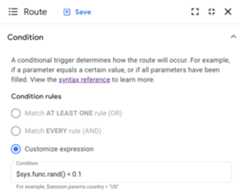
You can use the free formCustomize expression option for alltypes of conditions, includingsystem functionsandboolean constants.
For example,to set a condition that has a 10% chance of passing evaluation,select theCustomize expression optionand enter$sys.func.rand() < 0.1 in theCondition field:
Except as otherwise noted, the content of this page is licensed under theCreative Commons Attribution 4.0 License, and code samples are licensed under theApache 2.0 License. For details, see theGoogle Developers Site Policies. Java is a registered trademark of Oracle and/or its affiliates.
Last updated 2025-12-15 UTC.