

Website hosting
This article discusses how to host a website on Google Cloud.Google Cloud provides a robust, flexible, reliable, and scalable platformfor serving websites. Google built Google Cloud by using the sameinfrastructure that Google uses to serve content from sites such as Google.com,YouTube, and Gmail. You can host your website's content by using thetype and design of infrastructure that best suits your needs.
You might find this article useful if you are:
- Knowledgeable about how to create a website and have deployed and run someweb-hosting infrastructure before.
- Evaluating whether and how to migrate your site to Google Cloud.
If you want to build a simple website, consider usingGoogle Sites,a structured wiki- and web page–creation tool. For more information, visitSites help.
Note: You might find it helpful to read theConcepts page of the Google Cloud overview before reading this article. Some of those concepts are referenced in thisarticle without further explanation. If you're already a bit familiar withGoogle Cloud, you can skip this step.Choosing an option
If you're new to using Google Cloud, it's a reasonable approach to startby using the kind of technology you're already familiar with. For example, ifyou currently use hardware servers or virtual machines (VMs) to host your site,perhaps with another cloud provider or on your own hardware,Compute Engine provides a familiar paradigm for you. If you preferserverless computing,thenCloud Run is probably a good option for you. If you use a platform-as-a-service (PaaS)offering, such as Heroku or Engine Yard, thenApp Engine can be the best place to start.
After you become more familiar with Google Cloud, you can explore therichness of products and services that Google Cloud provides. For example,if you started by using Compute Engine, you might augment yoursite's capabilities by usingGoogle Kubernetes Engine (GKE) or migrate some or all of the functionality to App Engine andCloud Run.
The following table summarizes your hosting options on Google Cloud:
| Option | Product | Data storage | Load balancing | Scalability | Logging and monitoring |
|---|---|---|---|---|---|
| Static website | Cloud Storage Firebase Hosting | Cloud Storage bucket | HTTP(S) optional | Automatically | |
| Virtual machines | Compute Engine | Cloud SQL, Cloud Storage, Firestore, and Bigtable, or you can use another external storage provider. Hard-disk-based persistent disks, calledstandard persistent disks, and solid-state persistent disks (SSD). | HTTP(S) TCP Proxy SSL Proxy IPv6 termination Network Cross-region Internal | Automatically with managed instance groups | |
| Containers | GKE | Similar to Compute Engine but interacts with persistent disksdifferently | Network HTTP(S) | Cluster autoscaler | |
| Serverless | Cloud Run | Google Cloud services such as Cloud SQL, Firestore, Cloud Storage, and accessible third-party databases | HTTP(S) Managed by Google | Managed by Google | |
| Managed platform | App Engine | Google Cloud services such as Cloud SQL, Firestore, Cloud Storage, and accessible third-party databases | HTTP(S) Managed by Google | Managed by Google |
This article can help you to understand the main technologiesthat you can use for web hosting on Google Cloud and give you a glimpse ofhow the technologies work. The article provides links to complete documentation,tutorials, and solutions articles that can help you build a deeper understanding,when you're ready.
Understanding costs
Because there are so many variables and each implementation is different,it's beyond the scope of this article to provide specific advice about costs. Tounderstand Google's principles about how pricing works on Google Cloud,seethe pricing page.To understand pricing for individual services, see theproduct pricingsection. You can also use thepricing calculator to estimate what your Google Cloud usage might look like. You can providedetails about the services you want to use and then see a pricing estimate.
Setting up domain name services
Usually, you will want to register a domain name for your site. You can use apublic domain name registrar to register a unique name for your site. If youwant complete control of your owndomain name system (DNS),you can useCloud DNS to serve as your DNS provider. TheCloud DNS documentationincludes a quickstart to getyou going.
If you have an existing DNS provider that you want to use, you generally need tocreate a couple of records with that provider. For a domain name such asexample.com, you create anA record with your DNS provider. For thewww.example.com sub-domain, you create aCNAME record forwww to pointit to theexample.com domain. TheA record maps a hostname to an IP address.TheCNAME record creates an alias for theA record.
If your domain name registrar is also your DNS provider, that's probably all youneed to do. If you use separate providers for registration and DNS, make surethat your domain name registrar has the correct name servers associated withyour domain.
After making your DNS changes, the record updates can take some time topropagate depending on your time-to-live (TTL) values in your zone. If this is anew hostname, the changes go into effect quickly because the DNSresolvers don't have cached previous values and can contact the DNS providerto get the necessary information to route requests.
Hosting a static website
The simplest way to serve website content over HTTP(S) is to hoststatic web pages. Static web pages are servedunchanged, as they were written, usually by using HTML. Using a static websiteis a good option if your site's pages rarely change after they have beenpublished, such as blog posts or pages that are part of a small-businesswebsite. You can do a lot with static web pages, but if you need your site tohave robust interactions with users through server-side code, you shouldconsider the other options discussed in this article.
Hosting a static website with Cloud Storage
Note: Though Cloud Storage serves content over HTTPS, it doesn'tsupport end-to-end HTTPS for custom domains. If you need end-to-end HTTPSserving, check outFirebase hosting in the next section.Alternatively, you can useHTTP(S) load balancing withCloud Storage to serve content from a custom domain over HTTPS.To host a static site in Cloud Storage, you need to create aCloud Storage bucket,upload the content, and test your new site. You canserve your data directly fromstorage.googleapis.com,or you canverify that you own your domain and useyour domain name.
You can create your static web pages however you choose. For example, you couldhand-author pages by using HTML and CSS. You can use astatic-site generator,such asJekyll,Ghost,orHugo,to create the content.With static-site generators, you create a static website byauthoring inmarkdown,and providing templates and tools. Site generators generallyprovide a local web server that you can use to preview your content.
After your static site is working, you can update the static pages by using anyprocess you like. That process can be as straightforward as hand-copying anupdated page to the bucket. You might choose to use a more automated approach,such as storing your content on GitHub and thenusing awebhook to run ascript that updates the bucket. An even more advanced system might use acontinuous-integration/continuous-delivery (CI/CD) tool, such asJenkins,to update the content in thebucket. Jenkins has aCloud Storageplugin that provides aGoogle Cloud Storage Uploader post-build step to publish buildartifacts to Cloud Storage.
If you have a web app that needs to serve static content oruser-uploaded static media, using Cloud Storage can be a cost-effectiveand efficient way to host and serve this content, while reducing the amount ofdynamic requests to your web app.
Additionally, Cloud Storage can directly accept user-submitted content.This feature lets users upload large media files directly and securely withoutproxying through your servers.
To get the best performance from your static website, seeBest practices for Cloud Storage.
For more information, see the following pages:
- Hosting a static website
- J is for Jenkins (blog post)
- Band Aid 30 on Google Cloud (blog post)
- Cloud Storage documentation
Hosting a static website with Firebase Hosting
Firebase Hosting provides fast and secure static hosting for your web app. WithFirebase Hosting, you can deploy web apps and static contentto a global content-delivery network (CDN) by using a single command.
Here are some benefits you get when you use Firebase Hosting:
- Zero-configuration SSL is built into Firebase Hosting. Provisions SSLcertificates on custom domains for free.
- All of your content is served over HTTPS.
- Your content is delivered to your users from CDN edges around theworld.
- Using theFirebase CLI,you can get your app up and running in seconds. Use command-line tools to adddeployment targets into your build process.
- You get release management features, such as atomic deployment of new assets,full versioning, and one-click rollbacks.
- Hosting offers aconfiguration useful for single-page apps and other sites that are more app-like.
- Hosting is built to be used seamlessly with other Firebase features.
For more information, see the following pages:
Using virtual machines with Compute Engine
For infrastructure as a service (IaaS) use cases, Google Cloud providesCompute Engine.Compute Engine provides a robust computinginfrastructure, but you must choose and configure the platform components thatyou want to use. With Compute Engine, it's your responsibility toconfigure, administer, and monitor the systems. Google ensures that resourcesare available, reliable, and ready for you to use, but it's up to you toprovision and manage them. The advantage, here, is that you have completecontrol of the systems and unlimited flexibility.
Use Compute Engine to design and deploy nearly any website-hostingsystem you want. You can use VMs, calledinstances,to build yourapp, much like you would if you had your own hardware infrastructure.Compute Engine offers a variety ofmachinetypes to customize yourconfiguration to meet your needs and your budget. You can choose which operatingsystems, development stacks, languages, frameworks, services, and other softwaretechnologies you prefer.
Setting up automatically with Google Cloud Marketplace
The easiest way to deploy a complete web-hosting stack is by usingGoogle Cloud Marketplace.With just a few clicks, you candeploy any of over 100 fully realized solutions with Google Click to Deploy orBitnami.

For example, you canset up a LAMPstack orWordPress with Cloud Marketplace. The system deploys a complete, workingsoftware stack in just a few minutes on a single instance.Before you deploy, Cloud Marketplace shows you cost estimates forrunning the site, gives you clear information about which versions of the softwarecomponents it installs for you, and lets you customize your configuration bychanging component instance names, choosing the machine type, and choosing adisk size. After you deploy, you have complete control over theCompute Engine instances, their configurations, and the software.
Setting up manually
You can also create your infrastructure on Compute Enginemanually, either building your configuration from scratch or building on aGoogle Cloud Marketplace deployment. For example, you might want to use aversion of a software component not offered by Cloud Marketplace, orperhaps you prefer to install and configure everything on your own.
Providing a complete framework and best practices for setting up a website isbeyond the scope of this article. But from a high-level view, the technical sideof setting up a web-hosting infrastructure on Compute Engine requiresthat you:
- Understand the requirements. If you're building a new website, make sureyou understand the components you need, such as instances, storage needs,and networking infrastructure. If you're migrating your app from anexisting solution, you probably already understand these requirements, butyou need think through how your existing setup maps toGoogle Cloud services.
- Plan the design. Think through your architecture and write down yourdesign. Be as explicit as you can.
- Create the components. The components that you might usually think of asphysical assets, such as computers and network switches, are providedthrough services in Compute Engine. For example, if you want acomputer, you have to create a Compute Engine instance. If you wanta persistent hard disk drive, you create that, too.Infrastructure as code tools, such asTerraform, makes this an easy and repeatable process.
- Configure and customize. After you have the components you want, youneed to configure them, install and configure software, and write and deployany customization code that you require. You can replicate the configurationby running shell scripts, which helps to speed future deployments.Terraform helps here, too, by providing declarative,flexible configuration templates for automatic deployment of resources. Youcan also take advantage of IT automation tools such asPuppet andChef.
- Deploy the assets. Presumably, you have web pages and images.
- Test. Verify that everything works as you expect.
- Deploy to production. Open up your site for the world to see and use.
Storing data with Compute Engine
Most websites need some kind of storage. You might need storage for a variety ofreasons, such as saving files that your users upload, and of course the assetsthat your site uses.
Google Cloud provides a variety of managed storage services, including:
- A SQL database inCloud SQL,which is a fully managed relational database service for MySQL, PostgreSQL, and SQL Server.
- Two options for NoSQL data storage:Firestore andBigtable.
- Memorystore, which is a fully managed in-memory data store service forRedis andMemcached.
- Consistent, scalable, large-capacity object storage inCloud Storage.Cloud Storage comes in several classes:
- Standard provides maximum availability.
- Nearline provides a low-cost choice ideal for data accessed less thanonce a month.
- Coldline provides a low-cost choice ideal for data accessed less thanonce a quarter.
- Archive provides the lowest-cost choice for archiving, backup, anddisaster recovery.
- Persistent disks on Compute Engine for use as primary storage for your instances. Compute Engine offersboth hard-disk-based persistent disks, calledstandard persistent disks,and solid-state persistent disks (SSD). You can also choose to set up yourpreferred storage technology on Compute Engine by using persistentdisks. For example, you can set upPostgreSQL as your SQL database orMongoDB as your NoSQL storage. To understand the full range and benefits of storageservices on Google Cloud, seeChoosing a storage option.
Load balancing with Compute Engine
For any website that operates at scale, using load-balancing technologies todistribute the workload among servers is often a requirement. You have a varietyof options when architecting your load-balanced web servers onCompute Engine, including:
- HTTP(S) load balancing.Explains the fundamentals of using Cloud Load Balancing.
- Content-based load balancing. Demonstrates how to distribute traffic to different instances based on the incoming URL.
- Cross-region load balancing. Demonstrates configuring VM instances in differentregions and using HTTP or HTTPS load balancing to distribute traffic across the regions.
- TCP Proxy load balancing.Demonstrates setting up global TCP Proxy load balancing for a service thatexists in multiple regions.
- SSL Proxy load balancing.Demonstrates setting up global SSL Proxy load balancing for a service thatexists in multiple regions.
- IPv6 termination for HTTP(S), SSL Proxy, and TCP Proxy load balancing.Explains IPv6 termination and the options for configuring load balancers tohandle IPv6 requests.
- Network load balancing.Shows a basic scenario that sets up a layer 3 load balancing configurationto distribute HTTP traffic across healthy instances.
- Cross-region load balancing using Microsoft IIS backends.Shows how to use the Compute Engine load balancer to distributetraffic to Microsoft Internet Information Services (IIS) servers.
- Setting up internal load balancing You can set up a load balancer that distributes network traffic on a privatenetwork that isn't exposed to the internet. Internal load balancing isuseful not only for intranet apps where all traffic remains on aprivate network, but also for complex web apps where a frontendsends requests to backend servers by using a private network.
Load balancing deployment is flexible, and you can use Compute Enginewith your existing solutions. For example,HTTP(S) load balancing using Nginx is one possible solution that you could use in place of the Compute Engineload balancer.
Content distribution with Compute Engine
Because response time is a fundamental metric for any website, using a CDN tolower latency and increase performance is often a requirement, especially fora site with global web traffic.
Cloud CDN uses Google's globally distributededge points of presence to deliver content from cache locations closest tousers. Cloud CDN works with HTTP(S) load balancing. To serve contentout of Compute Engine, Cloud Storage, or both from a single IPaddress,enable Cloud CDN for an HTTP(S) load balancer.
Autoscaling with Compute Engine
You can set up your architecture to add and remove servers asdemand varies. This approach can help to ensure that your site performs wellunder peak load, while keeping costs under control during more-typical demandperiods. Compute Engine provides an autoscaler that you can use for thispurpose.
Autoscaling is a feature ofmanaged instance groups.A managed instance group is a pool of homogeneous virtual machine instances,created from a commoninstance template.An autoscaler adds or remove instances in a managed instance group. AlthoughCompute Engine has both managed and unmanaged instance groups, you canonly use managed instance groups with an autoscaler. For more information, seeautoscaling on Compute Engine.
For an in-depth look at what it takes to build a scalable and resilient web-appsolution, seeBuilding scalable and resilient web apps.
Logging and monitoring with Compute Engine
Google Cloud includes features that you can use to keep tabs on what'shappening with your website.
Cloud Logging collects and stores logs from apps and services on Google Cloud.You can view or export logs and integrate third-party logs by using a loggingagent.

Cloud Monitoring provides dashboards andalerts for your site. You configure Monitoring with theGoogle Cloud console.You can review performance metrics for cloud services,virtual machines, and common open source servers such as MongoDB, Apache, Nginx,and Elasticsearch. You can use the Cloud Monitoring API to retrievemonitoring data and create custom metrics.
Cloud Monitoring also providesuptime checks,which send requests to your websites to see if they respond. You can monitor awebsite's availability by deploying an alerting policy that creates an incidentif the uptime check fails.
Managing DevOps with Compute Engine
For information about managing DevOps with Compute Engine, seeDistributed load testing using Kubernetes.
Using containers with GKE
You might already be using containers, such asDocker containers. For web hosting, containers offer several advantages, including:
- Componentization. You can use containers to separate the variouscomponents of your web app. For example, suppose your site runs a webserver and a database. You can run these components in separate containers,modifying and updating one component without affecting the other. As yourapp's design becomes more complex, containers are a good fit for aservice-oriented architecture,includingmicroservices.This kind of design supports scalability, among other goals.
- Portability. A container has everything it needs to run—your appand its dependencies are bundled together. You can run your containers on avariety of platforms, without worrying about the underlying system details.
- Rapid deployment. When it's time to deploy, your system is built from aset of definitions and images, so the parts can be deployed quickly,reliably, and automatically. Containers are typically small and deploy muchmore quickly compared to, for example, virtual machines.
Container computing on Google Cloud offers even more advantages for webhosting, including:
- Orchestration.GKE is a managed service built onKubernetes,the open source container-orchestration system introduced by Google. WithGKE, your code runs in containers that are part of acluster that is composed of Compute Engine instances. Instead ofadministering individual containers or creating and shutting down eachcontainer manually, you can automatically manage the cluster throughGKE, which uses the configuration you define.
- Image registration.Artifact Registry provides private storage for Docker images on Google Cloud. You canaccess the registry through an HTTPSendpoint, so you can pull images from any machine, whether it's aCompute Engine instance or your own hardware. The registry servicehosts your custom images in Cloud Storage under yourGoogle Cloud project.This approach ensures by default that your custom images are only accessibleby principals that have access to your project.
- Mobility. This means that you have the flexibility to move and combineworkloads with other cloud providers, or mix cloud computing workloads withon-premises implementations to create a hybrid solution.
Storing data with GKE
Because GKE runs on Google Cloud and usesCompute Engine instances as nodes, your storageoptions have a lot in common withstorage on Compute Engine.You can access Cloud SQL, Cloud Storage, Firestore,and Bigtable throughtheir APIs, or you can use another external storage provider if you choose.However, GKE does interact with Compute Enginepersistent disks in a differentway than a normal Compute Engine instance would.
A Compute Engine instance includes an attached disk. When you useCompute Engine, as long as the instance exists, the disk volume remainswith the instance. You can even detach the disk and use it with a differentinstance. But in a container, on-disk files are ephemeral. When a containerrestarts, such as after a crash, the on-disk files are lost. Kubernetes solvesthis issue by usingvolume andStorage Class abstractions. One type of storage class isGCE PD.This means that you can use Compute Engine persistent disks with containers tokeep your data files from being deleted when you use GKE.
To understand the features and benefits of a volume, you should first understanda bit aboutpods.You can think of a pod as anapp-specific logical host for one or more containers. A pod runs on a nodeinstance. When containers are members of a pod, they can share severalresources, including a set of shared storage volumes. These volumes enable datato survive container restarts and to be shared among the containers within thepod. Of course, you can use a single container and volume in a pod, too, but thepod is a required abstraction to logically connect these resources to eachother.
For an example, see the tutorialUsing persistent disks with WordPress andMySQL.
Load balancing with GKE
Many large web-hosting architectures need to have multiple servers running thatcan share the traffic demands. Because you can create and manage multiplecontainers, nodes, and pods with GKE, it's a natural fitfor a load-balanced web-hosting system.
Using network load balancing
The easiest way to create a load balancer in GKE is to useCompute Engine'snetwork load balancing.Network load balancing can balance the load of your systems based on incominginternet protocol data, such as the address, port, and protocol type. Networkload balancing usesforwarding rules.These rules point totarget pools that list which instances are available to be used for load balancing.
With network load balancing, you can load balance additional TCP/UDP-basedprotocols such as SMTP traffic, and your app can directly inspect the packets.
You can deploy network load balancing simply by adding thetype: LoadBalancerfield to your service configuration file.
Using HTTP(S) load balancing
If you need more advanced load-balancing features, such as HTTPS load balancing,content-based load balancing, or cross-region load balancing, you can integrateyour GKE service with Compute Engine's HTTP/HTTPSload balancing feature. Kubernetes provides theIngress resource that encapsulates a collection of rules for routingexternal traffic to Kubernetes endpoints. In GKE, anIngress resource handles provisioning and configuring the Compute EngineHTTP/HTTPS load balancer.
For more information about using HTTP/HTTPS load balancing inGKE, seeSetting up HTTP load balancing with Ingress.
Scaling with GKE
For automatic resizing of clusters, you can use the Cluster Autoscaler. Thisfeature periodically checks whether there are any pods that are waiting for anode with free resources but aren't being scheduled. If such pods exist, thenthe autoscaler resizes the node pool if resizing would allow the waiting pods tobe scheduled.
Cluster Autoscaler also monitors the usage of all nodes. If a node isn't neededfor an extended period of time, and all of its pods can be scheduledelsewhere, then the node is deleted.
For more information about the Cluster Autoscaler, its limitations, andbest practices, see theCluster Autoscaler documentation.
Logging and monitoring with GKE
Like on Compute Engine,Logging andMonitoring provide your logging and monitoring services.Logging collects and stores logs from apps and services. Youcan view or export logs and integrate third-party logs by using a logging agent.
Monitoring provides dashboards and alerts foryour site. You configure Monitoring with theGoogle Cloud console.You can reviewperformance metrics for cloud services, virtual machines, and common open sourceservers such as MongoDB, Apache, Nginx, and Elasticsearch. You can use theMonitoring API to retrieve monitoring data and create custommetrics.
Managing DevOps with GKE
When you use GKE, you're already getting many of thebenefits most people think of when they think of DevOps. This is especially truewhen it comes to ease of packaging, deployment, and management. For your CI/CDworkflow needs, you can take advantage of tools that are built for the cloud,such asCloud Build,andCloud Deploy,or popular tools such as Jenkins. For more information, see thefollowing articles:
Building on a serverless platform with Cloud Run
Google Cloud'sserverless platform lets you write code your way without worrying about the underlyinginfrastructure. You can build full-stack serverless applications withGoogle Cloud’s storage, databases, machine learning, and more.
For your containerized websites, you can also deploy them toCloud Run in addition tousing GKE.Cloud Run is a fully managed serverless platform that lets you run highlyscalable containerized applications on Google Cloud. You only pay for the time that your code runs.
Using containers with Cloud Run, you can take advantage of mature technologies such asNginx, Express.js, and Django to build your websites, access your SQL database on Cloud SQL, and renderdynamic HTML pages.
The Cloud Run documentation includes aquickstart to get you going.
Storing data with Cloud Run
Cloud Run containers are ephemeral and you need to understand theirquotas and limits for your use cases. Files can be temporarily stored for processing in a containerinstance, but this storage comes out of the available memory for the service asdescribed in theruntime contract.
For persistent storage, similar toApp Engine,you can choose Google Cloud's services such as Cloud Storage,Firestore or Cloud SQL. Alternatively, you can also use a third-party storage solution.
Load balancing and autoscaling with Cloud Run
By default, when you build on Cloud Run, it automatically routesincoming requests to appropriate back-end containers and do load balancing for you.However, if you want to take advantage of Google Cloud’s fully featuredenterprise-grade HTTP(S) load balancing capabilities, you can useserverless network endpoint groups.
With HTTP(S) load balancing, you canenable Cloud CDN orserve traffic from multiple regions.In addition, you can usemiddleware such asAPI Gatewayto enhance your service.
For Cloud Run, Google Cloud managescontainer instance autoscalingfor you. Eachrevisionis automatically scaled to the number of container instances needed to handleall incoming requests. When a revision doesn't receive any traffic, by defaultit's scaled to zero container instances. However, if desired, you canchange this default to specify an instance to be kept idle orwarm usingtheminimum instances setting.
Logging and monitoring with Cloud Run
Cloud Run has two types of logs, which are automaticallysent toCloud Logging:
- Request logs: logs of requests sent to Cloud Run services. These logsare created automatically.
- Container logs: logs emitted from the container instances, typically from yourown code, written to supported locations as described inWriting container logs.
You can view logs for your service in a couple of ways:
- Use the Cloud Run page in the Google Cloud console.
- Use Cloud Logging Logs Explorer in the Google Cloud console.
Both of these viewing methods examine the same logs stored inCloud Logging, but the Logs Explorer providesmore details and more filtering capabilities.
Cloud Monitoring providesCloud Run performance monitoring,metrics,anduptime checks,along withalerts to sendnotifications when certain metric thresholds are exceeded.Google Cloud Observability pricingapplies, which means there is no charge for metrics on the fully managed versionof Cloud Run. Note that you can also useCloud Monitoring custom metrics.
Cloud Run is integrated with Cloud Monitoringwith no setup or configuration required. This means that metrics of yourCloud Run services are automatically captured when they are running.
Building on a managed platform with App Engine
On Google Cloud, the managed platform as a service (PaaS) is calledApp Engine.When you build your website on App Engine, you getto focus on coding up your features and let Google worry about managing thesupporting infrastructure. App Engine provides a wide range of featuresthat make scalability, load balancing, logging, monitoring, and security much easierthan if you had to build and manage them yourself. App Engine lets youcode in a variety of programming languages, and it can use a variety ofother Google Cloud services.
App Engine provides thestandard environment, which lets you runapps in a secure, sandboxed environment. The App Engine standardenvironment distributes requests across multiple servers, and scales servers tomeet traffic demands. Your app runs in its own secure, reliable environmentthat's independent of the hardware, operating system, or physical location of theserver.

To give you more options, App Engine offers theflexible environment.When you use the flexible environment, your app runs on configurableCompute Engine instances, but App Engine manages the hostingenvironment for you. This means that you can use additional runtimes, includingcustom runtimes, for more programming language choices. You can also takeadvantage of some of the flexibility that Compute Engine offers, such aschoosing from a variety of CPU and memory options.
Programming languages
The App Engine standard environment provides default runtimes, and youwrite source code in specific versions of thesupported programming languages.
With the flexible environment, you write source code in a version of anyof thesupported programming languages. Youcan customize these runtimes or provide your own runtime with a custom Dockerimage or Dockerfile.
If the programming language you use is a primary concern, you need to decidewhether the runtimes provided by the App Engine standard environmentmeet your requirements. Ifthey don't, you should consider using the flexible environment.
To determine which environment best meets your app's needs,seeChoosing an App Engine environment.
Getting started tutorials by language
The following tutorials can help you get started using the App Engine standardenvironment:
- Hello World in Python
- Hello World in Java
- Hello World in PHP
- Hello World in Ruby
- Hello World in Go
- Hello World in Node.js
The following tutorials can help you get started using the flexible environment:
- Getting started with Python
- Getting started with Java
- Getting started with PHP
- Getting started with Go
- Getting started with Node.js
- Getting started with Ruby
- Getting started with .NET
Storing data with App Engine
App Engine gives you options for storing your data:
| Name | Structure | Consistency |
|---|---|---|
| Firestore | Schemaless | Strongly consistent. |
| Cloud SQL | Relational | Strongly consistent. |
| Cloud Storage | Files and their associated metadata | Strongly consistent except when performing list operations that get a list of buckets or objects. |
You can alsouse several third-party databases with the standard environment.
For more details about storage in App Engine, seeChoosing a storage option,and then select your preferred programminglanguage.
When you use the flexible environment, you can use all of the same storageoptions as you can with the standard environment, and a wider rangeof third-party databases as well. For moreinformation about third-party databases in the flexible environment, seeUsing third-party databases.
Load balancing and autoscaling with App Engine
By default, App Engine automatically routes incoming requests toappropriate backend instances and does load balancing for you.However, if you want to take advantage of Google Cloud’s fully featuredenterprise-grade HTTP(S) load balancing capabilities, you can useserverless network endpoint groups.
For scaling, App Engine can automatically create and shut down instancesas traffic fluctuates, or you can specify a number of instances to run regardlessof the amount of traffic.
Logging and monitoring with App Engine
In App Engine, requests are logged automatically, and you can view theselogs in the Google Cloud console. App Engine also works withstandard, language-specific libraries that provide logging functionality andforwards the log entries to the logs in the Google Cloud console. For example,in Python you can use the standard Python logging module andin Java you can integrate the logback appender orjava.util.logging with Cloud Logging. This approach enables the full features of Cloud Loggingand requires only a few lines of Google Cloud-specific code.
Cloud Monitoring provides features for monitoring yourApp Engine apps. Through the Google Cloud console, you can monitorincidents, uptime checks, and other details.
Building content management systems
Hosting a website means managing your website assets. Cloud Storageprovides a global repository for these assets. One common architecture deploysstatic content to Cloud Storage and then syncs toCompute Engine to render dynamic pages. Cloud Storage workswith many third-party content management systems, such asWordPress,Drupal,andJoomla.Cloud Storage also offers anAmazon S3 compatible API,so any system that works with Amazon S3 can work with Cloud Storage.
The diagram below is a sample architecture for a content management system.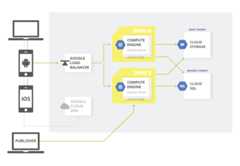
What's next
- Explore reference architectures, diagrams, and best practices about Google Cloud.Take a look at ourCloud Architecture Center.
Except as otherwise noted, the content of this page is licensed under theCreative Commons Attribution 4.0 License, and code samples are licensed under theApache 2.0 License. For details, see theGoogle Developers Site Policies. Java is a registered trademark of Oracle and/or its affiliates.
Last updated 2024-06-11 UTC.