

Best practices for securing your applications and APIs using Apigee
This document describes best practices that can help you to secure yourapplications and APIs usingApigee API management and the following Google Cloud products:
This document is intended for API architects, security architects, andengineering leads who manage the infrastructure of an application and who wantto expose secure, scalable, and performant APIs.
This document uses a series of example architectures to demonstrate bestpractices for using Apigee API management. This document also discusses bestpractices for usingweb app and API protection (WAAP), a comprehensive security solution that you can useto help secure your applications and APIs.
This document assumes that you are familiar with networking, APIs, andGoogle Cloud.
Apigee API management
Apigee is a platform for developing and managing APIs. Byadding a proxy layer to your services, Apigee provides an abstraction or facadethat helps you to secure your backend service APIs.
Users can interact with applications using OAuth 2.0 and allow-listed IP addressranges. As shown in the following image, users can interact with an application,and data and services are exposed in a bidirectional flow.
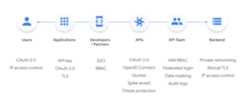
The security points are as follows:
- Users:
- OAuth 2.0
- IP address access control
- Applications
- API keys
- OAuth 2.0
- TLS
- Developers and partners
- SSO
- RBAC
- APIs
- OAuth 2.0
- OpenID Connect
- Quotas
- Spike arrest
- Threat protection
- API team
- IAM RBAC
- Federated logic
- Data masking
- Audit logs
- Backend
- Private networking
- Mutual TLS
- IP address access control
As the preceding image shows, you can use different security mechanisms in anapplication, such as API key or OAuth 2.0 with Transport Layer Security (TLS).You can also add rate limiting, threat protection policies, and configure mutualTLS to the backend of your API layer.
To help you to manage access for an API team within the Apigee platform, Apigeehas role-based access control (RBAC) and federated login.
We recommend that you use the Apigeedefault policies to secure your APIs. The policies are as follows:
- Traffic Management. Helps you to configure caching, control quotas,mitigate the effects of spikes, and control API traffic.
- Message level protection. Lets you inspect and validate requestpayloads to help protect your backend from malicious attackers.
- Security. Helps you to control access to your APIs.
You can attach one or more of these policies to your proxy layer. The followingtable lists the security use case for each policy, categorized by policy type.
| Policy type | Policy name | Security use case |
|---|---|---|
| Traffic management | SpikeArrest policy | Applies rate limiting to the number of requests sent to the backend. |
| Traffic management | Quota policy | Helps your organization to enforce quotas (the number of API calls made) for each consumer. |
| Traffic management | ResponseCache policy | Caches responses, reducing the number of requests to the backend. |
| Message-level protection | OASValidation policy | Validates incoming requests or response messages against an OpenAPI 3.0 Specification (JSON or YAML). |
| Message-level protection | SOAPMessageValidation policy | Validates XML messages against a schema of your choice. Validates SOAP messages against a WSDL and determines whether JSON and XML messages are correctly formed. |
| Message-level protection | JSONThreatProtection policy | Helps to mitigate the risk of content-level attacks by letting you specify limits on JSON structures like arrays and strings. |
| Message-level protection | XMLThreatProtection policy | Helps you to address XML vulnerabilities and mitigate the risk of attacks by evaluating message content and detecting corrupt or malformed messages before they can be parsed. |
| Message-level protection | RegularExpressionProtection policy | Evaluates content against predefined regular expressions and rejects it if the expression is true. |
| Security | BasicAuthentication policy | Base64 encodes and decodes user credentials. |
| Security | VerifyAPIKey policy | Enforces the verification and the validation of API keys at runtime. Only allows applications with approved API keys associated with yourAPI products to access your APIs. |
| Security | OAuthV2 policy | Performs OAuth 2.0 grant type operations to generate and validate access tokens. |
| Security | JWS and JWT policies | Generates, verifies, and decodes JSON Web Tokens (JWT) and JSON Web Signatures (JWS). |
| Security | HMAC policy | Computes and verifies hash-based message authentication code (HMAC) for authentication and application-level integrity checks. |
| Security | SAMLAssertion policy |
|
| Security | CORS policy | Lets you setcross-origin resource sharing (CORS) headers for APIs that are consumed by web applications. |
We recommend that you useCloud Armor for IP address-based and geo-based access control. However, in cases where it'snot possible, you can use theAccessControl policy. To help you tosecure the connections from Apigee to your backend, Apigee also provideskeystore management,which lets you configure the keystore and truststore for TLS handshakes.
You can use Apigee to createAPI products that let you bundle your API operations and make them available to applicationdevelopers for consumption. An API product bundles together one or moreoperations. An operation specifies an API proxy and resource paths that can beaccessed on that proxy. An operation can also limit access by HTTP methods andby quota.
You use API products to control access to your APIs. By defining one or more APIproducts in a developer application, you can restrict access to proxies with anAPI key. For example, mobile applications which are used by customers can onlyperform a POST operation on the/v1/payments endpoint, in this case,https://$DOMAIN/v1/payments. In another example, call center applicationswhich are used by call center staff can perform operations like PUT or DELETE onthe/payments endpoint, such ashttps://$DOMAIN/v1/payments/1234, to revertor reverse payments.
Initial architecture
This section describes an example microservices architecture with the servicesdeployed in the data center and cloud provider. The followingarchitecture best practices demonstrate how you can iterate and improve the initialarchitecture.

The initial architecture is as follows:
- The payments and accounts services are hosted in the data center, and themoney-transfer service is hosted in Google Cloud.
- Theexternal Application Load Balancer controls and configures ingress to the services.
- The external Application Load Balancer forwards the request to the appropriatebackend or third-party service and handles the TLS handshake.
In its initial state, the example architecture has the following constraints:
- It's unlikely to scale.
- It's unlikely to protect a system from malicious attacks
- It doesn't reflect consistent best practices for security and loggingbecause these services are developed and maintained by different teamswithin the organization.
Architecture best practices
Apigee can add value and make it easier to expose your services to yourconsumers by implementing a standard set of security policies across all APIs.This section discusses best practices for using Apigee to help secure your APIs.
Use Apigee as a proxy layer
The following diagram shows the initial architecture with the addition ofApigee as a proxy (facade) layer:

Apigee is provisioned in a Google Cloud project and the runtime is provisioned andpeered in a tenant project usingVPC Network Peering.To help secure your system, instead of sending data through the internet, youcan use Apigee as a proxy layer to establish a direct (private) connection toyour data center usingCloud Interconnect.
The request flow is as follows:
- The client sends the request to theexternal Application Load Balancer with the credentials for the application—for example, a key, token, orcertificate.
- The load balancer routes the request to Apigee.
- Apigee processes the request, executes the security policies asdescribed inApigee API management,and allows or denies the request. Apigee can also be used to route therequest to different backends based on the client, the request, or both theclient and the request.
- Apigee forwards the request to the GKE backends directly throughinternal IP addresses. The communication between Apigee and the money-transferservice can happen over an RFC 1918 address (internal IP address) because they arewithin the peered network.
- Apigee sends the request to the private data center backends throughCloud Interconnect.
- Apigee sends the request to third-party services through Apigee NAT IP addressprovisioning.
Use Cloud Armor as a WAF layer with Apigee
You can addCloud Armor to the architecture to increase your security perimeter. Cloud Armor ispart of the global load-balancing infrastructure for Google Cloud. Itprovides web application firewall (WAF) capabilities and helps to prevent distributeddenial of service (DDoS) attacks. It can also help you to mitigate the threat toapplications from the risks listed in theOWASP Top 10.
You can configure rules and policies in Cloud Armor to evaluate everycall made by the client that hits the external Application Load Balancer. You canalso automate the configuration of Cloud Armor policies. For moreinformation about how to configure rules in Cloud Armor, see theCloud ArmorHow-to guides.
The following diagram shows the example architecture with both Apigee andCloud Armor in place:

The flow of events in this architecture is similar to those discussed inUse Apigee as a proxy layer earlier in this document. The request flow is asfollows:
- The client sends the request to theexternal Application Load Balancer with the credentials for the application—for example, a key, token, orcertificate.
- Cloud Armor filters the request because the external Application Load Balancerhas it enabled. It enforces and evaluates all the configured rules and policies.If any rule is violated, Cloud Armor rejects the request and givesyou an error message and status code.
- If there are no Cloud Armor rule violations, the external Application Load Balancerroutes the request to Apigee.
- Apigee processes the request, executes the security policies, and allowsor denies the request. It can also be used to route the request todifferent backends based on the client, the request, or both the client andthe request.
- Apigee forwards the request to the GKE backends directlythrough internal IP addresses. The communication between Apigee and the money-transferservice can happen over an RFC 1918 address (internal IP address) becausethey are within the peered network.
- Apigee sends the request to the private data center backends throughCloud Interconnect.
- Apigee sends the request to third-party services through Apigee NAT IP addressprovisioning.
Use WAAP
To further enhance your security profile, you can also use WAAP, which bringstogether Cloud Armor, reCAPTCHA, and Apigee to help protectyour system against DDoS attacks and bots. It also provides WAF and APIprotection.
We recommend WAAP for enterprise use cases where the API calls are made froma website and mobile applications. You can set applications to load thereCAPTCHA libraries to generate a reCAPTCHA token and send it along when theymake a request.
This following diagram shows the workflow:
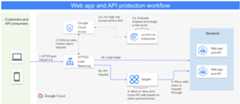
The request flow in the preceding diagram is as follows:
- (1) All HTTP(S) requests by customers and API consumers are sent tothe external Application Load Balancer.
- (2) The first point of contact on the WAAP solution is Cloud Armor.
- (2a) If none of these rules are triggered by the Cloud Armor policies,a request is sent to the reCAPTCHA API to evaluate whether theincoming traffic is a legitimate request or not.
- (3a) If it's a legitimate request, then the request is forwarded to thebackend.
- (2b) If the request isn't legitimate, Cloud Armor can denythe request and send a 403 response code to the user.
- (3b) For any API requests, after the Cloud Armor OWASP rules and DDoSprotection are evaluated, the request is then forwarded to Apigee tocheck the validity of the API request.
- (4) Apigee determines whether the API keys or access tokensused in the request are valid. If Apigee determines that the request isn'tlegitimate, Apigee can send a 403 response code.
- (5) If the request is legitimate, Apigee forwards the request to the backend.
The following diagram shows the architecture of WAAP with Cloud Armor,reCAPTCHA, and Apigee for the API requests.

The request flow in the preceding diagram is as follows:
- The client sends the request to theexternal Application Load Balancer with the credentials for the application—for example, a key, token, orcertificate.
- Because the external Application Load Balancer has Cloud Armor enabled, Cloud Armorselects the request. It enforces and evaluates all the configured rules andpolicies. If any rule is violated, Cloud Armor rejects the requestwith an error message and status code.
- For website calls such as a form submission for a login page,Cloud Armor is integrated with reCAPTCHA.reCAPTCHA evaluates incoming traffic and adds risk scores tolegitimate traffic. For traffic that isn't legitimate, Cloud Armorcan deny the request.
- If there are no Cloud Armor rule violations, theexternal Application Load Balancer routes the API request to Apigee.
- Apigee processes the request, executes the security policies, and allowsor denies the request. Apigee can also be used to route the request todifferent backends based on the client, the request, or both the client andthe request.
- Apigee forwards the request to the GKE backends directly throughinternal IP addresses. The communication between Apigee and the money-transferservice can happen over the RFC 1918 address, which is an internal IP address,because they are both within the peered network.
- Apigee sends the request to the private data center backends throughCloud Interconnect.
- Apigee sends the request to third-party services throughApigee NAT IP address provisioning.
Use Cloud CDN for caching
Cloud CDN uses the Google global network to serve content closer to users, whichaccelerates response times for your websites and applications. Cloud CDNalso offers caching capabilities that help you to secure the backend by returningthe response from its cache. By caching frequently accessed data at aGoogle Front End (GFE) , which is at the edge of the Google network, it keeps the data as close aspossible to users and allows for the fastest possible access.
Cloud CDN also helps organizations seamlessly handle seasonal spikes in traffic—for example, spikes that might occur during the holiday or back-to-schoolseasons. This approach to caching helps to improve reliability and userexperience in an ecosystem. It can also help to minimize web server load,compute, and network usage. To implement this architecture, you must enableCloud CDN on the load balancer which serves traffic for Apigee.
Cloud CDN can be used with any of the options discussed in this document. Thefollowing diagram shows the initial example architecture of WAAP with theaddition of Cloud CDN.

The request flow shown in the preceding diagram is as follows:
- The client uses reCAPTCHA libraries to get a token and sends therequest to theexternal Application Load Balancer with the credentials for the application—for example, a key, token,or certificate.
- Cloud CDN checks the cache with the cache key and returns the responseif the cache hit is true.
- If the cache hit is false, Cloud Armor filters the request becausethe external Application Load Balancer has Cloud Armor enabled. Cloud Armorenforces and evaluates all the configured rules and policies. If anyrule is violated, it rejects the request with an error message and status code.
- Cloud Armor is integrated with reCAPTCHA, whichevaluates the legitimate incoming traffic with risk scores. Fortraffic that isn't legitimate, Cloud Armor can deny the request.
- If there are no Cloud Armor rule violations, the external Application Load Balancer routes therequest to Apigee.
- Apigee processes the request, executes the security policies asdescribed inApigee API management,and allows or denies the request. It can also be used to route the requestto different backends based on the client, the request, or both the clientand the request.
- Apigee forwards the request to the GKE backends directly throughinternal IP addresses. The communication between Apigee and the money-transferservice can happen over the RFC 1918 address, which is an internal IP address,because they are within the peered network.
- Apigee sends the request to the private data center backends throughCloud Interconnect.
- Apigee sends the request to third-party services through Apigee NAT IP addressprovisioning.
- When a response flows back to the client, Cloud CDN caches it so that it canreturn the response from the cache for future calls.
What's next
- Learn more aboutApigee provisioning options.
- Read aboutmulti-layer API security with Apigee and Cloud Armor.
- Learn how to deliverhigh-performing global APIs with Apigee X and Cloud CDN.
- Read and ask questions in theApigee community.
- Explore theApigee repository on GitHub.
- For more reference architectures, diagrams, and best practices, explore theCloud Architecture Center.
Except as otherwise noted, the content of this page is licensed under theCreative Commons Attribution 4.0 License, and code samples are licensed under theApache 2.0 License. For details, see theGoogle Developers Site Policies. Java is a registered trademark of Oracle and/or its affiliates.
Last updated 2025-04-01 UTC.