
How Requests are Routed
Region ID
TheREGION_ID is an abbreviated code that Google assignsbased on the region you select when you create your app. The code does notcorrespond to a country or province, even though some region IDs may appearsimilar to commonly used country and province codes. For apps created after February 2020,REGION_ID.r is included in App Engine URLs. For existing apps created before this date, the region ID is optional in the URL.
Learn moreabout region IDs.
This page describes how HTTP requests from users reach the appropriate versionof a service. Requests can be routed in the following ways:
If you test your app using thelocal developmentserver, theavailable routing and dispatch features are slightly different. Toprogrammatically create URLs that work with both production and developmentservers, use theget_hostnamemethod.
Seerouting in the development serverto learn more.
Routing with URLs
Once your app is running in App Engine, you can use the following URL to send HTTP requests to the app:https://PROJECT_ID.REGION_ID.r.appspot.com
wherePROJECT_ID is the ID of the Google Cloud projectthat contains the app.
This URL sends requests to your app's default service at the version that youhave configured to receive traffic.
Note: Werecommendusing the HTTPS protocol to send requests to your app. HTTPS requests sent totheREGION_ID.r.appspot.com must use the string "-dot-" to separate subdomainsinstead of ".". You can use the simple "." URL notation with your owncustom domains and with HTTP requests.URLs for services and versions
If you create more than one service in your app, each service has its own URL.Each version of a service also has its own URL, so you can deploy and test a newversion before configuring that version to receive traffic.
The URLs for specific services and versions are in the following form:
VERSION-dot-SERVICE-dot-PROJECT_ID.REGION_ID.r.appspot.com
You can omitVERSION-dot- if you don't need to target aspecific version.
To retrieve the IDs of your app's services and versions, you can useany of the following tools:
Console
In the Google Cloud console, you can view the correspondingInstances,Services,andVersions pages.
gcloud
Run thegcloud app instances listcommand to list the resource IDs within a specific Google Cloud project.
API
To programmatically retrieve resource IDs, see thelist methods in theAdmin API.
Example URLs
Here are some examples of URLs for App Engine, showing both theappspot.com domain that App Engine assigns to your app anda custom domain, which you canset up for your app.
- Sends the request to an available instance of the
defaultservice: https://PROJECT_ID.REGION_ID.r.appspot.comhttps://CUSTOM_DOMAIN
Requests are received by any version that is configured for traffic in the
defaultservice.- Sends the request to an available instance of the
- Sends a request to an available instance of a specific service:
https://SERVICE_ID-dot-PROJECT_ID.REGION_ID.r.appspot.comhttps://SERVICE_ID.CUSTOM_DOMAIN
Requests are received by any version that is configured for traffic in thetargeted service. If the service that you are targeting does not exist, therequest getssoft routed.
- Sends a request to an available instance of a specific version in the
defaultservice:https://VERSION_ID-dot-default-dot-PROJECT_ID.REGION_ID.r.appspot.comhttps://VERSION_ID.CUSTOM_DOMAIN
When a service is not targeted, requests are sent to the
defaultservice.
Soft routing
If a request matches thePROJECT_ID.REGION_ID.r.appspot.com portion ofthe hostname, but includes a service, version, or instance name that does notexist, then the request is routed to thedefault service. Soft routing doesnot apply to custom domains; requests to them will return a HTTP404 statuscode if the hostname is invalid.
Targeted routing
The following URL patterns are guaranteed to reach their target,if they exist. These requests are never intercepted andrerouted by the patterns that you have defined in your dispatch file:
- Sends the request to an available instance of a specific service andversion:
https://VERSION-dot-SERVICE-dot-PROJECT_ID.REGION_ID.r.appspot.comhttps://VERSION_ID.SERVICE_ID.PROJECT_ID.CUSTOM_DOMAIN
If you are usingmanually-scaledservices,you can target and send a request to a instance by including the instance ID.The instance ID is an integer in the range from
0up to the total numberof instances that are running, and can be specified as follows:Sends a request to a specific service and version within a specificinstance:
https://INSTANCE_ID-dot-VERSION_ID-dot-SERVICE_ID-dot-PROJECT_ID.REGION_ID.r.appspot.comhttps://INSTANCE_ID.VERSION_ID.SERVICE_ID.CUSTOM_DOMAIN
0, up to the total number of instances running. Regardless ofyour scaling type or instance class, it is not possible to send a request toa specific instance without targeting a service or version within thatinstance.
Routing with a dispatch file
You can create a dispatch file to override App Engine's URL-basedrouting rules and define your own custom routing rules. With a dispatch file,you can send incoming requests to a specific service based on the path or hostname in the request URL.
Creating a dispatch file
To create a dispatch file:
Create a file named
dispatch.yamleither in the root of your project directory, or in the rootdirectory of yourdefaultservice.Define routing rules in the file as described see the
dispatch.yamlreference.
Note the following about the routing rules:
- You can define up to 20 routing rules. Each rule must contain the
urlandserviceelements. - The rules must use HTTP URL patterns that include the "
."notation for separating subdomains. URLsdefined with the HTTPS "-dot-" notation are not supported. - The rules also apply to the URLs that you define in yourcron file.
For example, you can create a dispatch file to route mobile requests likehttps://simple-sample.uc.r.appspot.com/mobile/ to a mobile frontend, and route workerrequests likehttps://simple-sample.uc.r.appspot.com/work/ to a static backend:
dispatch:# Send all mobile traffic to the mobile frontend.-url:"*/mobile/*"service:mobile-frontend# Send all work to the one static backend.-url:"*/work/*"service:static-backendDeploying the dispatch file
To deploy the dispatch file, run the following command:
gcloudappdeploydispatch.yamlRouting with Cloud Load Balancing
Cloud Load Balancing is a separate product that enables advanced networkconfigurations for all of your applications running on Google Cloud.
When HTTP(S) Load Balancing is enabled forserverless apps, you can:
Configure your serverless app to serve from a dedicated IPv4 and/or IPv6 IPaddress that is not shared with other services.
Reuse the same SSL certificates and private keys that you use forCompute Engine, Google Kubernetes Engine and Cloud Storage. This eliminatesthe need to manage separate certificates for serverless apps.
The load balancer does not interfere or interact with routing rules inyourdispatch.yaml file. Thedispatch.yaml rules are not evaluated until aserverless NEG directs traffic to App Engine.
Note the following:
- We recommend that youuse ingress controlsso that your app only receives requests sent from the load balancer(and the VPC if you use it). Otherwise, users can use your app'sApp Engine URL to bypass the load balancer, Cloud Armorsecurity policies, SSL certificates, and private keys that are passed throughthe load balancer.
Routing in the development server
Discovering instance addresses
The local development server creates all manual scaling instances at startup.Instances for automatic and basic scaling services are managed dynamically. Theserver assigns a port to each service, and clients can depend on the server toload-balance and select an instance automatically. The port assignments foraddressing each service appear in the server's log messagestream. Here are the ports for an app that defines three services (the scalingtype of each service is not relevant):
INFOStartingmodule"default"runningat:http://localhost:8084INFOStartingmodule"service1"runningat:http://localhost:8082INFOStartingmodule"service2"runningat:http://localhost:8083When you use a service's address (for examplehttp://localhost:8082/),the server will select (or create) an instance of the service and send therequest to that instance.
The server assigns unique ports to each instance of a service. To discoverthese ports you need to use the admin server. There is a unique port forthe admin server, which appears in the message log:
INFOStartingadminserverat:http://localhost:8000This address takes you to the admin server console. From there you can click onInstances to see the dynamic state of your app's instances:
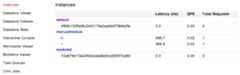
A separate entry will appear for each manual and basic instance. The instancenumbers are links with unique port addresses for each instance. You can hoverover a link to see the port assigned to that instance, or click on the linkto send a request directly to that instance.
Dispatch files
If your app includes adispatch.yaml file, the log messages stream willinclude a dispatcher port:INFOStartingdispatcherrunningat:http://localhost:8080Requests to this port are routed according to the rules in the dispatchfile. The server does not supportdispatch.yaml file rules that includehostnames (for example,url: "customer1.myapp.com/*"). Rules withrelative path patterns (url: "*/fun") will work, so you can useURLs likehttp://localhost/fun/mobile to reach instances. The server willreport an error in the log stream if you try to start an application with adispatch.yaml file that contains host-based rules.
Restricting access to a service
All services are public by default. If you want to restrict access to a service,add thelogin: admin element to itshandlers.
Additional details about App Engine URLs
Understanding the Region ID in URLs
TheREGION_ID is an abbreviated code that Google assignsbased on the region you select when you create your app. The code does notcorrespond to a country or province, even though some region IDs may appearsimilar to commonly used country and province codes. For apps created after February 2020,REGION_ID.r is included in App Engine URLs. For existing apps created before this date, the region ID is optional in the URL.
You can use the following tools to see the region ID of your app:
Console
In the Google Cloud console, you can view the URLs for your app'sInstances,Services,andVersions.
All of these URLs include the region ID.
gcloud
When you deploy an app or service, thegcloud app deploy commanddisplays the URL after the deployment succeeds. This URL includes theregion ID.
To view the URL for a service that is already deployed:
Enter the
gcloud app versions listcommand to list the versions of a specific service. For example, to listthe versions of the default service, entergcloud app versions list --service=default.Enter the
gcloud app versions describecommand. The output of that command includes the version URL with the app'sregion ID. For example, to describe version 20191023t101741 for thedefault service, entergcloud app versions describe 20191023t101741 --service=default
Domain name is included in the request data
The domain name used for the request is included in the request data that ispassed to your app. Therefore, you can use the request data to control how yourapp responds based on the domain name in the request. For example, if you wantto redirect to an official domain, you can code your app to check theHostrequest header and then respond accordingly based on the domain name.
Except as otherwise noted, the content of this page is licensed under theCreative Commons Attribution 4.0 License, and code samples are licensed under theApache 2.0 License. For details, see theGoogle Developers Site Policies. Java is a registered trademark of Oracle and/or its affiliates.
Last updated 2025-12-15 UTC.