

Metrics collection overview
Apigee hybrid collects operations metrics that you can use tomonitor the health of hybrid services, to set up alerts, andso on. Apigee uses the industry-standardPrometheus add-on for metrics collection. Oncecollected, hybrid sends the metrics data to Cloud Operations, at which point youcan use the Cloud Operations console for viewing, searching, andanalyzing metrics and managing alerts.
The following diagram shows the metrics collection process:
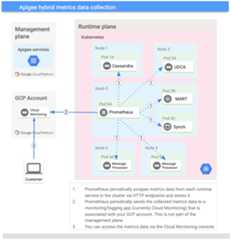
As you can see in this diagram, there is one Prometheus serverrunning per cluster, and it can run on any pod in the cluster.Prometheus scrapes application metrics data from all hybridservices and sends the metrics data to Cloud Operations. You can accessmetrics data through the Cloud Operations console.
Metrics collection is enabled by default. To disable it, seeConfigure metrics collection.
For a list of metrics you can use to analyze proxy traffic, seeAvailable metrics.
About metrics
Application metrics data is made available on a port as aninternal Kubernetes service. Data collected by this service isscraped by the hybrid metrics collector service. You can usetheMonitoring Metrics Explorer to select metrics you want to view, such as:
- read request count
- read request latency
- write request count
- write request latency
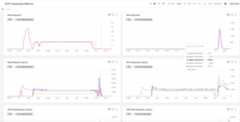
For example, you can create a dashboard in Cloud Operations to showyour metrics:
Except as otherwise noted, the content of this page is licensed under theCreative Commons Attribution 4.0 License, and code samples are licensed under theApache 2.0 License. For details, see theGoogle Developers Site Policies. Java is a registered trademark of Oracle and/or its affiliates.
Last updated 2026-02-05 UTC.