

View logs
This topic explains how to view log data onStackdriver and using thekubectl logs command.
View logs on Stackdriver
This section explains how to view Apigee hybrid logs on Stackdriver and directly usingkubectl.
logger.enabled tofalse. On AKS, you must explicitly enablelogging by settinglogger.enabled totrue in your overrides file.If you are on GKE or Anthos GKE, logs are automatically sent toStackdriver.
To view logs on Stackdriver:
- Go toMonitoring Logs Viewer.
- In the resource-type drop-down list, select GKE Container, the name of your cluster, and your namespace ID. For example:
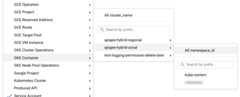
For more information, seeViewing logs in the GCP documentation.
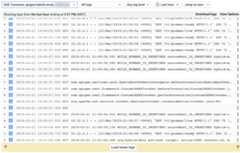
The following example shows hybrid log output in the Log viewer:
View log files directly
You can view the logs that are written to each pod's filesystemdirectly usingkubectl, as follows:
kubectl logspod_name -nnamespace
For example:
kubectl logs apigee-mp-hybrid-docs-test-blue-6fb96f5b9-2k8hp -n my-namespace
Except as otherwise noted, the content of this page is licensed under theCreative Commons Attribution 4.0 License, and code samples are licensed under theApache 2.0 License. For details, see theGoogle Developers Site Policies. Java is a registered trademark of Oracle and/or its affiliates.
Last updated 2026-02-05 UTC.