

DNS setup quickstart
This topic offers an example showing how to useGoogle Cloud DNS to configure a DNS zone with a record set that points to your Apigee hybrid ingress IP address.
Note:If you already have your own domain and DNS zoneto use, you do not need to do these steps. You can simply configure your own zone witha new record set pointing to your ingress load balancer.Create a managed zone and record set
This section explains how to create a DNS zone and record set in Google Cloud DNS.
- Create a managed zone and record set for your domain. This is the address you will use to make API proxy calls to hybrid.
- Create a managed public zone. For instructions, see Create a managed public zone.
- Create a new record set with the following selections. For instructions, seeCreate a new record.
- DNS Name: The name of the endpoint external API calls communicate with, like
api-servicesorexample-endpoint - Resource Record Type:A
- TTL andTTL Unit: Accept defaults
- IP Address: The static IP you created
- DNS Name: The name of the endpoint external API calls communicate with, like
- In theZone details view, copy the DNS name of theA record you just created and save it to a
DOMAINenvironment variable. Be careful to not include the period at the end.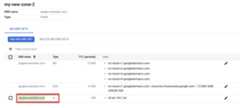
export DOMAIN=dns_name_of_record
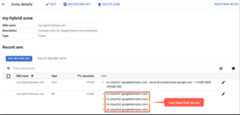
- TheZone details view lists four DNS servers as the NS data for your new zone. Copy the DNS record data as shown in the following example:
Add your DNS servers to Cloud DNS
In this step, you copy the DNS servers from your domain toGoogle Cloud DNS. Doing so allows Google Cloud to manage the DNS for your Google Cloud Project.
Configure your domain to use the Google Cloud name servers
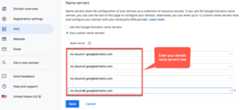
Go to your domain registrar and edit your domain's DNS settings to use the Google Cloud Name servers.
The following screenshot shows an example of entering the Google Cloud name servers inGoogle Domains:
Google Cloud DNS now manages the DNS records for your domain.
Except as otherwise noted, the content of this page is licensed under theCreative Commons Attribution 4.0 License, and code samples are licensed under theApache 2.0 License. For details, see theGoogle Developers Site Policies. Java is a registered trademark of Oracle and/or its affiliates.
Last updated 2026-02-19 UTC.