

Multi-region deployment
This topic describes a multi-region deployment for Apigee hybrid on GKE, Anthos GKE deployed on-prem, Microsoft® Azure Kubernetes Service (AKS), Amazon Elastic Kubernetes Service (EKS), and on RedHat OpenShift. Select your platform in the prerequisites and procedures.
Topologies for multi-region deployment include the following:
- Active-Active: When you have applications deployed in multiple geographic locations and you require low latency API response for your deployments. You have the option to deploy hybrid in multiple geographic locations nearest to your clients. For example: US West Coast, US East Coast, Europe, APAC.
- Active-Passive: When you have a primary region and a failover or disaster recovery region.
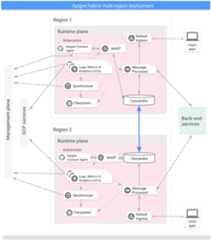
The regions in a multi-region hybrid deployment communicate via Cassandra, as the following imageshows:
Prerequisites
Before configuring hybrid for multiple regions, you must complete the following prerequisites:
GKE
- When installing multi-region Apigee deployments between different networks (e.g. different cloud providers, different VPC networks, cloud and on-prem, etc), you must provide internal connectivity between these separate networks that Cassandra can use to communicate between nodes. This can be accomplished with VPNs or cloud-specific connectivity solutions.
- If you are using Workload Identity in one cluster to authenticate service accounts, we strongly recommend that you use Workload Identity for each cluster you expand to. SeeEnabling Workload Identity with Apigee hybrid.
- Set up Kubernetes clusters in multiple regions with differentCIDR blocks
- Make surecert-manager is installed in each cluster
- Set up cross-region communication
- Make sure all Cassandra pods are able to resolve their own hostnames. IfhostNetwork is set tofalse, then the hostname is the Cassandra pod name. IfhostNetwork is set totrue, then the hostname is the Kubernetes node hostname running the Cassandra pod.Tip: To check if hostname resolution is working, use these commands.
IfhostNetwork is set tofalse, use Command 1. IfhostNetwork is set totrue, use Command 2.
If hostname resolution is working, the output will show an IP address. If hostname resolution is failing, the output will include "Host not found".
Command 1:kubectl run -l app=alpine --image=alpine --restart=Never --rm -i -t alpine-linux -n apigee -- hostname -i
Command 2:kubectl run -l app=alpine --image=alpine --restart=Never --rm -i -t alpine-linux -n apigee --overrides='{"kind":"Pod", "apiVersion":"v1", "spec": {"hostNetwork":true}}' -- hostname -i - Cassandra Multi Region requirements:
- Make sure the pod network namespace has connectivity across the regions, including firewalls, vpn, vpc peering and vNet peering. This is the case for most GKE installations.
- If the pod network namespace does not have connectivity between clusters (the clusters are running in "island network mode"), enable the Kubernetes
hostNetworkfeature by settingcassandra.hostNetwork: truein the overrides file for all of the regions in your Apigee hybrid multi-regions installation.For more information on the need for
hostNetwork, seeIsland mode clusters and hostNetwork below. - Enable
hostNetworkon existing clusters before expanding your multi-region configuration to new regions. - When
hostNetworkis enabled, make sure worker nodes can perform forward DNS lookup of their hostnames. Apigee Cassandra uses forward DNS lookup to obtain the host IP while starting.Tip: If the DNS resolution is not working, try this workaround.Add a static host entry in
/etc/hostsfile of each cassandra worker node similar to the following:echo -e "\\n127.0.1.1 ${HOSTNAME}" >> "/etc/hosts"or
"\\nWORKER-NODE-IP ${HOSTNAME}" >> "/etc/hosts" - Open TCP port 7001 between Kubernetes clusters across all regions to enable worker nodes across regions and datacenters to communicate. SeeConfigure ports for information about the Cassandra port numbers.
For detailed information, seeKubernetes documentation.
Note: Apigee recommends that you ensure that your servers' times are synchronized.Several features such as expiration and token revocation rely on accurate system times. If you host the runtime components in different datacenters, then be sure that the system times are synchronized.
You can use a tool such asntpdate to verify that server times are synchronized.
GKE on-prem
- When installing multi-region Apigee deployments between different networks (e.g. different cloud providers, different VPC networks, cloud and on-prem, etc), you must provide internal connectivity between these separate networks that Cassandra can use to communicate between nodes. This can be accomplished with VPNs or cloud-specific connectivity solutions.
- Set up Kubernetes clusters in multiple regions with differentCIDR blocks
- Make surecert-manager is installed in each cluster
- Set up cross-region communication
- Make sure all Cassandra pods are able to resolve their own hostnames. IfhostNetwork is set tofalse, then the hostname is the Cassandra pod name. IfhostNetwork is set totrue, then the hostname is the Kubernetes node hostname running the Cassandra pod.Tip: To check if hostname resolution is working, use these commands.
IfhostNetwork is set tofalse, use Command 1. IfhostNetwork is set totrue, use Command 2.
If hostname resolution is working, the output will show an IP address. If hostname resolution is failing, the output will include "Host not found".
Command 1:kubectl run -l app=alpine --image=alpine --restart=Never --rm -i -t alpine-linux -n apigee -- hostname -i
Command 2:kubectl run -l app=alpine --image=alpine --restart=Never --rm -i -t alpine-linux -n apigee --overrides='{"kind":"Pod", "apiVersion":"v1", "spec": {"hostNetwork":true}}' -- hostname -i - Cassandra Multi Region requirements:
- If the pod network namespace does not have connectivity between clusters (the clusters are running in "island network mode", the default case in GKE on-prem installations), enable the Kubernetes
hostNetworkfeature by settingcassandra.hostNetwork: truein the overrides file for all of the regions in your Apigee hybrid multi-regions installation.For more information on the need for
hostNetwork, seeIsland mode clusters and hostNetwork below. - Enable
hostNetworkon existing clusters before expanding your multi-region configuration to new regions. - When
hostNetworkis enabled, make sure worker nodes can perform forward DNS lookup of their hostnames. Apigee Cassandra uses forward DNS lookup to obtain the host IP while starting.Tip: If the DNS resolution is not working, try this workaround.Add a static host entry in
/etc/hostsfile of each cassandra worker node similar to the following:echo -e "\\n127.0.1.1 ${HOSTNAME}" >> "/etc/hosts"or
"\\nWORKER-NODE-IP ${HOSTNAME}" >> "/etc/hosts" - Open Cassandra ports between Kubernetes clusters across all regions to enable worker nodes across regions and datacenters to communicate. SeeConfigure ports for the Cassandra port numbers.
- If the pod network namespace does not have connectivity between clusters (the clusters are running in "island network mode", the default case in GKE on-prem installations), enable the Kubernetes
For detailed information, seeKubernetes documentation.
Note: Apigee recommends that you ensure that your servers' times are synchronized.Several features such as expiration and token revocation rely on accurate system times. If you host the runtime components in different datacenters, then be sure to synchronize the system times.
You can use a tool such asntpdate to verify that server times are synchronized.
AKS
- When installing multi-region Apigee deployments between different networks (e.g. different cloud providers, different VPC networks, cloud and on-prem, etc), you must provide internal connectivity between these separate networks that Cassandra can use to communicate between nodes. This can be accomplished with VPNs or cloud-specific connectivity solutions.
- Follow thehybrid installation guide for any prerequisites like Google Cloud and org configuration before moving to cluster setup steps.
- Make surecert-manager is installed in each cluster
- Make sure all Cassandra pods are able to resolve their own hostnames. IfhostNetwork is set tofalse, then the hostname is the Cassandra pod name. IfhostNetwork is set totrue, then the hostname is the Kubernetes node hostname running the Cassandra pod.Tip: To check if hostname resolution is working, use these commands.
IfhostNetwork is set tofalse, use Command 1. IfhostNetwork is set totrue, use Command 2.
If hostname resolution is working, the output will show an IP address. If hostname resolution is failing, the output will include "Host not found".
Command 1:kubectl run -l app=alpine --image=alpine --restart=Never --rm -i -t alpine-linux -n apigee -- hostname -i
Command 2:kubectl run -l app=alpine --image=alpine --restart=Never --rm -i -t alpine-linux -n apigee --overrides='{"kind":"Pod", "apiVersion":"v1", "spec": {"hostNetwork":true}}' -- hostname -i - Cassandra Multi Region requirements:
- If the pod network namespace does not have connectivity between clusters (the clusters are running in "island network mode", the default case in AKS installations), enable the Kubernetes
hostNetworkfeature by settingcassandra.hostNetwork: truein the overrides file for all of the regions in your Apigee hybrid multi-regions installation.For more information on the need for
hostNetwork, seeIsland mode clusters and hostNetwork below. - Enable
hostNetworkon existing clusters before expanding your multi-region configuration to new regions. - When
hostNetworkis enabled, make sure worker nodes can perform forward DNS lookup of their hostnames. Apigee Cassandra uses forward DNS lookup to obtain the host IP while starting.Tip: If the DNS resolution is not working, try this workaround.Add a static host entry in
/etc/hostsfile of each cassandra worker node similar to the following:echo -e "\\n127.0.1.1 ${HOSTNAME}" >> "/etc/hosts"or
"\\nWORKER-NODE-IP ${HOSTNAME}" >> "/etc/hosts" - Open Cassandra ports between Kubernetes clusters across all regions to enable worker nodes across regions and datacenters to communicate. SeeConfigure ports for the Cassandra port numbers.
- If the pod network namespace does not have connectivity between clusters (the clusters are running in "island network mode", the default case in AKS installations), enable the Kubernetes
For detailed information, seeKubernetes documentation.
Note: Apigee recommends that you ensure that your servers' times are synchronized.Several features such as expiration and token revocation rely on accurate system times. If you host the runtime components in different datacenters, then be sure that the system times are synchronized.
You can use a tool such asntpdate to verify that server times are synchronized.
EKS
- When installing multi-region Apigee deployments between different networks (e.g. different cloud providers, different VPC networks, cloud and on-prem, etc), you must provide internal connectivity between these separate networks that Cassandra can use to communicate between nodes. This can be accomplished with VPNs or cloud-specific connectivity solutions.
- Follow thehybrid installation guide for any prerequisites like Google Cloud and org configuration before moving to cluster setup steps.
- Make surecert-manager is installed in each cluster
- Make sure all Cassandra pods are able to resolve their own hostnames. IfhostNetwork is set tofalse, then the hostname is the Cassandra pod name. IfhostNetwork is set totrue, then the hostname is the Kubernetes node hostname running the Cassandra pod.Tip: To check if hostname resolution is working, use these commands.
IfhostNetwork is set tofalse, use Command 1. IfhostNetwork is set totrue, use Command 2.
If hostname resolution is working, the output will show an IP address. If hostname resolution is failing, the output will include "Host not found".
Command 1:kubectl run -l app=alpine --image=alpine --restart=Never --rm -i -t alpine-linux -n apigee -- hostname -i
Command 2:kubectl run -l app=alpine --image=alpine --restart=Never --rm -i -t alpine-linux -n apigee --overrides='{"kind":"Pod", "apiVersion":"v1", "spec": {"hostNetwork":true}}' -- hostname -i - Cassandra Multi Region requirements:
- If the pod network namespace does not have connectivity between clusters (the clusters are running in "island network mode"), enable the Kubernetes
hostNetworkfeature by settingcassandra.hostNetwork: truein the overrides file for all of the regions in your Apigee hybrid multi-regions installation. Amazon EKS uses the fully integrated network model by default.For more information on the need for
hostNetwork, seeIsland mode clusters and hostNetwork below. - Enable
hostNetworkon existing clusters before expanding your multi-region configuration to new regions. - When
hostNetworkis enabled, make sure worker nodes can perform forward DNS lookup of their hostnames. Apigee Cassandra uses forward DNS lookup to obtain the host IP while starting.Tip: If the DNS resolution is not working, try this workaround.Add a static host entry in
/etc/hostsfile of each cassandra worker node similar to the following:echo -e "\\n127.0.1.1 ${HOSTNAME}" >> "/etc/hosts"or
"\\nWORKER-NODE-IP ${HOSTNAME}" >> "/etc/hosts" - Open Cassandra ports between Kubernetes clusters across all regions to enable worker nodes across regions and datacenters to communicate. SeeConfigure ports for the Cassandra port numbers.
- If the pod network namespace does not have connectivity between clusters (the clusters are running in "island network mode"), enable the Kubernetes
For detailed information, seeKubernetes documentation.
Note: Apigee recommends that you ensure that your servers' times are synchronized.Several features such as expiration and token revocation rely on accurate system times. If you host the runtime components in different datacenters, then be sure that the system times are synchronized.
You can use a tool such asntpdate to verify that server times are synchronized.
OpenShift
- When installing multi-region Apigee deployments between different networks (e.g. different cloud providers, different VPC networks, cloud and on-prem, etc), you must provide internal connectivity between these separate networks that Cassandra can use to communicate between nodes. This can be accomplished with VPNs or cloud-specific connectivity solutions.
- Follow thehybrid installation guide for any prerequisites like Google Cloud and org configuration before moving to cluster setup steps.
- Make surecert-manager is installed in each cluster
- Make sure all Cassandra pods are able to resolve their own hostnames. IfhostNetwork is set tofalse, then the hostname is the Cassandra pod name. IfhostNetwork is set totrue, then the hostname is the Kubernetes node hostname running the Cassandra pod.Tip: To check if hostname resolution is working, use these commands.
IfhostNetwork is set tofalse, use Command 1. IfhostNetwork is set totrue, use Command 2.
If hostname resolution is working, the output will show an IP address. If hostname resolution is failing, the output will include "Host not found".
Command 1:kubectl run -l app=alpine --image=alpine --restart=Never --rm -i -t alpine-linux -n apigee -- hostname -i
Command 2:kubectl run -l app=alpine --image=alpine --restart=Never --rm -i -t alpine-linux -n apigee --overrides='{"kind":"Pod", "apiVersion":"v1", "spec": {"hostNetwork":true}}' -- hostname -i - Cassandra Multi Region requirements:
- If the pod network namespace does not have connectivity between clusters (the clusters are running in "island network mode", the default case in OpenShift installations), enable the Kubernetes
hostNetworkfeature by settingcassandra.hostNetwork: truein the overrides file for all of the regions in your Apigee hybrid multi-regions installation.For more information on the need for
hostNetwork, seeIsland mode clusters and hostNetwork below. - Enable
hostNetworkon existing clusters before expanding your multi-region configuration to new regions. - When
hostNetworkis enabled, make sure worker nodes can perform forward DNS lookup of their hostnames. Apigee Cassandra uses forward DNS lookup to obtain the host IP while starting.Tip: If the DNS resolution is not working, try this workaround.Add a static host entry in
/etc/hostsfile of each cassandra worker node similar to the following:echo -e "\\n127.0.1.1 ${HOSTNAME}" >> "/etc/hosts"or
"\\nWORKER-NODE-IP ${HOSTNAME}" >> "/etc/hosts" - Open Cassandra ports between Kubernetes clusters across all regions to enable worker nodes across regions and datacenters to communicate. SeeConfigure ports for the Cassandra port numbers.
- If the pod network namespace does not have connectivity between clusters (the clusters are running in "island network mode", the default case in OpenShift installations), enable the Kubernetes
For detailed information, seeKubernetes documentation.
Note: Apigee recommends that you ensure that your servers' times are synchronized.Several features such as expiration and token revocation rely on accurate system times. If you host the runtime components in different datacenters, then be sure that the system times are synchronized.
You can use a tool such asntpdate to verify that server times are synchronized.
Island mode clusters and hostNetwork
There are two main network models for Kubernetes clusters: fully integrated (or flat) and island mode. Apigee recommends using the flat network model where possible, as it makes multi-region Cassandra connectivity simpler. When a Kubernetes cluster is configured in island mode, the pod network is isolated. Pods can not communicate directly with pods running in other clusters using the pod IP address. SeeTypical network model implementations for further information about the differences between these two network models and examples of each.
When Apigee Hybrid is running on two or more Kubernetes clusters using an island mode networking model, it is required to enable thehostNetwork setting for Cassandra through thecassandra.hostNetwork property. By default, Kubernetes pods are isolated into individual network namespaces that prevents them from using the Kubernetes worker node IP. WhenhostNetwork is set totrue, the pod is not isolated within its own network namespace, and instead uses the IP address and hostname of the Kubernetes worker node the pod is scheduled on. This allows Cassandra to natively use the Kubernetes worker node IP as its IP, providing a means for Cassandra to establish a full mesh between all Cassandra pods in multiple clusters running in island mode.
Cassandra hostname resolution
Though a Cassandra pod does not resolve other Cassandra pods by hostname, at startup Cassandra checks that its own hostname is resolvable by DNS. As the pod hostname is the same as the Kubernetes worker node hostname whenhostNetwork is set to true, the worker node hostname must be resolvable to an IP address via the cluster DNS service. If the Kubernetes worker node hostname is not resolvable, the Cassandra pod will fail to fully start. Therefore, it is important that Kubernetes worker node hostnames are resolvable from pods in the cluster when settinghostNetwork totrue.
Configure Apigee hybrid for multi-region
This section describes how to configure Apigee hybrid for multi-region.
GKE
Important: When expanding Apigee hybrid to a new regional datacenter, be sure to install the same version of hybrid as you have in your existing datacenter. Avoid running different versions of hybrid in multiple datacenters.Warning: If installation fails for a new region, do not continue with region installation. Instead, delete and recreate the hybrid installation on the failed region.
Configure the multi-region seed host
This section describes how to expand the existing Cassandra cluster to a new region. This setup allows the new region to bootstrap the cluster and join the existing data center. Without this configuration, the multi-region Kubernetes clusters would not know about each other.
Follow the procedures for the tool you are using to manage and install Apigee hybrid:
Helm charts
For the first region created, get the pods in your apigee namespace:
kubectl get pods -o wide -napigee
- Identify the multi-region seed host address for Cassandra in this region, for example
10.0.0.11. Prepare the
overrides.yamlfile for the second region and add in the seed host IP address as follows:cassandra:multiRegionSeedHost:"SEED_HOST_IP_ADDRESS"datacenter:"DATACENTER_NAME"rack:"RACK_NAME"hostNetwork:falseclusterName:CLUSTER_NAME
Replace the following:
- SEED_HOST_IP_ADDRESS with the seed host IP address, for example
10.0.0.11. - DATACENTER_NAME with the datacenter name, for example
dc-2. - RACK_NAME with the rack name, for example
ra-1. - CLUSTER_NAME with the name of your Cassandra cluster. By default the value is
apigeecluster. If you use a different cluster name, you must specify a value forcassandra.clusterName. You are free to choose your own value but it must be the same in all regions.
- SEED_HOST_IP_ADDRESS with the seed host IP address, for example
Configure the second region
To set up the new region:
Install
cert-managerin region 2:kubectl apply -f https://github.com/cert-manager/cert-manager/releases/download/v1.11.1/cert-manager.yaml
- Copy your certificate from the existing cluster to the new cluster. The new CA root is used by Cassandra and other hybrid components for mTLS. Therefore, it is essential to have consistent certificates across the cluster.
Set the context to the original namespace:
kubectl config use-contextORIGINAL_CLUSTER_NAME
Export the current namespace configuration to a file:
kubectl get namespaceapigee -o yaml > apigee-namespace.yaml
Export the
apigee-casecret to a file:kubectl -n cert-manager get secret apigee-ca -o yaml > apigee-ca.yaml
Set the context to the new region's cluster name:
kubectl config use-contextNEW_CLUSTER_NAME
Import the namespace configuration to the new cluster. Be sure to update the namespace in the file if you're using a different namespace in the new region:
kubectl apply -f apigee-namespace.yaml
Import the secret to the new cluster:
kubectl -n cert-manager apply -f apigee-ca.yaml
Follow the steps to Install the Apigee hybrid CRDs into the new region.
Now use Helm charts to install Apigee hybrid in the new region with the following Helm Chart commands (as done in region 1):
Note: You can use the same CRDs for consistency by using the same folder where you have the charts downloaded, you can also keep your overrides file unique between region 1 and 2 by naming your overrides something unique such asoverrides-region_name.yaml, etc.Important:Omit the‑‑atomicflag formigrated clusters.helm upgrade operator apigee-operator \ --install \ --create-namespace \ --namespace apigee-system \ --atomic \ -f overrides-DATACENTER_NAME.yaml
helm upgrade datastore apigee-datastore \ --install \ --namespaceapigee \ --atomic \ -f overrides-DATACENTER_NAME.yamlhelm upgrade telemetry apigee-telemetry \ --install \ --namespaceapigee \ --atomic \ -f overrides-DATACENTER_NAME.yamlhelm upgrade redis apigee-redis \ --install \ --namespaceapigee \ --atomic \ -f overrides-DATACENTER_NAME.yamlhelm upgrade ingress-manager apigee-ingress-manager \ --install \ --namespaceapigee \ --atomic \ -f overrides-DATACENTER_NAME.yamlhelm upgradeORG_NAME apigee-org \ --install \ --namespaceapigee \ --atomic \ -f overrides-DATACENTER_NAME.yaml# repeat the below command for each env mentioned on the overrideshelm upgradeENV_NAME apigee-env/ \ --install \ --namespaceapigee \ --atomic \ --set env=ENV_NAME \ -f overrides-DATACENTER_NAME.yaml# repeat the below command for each env group mentioned on the overrideshelm upgrade apigee-virtualhost-ENV_GROUP_NAME apigee-virtualhost/ \ --install \ --namespaceapigee \ --atomic \ --set envgroup=ENV_GROUP_NAME \ -f overrides-DATACENTER_NAME.yaml- Verify the Cassandra cluster setup by running the following command. The output should show both the existing and new data centers.Warning: If the output of this command does not show both the existing and new data centers, the setup failed. In this case,do not proceed further.
To fix the problem, the hybrid installation on the new region must be deleted and recreated. SeeUninstall hybrid runtime. If the setup fails, do not attempt to proceed further or attempt to join the cluster.
kubectl exec apigee-cassandra-default-0 -napigee \-- nodetool -uAPIGEE_JMX_USER -pwAPIGEE_JMX_PASSWORD status
Example showing a successful setup:
Datacenter:dc-1====================Status=Up/Down|/State=Normal/Leaving/Joining/Moving--AddressLoadTokensOwnsHostIDRackUN10.132.87.9368.07GiB256?fb51465c-167a-42f7-98c9-b6eba1de34decUN10.132.84.9469.9GiB256?f621a5ac-e7ee-48a9-9a14-73d69477c642bUN10.132.84.10576.95GiB256?0561086f-e95b-4232-ba6c-ad519ff30336dDatacenter:dc-2====================Status=Up/Down|/State=Normal/Leaving/Joining/Moving--AddressLoadTokensOwnsHostIDRackUN10.132.0.871.61GiB256?8894a98b-8406-45de-99e2-f404ab10b5d6cUN10.132.9.20475.1GiB256?afa0ffa3-630b-4f1e-b46f-fc3df988092eaUN10.132.3.13368.08GiB256?25ae39ab-b39e-4d4f-9cb7-de095ab873dbb
- Set up Cassandra on all the pods in the new data centers.
- Get
apigeeorgfrom the cluster with the following command:kubectl get apigeeorg -napigee -o json | jq ".items[].metadata.name"
For example:
Ex: kubectl get apigeeorg -napigee -o json | jq ".items[].metadata.name""rg-hybrid-b7d3b9c"
- Create a cassandra data replication custom resource (
YAML) file. The file can have any name. In the following examples the file will have the namedatareplication.yaml.The file must contain the following:
apiVersion: apigee.cloud.google.com/v1alpha1kind: CassandraDataReplicationmetadata: name:REGION_EXPANSION namespace:NAMESPACEspec: organizationRef:APIGEEORG_VALUE force:false source: region:SOURCE_REGION
Where:
- REGION_EXPANSION is the name you are giving this metadata. You can use any name.
- NAMESPACE is the same namespace that is provided in
overrides.yaml. This is usually "apigee". - APIGEEORG_VALUE is the value output from the
kubectl get apigeeorg -napigee -o json | jq ".items[].metadata.name"command in the previous step. For example,rg-hybrid-b7d3b9c - SOURCE_REGION is the source region, datacenter value under cassandra section from source region overrides.yaml
For example:
apiVersion:apigee.cloud.google.com/v1alpha1kind:CassandraDataReplicationmetadata:name:region-expansionnamespace:apigeespec:organizationRef:rg-hybrid-b7d3b9cforce:falsesource:region:"dc-1"
- Apply the
CassandraDataReplicationwith the following command:kubectl apply -f datareplication.yaml
- Get
- Verify the rebuild status using the following command.Note:The rebuild operation can take up to several hours depending on the data size.
kubectl -napigee get apigeeds -o json | jq ".items[].status.cassandraDataReplication"
The results should look something like:
{"rebuildDetails": {"apigee-cassandra-default-0": {"state": "complete","updated": 1623105760},"apigee-cassandra-default-1": {"state": "complete","updated": 1623105765},"apigee-cassandra-default-2": {"state": "complete","updated": 1623105770}},"state": "complete","updated": 1623105770} - Once the data replication is complete and verified, update the seed hosts:
- Remove
multiRegionSeedHost: 10.0.0.11fromoverrides-DATACENTER_NAME.yaml. Reapply the change to update the apigee datastore CR:
Important:Omit the‑‑atomicflag formigrated clusters.helm upgrade datastore apigee-datastore/ \ --install \ --namespaceapigee \ --atomic \ -f overrides-DATACENTER_NAME.yaml
- Remove
- Verify the rebuild processes from the logs. Also, verify the data size using the
nodetool statuscommand.Note:If the rebuild operation shows state complete and the rebuild processes logs contains "All sessions completed" all data has been successfully copied to the new region.kubectl logs apigee-cassandra-default-0 -f -napigee
kubectl exec apigee-cassandra-default-0 -napigee -- nodetool -uAPIGEE_JMX_USER -pwAPIGEE_JMX_PASSWORD status
APIGEE_JMX_USERandAPIGEE_JMX_PASSWORD are usually defined in the environment variables$APIGEE_JMX_USERand$APIGEE_JMX_PASSWORD.The following example shows example log entries:
INFO 01:42:24 rebuild from dc: dc-1, (All keyspaces), (All tokens)INFO 01:42:24 [Stream #3a04e810-580d-11e9-a5aa-67071bf82889] Executing streaming plan for RebuildINFO 01:42:24 [Stream #3a04e810-580d-11e9-a5aa-67071bf82889] Starting streaming to /10.12.1.45INFO 01:42:25 [Stream #3a04e810-580d-11e9-a5aa-67071bf82889, ID#0] Beginning stream session with /10.12.1.45INFO 01:42:25 [Stream #3a04e810-580d-11e9-a5aa-67071bf82889] Starting streaming to /10.12.4.36INFO 01:42:25 [Stream #3a04e810-580d-11e9-a5aa-67071bf82889 ID#0] Prepare completed. Receiving 1 files(0.432KiB), sending 0 files(0.000KiB)INFO 01:42:25 [Stream #3a04e810-580d-11e9-a5aa-67071bf82889] Session with /10.12.1.45 is completeINFO 01:42:25 [Stream #3a04e810-580d-11e9-a5aa-67071bf82889, ID#0] Beginning stream session with /10.12.4.36INFO 01:42:25 [Stream #3a04e810-580d-11e9-a5aa-67071bf82889] Starting streaming to /10.12.5.22INFO 01:42:26 [Stream #3a04e810-580d-11e9-a5aa-67071bf82889 ID#0] Prepare completed. Receiving 1 files(0.693KiB), sending 0 files(0.000KiB)INFO 01:42:26 [Stream #3a04e810-580d-11e9-a5aa-67071bf82889] Session with /10.12.4.36 is completeINFO 01:42:26 [Stream #3a04e810-580d-11e9-a5aa-67071bf82889, ID#0] Beginning stream session with /10.12.5.22INFO 01:42:26 [Stream #3a04e810-580d-11e9-a5aa-67071bf82889 ID#0] Prepare completed. Receiving 3 files(0.720KiB), sending 0 files(0.000KiB)INFO 01:42:26 [Stream #3a04e810-580d-11e9-a5aa-67071bf82889] Session with /10.12.5.22 is completeINFO 01:42:26 [Stream #3a04e810-580d-11e9-a5aa-67071bf82889] All sessions completed
apigeectl
- Set the kubectl context to the original cluster before retrieving the seed name:
kubectl config use-contextoriginal-cluster-name
Run the following
kubectlcommand to identify a seed host address for Cassandra in the current region.Aseed host address allows a new regional instance to find the original cluster on the very first startup to learn the topology of the cluster. The seed host address is designated as the contact point in the cluster.
kubectl get pods -o wide -napigee -l app=apigee-cassandra --field-selector status.phase=Running
NAME READY STATUS RESTARTS AGE IP NODE NOMINATED NODEapigee-cassandra-default-0 1/1 Running 0 5d 10.0.0.11 gke-k8s-dc-2-default-pool-a2206492-p55dapigee-cassandra-default-1 1/1 Running 0 5d 10.0.2.4 gke-k8s-dc-2-default-pool-e9daaab3-tjmzapigee-cassandra-default-2 1/1 Running 0 5d 10.0.3.5 gke-k8s-dc-2-default-pool-e589awq3-kjch
- Decide which of the IPs returned from the previous command will be the multi-region seed host.
- In data center 2, configure
cassandra.multiRegionSeedHostandcassandra.datacenterinManage runtime plane components, wheremultiRegionSeedHostis one of the IPs returned by the previous command:cassandra:multiRegionSeedHost:seed_host_IPdatacenter:data_center_namerack:rack_namehostNetwork:falseclusterName:cluster_name#mustbethesameforallregions
For example:
cassandra:multiRegionSeedHost:10.0.0.11datacenter:"dc-2"rack:"ra-1"hostNetwork:falseclusterName:my-apigee-cluster
- In the new data center/region, before you install hybrid, set the same TLS certificates and credentials in
overrides.yamlas you set in the first region.Note: Be sure to use the same Cassandra TLS certificates and credentials in the second data center as you provided in the original data center. The credentials you set in the overrides file in the first data center must match the ones you specify in the overrides file in the second data center. For details seeConfiguring TLS for Cassandra.
Set up the new region
After you configure the seed host, you can set up the new region.
To set up the new region:
- Copy your certificate from the existing cluster to the new cluster. The new CA root is used by Cassandra and other hybrid components for mTLS. Therefore, it is essential to have consistent certificates across the cluster.
- Set the context to the original namespace:
kubectl config use-contextoriginal-cluster-name
- Export the current namespace configuration to a file:
kubectl get namespacenamespace -o yaml > apigee-namespace.yaml
- Export the
apigee-casecret to a file:kubectl -n cert-manager get secret apigee-ca -o yaml > apigee-ca.yaml
- Set the context to the new region's cluster name:
kubectl config use-contextnew-cluster-name
- Import the namespace configuration to the new cluster. Be sure to update the "namespace" in the file if you're using a different namespace in the new region:
kubectl apply -f apigee-namespace.yaml
Import the secret to the new cluster:
kubectl -n cert-manager apply -f apigee-ca.yaml
- Set the context to the original namespace:
- Install hybrid in the new region. Be sure that the
overrides-DC_name.yamlfile includes the same TLS certificates that are configured in the first region, as explained in the previous section.Execute the following two commands to install hybrid in the new region:
Important: When expanding Apigee hybrid to a new regional datacenter, be sure to install the same version of hybrid as you have in your existing datacenter. Avoid running different versions of hybrid in multiple datacenters.apigeectl init -f overrides/overrides-DC_name.yaml
apigeectl apply -f overrides/overrides-DC_name.yaml
- Verify the hybrid installation is successful by running the following command:
apigeectl check-ready -f overrides_DC_name.yaml
- Verify the Cassandra cluster setup by running the following command. The output should show both the existing and new data centers.Warning: If the output of this command does not show both the existing and new data centers, the setup failed. In this case,do not proceed further.
To fix the problem, the hybrid installation on the new region must be deleted and recreated. SeeUninstall hybrid runtime. If the setup fails, do not attempt to proceed further or attempt to join the cluster.
kubectl exec apigee-cassandra-default-0 -napigee \ -- nodetool -uAPIGEE_JMX_USER -pwAPIGEE_JMX_PASSWORD status
Example showing a successful setup:
Datacenter:dc-1====================Status=Up/Down|/State=Normal/Leaving/Joining/Moving--AddressLoadTokensOwnsHostIDRackUN10.132.87.9368.07GiB256?fb51465c-167a-42f7-98c9-b6eba1de34decUN10.132.84.9469.9GiB256?f621a5ac-e7ee-48a9-9a14-73d69477c642bUN10.132.84.10576.95GiB256?0561086f-e95b-4232-ba6c-ad519ff30336dDatacenter:dc-2====================Status=Up/Down|/State=Normal/Leaving/Joining/Moving--AddressLoadTokensOwnsHostIDRackUN10.132.0.871.61GiB256?8894a98b-8406-45de-99e2-f404ab10b5d6cUN10.132.9.20475.1GiB256?afa0ffa3-630b-4f1e-b46f-fc3df988092eaUN10.132.3.13368.08GiB256?25ae39ab-b39e-4d4f-9cb7-de095ab873dbb
- Set up Cassandra on all the pods in the new data centers.
- Get
apigeeorgfrom the cluster with the following command:kubectl get apigeeorg -napigee -o json | jq ".items[].metadata.name"
For example:
Ex: kubectl get apigeeorg -napigee -o json | jq ".items[].metadata.name""rg-hybrid-b7d3b9c"
- Create a cassandra data replication custom resource (
YAML) file. The file can have any name. In the following examples the file will have the namedatareplication.yaml.The file must contain the following:
apiVersion: apigee.cloud.google.com/v1alpha1kind: CassandraDataReplicationmetadata: name:REGION_EXPANSION namespace:NAMESPACEspec: organizationRef:APIGEEORG_VALUE force:false source: region:SOURCE_REGION
Where:
- REGION_EXPANSION is the name you are giving this metadata. You can use any name.
- NAMESPACE is the same namespace that is provided in
overrides.yaml. This is usually "apigee". - APIGEEORG_VALUE is the value output from the
kubectl get apigeeorg -napigee -o json | jq ".items[].metadata.name"command in the previous step. For example,rg-hybrid-b7d3b9c - SOURCE_REGION is the source region, datacenter value under cassandra section from source region overrides.yaml
For example:
apiVersion:apigee.cloud.google.com/v1alpha1kind:CassandraDataReplicationmetadata:name:region-expansionnamespace:apigeespec:organizationRef:rg-hybrid-b7d3b9cforce:falsesource:region:"dc-1"
- Apply the
CassandraDataReplicationwith the following command:kubectl apply -f datareplication.yaml
- Verify the rebuild status using the following command.Note:The rebuild operation can take up to several hours depending on the data size.
kubectl -napigee get apigeeds -o json | jq ".items[].status.cassandraDataReplication"
The results should look something like:
{ "rebuildDetails": { "apigee-cassandra-default-0": { "state": "complete", "updated": 1623105760 }, "apigee-cassandra-default-1": { "state": "complete", "updated": 1623105765 }, "apigee-cassandra-default-2": { "state": "complete", "updated": 1623105770 } }, "state": "complete", "updated": 1623105770}
- Get
- Verify the rebuild processes from the logs. Also, verify the data size using the
nodetool statuscommand.Note:If the rebuild operation shows state complete and the rebuild processes logs contains "All sessions completed" all data has been successfully copied to the new region.kubectl logs apigee-cassandra-default-0 -f -napigee
kubectl exec apigee-cassandra-default-0 -napigee -- nodetool -uAPIGEE_JMX_USER -pwAPIGEE_JMX_PASSWORD status
The following example shows example log entries:
INFO 01:42:24 rebuild from dc: dc-1, (All keyspaces), (All tokens)INFO 01:42:24 [Stream #3a04e810-580d-11e9-a5aa-67071bf82889] Executing streaming plan for RebuildINFO 01:42:24 [Stream #3a04e810-580d-11e9-a5aa-67071bf82889] Starting streaming to /10.12.1.45INFO 01:42:25 [Stream #3a04e810-580d-11e9-a5aa-67071bf82889, ID#0] Beginning stream session with /10.12.1.45INFO 01:42:25 [Stream #3a04e810-580d-11e9-a5aa-67071bf82889] Starting streaming to /10.12.4.36INFO 01:42:25 [Stream #3a04e810-580d-11e9-a5aa-67071bf82889 ID#0] Prepare completed. Receiving 1 files(0.432KiB), sending 0 files(0.000KiB)INFO 01:42:25 [Stream #3a04e810-580d-11e9-a5aa-67071bf82889] Session with /10.12.1.45 is completeINFO 01:42:25 [Stream #3a04e810-580d-11e9-a5aa-67071bf82889, ID#0] Beginning stream session with /10.12.4.36INFO 01:42:25 [Stream #3a04e810-580d-11e9-a5aa-67071bf82889] Starting streaming to /10.12.5.22INFO 01:42:26 [Stream #3a04e810-580d-11e9-a5aa-67071bf82889 ID#0] Prepare completed. Receiving 1 files(0.693KiB), sending 0 files(0.000KiB)INFO 01:42:26 [Stream #3a04e810-580d-11e9-a5aa-67071bf82889] Session with /10.12.4.36 is completeINFO 01:42:26 [Stream #3a04e810-580d-11e9-a5aa-67071bf82889, ID#0] Beginning stream session with /10.12.5.22INFO 01:42:26 [Stream #3a04e810-580d-11e9-a5aa-67071bf82889 ID#0] Prepare completed. Receiving 3 files(0.720KiB), sending 0 files(0.000KiB)INFO 01:42:26 [Stream #3a04e810-580d-11e9-a5aa-67071bf82889] Session with /10.12.5.22 is completeINFO 01:42:26 [Stream #3a04e810-580d-11e9-a5aa-67071bf82889] All sessions completed
- Update the seed hosts. Remove
multiRegionSeedHost: 10.0.0.11fromoverrides-DC_name.yamland reapply.Note: Seed hosts are local cluster members. To boot up a new region an external seed host is required. Once a region boots up you need to change the seed hosts back to their local clusters inoverrides.yamland then reapply the configuration.apigeectl apply -f overrides/overrides-DC_name.yaml
Check the Cassandra cluster status
The following command is useful to see if the cluster setup is successful in two data centers. The command checks the nodetool status for the two regions.
kubectl exec apigee-cassandra-default-0 -napigee -- nodetool -uAPIGEE_JMX_USER -pwAPIGEE_JMX_PASSWORD statusDatacenter: dc-1=======================Status=Up/Down|/ State=Normal/Leaving/Joining/Moving-- Address Load Tokens Owns (effective) Host ID RackUN 10.12.1.45 112.09 KiB 256 100.0% 3c98c816-3f4d-48f0-9717-03d0c998637f ra-1UN 10.12.4.36 95.27 KiB 256 100.0% 0a36383d-1d9e-41e2-924c-7b62be12d6cc ra-1UN 10.12.5.22 88.7 KiB 256 100.0% 3561f4fa-af3d-4ea4-93b2-79ac7e938201 ra-1Datacenter: us-west1====================Status=Up/Down|/ State=Normal/Leaving/Joining/Moving-- Address Load Tokens Owns (effective) Host ID RackUN 10.0.4.33 78.69 KiB 256 100.0% a200217d-260b-45cd-b83c-182b27ff4c99 ra-1UN 10.0.0.21 78.68 KiB 256 100.0% 9f3364b9-a7a1-409c-9356-b7d1d312e52b ra-1UN 10.0.1.26 15.46 KiB 256 100.0% 1666df0f-702e-4c5b-8b6e-086d0f2e47fa ra-1
GKE on-prem
Important: When expanding Apigee hybrid to a new regional datacenter, be sure to install the same version of hybrid as you have in your existing datacenter. Avoid running different versions of hybrid in multiple datacenters.Warning: If installation fails for a new region, do not continue with region installation. Instead, delete and recreate the hybrid installation on the failed region.
Configure the multi-region seed host
This section describes how to expand the existing Cassandra cluster to a new region. This setup allows the new region to bootstrap the cluster and join the existing data center. Without this configuration, the multi-region Kubernetes clusters would not know about each other.
Follow the procedures for the tool you are using to manage and install Apigee hybrid:
Helm charts
For the first region created, get the pods in your apigee namespace:
kubectl get pods -o wide -napigee
- Identify the multi-region seed host address for Cassandra in this region, for example
10.0.0.11. Prepare the
overrides.yamlfile for the second region and add in the seed host IP address as follows:cassandra:multiRegionSeedHost:"SEED_HOST_IP_ADDRESS"datacenter:"DATACENTER_NAME"rack:"RACK_NAME"hostNetwork:falseclusterName:CLUSTER_NAME
Replace the following:
- SEED_HOST_IP_ADDRESS with the seed host IP address, for example
10.0.0.11. - DATACENTER_NAME with the datacenter name, for example
dc-2. - RACK_NAME with the rack name, for example
ra-1. - CLUSTER_NAME with the name of your Cassandra cluster. By default the value is
apigeecluster. If you use a different cluster name, you must specify a value forcassandra.clusterName. You are free to choose your own value but it must be the same in all regions.
- SEED_HOST_IP_ADDRESS with the seed host IP address, for example
Configure the second region
To set up the new region:
Install
cert-managerin region 2:kubectl apply -f https://github.com/cert-manager/cert-manager/releases/download/v1.11.1/cert-manager.yaml
- Copy your certificate from the existing cluster to the new cluster. The new CA root is used by Cassandra and other hybrid components for mTLS. Therefore, it is essential to have consistent certificates across the cluster.
Set the context to the original namespace:
kubectl config use-contextORIGINAL_CLUSTER_NAME
Export the current namespace configuration to a file:
kubectl get namespaceapigee -o yaml > apigee-namespace.yaml
Export the
apigee-casecret to a file:kubectl -n cert-manager get secret apigee-ca -o yaml > apigee-ca.yaml
Set the context to the new region's cluster name:
kubectl config use-contextNEW_CLUSTER_NAME
Import the namespace configuration to the new cluster. Be sure to update the namespace in the file if you're using a different namespace in the new region:
kubectl apply -f apigee-namespace.yaml
Import the secret to the new cluster:
kubectl -n cert-manager apply -f apigee-ca.yaml
Follow the steps to Install the Apigee hybrid CRDs into the new region.
Now use Helm charts to install Apigee hybrid in the new region with the following Helm Chart commands (as done in region 1):
Note: You can use the same CRDs for consistency by using the same folder where you have the charts downloaded, you can also keep your overrides file unique between region 1 and 2 by naming your overrides something unique such asoverrides-region_name.yaml, etc.Important:Omit the‑‑atomicflag formigrated clusters.helm upgrade operator apigee-operator \ --install \ --create-namespace \ --namespace apigee-system \ --atomic \ -f overrides-DATACENTER_NAME.yaml
helm upgrade datastore apigee-datastore \ --install \ --namespaceapigee \ --atomic \ -f overrides-DATACENTER_NAME.yamlhelm upgrade telemetry apigee-telemetry \ --install \ --namespaceapigee \ --atomic \ -f overrides-DATACENTER_NAME.yamlhelm upgrade redis apigee-redis \ --install \ --namespaceapigee \ --atomic \ -f overrides-DATACENTER_NAME.yamlhelm upgrade ingress-manager apigee-ingress-manager \ --install \ --namespaceapigee \ --atomic \ -f overrides-DATACENTER_NAME.yamlhelm upgradeORG_NAME apigee-org \ --install \ --namespaceapigee \ --atomic \ -f overrides-DATACENTER_NAME.yaml# repeat the below command for each env mentioned on the overrideshelm upgradeENV_NAME apigee-env/ \ --install \ --namespaceapigee \ --atomic \ --set env=ENV_NAME \ -f overrides-DATACENTER_NAME.yaml# repeat the below command for each env group mentioned on the overrideshelm upgrade apigee-virtualhost-ENV_GROUP_NAME apigee-virtualhost/ \ --install \ --namespaceapigee \ --atomic \ --set envgroup=ENV_GROUP_NAME \ -f overrides-DATACENTER_NAME.yaml- Verify the Cassandra cluster setup by running the following command. The output should show both the existing and new data centers.Warning: If the output of this command does not show both the existing and new data centers, the setup failed. In this case,do not proceed further.
To fix the problem, the hybrid installation on the new region must be deleted and recreated. SeeUninstall hybrid runtime. If the setup fails, do not attempt to proceed further or attempt to join the cluster.
kubectl exec apigee-cassandra-default-0 -napigee \-- nodetool -uAPIGEE_JMX_USER -pwAPIGEE_JMX_PASSWORD status
Example showing a successful setup:
Datacenter:dc-1====================Status=Up/Down|/State=Normal/Leaving/Joining/Moving--AddressLoadTokensOwnsHostIDRackUN10.132.87.9368.07GiB256?fb51465c-167a-42f7-98c9-b6eba1de34decUN10.132.84.9469.9GiB256?f621a5ac-e7ee-48a9-9a14-73d69477c642bUN10.132.84.10576.95GiB256?0561086f-e95b-4232-ba6c-ad519ff30336dDatacenter:dc-2====================Status=Up/Down|/State=Normal/Leaving/Joining/Moving--AddressLoadTokensOwnsHostIDRackUN10.132.0.871.61GiB256?8894a98b-8406-45de-99e2-f404ab10b5d6cUN10.132.9.20475.1GiB256?afa0ffa3-630b-4f1e-b46f-fc3df988092eaUN10.132.3.13368.08GiB256?25ae39ab-b39e-4d4f-9cb7-de095ab873dbb
- Set up Cassandra on all the pods in the new data centers.
- Get
apigeeorgfrom the cluster with the following command:kubectl get apigeeorg -napigee -o json | jq ".items[].metadata.name"
For example:
Ex: kubectl get apigeeorg -napigee -o json | jq ".items[].metadata.name""rg-hybrid-b7d3b9c"
- Create a cassandra data replication custom resource (
YAML) file. The file can have any name. In the following examples the file will have the namedatareplication.yaml.The file must contain the following:
apiVersion: apigee.cloud.google.com/v1alpha1kind: CassandraDataReplicationmetadata: name:REGION_EXPANSION namespace:NAMESPACEspec: organizationRef:APIGEEORG_VALUE force:false source: region:SOURCE_REGION
Where:
- REGION_EXPANSION is the name you are giving this metadata. You can use any name.
- NAMESPACE is the same namespace that is provided in
overrides.yaml. This is usually "apigee". - APIGEEORG_VALUE is the value output from the
kubectl get apigeeorg -napigee -o json | jq ".items[].metadata.name"command in the previous step. For example,rg-hybrid-b7d3b9c - SOURCE_REGION is the source region, datacenter value under cassandra section from source region overrides.yaml
For example:
apiVersion:apigee.cloud.google.com/v1alpha1kind:CassandraDataReplicationmetadata:name:region-expansionnamespace:apigeespec:organizationRef:rg-hybrid-b7d3b9cforce:falsesource:region:"dc-1"
- Apply the
CassandraDataReplicationwith the following command:kubectl apply -f datareplication.yaml
- Get
- Verify the rebuild status using the following command.Note:The rebuild operation can take up to several hours depending on the data size.
kubectl -napigee get apigeeds -o json | jq ".items[].status.cassandraDataReplication"
The results should look something like:
{"rebuildDetails": {"apigee-cassandra-default-0": {"state": "complete","updated": 1623105760},"apigee-cassandra-default-1": {"state": "complete","updated": 1623105765},"apigee-cassandra-default-2": {"state": "complete","updated": 1623105770}},"state": "complete","updated": 1623105770} - Once the data replication is complete and verified, update the seed hosts:
- Remove
multiRegionSeedHost: 10.0.0.11fromoverrides-DATACENTER_NAME.yaml. Reapply the change to update the apigee datastore CR:
Important:Omit the‑‑atomicflag formigrated clusters.helm upgrade datastore apigee-datastore/ \ --install \ --namespaceapigee \ --atomic \ -f overrides-DATACENTER_NAME.yaml
- Remove
- Verify the rebuild processes from the logs. Also, verify the data size using the
nodetool statuscommand.Note:If the rebuild operation shows state complete and the rebuild processes logs contains "All sessions completed" all data has been successfully copied to the new region.kubectl logs apigee-cassandra-default-0 -f -napigee
kubectl exec apigee-cassandra-default-0 -napigee -- nodetool -uAPIGEE_JMX_USER -pwAPIGEE_JMX_PASSWORD status
APIGEE_JMX_USERandAPIGEE_JMX_PASSWORD are usually defined in the environment variables$APIGEE_JMX_USERand$APIGEE_JMX_PASSWORD.The following example shows example log entries:
INFO 01:42:24 rebuild from dc: dc-1, (All keyspaces), (All tokens)INFO 01:42:24 [Stream #3a04e810-580d-11e9-a5aa-67071bf82889] Executing streaming plan for RebuildINFO 01:42:24 [Stream #3a04e810-580d-11e9-a5aa-67071bf82889] Starting streaming to /10.12.1.45INFO 01:42:25 [Stream #3a04e810-580d-11e9-a5aa-67071bf82889, ID#0] Beginning stream session with /10.12.1.45INFO 01:42:25 [Stream #3a04e810-580d-11e9-a5aa-67071bf82889] Starting streaming to /10.12.4.36INFO 01:42:25 [Stream #3a04e810-580d-11e9-a5aa-67071bf82889 ID#0] Prepare completed. Receiving 1 files(0.432KiB), sending 0 files(0.000KiB)INFO 01:42:25 [Stream #3a04e810-580d-11e9-a5aa-67071bf82889] Session with /10.12.1.45 is completeINFO 01:42:25 [Stream #3a04e810-580d-11e9-a5aa-67071bf82889, ID#0] Beginning stream session with /10.12.4.36INFO 01:42:25 [Stream #3a04e810-580d-11e9-a5aa-67071bf82889] Starting streaming to /10.12.5.22INFO 01:42:26 [Stream #3a04e810-580d-11e9-a5aa-67071bf82889 ID#0] Prepare completed. Receiving 1 files(0.693KiB), sending 0 files(0.000KiB)INFO 01:42:26 [Stream #3a04e810-580d-11e9-a5aa-67071bf82889] Session with /10.12.4.36 is completeINFO 01:42:26 [Stream #3a04e810-580d-11e9-a5aa-67071bf82889, ID#0] Beginning stream session with /10.12.5.22INFO 01:42:26 [Stream #3a04e810-580d-11e9-a5aa-67071bf82889 ID#0] Prepare completed. Receiving 3 files(0.720KiB), sending 0 files(0.000KiB)INFO 01:42:26 [Stream #3a04e810-580d-11e9-a5aa-67071bf82889] Session with /10.12.5.22 is completeINFO 01:42:26 [Stream #3a04e810-580d-11e9-a5aa-67071bf82889] All sessions completed
apigeectl
- In the
overrides.yamlfile for your original cluster, make surecassandra:hostNetworkis set totrue. For example:cassandra:hostNetwork:true
SeePrerequisites for more information about when to set
hostNetwork: true. - If the
cassandra:hostNetworkis not set totrue, do the following:- Change
cassandra.hostNetworktotrue. - Apply the
overrides.yamlconfig file with the command:apigeectl apply -f overrides.yaml --datastore
- Wait for the Cassandra pods to complete a rolling restart.
Verify the Cassandra cluster is healthy with the following commands:
kubectl exec -it -napigee apigee-cassandra-default-0 -- /bin/bash
nodetool -u -pwAPIGEE_JMX_PASSWORD status
Make sure all Cassandra nodes in the output are in UN (Up/Normal) status:
nodetool -uAPIGEE_JMX_USER -pwAPIGEE_JMX_PASSWORD describecluster
Make sure there are no unreachable nodes listed in the output.
- Change
- Set the kubectl context to the original cluster before retrieving the seed name:
kubectl config use-contextoriginal-cluster-name
Run the following
kubectlcommand to identify a seed host address for Cassandra in the current region.Aseed host address allows a new regional instance to find the original cluster on the very first startup to learn the topology of the cluster. The seed host address is designated as the contact point in the cluster.
kubectl get pods -o wide -napigee -l app=apigee-cassandra --field-selector status.phase=Running
NAME READY STATUS RESTARTS AGE IP NODE NOMINATED NODEapigee-cassandra-default-0 1/1 Running 0 5d 10.0.0.11 gke-k8s-dc-2-default-pool-a2206492-p55dapigee-cassandra-default-1 1/1 Running 0 5d 10.0.2.4 gke-k8s-dc-2-default-pool-e9daaab3-tjmzapigee-cassandra-default-2 1/1 Running 0 5d 10.0.3.5 gke-k8s-dc-2-default-pool-e589awq3-kjch
- Decide which of the IPs returned from the previous command will be the multi-region seed host.
- In data center 2, configure
cassandra.multiRegionSeedHostin your overrides file, wheremultiRegionSeedHostis one of the IPs returned by the previous command:cassandra:hostNetwork:truemultiRegionSeedHost:seed_host_IPdatacenter:data_center_namerack:rack_nameclusterName:cluster_name#mustbethesameforallregions
For example:
cassandra:hostNetwork:truemultiRegionSeedHost:10.0.0.11datacenter:"dc-2"rack:"ra-1"clusterName:my-apigee-cluster
- In the new data center/region, before you install hybrid, set the same TLS certificates and credentials in
overrides.yamlas you set in the first region.Note: Be sure to use the same Cassandra TLS certificates and credentials in the second data center as you provided in the original data center. The credentials you set in the overrides file in the first data center must match the ones you specify in the overrides file in the second data center. For details seeConfiguring TLS for Cassandra.
Set up the new region
After you configure the seed host, you can set up the new region.
To set up the new region:
- Copy your certificate from the existing cluster to the new cluster. The new CA root is used by Cassandra and other hybrid components for mTLS. Therefore, it is essential to have consistent certificates across the cluster.
- Set the context to the original namespace:
kubectl config use-contextoriginal-cluster-name
- Export the current namespace configuration to a file:
kubectl get namespacenamespace -o yaml > apigee-namespace.yaml
- Export the
apigee-casecret to a file:kubectl -n cert-manager get secret apigee-ca -o yaml > apigee-ca.yaml
- Set the context to the new region's cluster name:
kubectl config use-contextnew-cluster-name
- Import the namespace configuration to the new cluster. Be sure to update the "namespace" in the file if you're using a different namespace in the new region:
kubectl apply -f apigee-namespace.yaml
Import the secret to the new cluster:
kubectl -n cert-manager apply -f apigee-ca.yaml
- Set the context to the original namespace:
- Install hybrid in the new region. Be sure that the
overrides-DC_name.yamlfile includes the same TLS certificates that are configured in the first region, as explained in the previous section.Execute the following two commands to install hybrid in the new region:
Important: When expanding Apigee hybrid to a new regional datacenter, be sure to install the same version of hybrid as you have in your existing datacenter. Avoid running different versions of hybrid in multiple datacenters.apigeectl init -f overrides/overrides-DC_name.yaml
apigeectl apply -f overrides/overrides-DC_name.yaml
- Verify the hybrid installation is successful by running the following command:
apigeectl check-ready -f overrides_DC_name.yaml
- Verify the Cassandra cluster setup by running the following command. The output should show both the existing and new data centers.Warning: If the output of this command does not show both the existing and new data centers, the setup failed. In this case,do not proceed further.
To fix the problem, the hybrid installation on the new region must be deleted and recreated. SeeUninstall hybrid runtime. If the setup fails, do not attempt to proceed further or attempt to join the cluster.
kubectl exec apigee-cassandra-default-0 -napigee \ -- nodetool -uAPIGEE_JMX_USER -pwAPIGEE_JMX_PASSWORD status
Example showing a successful setup:
Datacenter:dc-1====================Status=Up/Down|/State=Normal/Leaving/Joining/Moving--AddressLoadTokensOwnsHostIDRackUN10.132.87.9368.07GiB256?fb51465c-167a-42f7-98c9-b6eba1de34decUN10.132.84.9469.9GiB256?f621a5ac-e7ee-48a9-9a14-73d69477c642bUN10.132.84.10576.95GiB256?0561086f-e95b-4232-ba6c-ad519ff30336dDatacenter:dc-2====================Status=Up/Down|/State=Normal/Leaving/Joining/Moving--AddressLoadTokensOwnsHostIDRackUN10.132.0.871.61GiB256?8894a98b-8406-45de-99e2-f404ab10b5d6cUN10.132.9.20475.1GiB256?afa0ffa3-630b-4f1e-b46f-fc3df988092eaUN10.132.3.13368.08GiB256?25ae39ab-b39e-4d4f-9cb7-de095ab873dbb
- Set up Cassandra on all the pods in the new data centers.
- Get
apigeeorgfrom the cluster with the following command:kubectl get apigeeorg -napigee -o json | jq ".items[].metadata.name"
For example:
Ex: kubectl get apigeeorg -napigee -o json | jq ".items[].metadata.name""rg-hybrid-b7d3b9c"
- Create a cassandra data replication custom resource (
YAML) file. The file can have any name. In the following examples the file will have the namedatareplication.yaml.The file must contain the following:
apiVersion: apigee.cloud.google.com/v1alpha1kind: CassandraDataReplicationmetadata: name:REGION_EXPANSION namespace:NAMESPACEspec: organizationRef:APIGEEORG_VALUE force:false source: region:SOURCE_REGION
Where:
- REGION_EXPANSION is the name you are giving this metadata. You can use any name.
- NAMESPACE is the same namespace that is provided in
overrides.yaml. This is usually "apigee". - APIGEEORG_VALUE is the value output from the
kubectl get apigeeorg -napigee -o json | jq ".items[].metadata.name"command in the previous step. For example,rg-hybrid-b7d3b9c - SOURCE_REGION is the source region, datacenter value under cassandra section from source region overrides.yaml
For example:
apiVersion:apigee.cloud.google.com/v1alpha1kind:CassandraDataReplicationmetadata:name:region-expansionnamespace:apigeespec:organizationRef:rg-hybrid-b7d3b9cforce:falsesource:region:"dc-1"
- Apply the
CassandraDataReplicationwith the following command:kubectl apply -f datareplication.yaml
- Verify the rebuild status using the following command.Note:The rebuild operation can take up to several hours depending on the data size.
kubectl -napigee get apigeeds -o json | jq ".items[].status.cassandraDataReplication"
The results should look something like:
{ "rebuildDetails": { "apigee-cassandra-default-0": { "state": "complete", "updated": 1623105760 }, "apigee-cassandra-default-1": { "state": "complete", "updated": 1623105765 }, "apigee-cassandra-default-2": { "state": "complete", "updated": 1623105770 } }, "state": "complete", "updated": 1623105770}
- Get
- Verify the rebuild processes from the logs. Also, verify the data size using the
nodetool statuscommand.Note:If the rebuild operation shows state complete and the rebuild processes logs contains "All sessions completed" all data has been successfully copied to the new region.kubectl logs apigee-cassandra-default-0 -f -napigee
kubectl exec apigee-cassandra-default-0 -napigee -- nodetool -uAPIGEE_JMX_USER -pwAPIGEE_JMX_PASSWORD status
The following example shows example log entries:
INFO 01:42:24 rebuild from dc: dc-1, (All keyspaces), (All tokens)INFO 01:42:24 [Stream #3a04e810-580d-11e9-a5aa-67071bf82889] Executing streaming plan for RebuildINFO 01:42:24 [Stream #3a04e810-580d-11e9-a5aa-67071bf82889] Starting streaming to /10.12.1.45INFO 01:42:25 [Stream #3a04e810-580d-11e9-a5aa-67071bf82889, ID#0] Beginning stream session with /10.12.1.45INFO 01:42:25 [Stream #3a04e810-580d-11e9-a5aa-67071bf82889] Starting streaming to /10.12.4.36INFO 01:42:25 [Stream #3a04e810-580d-11e9-a5aa-67071bf82889 ID#0] Prepare completed. Receiving 1 files(0.432KiB), sending 0 files(0.000KiB)INFO 01:42:25 [Stream #3a04e810-580d-11e9-a5aa-67071bf82889] Session with /10.12.1.45 is completeINFO 01:42:25 [Stream #3a04e810-580d-11e9-a5aa-67071bf82889, ID#0] Beginning stream session with /10.12.4.36INFO 01:42:25 [Stream #3a04e810-580d-11e9-a5aa-67071bf82889] Starting streaming to /10.12.5.22INFO 01:42:26 [Stream #3a04e810-580d-11e9-a5aa-67071bf82889 ID#0] Prepare completed. Receiving 1 files(0.693KiB), sending 0 files(0.000KiB)INFO 01:42:26 [Stream #3a04e810-580d-11e9-a5aa-67071bf82889] Session with /10.12.4.36 is completeINFO 01:42:26 [Stream #3a04e810-580d-11e9-a5aa-67071bf82889, ID#0] Beginning stream session with /10.12.5.22INFO 01:42:26 [Stream #3a04e810-580d-11e9-a5aa-67071bf82889 ID#0] Prepare completed. Receiving 3 files(0.720KiB), sending 0 files(0.000KiB)INFO 01:42:26 [Stream #3a04e810-580d-11e9-a5aa-67071bf82889] Session with /10.12.5.22 is completeINFO 01:42:26 [Stream #3a04e810-580d-11e9-a5aa-67071bf82889] All sessions completed
- Update the seed hosts. Remove
multiRegionSeedHost: 10.0.0.11fromoverrides-DC_name.yamland reapply.Note: Seed hosts are local cluster members. To boot up a new region an external seed host is required. Once a region boots up you need to change the seed hosts back to their local clusters inoverrides.yamland then reapply the configuration.apigeectl apply -f overrides/overrides-DC_name.yaml
Check the Cassandra cluster status
The following command is useful to see if the cluster setup is successful in two data centers. The command checks the nodetool status for the two regions.
kubectl exec apigee-cassandra-default-0 -napigee -- nodetool -uAPIGEE_JMX_USER -pwAPIGEE_JMX_PASSWORD statusDatacenter: dc-1=======================Status=Up/Down|/ State=Normal/Leaving/Joining/Moving-- Address Load Tokens Owns (effective) Host ID RackUN 10.12.1.45 112.09 KiB 256 100.0% 3c98c816-3f4d-48f0-9717-03d0c998637f ra-1UN 10.12.4.36 95.27 KiB 256 100.0% 0a36383d-1d9e-41e2-924c-7b62be12d6cc ra-1UN 10.12.5.22 88.7 KiB 256 100.0% 3561f4fa-af3d-4ea4-93b2-79ac7e938201 ra-1Datacenter: us-west1====================Status=Up/Down|/ State=Normal/Leaving/Joining/Moving-- Address Load Tokens Owns (effective) Host ID RackUN 10.0.4.33 78.69 KiB 256 100.0% a200217d-260b-45cd-b83c-182b27ff4c99 ra-1UN 10.0.0.21 78.68 KiB 256 100.0% 9f3364b9-a7a1-409c-9356-b7d1d312e52b ra-1UN 10.0.1.26 15.46 KiB 256 100.0% 1666df0f-702e-4c5b-8b6e-086d0f2e47fa ra-1
AKS
Important: When expanding Apigee hybrid to a new regional datacenter, be sure to install the same version of hybrid as you have in your existing datacenter. Avoid running different versions of hybrid in multiple datacenters.Warning: If installation fails for a new region, do not continue with region installation. Instead, delete and recreate the hybrid installation on the failed region.
Create a virtual network in each region
Follow the Azure recommendations for establishing cross-region communication here:VNet-to-VNet: Connecting Virtual Networks in Azure across Different Regions.
Create multi-regional clusters
Set up Kubernetes clusters in multiple regions with differentCIDR blocks. See alsoStep 1: Create a cluster. Use thelocations and virtual network names you created previously.
Open Cassandra ports between Kubernetes clusters across all regions to enable worker nodes across regions and datacenters to communicate. SeeConfigure ports for the Cassandra port numbers.
Configure the multi-region seed host
This section describes how to expand the existing Cassandra cluster to a new region. This setup allows the new region to bootstrap the cluster and join the existing data center. Without this configuration, the multi-region Kubernetes clusters would not know about each other.
Follow the procedures for the tool you are using to manage and install Apigee hybrid:
Helm charts
For the first region created, get the pods in your apigee namespace:
kubectl get pods -o wide -napigee
- Identify the multi-region seed host address for Cassandra in this region, for example
10.0.0.11. Prepare the
overrides.yamlfile for the second region and add in the seed host IP address as follows:cassandra:multiRegionSeedHost:"SEED_HOST_IP_ADDRESS"datacenter:"DATACENTER_NAME"rack:"RACK_NAME"hostNetwork:falseclusterName:CLUSTER_NAME
Replace the following:
- SEED_HOST_IP_ADDRESS with the seed host IP address, for example
10.0.0.11. - DATACENTER_NAME with the datacenter name, for example
dc-2. - RACK_NAME with the rack name, for example
ra-1. - CLUSTER_NAME with the name of your Cassandra cluster. By default the value is
apigeecluster. If you use a different cluster name, you must specify a value forcassandra.clusterName. You are free to choose your own value but it must be the same in all regions.
- SEED_HOST_IP_ADDRESS with the seed host IP address, for example
Configure the second region
To set up the new region:
Install
cert-managerin region 2:kubectl apply -f https://github.com/cert-manager/cert-manager/releases/download/v1.11.1/cert-manager.yaml
- Copy your certificate from the existing cluster to the new cluster. The new CA root is used by Cassandra and other hybrid components for mTLS. Therefore, it is essential to have consistent certificates across the cluster.
Set the context to the original namespace:
kubectl config use-contextORIGINAL_CLUSTER_NAME
Export the current namespace configuration to a file:
kubectl get namespaceapigee -o yaml > apigee-namespace.yaml
Export the
apigee-casecret to a file:kubectl -n cert-manager get secret apigee-ca -o yaml > apigee-ca.yaml
Set the context to the new region's cluster name:
kubectl config use-contextNEW_CLUSTER_NAME
Import the namespace configuration to the new cluster. Be sure to update the namespace in the file if you're using a different namespace in the new region:
kubectl apply -f apigee-namespace.yaml
Import the secret to the new cluster:
kubectl -n cert-manager apply -f apigee-ca.yaml
Follow the steps to Install the Apigee hybrid CRDs into the new region.
Now use Helm charts to install Apigee hybrid in the new region with the following Helm Chart commands (as done in region 1):
Note: You can use the same CRDs for consistency by using the same folder where you have the charts downloaded, you can also keep your overrides file unique between region 1 and 2 by naming your overrides something unique such asoverrides-region_name.yaml, etc.Important:Omit the‑‑atomicflag formigrated clusters.helm upgrade operator apigee-operator \ --install \ --create-namespace \ --namespace apigee-system \ --atomic \ -f overrides-DATACENTER_NAME.yaml
helm upgrade datastore apigee-datastore \ --install \ --namespaceapigee \ --atomic \ -f overrides-DATACENTER_NAME.yamlhelm upgrade telemetry apigee-telemetry \ --install \ --namespaceapigee \ --atomic \ -f overrides-DATACENTER_NAME.yamlhelm upgrade redis apigee-redis \ --install \ --namespaceapigee \ --atomic \ -f overrides-DATACENTER_NAME.yamlhelm upgrade ingress-manager apigee-ingress-manager \ --install \ --namespaceapigee \ --atomic \ -f overrides-DATACENTER_NAME.yamlhelm upgradeORG_NAME apigee-org \ --install \ --namespaceapigee \ --atomic \ -f overrides-DATACENTER_NAME.yaml# repeat the below command for each env mentioned on the overrideshelm upgradeENV_NAME apigee-env/ \ --install \ --namespaceapigee \ --atomic \ --set env=ENV_NAME \ -f overrides-DATACENTER_NAME.yaml# repeat the below command for each env group mentioned on the overrideshelm upgrade apigee-virtualhost-ENV_GROUP_NAME apigee-virtualhost/ \ --install \ --namespaceapigee \ --atomic \ --set envgroup=ENV_GROUP_NAME \ -f overrides-DATACENTER_NAME.yaml- Verify the Cassandra cluster setup by running the following command. The output should show both the existing and new data centers.Warning: If the output of this command does not show both the existing and new data centers, the setup failed. In this case,do not proceed further.
To fix the problem, the hybrid installation on the new region must be deleted and recreated. SeeUninstall hybrid runtime. If the setup fails, do not attempt to proceed further or attempt to join the cluster.
kubectl exec apigee-cassandra-default-0 -napigee \-- nodetool -uAPIGEE_JMX_USER -pwAPIGEE_JMX_PASSWORD status
Example showing a successful setup:
Datacenter:dc-1====================Status=Up/Down|/State=Normal/Leaving/Joining/Moving--AddressLoadTokensOwnsHostIDRackUN10.132.87.9368.07GiB256?fb51465c-167a-42f7-98c9-b6eba1de34decUN10.132.84.9469.9GiB256?f621a5ac-e7ee-48a9-9a14-73d69477c642bUN10.132.84.10576.95GiB256?0561086f-e95b-4232-ba6c-ad519ff30336dDatacenter:dc-2====================Status=Up/Down|/State=Normal/Leaving/Joining/Moving--AddressLoadTokensOwnsHostIDRackUN10.132.0.871.61GiB256?8894a98b-8406-45de-99e2-f404ab10b5d6cUN10.132.9.20475.1GiB256?afa0ffa3-630b-4f1e-b46f-fc3df988092eaUN10.132.3.13368.08GiB256?25ae39ab-b39e-4d4f-9cb7-de095ab873dbb
- Set up Cassandra on all the pods in the new data centers.
- Get
apigeeorgfrom the cluster with the following command:kubectl get apigeeorg -napigee -o json | jq ".items[].metadata.name"
For example:
Ex: kubectl get apigeeorg -napigee -o json | jq ".items[].metadata.name""rg-hybrid-b7d3b9c"
- Create a cassandra data replication custom resource (
YAML) file. The file can have any name. In the following examples the file will have the namedatareplication.yaml.The file must contain the following:
apiVersion: apigee.cloud.google.com/v1alpha1kind: CassandraDataReplicationmetadata: name:REGION_EXPANSION namespace:NAMESPACEspec: organizationRef:APIGEEORG_VALUE force:false source: region:SOURCE_REGION
Where:
- REGION_EXPANSION is the name you are giving this metadata. You can use any name.
- NAMESPACE is the same namespace that is provided in
overrides.yaml. This is usually "apigee". - APIGEEORG_VALUE is the value output from the
kubectl get apigeeorg -napigee -o json | jq ".items[].metadata.name"command in the previous step. For example,rg-hybrid-b7d3b9c - SOURCE_REGION is the source region, datacenter value under cassandra section from source region overrides.yaml
For example:
apiVersion:apigee.cloud.google.com/v1alpha1kind:CassandraDataReplicationmetadata:name:region-expansionnamespace:apigeespec:organizationRef:rg-hybrid-b7d3b9cforce:falsesource:region:"dc-1"
- Apply the
CassandraDataReplicationwith the following command:kubectl apply -f datareplication.yaml
- Get
- Verify the rebuild status using the following command.Note:The rebuild operation can take up to several hours depending on the data size.
kubectl -napigee get apigeeds -o json | jq ".items[].status.cassandraDataReplication"
The results should look something like:
{"rebuildDetails": {"apigee-cassandra-default-0": {"state": "complete","updated": 1623105760},"apigee-cassandra-default-1": {"state": "complete","updated": 1623105765},"apigee-cassandra-default-2": {"state": "complete","updated": 1623105770}},"state": "complete","updated": 1623105770} - Once the data replication is complete and verified, update the seed hosts:
- Remove
multiRegionSeedHost: 10.0.0.11fromoverrides-DATACENTER_NAME.yaml. Reapply the change to update the apigee datastore CR:
Important:Omit the‑‑atomicflag formigrated clusters.helm upgrade datastore apigee-datastore/ \ --install \ --namespaceapigee \ --atomic \ -f overrides-DATACENTER_NAME.yaml
- Remove
- Verify the rebuild processes from the logs. Also, verify the data size using the
nodetool statuscommand.Note:If the rebuild operation shows state complete and the rebuild processes logs contains "All sessions completed" all data has been successfully copied to the new region.kubectl logs apigee-cassandra-default-0 -f -napigee
kubectl exec apigee-cassandra-default-0 -napigee -- nodetool -uAPIGEE_JMX_USER -pwAPIGEE_JMX_PASSWORD status
APIGEE_JMX_USERandAPIGEE_JMX_PASSWORD are usually defined in the environment variables$APIGEE_JMX_USERand$APIGEE_JMX_PASSWORD.The following example shows example log entries:
INFO 01:42:24 rebuild from dc: dc-1, (All keyspaces), (All tokens)INFO 01:42:24 [Stream #3a04e810-580d-11e9-a5aa-67071bf82889] Executing streaming plan for RebuildINFO 01:42:24 [Stream #3a04e810-580d-11e9-a5aa-67071bf82889] Starting streaming to /10.12.1.45INFO 01:42:25 [Stream #3a04e810-580d-11e9-a5aa-67071bf82889, ID#0] Beginning stream session with /10.12.1.45INFO 01:42:25 [Stream #3a04e810-580d-11e9-a5aa-67071bf82889] Starting streaming to /10.12.4.36INFO 01:42:25 [Stream #3a04e810-580d-11e9-a5aa-67071bf82889 ID#0] Prepare completed. Receiving 1 files(0.432KiB), sending 0 files(0.000KiB)INFO 01:42:25 [Stream #3a04e810-580d-11e9-a5aa-67071bf82889] Session with /10.12.1.45 is completeINFO 01:42:25 [Stream #3a04e810-580d-11e9-a5aa-67071bf82889, ID#0] Beginning stream session with /10.12.4.36INFO 01:42:25 [Stream #3a04e810-580d-11e9-a5aa-67071bf82889] Starting streaming to /10.12.5.22INFO 01:42:26 [Stream #3a04e810-580d-11e9-a5aa-67071bf82889 ID#0] Prepare completed. Receiving 1 files(0.693KiB), sending 0 files(0.000KiB)INFO 01:42:26 [Stream #3a04e810-580d-11e9-a5aa-67071bf82889] Session with /10.12.4.36 is completeINFO 01:42:26 [Stream #3a04e810-580d-11e9-a5aa-67071bf82889, ID#0] Beginning stream session with /10.12.5.22INFO 01:42:26 [Stream #3a04e810-580d-11e9-a5aa-67071bf82889 ID#0] Prepare completed. Receiving 3 files(0.720KiB), sending 0 files(0.000KiB)INFO 01:42:26 [Stream #3a04e810-580d-11e9-a5aa-67071bf82889] Session with /10.12.5.22 is completeINFO 01:42:26 [Stream #3a04e810-580d-11e9-a5aa-67071bf82889] All sessions completed
apigeectl
- In the
overrides.yamlfile for your original cluster, make surecassandra:hostNetworkis set totrue. For example:cassandra:hostNetwork:true
SeePrerequisites for more information about when to set
hostNetwork: true. - If the
cassandra:hostNetworkis not set totrue, do the following:- Change
cassandra.hostNetworktotrue. - Apply the
overrides.yamlconfig file with the command:apigeectl apply -f overrides.yaml --datastore
- Wait for the Cassandra pods to complete a rolling restart.
Verify the Cassandra cluster is healthy with the following commands:
kubectl exec -it -napigee apigee-cassandra-default-0 -- /bin/bash
nodetool -u -pwAPIGEE_JMX_PASSWORD status
Make sure all Cassandra nodes in the output are in UN (Up/Normal) status:
nodetool -uAPIGEE_JMX_USER -pwAPIGEE_JMX_PASSWORD describecluster
Make sure there are no unreachable nodes listed in the output.
- Change
- Set the kubectl context to the original cluster before retrieving the seed name:
kubectl config use-contextoriginal-cluster-name
Run the following
kubectlcommand to identify a seed host address for Cassandra in the current region.Aseed host address allows a new regional instance to find the original cluster on the very first startup to learn the topology of the cluster. The seed host address is designated as the contact point in the cluster.
kubectl get pods -o wide -napigee -l app=apigee-cassandra --field-selector status.phase=Running
apigee-cassandra-default-0 1/1 Running 0 4d17h 120.38.1.9 aks-agentpool-21207753-vmss000000
- Decide which of the IPs returned from the previous command will be the multi-region seed host. In this example, where only a single node cassandra cluster is running, the seed host is
120.38.1.9. - In data center 2, copy your overrides file to a new file whose name includes the cluster name. For example,
overrides_your_cluster_name.yaml. - In data center 2, configure
cassandra.multiRegionSeedHostandcassandra.datacenterinoverrides_your_cluster_name.yaml, wheremultiRegionSeedHostis one of the IPs returned by the previous command:cassandra:multiRegionSeedHost:seed_host_IPdatacenter:data_center_namerack:rack_namehostNetwork:true
For example:
cassandra:multiRegionSeedHost:120.38.1.9datacenter:"centralus"rack:"ra-1"hostNetwork:trueclusterName:my-apigee-cluster
- In the new data center/region, before you install hybrid, set the same TLS certificates and credentials in
overrides_your_cluster_name.yamlas you set in the first region.Note: Be sure to use the same Cassandra TLS certificates and credentials in the second data center as you provided in the original data center. The credentials you set in the overrides file in the first data center must match the ones you specify in the overrides file in the second data center. For details seeConfiguring TLS for Cassandra.
Set up the new region
After you configure the seed host, you can set up the new region.
To set up the new region:
- Copy your certificate from the existing cluster to the new cluster. The new CA root is used by Cassandra and other hybrid components for mTLS. Therefore, it is essential to have consistent certificates across the cluster.
- Set the context to the original namespace:
kubectl config use-contextoriginal-cluster-name
- Export the current namespace configuration to a file:
kubectl get namespacenamespace -o yaml > apigee-namespace.yaml
- Export the
apigee-casecret to a file:kubectl -n cert-manager get secret apigee-ca -o yaml > apigee-ca.yaml
- Set the context to the new region's cluster name:
kubectl config use-contextnew-cluster-name
- Import the namespace configuration to the new cluster. Be sure to update the "namespace" in the file if you're using a different namespace in the new region:
kubectl apply -f apigee-namespace.yaml
Import the secret to the new cluster:
kubectl -n cert-manager apply -f apigee-ca.yaml
- Set the context to the original namespace:
- Install hybrid in the new region. Be sure that the
overrides_your_cluster_name.yamlfile includes the same TLS certificates that are configured in the first region, as explained in the previous section.Execute the following two commands to install hybrid in the new region:
Important: When expanding Apigee hybrid to a new regional datacenter, be sure to install the same version of hybrid as you have in your existing datacenter. Avoid running different versions of hybrid in multiple datacenters.apigeectl init -f overrides_your_cluster_name.yaml
apigeectl apply -f overrides_your_cluster_name.yaml
- Verify the hybrid installation is successful by running the following command:
apigeectl check-ready -f overrides_your_cluster_name.yaml
- Verify the Cassandra cluster setup by running the following command. The output should show both the existing and new data centers.Warning: If the output of this command does not show both the existing and new data centers, the setup failed. In this case,do not proceed further.
To fix the problem, the hybrid installation on the new region must be deleted and recreated. SeeUninstall hybrid runtime. If the setup fails, do not attempt to proceed further or attempt to join the cluster.
kubectl exec apigee-cassandra-default-0 -napigee \ -- nodetool -uAPIGEE_JMX_USER -pwAPIGEE_JMX_PASSWORD status
Example showing a successful setup:
Datacenter:dc-1====================Status=Up/Down|/State=Normal/Leaving/Joining/Moving--AddressLoadTokensOwnsHostIDRackUN10.132.87.9368.07GiB256?fb51465c-167a-42f7-98c9-b6eba1de34decUN10.132.84.9469.9GiB256?f621a5ac-e7ee-48a9-9a14-73d69477c642bUN10.132.84.10576.95GiB256?0561086f-e95b-4232-ba6c-ad519ff30336dDatacenter:dc-2====================Status=Up/Down|/State=Normal/Leaving/Joining/Moving--AddressLoadTokensOwnsHostIDRackUN10.132.0.871.61GiB256?8894a98b-8406-45de-99e2-f404ab10b5d6cUN10.132.9.20475.1GiB256?afa0ffa3-630b-4f1e-b46f-fc3df988092eaUN10.132.3.13368.08GiB256?25ae39ab-b39e-4d4f-9cb7-de095ab873dbb
- Set up Cassandra on all the pods in the new data centers.
- Get
apigeeorgfrom the cluster with the following command:kubectl get apigeeorg -napigee -o json | jq ".items[].metadata.name"
For example:
Ex: kubectl get apigeeorg -napigee -o json | jq ".items[].metadata.name""rg-hybrid-b7d3b9c"
- Create a cassandra data replication custom resource (
YAML) file. The file can have any name. In the following examples the file will have the namedatareplication.yaml.The file must contain the following:
apiVersion: apigee.cloud.google.com/v1alpha1kind: CassandraDataReplicationmetadata: name:REGION_EXPANSION namespace:NAMESPACEspec: organizationRef:APIGEEORG_VALUE force:false source: region:SOURCE_REGION
Where:
- REGION_EXPANSION is the name you are giving this metadata. You can use any name.
- NAMESPACE is the same namespace that is provided in
overrides.yaml. This is usually "apigee". - APIGEEORG_VALUE is the value output from the
kubectl get apigeeorg -napigee -o json | jq ".items[].metadata.name"command in the previous step. For example,rg-hybrid-b7d3b9c - SOURCE_REGION is the source region, datacenter value under cassandra section from source region overrides.yaml
For example:
apiVersion:apigee.cloud.google.com/v1alpha1kind:CassandraDataReplicationmetadata:name:region-expansionnamespace:apigeespec:organizationRef:rg-hybrid-b7d3b9cforce:falsesource:region:"dc-1"
- Apply the
CassandraDataReplicationwith the following command:kubectl apply -f datareplication.yaml
- Verify the rebuild status using the following command.Note:The rebuild operation can take up to several hours depending on the data size.
kubectl -napigee get apigeeds -o json | jq ".items[].status.cassandraDataReplication"
The results should look something like:
{ "rebuildDetails": { "apigee-cassandra-default-0": { "state": "complete", "updated": 1623105760 }, "apigee-cassandra-default-1": { "state": "complete", "updated": 1623105765 }, "apigee-cassandra-default-2": { "state": "complete", "updated": 1623105770 } }, "state": "complete", "updated": 1623105770}
- Get
- Verify the rebuild processes from the logs. Also, verify the data size using the
nodetool statuscommand.Note:If the rebuild operation shows state complete and the rebuild processes logs contains "All sessions completed" all data has been successfully copied to the new region.kubectl logs apigee-cassandra-default-0 -f -napigee
kubectl exec apigee-cassandra-default-0 -napigee -- nodetool -uAPIGEE_JMX_USER -pwAPIGEE_JMX_PASSWORD status
The following example shows example log entries:
INFO 01:42:24 rebuild from dc: dc-1, (All keyspaces), (All tokens)INFO 01:42:24 [Stream #3a04e810-580d-11e9-a5aa-67071bf82889] Executing streaming plan for RebuildINFO 01:42:24 [Stream #3a04e810-580d-11e9-a5aa-67071bf82889] Starting streaming to /10.12.1.45INFO 01:42:25 [Stream #3a04e810-580d-11e9-a5aa-67071bf82889, ID#0] Beginning stream session with /10.12.1.45INFO 01:42:25 [Stream #3a04e810-580d-11e9-a5aa-67071bf82889] Starting streaming to /10.12.4.36INFO 01:42:25 [Stream #3a04e810-580d-11e9-a5aa-67071bf82889 ID#0] Prepare completed. Receiving 1 files(0.432KiB), sending 0 files(0.000KiB)INFO 01:42:25 [Stream #3a04e810-580d-11e9-a5aa-67071bf82889] Session with /10.12.1.45 is completeINFO 01:42:25 [Stream #3a04e810-580d-11e9-a5aa-67071bf82889, ID#0] Beginning stream session with /10.12.4.36INFO 01:42:25 [Stream #3a04e810-580d-11e9-a5aa-67071bf82889] Starting streaming to /10.12.5.22INFO 01:42:26 [Stream #3a04e810-580d-11e9-a5aa-67071bf82889 ID#0] Prepare completed. Receiving 1 files(0.693KiB), sending 0 files(0.000KiB)INFO 01:42:26 [Stream #3a04e810-580d-11e9-a5aa-67071bf82889] Session with /10.12.4.36 is completeINFO 01:42:26 [Stream #3a04e810-580d-11e9-a5aa-67071bf82889, ID#0] Beginning stream session with /10.12.5.22INFO 01:42:26 [Stream #3a04e810-580d-11e9-a5aa-67071bf82889 ID#0] Prepare completed. Receiving 3 files(0.720KiB), sending 0 files(0.000KiB)INFO 01:42:26 [Stream #3a04e810-580d-11e9-a5aa-67071bf82889] Session with /10.12.5.22 is completeINFO 01:42:26 [Stream #3a04e810-580d-11e9-a5aa-67071bf82889] All sessions completed
- Update the seed hosts. Remove
multiRegionSeedHost: 10.0.0.11fromoverrides-DC_name.yamland reapply.Note: Seed hosts are local cluster members. To boot up a new region an external seed host is required. Once a region boots up you need to change the seed hosts back to their local clusters inoverrides.yamland then reapply the configuration.apigeectl apply -f overrides/overrides-DC_name.yaml
Check the Cassandra cluster status
The following command is useful to see if the cluster setup is successful in two data centers. The command checks the nodetool status for the two regions.
kubectl exec apigee-cassandra-default-0 -napigee -- nodetool -uAPIGEE_JMX_USER -pwAPIGEE_JMX_PASSWORD statusDatacenter: dc-1=======================Status=Up/Down|/ State=Normal/Leaving/Joining/Moving-- Address Load Tokens Owns (effective) Host ID RackUN 10.12.1.45 112.09 KiB 256 100.0% 3c98c816-3f4d-48f0-9717-03d0c998637f ra-1UN 10.12.4.36 95.27 KiB 256 100.0% 0a36383d-1d9e-41e2-924c-7b62be12d6cc ra-1UN 10.12.5.22 88.7 KiB 256 100.0% 3561f4fa-af3d-4ea4-93b2-79ac7e938201 ra-1Datacenter: us-west1====================Status=Up/Down|/ State=Normal/Leaving/Joining/Moving-- Address Load Tokens Owns (effective) Host ID RackUN 10.0.4.33 78.69 KiB 256 100.0% a200217d-260b-45cd-b83c-182b27ff4c99 ra-1UN 10.0.0.21 78.68 KiB 256 100.0% 9f3364b9-a7a1-409c-9356-b7d1d312e52b ra-1UN 10.0.1.26 15.46 KiB 256 100.0% 1666df0f-702e-4c5b-8b6e-086d0f2e47fa ra-1
EKS
Important: When expanding Apigee hybrid to a new regional datacenter, be sure to install the same version of hybrid as you have in your existing datacenter. Avoid running different versions of hybrid in multiple datacenters. This restriction does not apply when upgrading multiple data centers to a new version.Warning: If installation fails for a new region, do not continue with region installation. Instead, delete and recreate the hybrid installation on the failed region.
Create a virtual network in each region
Follow the AWS recommendations for establishing cross-region communication as described in: What is VPC peering?. The AWS term for using different regions isinter-Region VPC peering.
Create multi-regional clusters
Set up Kubernetes clusters in multiple regions with differentCIDR blocks. See alsoStep 1: Create a cluster. Use thelocations and virtual network names you created previously.
Open Cassandra ports between Kubernetes clusters across all regions to enable worker nodes across regions and datacenters to communicate. SeeConfigure ports for the Cassandra port numbers.
Configure the multi-region seed host
This section describes how to expand the existing Cassandra cluster to a new region. This setup allows the new region to bootstrap the cluster and join the existing data center. Without this configuration, the multi-region Kubernetes clusters would not know about each other.
Follow the procedures for the tool you are using to manage and install Apigee hybrid:
Helm charts
For the first region created, get the pods in your apigee namespace:
kubectl get pods -o wide -napigee
- Identify the multi-region seed host address for Cassandra in this region, for example
10.0.0.11. Prepare the
overrides.yamlfile for the second region and add in the seed host IP address as follows:cassandra:multiRegionSeedHost:"SEED_HOST_IP_ADDRESS"datacenter:"DATACENTER_NAME"rack:"RACK_NAME"hostNetwork:falseclusterName:CLUSTER_NAME
Replace the following:
- SEED_HOST_IP_ADDRESS with the seed host IP address, for example
10.0.0.11. - DATACENTER_NAME with the datacenter name, for example
dc-2. - RACK_NAME with the rack name, for example
ra-1. - CLUSTER_NAME with the name of your Cassandra cluster. By default the value is
apigeecluster. If you use a different cluster name, you must specify a value forcassandra.clusterName. You are free to choose your own value but it must be the same in all regions.
- SEED_HOST_IP_ADDRESS with the seed host IP address, for example
Configure the second region
To set up the new region:
Install
cert-managerin region 2:kubectl apply -f https://github.com/cert-manager/cert-manager/releases/download/v1.11.1/cert-manager.yaml
- Copy your certificate from the existing cluster to the new cluster. The new CA root is used by Cassandra and other hybrid components for mTLS. Therefore, it is essential to have consistent certificates across the cluster.
Set the context to the original namespace:
kubectl config use-contextORIGINAL_CLUSTER_NAME
Export the current namespace configuration to a file:
kubectl get namespaceapigee -o yaml > apigee-namespace.yaml
Export the
apigee-casecret to a file:kubectl -n cert-manager get secret apigee-ca -o yaml > apigee-ca.yaml
Set the context to the new region's cluster name:
kubectl config use-contextNEW_CLUSTER_NAME
Import the namespace configuration to the new cluster. Be sure to update the namespace in the file if you're using a different namespace in the new region:
kubectl apply -f apigee-namespace.yaml
Import the secret to the new cluster:
kubectl -n cert-manager apply -f apigee-ca.yaml
Follow the steps to Install the Apigee hybrid CRDs into the new region.
Now use Helm charts to install Apigee hybrid in the new region with the following Helm Chart commands (as done in region 1):
Note: You can use the same CRDs for consistency by using the same folder where you have the charts downloaded, you can also keep your overrides file unique between region 1 and 2 by naming your overrides something unique such asoverrides-region_name.yaml, etc.Important:Omit the‑‑atomicflag formigrated clusters.helm upgrade operator apigee-operator \ --install \ --create-namespace \ --namespace apigee-system \ --atomic \ -f overrides-DATACENTER_NAME.yaml
helm upgrade datastore apigee-datastore \ --install \ --namespaceapigee \ --atomic \ -f overrides-DATACENTER_NAME.yamlhelm upgrade telemetry apigee-telemetry \ --install \ --namespaceapigee \ --atomic \ -f overrides-DATACENTER_NAME.yamlhelm upgrade redis apigee-redis \ --install \ --namespaceapigee \ --atomic \ -f overrides-DATACENTER_NAME.yamlhelm upgrade ingress-manager apigee-ingress-manager \ --install \ --namespaceapigee \ --atomic \ -f overrides-DATACENTER_NAME.yamlhelm upgradeORG_NAME apigee-org \ --install \ --namespaceapigee \ --atomic \ -f overrides-DATACENTER_NAME.yaml# repeat the below command for each env mentioned on the overrideshelm upgradeENV_NAME apigee-env/ \ --install \ --namespaceapigee \ --atomic \ --set env=ENV_NAME \ -f overrides-DATACENTER_NAME.yaml# repeat the below command for each env group mentioned on the overrideshelm upgrade apigee-virtualhost-ENV_GROUP_NAME apigee-virtualhost/ \ --install \ --namespaceapigee \ --atomic \ --set envgroup=ENV_GROUP_NAME \ -f overrides-DATACENTER_NAME.yaml- Verify the Cassandra cluster setup by running the following command. The output should show both the existing and new data centers.Warning: If the output of this command does not show both the existing and new data centers, the setup failed. In this case,do not proceed further.
To fix the problem, the hybrid installation on the new region must be deleted and recreated. SeeUninstall hybrid runtime. If the setup fails, do not attempt to proceed further or attempt to join the cluster.
kubectl exec apigee-cassandra-default-0 -napigee \-- nodetool -uAPIGEE_JMX_USER -pwAPIGEE_JMX_PASSWORD status
Example showing a successful setup:
Datacenter:dc-1====================Status=Up/Down|/State=Normal/Leaving/Joining/Moving--AddressLoadTokensOwnsHostIDRackUN10.132.87.9368.07GiB256?fb51465c-167a-42f7-98c9-b6eba1de34decUN10.132.84.9469.9GiB256?f621a5ac-e7ee-48a9-9a14-73d69477c642bUN10.132.84.10576.95GiB256?0561086f-e95b-4232-ba6c-ad519ff30336dDatacenter:dc-2====================Status=Up/Down|/State=Normal/Leaving/Joining/Moving--AddressLoadTokensOwnsHostIDRackUN10.132.0.871.61GiB256?8894a98b-8406-45de-99e2-f404ab10b5d6cUN10.132.9.20475.1GiB256?afa0ffa3-630b-4f1e-b46f-fc3df988092eaUN10.132.3.13368.08GiB256?25ae39ab-b39e-4d4f-9cb7-de095ab873dbb
- Set up Cassandra on all the pods in the new data centers.
- Get
apigeeorgfrom the cluster with the following command:kubectl get apigeeorg -napigee -o json | jq ".items[].metadata.name"
For example:
Ex: kubectl get apigeeorg -napigee -o json | jq ".items[].metadata.name""rg-hybrid-b7d3b9c"
- Create a cassandra data replication custom resource (
YAML) file. The file can have any name. In the following examples the file will have the namedatareplication.yaml.The file must contain the following:
apiVersion: apigee.cloud.google.com/v1alpha1kind: CassandraDataReplicationmetadata: name:REGION_EXPANSION namespace:NAMESPACEspec: organizationRef:APIGEEORG_VALUE force:false source: region:SOURCE_REGION
Where:
- REGION_EXPANSION is the name you are giving this metadata. You can use any name.
- NAMESPACE is the same namespace that is provided in
overrides.yaml. This is usually "apigee". - APIGEEORG_VALUE is the value output from the
kubectl get apigeeorg -napigee -o json | jq ".items[].metadata.name"command in the previous step. For example,rg-hybrid-b7d3b9c - SOURCE_REGION is the source region, datacenter value under cassandra section from source region overrides.yaml
For example:
apiVersion:apigee.cloud.google.com/v1alpha1kind:CassandraDataReplicationmetadata:name:region-expansionnamespace:apigeespec:organizationRef:rg-hybrid-b7d3b9cforce:falsesource:region:"dc-1"
- Apply the
CassandraDataReplicationwith the following command:kubectl apply -f datareplication.yaml
- Get
- Verify the rebuild status using the following command.Note:The rebuild operation can take up to several hours depending on the data size.
kubectl -napigee get apigeeds -o json | jq ".items[].status.cassandraDataReplication"
The results should look something like:
{"rebuildDetails": {"apigee-cassandra-default-0": {"state": "complete","updated": 1623105760},"apigee-cassandra-default-1": {"state": "complete","updated": 1623105765},"apigee-cassandra-default-2": {"state": "complete","updated": 1623105770}},"state": "complete","updated": 1623105770} - Once the data replication is complete and verified, update the seed hosts:
- Remove
multiRegionSeedHost: 10.0.0.11fromoverrides-DATACENTER_NAME.yaml. Reapply the change to update the apigee datastore CR:
Important:Omit the‑‑atomicflag formigrated clusters.helm upgrade datastore apigee-datastore/ \ --install \ --namespaceapigee \ --atomic \ -f overrides-DATACENTER_NAME.yaml
- Remove
- Verify the rebuild processes from the logs. Also, verify the data size using the
nodetool statuscommand.Note:If the rebuild operation shows state complete and the rebuild processes logs contains "All sessions completed" all data has been successfully copied to the new region.kubectl logs apigee-cassandra-default-0 -f -napigee
kubectl exec apigee-cassandra-default-0 -napigee -- nodetool -uAPIGEE_JMX_USER -pwAPIGEE_JMX_PASSWORD status
APIGEE_JMX_USERandAPIGEE_JMX_PASSWORD are usually defined in the environment variables$APIGEE_JMX_USERand$APIGEE_JMX_PASSWORD.The following example shows example log entries:
INFO 01:42:24 rebuild from dc: dc-1, (All keyspaces), (All tokens)INFO 01:42:24 [Stream #3a04e810-580d-11e9-a5aa-67071bf82889] Executing streaming plan for RebuildINFO 01:42:24 [Stream #3a04e810-580d-11e9-a5aa-67071bf82889] Starting streaming to /10.12.1.45INFO 01:42:25 [Stream #3a04e810-580d-11e9-a5aa-67071bf82889, ID#0] Beginning stream session with /10.12.1.45INFO 01:42:25 [Stream #3a04e810-580d-11e9-a5aa-67071bf82889] Starting streaming to /10.12.4.36INFO 01:42:25 [Stream #3a04e810-580d-11e9-a5aa-67071bf82889 ID#0] Prepare completed. Receiving 1 files(0.432KiB), sending 0 files(0.000KiB)INFO 01:42:25 [Stream #3a04e810-580d-11e9-a5aa-67071bf82889] Session with /10.12.1.45 is completeINFO 01:42:25 [Stream #3a04e810-580d-11e9-a5aa-67071bf82889, ID#0] Beginning stream session with /10.12.4.36INFO 01:42:25 [Stream #3a04e810-580d-11e9-a5aa-67071bf82889] Starting streaming to /10.12.5.22INFO 01:42:26 [Stream #3a04e810-580d-11e9-a5aa-67071bf82889 ID#0] Prepare completed. Receiving 1 files(0.693KiB), sending 0 files(0.000KiB)INFO 01:42:26 [Stream #3a04e810-580d-11e9-a5aa-67071bf82889] Session with /10.12.4.36 is completeINFO 01:42:26 [Stream #3a04e810-580d-11e9-a5aa-67071bf82889, ID#0] Beginning stream session with /10.12.5.22INFO 01:42:26 [Stream #3a04e810-580d-11e9-a5aa-67071bf82889 ID#0] Prepare completed. Receiving 3 files(0.720KiB), sending 0 files(0.000KiB)INFO 01:42:26 [Stream #3a04e810-580d-11e9-a5aa-67071bf82889] Session with /10.12.5.22 is completeINFO 01:42:26 [Stream #3a04e810-580d-11e9-a5aa-67071bf82889] All sessions completed
apigeectl
- In the
overrides.yamlfile for your original cluster, make surecassandra:hostNetworkis set totrue. For example:cassandra:hostNetwork:true
SeePrerequisites for more information about when to set
hostNetwork: true. - If the
cassandra:hostNetworkis not set totrue, do the following:- Change
cassandra.hostNetworktotrue. - Apply the
overrides.yamlconfig file with the command:apigeectl apply -f overrides.yaml --datastore
- Wait for the Cassandra pods to complete a rolling restart.
Verify the Cassandra cluster is healthy with the following commands:
kubectl exec -it -napigee apigee-cassandra-default-0 -- /bin/bash
nodetool -u -pwAPIGEE_JMX_PASSWORD status
Make sure all Cassandra nodes in the output are in UN (Up/Normal) status:
nodetool -uAPIGEE_JMX_USER -pwAPIGEE_JMX_PASSWORD describecluster
Make sure there are no unreachable nodes listed in the output.
- Change
- Set the kubectl context to the original cluster before retrieving the seed name:
kubectl config use-contextoriginal-cluster-name
Run the following
kubectlcommand to identify a seed host address for Cassandra in the current region.Aseed host address allows a new regional instance to find the original cluster on the very first startup to learn the topology of the cluster. The seed host address is designated as the contact point in the cluster.
kubectl get pods -o wide -napigee -l app=apigee-cassandra --field-selector status.phase=Running
apigee-cassandra-default-0 1/1 Running 0 4d17h 120.38.1.9 aks-agentpool-21207753-vmss000000
- Decide which of the IPs returned from the previous command will be the multi-region seed host. In this example, where only a single node cassandra cluster is running, the seed host is
120.38.1.9. - In data center 2, copy your overrides file to a new file whose name includes the cluster name. For example,
overrides_your_cluster_name.yaml. - In data center 2, configure
cassandra.multiRegionSeedHostandcassandra.datacenterinoverrides_your_cluster_name.yaml, wheremultiRegionSeedHostis one of the IPs returned by the previous command:cassandra:multiRegionSeedHost:seed_host_IPdatacenter:data_center_namerack:rack_namehostNetwork:true
For example:
cassandra:multiRegionSeedHost:120.38.1.9datacenter:"centralus"rack:"ra-1"hostNetwork:trueclusterName:my-apigee-cluster
- In the new data center/region, before you install hybrid, set the same TLS certificates and credentials in
overrides_your_cluster_name.yamlas you set in the first region.Note: Be sure to use the same Cassandra TLS certificates and credentials in the second data center as you provided in the original data center. The credentials you set in the overrides file in the first data center must match the ones you specify in the overrides file in the second data center. For details seeConfiguring TLS for Cassandra.
Set up the new region
After you configure the seed host, you can set up the new region.
To set up the new region:
- Copy your certificate from the existing cluster to the new cluster. The new CA root is used by Cassandra and other hybrid components for mTLS. Therefore, it is essential to have consistent certificates across the cluster.
- Set the context to the original namespace:
kubectl config use-contextoriginal-cluster-name
- Export the current namespace configuration to a file:
kubectl get namespacenamespace -o yaml > apigee-namespace.yaml
- Export the
apigee-casecret to a file:kubectl -n cert-manager get secret apigee-ca -o yaml > apigee-ca.yaml
- Set the context to the new region's cluster name:
kubectl config use-contextnew-cluster-name
- Import the namespace configuration to the new cluster. Be sure to update the "namespace" in the file if you're using a different namespace in the new region:
kubectl apply -f apigee-namespace.yaml
Import the secret to the new cluster:
kubectl -n cert-manager apply -f apigee-ca.yaml
- Set the context to the original namespace:
- Install hybrid in the new region. Be sure that the
overrides_your_cluster_name.yamlfile includes the same TLS certificates that are configured in the first region, as explained in the previous section.Execute the following two commands to install hybrid in the new region:
Important: When expanding Apigee hybrid to a new regional datacenter, be sure to install the same version of hybrid as you have in your existing datacenter. Avoid running different versions of hybrid in multiple datacenters.apigeectl init -f overrides_your_cluster_name.yaml
apigeectl apply -f overrides_your_cluster_name.yaml
- Verify the hybrid installation is successful by running the following command:
apigeectl check-ready -f overrides_your_cluster_name.yaml
- Verify the Cassandra cluster setup by running the following command. The output should show both the existing and new data centers.Warning: If the output of this command does not show both the existing and new data centers, the setup failed. In this case,do not proceed further.
To fix the problem, the hybrid installation on the new region must be deleted and recreated. SeeUninstall hybrid runtime. If the setup fails, do not attempt to proceed further or attempt to join the cluster.
kubectl exec apigee-cassandra-default-0 -napigee \ -- nodetool -uAPIGEE_JMX_USER -pwAPIGEE_JMX_PASSWORD status
Example showing a successful setup:
Datacenter:dc-1====================Status=Up/Down|/State=Normal/Leaving/Joining/Moving--AddressLoadTokensOwnsHostIDRackUN10.132.87.9368.07GiB256?fb51465c-167a-42f7-98c9-b6eba1de34decUN10.132.84.9469.9GiB256?f621a5ac-e7ee-48a9-9a14-73d69477c642bUN10.132.84.10576.95GiB256?0561086f-e95b-4232-ba6c-ad519ff30336dDatacenter:dc-2====================Status=Up/Down|/State=Normal/Leaving/Joining/Moving--AddressLoadTokensOwnsHostIDRackUN10.132.0.871.61GiB256?8894a98b-8406-45de-99e2-f404ab10b5d6cUN10.132.9.20475.1GiB256?afa0ffa3-630b-4f1e-b46f-fc3df988092eaUN10.132.3.13368.08GiB256?25ae39ab-b39e-4d4f-9cb7-de095ab873dbb
- Set up Cassandra on all the pods in the new data centers.
- Get
apigeeorgfrom the cluster with the following command:kubectl get apigeeorg -napigee -o json | jq ".items[].metadata.name"
For example:
Ex: kubectl get apigeeorg -napigee -o json | jq ".items[].metadata.name""rg-hybrid-b7d3b9c"
- Create a cassandra data replication custom resource (
YAML) file. The file can have any name. In the following examples the file will have the namedatareplication.yaml.The file must contain the following:
apiVersion: apigee.cloud.google.com/v1alpha1kind: CassandraDataReplicationmetadata: name:REGION_EXPANSION namespace:NAMESPACEspec: organizationRef:APIGEEORG_VALUE force:false source: region:SOURCE_REGION
Where:
- REGION_EXPANSION is the name you are giving this metadata. You can use any name.
- NAMESPACE is the same namespace that is provided in
overrides.yaml. This is usually "apigee". - APIGEEORG_VALUE is the value output from the
kubectl get apigeeorg -napigee -o json | jq ".items[].metadata.name"command in the previous step. For example,rg-hybrid-b7d3b9c - SOURCE_REGION is the source region, datacenter value under cassandra section from source region overrides.yaml
For example:
apiVersion:apigee.cloud.google.com/v1alpha1kind:CassandraDataReplicationmetadata:name:region-expansionnamespace:apigeespec:organizationRef:rg-hybrid-b7d3b9cforce:falsesource:region:"dc-1"
- Apply the
CassandraDataReplicationwith the following command:kubectl apply -f datareplication.yaml
- Verify the rebuild status using the following command.Note:The rebuild operation can take up to several hours depending on the data size.
kubectl -napigee get apigeeds -o json | jq ".items[].status.cassandraDataReplication"
The results should look something like:
{ "rebuildDetails": { "apigee-cassandra-default-0": { "state": "complete", "updated": 1623105760 }, "apigee-cassandra-default-1": { "state": "complete", "updated": 1623105765 }, "apigee-cassandra-default-2": { "state": "complete", "updated": 1623105770 } }, "state": "complete", "updated": 1623105770}
- Get
- Verify the rebuild processes from the logs. Also, verify the data size using the
nodetool statuscommand.Note:If the rebuild operation shows state complete and the rebuild processes logs contains "All sessions completed" all data has been successfully copied to the new region.kubectl logs apigee-cassandra-default-0 -f -napigee
kubectl exec apigee-cassandra-default-0 -napigee -- nodetool -uAPIGEE_JMX_USER -pwAPIGEE_JMX_PASSWORD status
The following example shows example log entries:
INFO 01:42:24 rebuild from dc: dc-1, (All keyspaces), (All tokens)INFO 01:42:24 [Stream #3a04e810-580d-11e9-a5aa-67071bf82889] Executing streaming plan for RebuildINFO 01:42:24 [Stream #3a04e810-580d-11e9-a5aa-67071bf82889] Starting streaming to /10.12.1.45INFO 01:42:25 [Stream #3a04e810-580d-11e9-a5aa-67071bf82889, ID#0] Beginning stream session with /10.12.1.45INFO 01:42:25 [Stream #3a04e810-580d-11e9-a5aa-67071bf82889] Starting streaming to /10.12.4.36INFO 01:42:25 [Stream #3a04e810-580d-11e9-a5aa-67071bf82889 ID#0] Prepare completed. Receiving 1 files(0.432KiB), sending 0 files(0.000KiB)INFO 01:42:25 [Stream #3a04e810-580d-11e9-a5aa-67071bf82889] Session with /10.12.1.45 is completeINFO 01:42:25 [Stream #3a04e810-580d-11e9-a5aa-67071bf82889, ID#0] Beginning stream session with /10.12.4.36INFO 01:42:25 [Stream #3a04e810-580d-11e9-a5aa-67071bf82889] Starting streaming to /10.12.5.22INFO 01:42:26 [Stream #3a04e810-580d-11e9-a5aa-67071bf82889 ID#0] Prepare completed. Receiving 1 files(0.693KiB), sending 0 files(0.000KiB)INFO 01:42:26 [Stream #3a04e810-580d-11e9-a5aa-67071bf82889] Session with /10.12.4.36 is completeINFO 01:42:26 [Stream #3a04e810-580d-11e9-a5aa-67071bf82889, ID#0] Beginning stream session with /10.12.5.22INFO 01:42:26 [Stream #3a04e810-580d-11e9-a5aa-67071bf82889 ID#0] Prepare completed. Receiving 3 files(0.720KiB), sending 0 files(0.000KiB)INFO 01:42:26 [Stream #3a04e810-580d-11e9-a5aa-67071bf82889] Session with /10.12.5.22 is completeINFO 01:42:26 [Stream #3a04e810-580d-11e9-a5aa-67071bf82889] All sessions completed
- Update the seed hosts. Remove
multiRegionSeedHost: 10.0.0.11fromoverrides-DC_name.yamland reapply.Note: Seed hosts are local cluster members. To boot up a new region an external seed host is required. Once a region boots up you need to change the seed hosts back to their local clusters inoverrides.yamland then reapply the configuration.apigeectl apply -f overrides/overrides-DC_name.yaml
Check the Cassandra cluster status
The following command is useful to see if the cluster setup is successful in two data centers. The command checks the nodetool status for the two regions.
kubectl exec apigee-cassandra-default-0 -napigee -- nodetool -uAPIGEE_JMX_USER -pwAPIGEE_JMX_PASSWORD statusDatacenter: dc-1=======================Status=Up/Down|/ State=Normal/Leaving/Joining/Moving-- Address Load Tokens Owns (effective) Host ID RackUN 10.12.1.45 112.09 KiB 256 100.0% 3c98c816-3f4d-48f0-9717-03d0c998637f ra-1UN 10.12.4.36 95.27 KiB 256 100.0% 0a36383d-1d9e-41e2-924c-7b62be12d6cc ra-1UN 10.12.5.22 88.7 KiB 256 100.0% 3561f4fa-af3d-4ea4-93b2-79ac7e938201 ra-1Datacenter: us-west1====================Status=Up/Down|/ State=Normal/Leaving/Joining/Moving-- Address Load Tokens Owns (effective) Host ID RackUN 10.0.4.33 78.69 KiB 256 100.0% a200217d-260b-45cd-b83c-182b27ff4c99 ra-1UN 10.0.0.21 78.68 KiB 256 100.0% 9f3364b9-a7a1-409c-9356-b7d1d312e52b ra-1UN 10.0.1.26 15.46 KiB 256 100.0% 1666df0f-702e-4c5b-8b6e-086d0f2e47fa ra-1
OpenShift
Important: When expanding Apigee hybrid to a new regional datacenter, be sure to install the same version of hybrid as you have in your existing datacenter. Avoid running different versions of hybrid in multiple datacenters.Warning: If installation fails for a new region, do not continue with region installation. Instead, delete and recreate the hybrid installation on the failed region.
Configure the multi-region seed host
This section describes how to expand the existing Cassandra cluster to a new region. This setup allows the new region to bootstrap the cluster and join the existing data center. Without this configuration, the multi-region Kubernetes clusters would not know about each other.
Follow the procedures for the tool you are using to manage and install Apigee hybrid:
Helm charts
For the first region created, get the pods in your apigee namespace:
kubectl get pods -o wide -napigee
- Identify the multi-region seed host address for Cassandra in this region, for example
10.0.0.11. Prepare the
overrides.yamlfile for the second region and add in the seed host IP address as follows:cassandra:multiRegionSeedHost:"SEED_HOST_IP_ADDRESS"datacenter:"DATACENTER_NAME"rack:"RACK_NAME"hostNetwork:falseclusterName:CLUSTER_NAME
Replace the following:
- SEED_HOST_IP_ADDRESS with the seed host IP address, for example
10.0.0.11. - DATACENTER_NAME with the datacenter name, for example
dc-2. - RACK_NAME with the rack name, for example
ra-1. - CLUSTER_NAME with the name of your Cassandra cluster. By default the value is
apigeecluster. If you use a different cluster name, you must specify a value forcassandra.clusterName. You are free to choose your own value but it must be the same in all regions.
- SEED_HOST_IP_ADDRESS with the seed host IP address, for example
Configure the second region
To set up the new region:
Install
cert-managerin region 2:kubectl apply -f https://github.com/cert-manager/cert-manager/releases/download/v1.11.1/cert-manager.yaml
- Copy your certificate from the existing cluster to the new cluster. The new CA root is used by Cassandra and other hybrid components for mTLS. Therefore, it is essential to have consistent certificates across the cluster.
Set the context to the original namespace:
kubectl config use-contextORIGINAL_CLUSTER_NAME
Export the current namespace configuration to a file:
kubectl get namespaceapigee -o yaml > apigee-namespace.yaml
Export the
apigee-casecret to a file:kubectl -n cert-manager get secret apigee-ca -o yaml > apigee-ca.yaml
Set the context to the new region's cluster name:
kubectl config use-contextNEW_CLUSTER_NAME
Import the namespace configuration to the new cluster. Be sure to update the namespace in the file if you're using a different namespace in the new region:
kubectl apply -f apigee-namespace.yaml
Import the secret to the new cluster:
kubectl -n cert-manager apply -f apigee-ca.yaml
Follow the steps to Install the Apigee hybrid CRDs into the new region.
Now use Helm charts to install Apigee hybrid in the new region with the following Helm Chart commands (as done in region 1):
Note: You can use the same CRDs for consistency by using the same folder where you have the charts downloaded, you can also keep your overrides file unique between region 1 and 2 by naming your overrides something unique such asoverrides-region_name.yaml, etc.Important:Omit the‑‑atomicflag formigrated clusters.helm upgrade operator apigee-operator \ --install \ --create-namespace \ --namespace apigee-system \ --atomic \ -f overrides-DATACENTER_NAME.yaml
helm upgrade datastore apigee-datastore \ --install \ --namespaceapigee \ --atomic \ -f overrides-DATACENTER_NAME.yamlhelm upgrade telemetry apigee-telemetry \ --install \ --namespaceapigee \ --atomic \ -f overrides-DATACENTER_NAME.yamlhelm upgrade redis apigee-redis \ --install \ --namespaceapigee \ --atomic \ -f overrides-DATACENTER_NAME.yamlhelm upgrade ingress-manager apigee-ingress-manager \ --install \ --namespaceapigee \ --atomic \ -f overrides-DATACENTER_NAME.yamlhelm upgradeORG_NAME apigee-org \ --install \ --namespaceapigee \ --atomic \ -f overrides-DATACENTER_NAME.yaml# repeat the below command for each env mentioned on the overrideshelm upgradeENV_NAME apigee-env/ \ --install \ --namespaceapigee \ --atomic \ --set env=ENV_NAME \ -f overrides-DATACENTER_NAME.yaml# repeat the below command for each env group mentioned on the overrideshelm upgrade apigee-virtualhost-ENV_GROUP_NAME apigee-virtualhost/ \ --install \ --namespaceapigee \ --atomic \ --set envgroup=ENV_GROUP_NAME \ -f overrides-DATACENTER_NAME.yaml- Verify the Cassandra cluster setup by running the following command. The output should show both the existing and new data centers.Warning: If the output of this command does not show both the existing and new data centers, the setup failed. In this case,do not proceed further.
To fix the problem, the hybrid installation on the new region must be deleted and recreated. SeeUninstall hybrid runtime. If the setup fails, do not attempt to proceed further or attempt to join the cluster.
kubectl exec apigee-cassandra-default-0 -napigee \-- nodetool -uAPIGEE_JMX_USER -pwAPIGEE_JMX_PASSWORD status
Example showing a successful setup:
Datacenter:dc-1====================Status=Up/Down|/State=Normal/Leaving/Joining/Moving--AddressLoadTokensOwnsHostIDRackUN10.132.87.9368.07GiB256?fb51465c-167a-42f7-98c9-b6eba1de34decUN10.132.84.9469.9GiB256?f621a5ac-e7ee-48a9-9a14-73d69477c642bUN10.132.84.10576.95GiB256?0561086f-e95b-4232-ba6c-ad519ff30336dDatacenter:dc-2====================Status=Up/Down|/State=Normal/Leaving/Joining/Moving--AddressLoadTokensOwnsHostIDRackUN10.132.0.871.61GiB256?8894a98b-8406-45de-99e2-f404ab10b5d6cUN10.132.9.20475.1GiB256?afa0ffa3-630b-4f1e-b46f-fc3df988092eaUN10.132.3.13368.08GiB256?25ae39ab-b39e-4d4f-9cb7-de095ab873dbb
- Set up Cassandra on all the pods in the new data centers.
- Get
apigeeorgfrom the cluster with the following command:kubectl get apigeeorg -napigee -o json | jq ".items[].metadata.name"
For example:
Ex: kubectl get apigeeorg -napigee -o json | jq ".items[].metadata.name""rg-hybrid-b7d3b9c"
- Create a cassandra data replication custom resource (
YAML) file. The file can have any name. In the following examples the file will have the namedatareplication.yaml.The file must contain the following:
apiVersion: apigee.cloud.google.com/v1alpha1kind: CassandraDataReplicationmetadata: name:REGION_EXPANSION namespace:NAMESPACEspec: organizationRef:APIGEEORG_VALUE force:false source: region:SOURCE_REGION
Where:
- REGION_EXPANSION is the name you are giving this metadata. You can use any name.
- NAMESPACE is the same namespace that is provided in
overrides.yaml. This is usually "apigee". - APIGEEORG_VALUE is the value output from the
kubectl get apigeeorg -napigee -o json | jq ".items[].metadata.name"command in the previous step. For example,rg-hybrid-b7d3b9c - SOURCE_REGION is the source region, datacenter value under cassandra section from source region overrides.yaml
For example:
apiVersion:apigee.cloud.google.com/v1alpha1kind:CassandraDataReplicationmetadata:name:region-expansionnamespace:apigeespec:organizationRef:rg-hybrid-b7d3b9cforce:falsesource:region:"dc-1"
- Apply the
CassandraDataReplicationwith the following command:kubectl apply -f datareplication.yaml
- Get
- Verify the rebuild status using the following command.Note:The rebuild operation can take up to several hours depending on the data size.
kubectl -napigee get apigeeds -o json | jq ".items[].status.cassandraDataReplication"
The results should look something like:
{"rebuildDetails": {"apigee-cassandra-default-0": {"state": "complete","updated": 1623105760},"apigee-cassandra-default-1": {"state": "complete","updated": 1623105765},"apigee-cassandra-default-2": {"state": "complete","updated": 1623105770}},"state": "complete","updated": 1623105770} - Once the data replication is complete and verified, update the seed hosts:
- Remove
multiRegionSeedHost: 10.0.0.11fromoverrides-DATACENTER_NAME.yaml. Reapply the change to update the apigee datastore CR:
Important:Omit the‑‑atomicflag formigrated clusters.helm upgrade datastore apigee-datastore/ \ --install \ --namespaceapigee \ --atomic \ -f overrides-DATACENTER_NAME.yaml
- Remove
- Verify the rebuild processes from the logs. Also, verify the data size using the
nodetool statuscommand.Note:If the rebuild operation shows state complete and the rebuild processes logs contains "All sessions completed" all data has been successfully copied to the new region.kubectl logs apigee-cassandra-default-0 -f -napigee
kubectl exec apigee-cassandra-default-0 -napigee -- nodetool -uAPIGEE_JMX_USER -pwAPIGEE_JMX_PASSWORD status
APIGEE_JMX_USERandAPIGEE_JMX_PASSWORD are usually defined in the environment variables$APIGEE_JMX_USERand$APIGEE_JMX_PASSWORD.The following example shows example log entries:
INFO 01:42:24 rebuild from dc: dc-1, (All keyspaces), (All tokens)INFO 01:42:24 [Stream #3a04e810-580d-11e9-a5aa-67071bf82889] Executing streaming plan for RebuildINFO 01:42:24 [Stream #3a04e810-580d-11e9-a5aa-67071bf82889] Starting streaming to /10.12.1.45INFO 01:42:25 [Stream #3a04e810-580d-11e9-a5aa-67071bf82889, ID#0] Beginning stream session with /10.12.1.45INFO 01:42:25 [Stream #3a04e810-580d-11e9-a5aa-67071bf82889] Starting streaming to /10.12.4.36INFO 01:42:25 [Stream #3a04e810-580d-11e9-a5aa-67071bf82889 ID#0] Prepare completed. Receiving 1 files(0.432KiB), sending 0 files(0.000KiB)INFO 01:42:25 [Stream #3a04e810-580d-11e9-a5aa-67071bf82889] Session with /10.12.1.45 is completeINFO 01:42:25 [Stream #3a04e810-580d-11e9-a5aa-67071bf82889, ID#0] Beginning stream session with /10.12.4.36INFO 01:42:25 [Stream #3a04e810-580d-11e9-a5aa-67071bf82889] Starting streaming to /10.12.5.22INFO 01:42:26 [Stream #3a04e810-580d-11e9-a5aa-67071bf82889 ID#0] Prepare completed. Receiving 1 files(0.693KiB), sending 0 files(0.000KiB)INFO 01:42:26 [Stream #3a04e810-580d-11e9-a5aa-67071bf82889] Session with /10.12.4.36 is completeINFO 01:42:26 [Stream #3a04e810-580d-11e9-a5aa-67071bf82889, ID#0] Beginning stream session with /10.12.5.22INFO 01:42:26 [Stream #3a04e810-580d-11e9-a5aa-67071bf82889 ID#0] Prepare completed. Receiving 3 files(0.720KiB), sending 0 files(0.000KiB)INFO 01:42:26 [Stream #3a04e810-580d-11e9-a5aa-67071bf82889] Session with /10.12.5.22 is completeINFO 01:42:26 [Stream #3a04e810-580d-11e9-a5aa-67071bf82889] All sessions completed
apigeectl
- In the
overrides.yamlfile for your original cluster, make surecassandra:hostNetworkis set totrue. For example:cassandra:hostNetwork:true
SeePrerequisites for more information about when to set
hostNetwork: true. - If the
cassandra:hostNetworkis not set totrue, do the following:- Change
cassandra.hostNetworktotrue. - Apply the
overrides.yamlconfig file with the command:apigeectl apply -f overrides.yaml --datastore
- Wait for the Cassandra pods to complete a rolling restart.
Verify the Cassandra cluster is healthy with the following commands:
kubectl exec -it -napigee apigee-cassandra-default-0 -- /bin/bash
nodetool -u -pwAPIGEE_JMX_PASSWORD status
Make sure all Cassandra nodes in the output are in UN (Up/Normal) status:
nodetool -uAPIGEE_JMX_USER -pwAPIGEE_JMX_PASSWORD describecluster
Make sure there are no unreachable nodes listed in the output.
- Change
- Set the kubectl context to the original cluster before retrieving the seed name:
kubectl config use-contextoriginal-cluster-name
Run the following
kubectlcommand to identify a seed host address for Cassandra in the current region.Aseed host address allows a new regional instance to find the original cluster on the very first startup to learn the topology of the cluster. The seed host address is designated as the contact point in the cluster.
kubectl get pods -o wide -napigee -l app=apigee-cassandra --field-selector status.phase=Running
NAME READY STATUS RESTARTS AGE IP NODE NOMINATED NODEapigee-cassandra-default-0 1/1 Running 0 5d 10.0.0.11 gke-k8s-dc-2-default-pool-a2206492-p55dapigee-cassandra-default-1 1/1 Running 0 5d 10.0.2.4 gke-k8s-dc-2-default-pool-e9daaab3-tjmzapigee-cassandra-default-2 1/1 Running 0 5d 10.0.3.5 gke-k8s-dc-2-default-pool-e589awq3-kjch
- Select the IP address of your source Cassandra host to use as the multi-region seed host. In this example, this is the
apigee-cassandra-default-0cluster is running, the seed host is10.0.0.11. - In data center 2, copy your overrides file to a new file whose name includes the cluster name. For example,
overrides_your_cluster_name.yaml. - In data center 2, configure
cassandra.multiRegionSeedHostandcassandra.datacenterinoverrides_your_cluster_name.yaml, wheremultiRegionSeedHostis one of the IPs returned by the previous command:cassandra:hostNetwork:truemultiRegionSeedHost:seed_host_IP#CassandrapodIPaddressfromthesourceregion.datacenter:data_center_namerack:rack_nameclusterName:cluster_name#mustbethesameforallregions
For example:
cassandra:hostNetwork:truemultiRegionSeedHost:10.0.0.11datacenter:"dc-2"rack:"ra-1"clusterName:my-apigee-cluster
- In the new data center/region, before you install hybrid, set the same TLS certificates and credentials in
overrides_your_cluster_name.yamlas you set in the first region.Note: Be sure to use the same Cassandra TLS certificates and credentials in the second data center as you provided in the original data center. The credentials you set in the overrides file in the first data center must match the ones you specify in the overrides file in the second data center. For details seeConfiguring TLS for Cassandra.
Set up the new region
After you configure the seed host, you can set up the new region.
To set up the new region:
- Copy your certificate from the existing cluster to the new cluster. The new CA root is used by Cassandra and other hybrid components for mTLS. Therefore, it is essential to have consistent certificates across the cluster.
- Set the context to the original namespace:
kubectl config use-contextoriginal-cluster-name
- Export the current namespace configuration to a file:
kubectl get namespacenamespace -o yaml > apigee-namespace.yaml
- Export the
apigee-casecret to a file:kubectl -n cert-manager get secret apigee-ca -o yaml > apigee-ca.yaml
- Set the context to the new region's cluster name:
kubectl config use-contextnew-cluster-name
- Import the namespace configuration to the new cluster. Be sure to update the "namespace" in the file if you're using a different namespace in the new region:
kubectl apply -f apigee-namespace.yaml
Import the secret to the new cluster:
kubectl -n cert-manager apply -f apigee-ca.yaml
- Set the context to the original namespace:
- Install hybrid in the new region. Be sure that the
overrides_your_cluster_name.yamlfile includes the same TLS certificates that are configured in the first region, as explained in the previous section.Execute the following two commands to install hybrid in the new region:
Important: When expanding Apigee hybrid to a new regional datacenter, be sure to install the same version of hybrid as you have in your existing datacenter. Avoid running different versions of hybrid in multiple datacenters.apigeectl init -f overrides_your_cluster_name.yaml
apigeectl apply -f overrides_your_cluster_name.yaml
- Verify the hybrid installation is successful by running the following command:
apigeectl check-ready -f overrides_your_cluster_name.yaml
- Verify the Cassandra cluster setup by running the following command. The output should show both the existing and new data centers.Warning: If the output of this command does not show both the existing and new data centers, the setup failed. In this case,do not proceed further.
To fix the problem, the hybrid installation on the new region must be deleted and recreated. SeeUninstall hybrid runtime. If the setup fails, do not attempt to proceed further or attempt to join the cluster.
kubectl exec apigee-cassandra-default-0 -napigee \ -- nodetool -uAPIGEE_JMX_USER -pwAPIGEE_JMX_PASSWORD status
Example showing a successful setup:
Datacenter:dc-1====================Status=Up/Down|/State=Normal/Leaving/Joining/Moving--AddressLoadTokensOwnsHostIDRackUN10.132.87.9368.07GiB256?fb51465c-167a-42f7-98c9-b6eba1de34decUN10.132.84.9469.9GiB256?f621a5ac-e7ee-48a9-9a14-73d69477c642bUN10.132.84.10576.95GiB256?0561086f-e95b-4232-ba6c-ad519ff30336dDatacenter:dc-2====================Status=Up/Down|/State=Normal/Leaving/Joining/Moving--AddressLoadTokensOwnsHostIDRackUN10.132.0.871.61GiB256?8894a98b-8406-45de-99e2-f404ab10b5d6cUN10.132.9.20475.1GiB256?afa0ffa3-630b-4f1e-b46f-fc3df988092eaUN10.132.3.13368.08GiB256?25ae39ab-b39e-4d4f-9cb7-de095ab873dbb
- Set up Cassandra on all the pods in the new data centers.
- Get
apigeeorgfrom the cluster with the following command:kubectl get apigeeorg -napigee -o json | jq ".items[].metadata.name"
For example:
Ex: kubectl get apigeeorg -napigee -o json | jq ".items[].metadata.name""rg-hybrid-b7d3b9c"
- Create a cassandra data replication custom resource (
YAML) file. The file can have any name. In the following examples the file will have the namedatareplication.yaml.The file must contain the following:
apiVersion: apigee.cloud.google.com/v1alpha1kind: CassandraDataReplicationmetadata: name:REGION_EXPANSION namespace:NAMESPACEspec: organizationRef:APIGEEORG_VALUE force:false source: region:SOURCE_REGION
Where:
- REGION_EXPANSION is the name you are giving this metadata. You can use any name.
- NAMESPACE is the same namespace that is provided in
overrides.yaml. This is usually "apigee". - APIGEEORG_VALUE is the value output from the
kubectl get apigeeorg -napigee -o json | jq ".items[].metadata.name"command in the previous step. For example,rg-hybrid-b7d3b9c - SOURCE_REGION is the source region, datacenter value under cassandra section from source region overrides.yaml
For example:
apiVersion:apigee.cloud.google.com/v1alpha1kind:CassandraDataReplicationmetadata:name:region-expansionnamespace:apigeespec:organizationRef:rg-hybrid-b7d3b9cforce:falsesource:region:"dc-1"
- Apply the
CassandraDataReplicationwith the following command:kubectl apply -f datareplication.yaml
- Verify the rebuild status using the following command.Note:The rebuild operation can take up to several hours depending on the data size.
kubectl -napigee get apigeeds -o json | jq ".items[].status.cassandraDataReplication"
The results should look something like:
{ "rebuildDetails": { "apigee-cassandra-default-0": { "state": "complete", "updated": 1623105760 }, "apigee-cassandra-default-1": { "state": "complete", "updated": 1623105765 }, "apigee-cassandra-default-2": { "state": "complete", "updated": 1623105770 } }, "state": "complete", "updated": 1623105770}
- Get
- Verify the rebuild processes from the logs. Also, verify the data size using the
nodetool statuscommand.Note:If the rebuild operation shows state complete and the rebuild processes logs contains "All sessions completed" all data has been successfully copied to the new region.kubectl logs apigee-cassandra-default-0 -f -napigee
kubectl exec apigee-cassandra-default-0 -napigee -- nodetool -uAPIGEE_JMX_USER -pwAPIGEE_JMX_PASSWORD status
The following example shows example log entries:
INFO 01:42:24 rebuild from dc: dc-1, (All keyspaces), (All tokens)INFO 01:42:24 [Stream #3a04e810-580d-11e9-a5aa-67071bf82889] Executing streaming plan for RebuildINFO 01:42:24 [Stream #3a04e810-580d-11e9-a5aa-67071bf82889] Starting streaming to /10.12.1.45INFO 01:42:25 [Stream #3a04e810-580d-11e9-a5aa-67071bf82889, ID#0] Beginning stream session with /10.12.1.45INFO 01:42:25 [Stream #3a04e810-580d-11e9-a5aa-67071bf82889] Starting streaming to /10.12.4.36INFO 01:42:25 [Stream #3a04e810-580d-11e9-a5aa-67071bf82889 ID#0] Prepare completed. Receiving 1 files(0.432KiB), sending 0 files(0.000KiB)INFO 01:42:25 [Stream #3a04e810-580d-11e9-a5aa-67071bf82889] Session with /10.12.1.45 is completeINFO 01:42:25 [Stream #3a04e810-580d-11e9-a5aa-67071bf82889, ID#0] Beginning stream session with /10.12.4.36INFO 01:42:25 [Stream #3a04e810-580d-11e9-a5aa-67071bf82889] Starting streaming to /10.12.5.22INFO 01:42:26 [Stream #3a04e810-580d-11e9-a5aa-67071bf82889 ID#0] Prepare completed. Receiving 1 files(0.693KiB), sending 0 files(0.000KiB)INFO 01:42:26 [Stream #3a04e810-580d-11e9-a5aa-67071bf82889] Session with /10.12.4.36 is completeINFO 01:42:26 [Stream #3a04e810-580d-11e9-a5aa-67071bf82889, ID#0] Beginning stream session with /10.12.5.22INFO 01:42:26 [Stream #3a04e810-580d-11e9-a5aa-67071bf82889 ID#0] Prepare completed. Receiving 3 files(0.720KiB), sending 0 files(0.000KiB)INFO 01:42:26 [Stream #3a04e810-580d-11e9-a5aa-67071bf82889] Session with /10.12.5.22 is completeINFO 01:42:26 [Stream #3a04e810-580d-11e9-a5aa-67071bf82889] All sessions completed
- Update the seed hosts. Remove
multiRegionSeedHost: 10.0.0.11fromoverrides-DC_name.yamland reapply.Note: Seed hosts are local cluster members. To boot up a new region an external seed host is required. Once a region boots up you need to change the seed hosts back to their local clusters inoverrides.yamland then reapply the configuration.apigeectl apply -f overrides/overrides-DC_name.yaml
Check the Cassandra cluster status
The following command is useful to see if the cluster setup is successful in two data centers. The command checks the nodetool status for the two regions.
kubectl exec apigee-cassandra-default-0 -napigee -- nodetool -uAPIGEE_JMX_USER -pwAPIGEE_JMX_PASSWORD statusDatacenter: dc-1=======================Status=Up/Down|/ State=Normal/Leaving/Joining/Moving-- Address Load Tokens Owns (effective) Host ID RackUN 10.12.1.45 112.09 KiB 256 100.0% 3c98c816-3f4d-48f0-9717-03d0c998637f ra-1UN 10.12.4.36 95.27 KiB 256 100.0% 0a36383d-1d9e-41e2-924c-7b62be12d6cc ra-1UN 10.12.5.22 88.7 KiB 256 100.0% 3561f4fa-af3d-4ea4-93b2-79ac7e938201 ra-1Datacenter: us-west1====================Status=Up/Down|/ State=Normal/Leaving/Joining/Moving-- Address Load Tokens Owns (effective) Host ID RackUN 10.0.4.33 78.69 KiB 256 100.0% a200217d-260b-45cd-b83c-182b27ff4c99 ra-1UN 10.0.0.21 78.68 KiB 256 100.0% 9f3364b9-a7a1-409c-9356-b7d1d312e52b ra-1UN 10.0.1.26 15.46 KiB 256 100.0% 1666df0f-702e-4c5b-8b6e-086d0f2e47fa ra-1
Troubleshooting
SeeCassandra data replication failure.
Except as otherwise noted, the content of this page is licensed under theCreative Commons Attribution 4.0 License, and code samples are licensed under theApache 2.0 License. For details, see theGoogle Developers Site Policies. Java is a registered trademark of Oracle and/or its affiliates.
Last updated 2026-02-05 UTC.