

Logging overview
All of the Apigee hybrid services that run in your Kubernetescluster output operational log information. This log information isuseful for troubleshooting and debugging. For example, if a servicepod's status indicates a problem, you can look at the log files forthat pod to gain insight into the issue. Apigee support may requestyou to provide log information to diagnose and solve a problem.
About logging
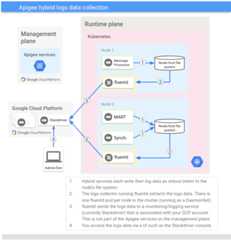
Each runtime plane service writes log data to stdout/stderr, andKubernetes writes this data to the host filesystem. A logscollector for hybrid runs on each hybrid node. Thecollector is aDaemonSet (replicated once and only once per node) whose job itis to collect the written log data and export it to theStackdriver Loggingapplication associated with your GCP account.
The following diagram shows the log data collection process:
Next steps
Except as otherwise noted, the content of this page is licensed under theCreative Commons Attribution 4.0 License, and code samples are licensed under theApache 2.0 License. For details, see theGoogle Developers Site Policies. Java is a registered trademark of Oracle and/or its affiliates.
Last updated 2026-02-18 UTC.