

GraphQL policy
This pageapplies toApigee andApigee hybrid.
View Apigee Edge documentation.
The GraphQL policy parses GraphQL payloads into message flow variables, verifies GraphQL requests against a schema, or both.
Use the GraphQL policy to:
- Ensure that your APIs only process requests that conform to the schema you provide.
- Impose restrictions on the payload by setting a maximum on the number of fragments allowed.
- Associate GraphQL with API products.
- Leverage the Oauth2, VerifyAPIKey, and Quota policy features, just as in REST.
GraphQL supports the following types of payloads:
- POST of graphQL payloads with
Content-Type : application/graphql - POST of graphQL payloads with
Content-Type: applcation/json - GET of graphQL payloads where the payload is a query parameter
application/json payloads of the form{"query": "...","operationName": "...","variables": { "myVariable": "someValue", ... }}operationName andvariables fields.For more information, see the following resources:
This policy is aStandard policy and can be deployed to any environment type. For information on policy types and availability with each environment type, seePolicy types.
SeeUsing GraphQL for an example that uses this policy.
Caution: Verifying the payload against the schema is generally an expensive operation, and we recommend considering this carefully when deciding whether to perform schema validation. Schema validation operations can be CPU intensive, especially when the payload and the schema are complex, and can result in significant latencies.Note: You can only provide one schema per policy. If you need to includemultiple schemas, add multiple GraphQL policies to your proxy.<GraphQL> element
Defines a<GraphQL> policy.
| Default value | SeeDefault Policy tab, below |
| Required? | Required |
| Type | TYPE |
| Parent Element | n/a |
| Child Elements | <Action><MaxDepth><MaxCount><MaxPayloadSizeInBytes><OperationType><Source><ResourceURL> |
Syntax
The<GraphQL> element uses the following syntax:
<GraphQLcontinueOnError="[false|true]"enabled="[true|false]"name="POLICY_NAME"><Source>request</Source><OperationType>[query|mutuation|all]</OperationType><MaxDepth>MAX_DEPTH</MaxDepth><MaxCount>MAX_NUMBER_OF_QUERIES</MaxCount>// [Start maxpayloadsize]<MaxPayloadSizeInBytes>MAX_PAYLOAD_SIZE_IN_BYTES</MaxPayloadSizeInBytes><Action>parse</Action><ResourceURL>PATH/TO/SCHEMA.xsd</ResourceURL></GraphQL>
Default Policy
The following example shows the default settings when you add a<GraphQL> policy to your flow in the Apigee UI:
<?xmlversion="1.0"encoding="UTF-8"standalone="yes"?><GraphQLname="GraphQLParser"><Source>request</Source><OperationType>query</OperationType><MaxDepth>10</MaxDepth><MaxCount>10</MaxCount><MaxPayloadSizeInBytes></MaxPayloadSizeInBytes><Action>parse</Action><ResourceURL></ResourceURL></GraphQL>
This element has the following attributes that are common to all policies:
| Attribute | Default | Required? | Description |
|---|---|---|---|
name | N/A | Required | The internal name of the policy. The value of the Optionally, use the |
continueOnError | false | Optional | Set tofalse to return an error when a policy fails. This is expected behavior for most policies. Set totrue to have flow execution continue even after a policy fails. See also: |
enabled | true | Optional | Set totrue to enforce the policy. Set tofalse toturn off the policy. The policy will not be enforced even if it remains attached to a flow. |
async | false | Deprecated | This attribute is deprecated. |
The following table provides a high-level description of the child elements of<GraphQL>:
| Child Element | Required? | Description |
|---|---|---|
| Common operations | ||
<Action> | Optional | Specifies the action to take for a request:parse,verify, orparse_verify (both). |
<MaxCount> | Optional | The maximum number of queries or fragments that a GraphQL request can spawn. The default value is 10. |
<MaxDepth> | Optional | The maximum depth of the tree for the query. The default value is 4. |
<MaxPayloadSizeInBytes> | Optional | The maximum size of a payload in kilobytes. |
<OperationType> | Required | Specifies the type of request that can be parsed:query,mutation, orquery_mutation (either). |
<ResourceURL> | Optional | DESCRIPTION. The location of the GraphQL schema file. |
<Source> | Required | request |
Each of these child elements is described in the sections that follow.
Child element reference
This section describes the child elements of<GraphQL>.
<Action>
Action represents one of the following GraphQL actions:
parse: Apigee parses the GraphQL payload into message flow variables. SeeExamples of message flow variable representations for an explanation of the variables that are set whenActionis set toparse. This can save valuable CPU time in the backend. Note thatverifyalso parses the payload.verify: Apigee verifies that the GraphQL payload conforms to the schema uploaded to the proxy.parse_verify: Apigee parses and verifies the GraphQL request.
| Default value | parse |
| Required? | Optional |
| Type | String |
| Parent Element | <GraphQL> |
| Child Elements | none |
The<Action> element uses the following syntax:
Syntax
<GraphQL continueOnError="[false|true]" enabled="[true|false]" name="POLICY_NAME" > <Action>parse</Action></GraphQL>
<MaxCount>
The maximum number of fragments that can be in the payload. You can use this to prevent the GraphQL back-end server of the customer from executing highly complex queries, forcing clients to break their logic in to smaller payloads.
| Default value | 10 |
| Required? | Optional |
| Type | String |
| Parent Element | <GraphQL> |
| Child Elements | none |
The<MaxCount> element uses the following syntax:
Syntax
<GraphQL continueOnError="[false|true]" enabled="[true|false]" name="POLICY_NAME" > <MaxCount>MAX_NUMBER_OF_QUERIES</MaxCount></GraphQL>
<MaxDepth>
The maximum depth of the query, when represented as a tree.MaxDepth allows you to block deep queries in the payload, so that Apigee does not need to create very large flow variables to hold the values. However, the payload is sent as is, regardless of the value ofMaxDepth. The default value is 10.
MaxDepth works when theAction element isset toparse orparse-verify. It's a good practice to useMaxDepth with these actions to check for depth instead of using the morecostlyverify action.| Default value | 10 |
| Required? | Optional |
| Type | Integer |
| Parent Element | <GraphQL> |
| Child Elements | none |
The<MaxDepth> element uses the following syntax:
Syntax
<GraphQL continueOnError="[false|true]" enabled="[true|false]" name="POLICY_NAME" > <MaxDepth>MAX_DEPTH</MaxDepth></GraphQL>
<MaxPayloadSizeInBytes>
The maximum size of a payload in kilobytes. You can use this to limit the payload size, to avoid performance issues.
Note: IfMaxPayloadSizeInByte is not provided in the policy, no size restriction is enforced.
| Default value | request |
| Required? | Optional |
| Type | String |
| Parent Element | <GraphQL> |
| Child Elements | none |
The<MaxPayloadSizeInBytes> element uses the following syntax:
Syntax
<GraphQLcontinueOnError="[false|true]"enabled="[true|false]"name="POLICY_NAME"><MaxPayloadSizeInBytes>MAX_PAYLOAD_SIZE_IN_BYTES</MaxPayloadSizeInBytes></GraphQL>
<OperationType>
Indicates the type of request that can be parsed:
query: A GraphQL query.mutation: A GraphQL mutationquery_mutation: A GraphQL query or a mutation.
If the scope isquery, and a mutation request is passed, the request fails and returns a4xx error.
| Default value | query |
| Required? | Optional |
| Type | String |
| Parent Element | <GraphQL> |
| Child Elements | none |
The<OperationType> element uses the following syntax:
Syntax
<GraphQL continueOnError="[false|true]" enabled="[true|false]" name="POLICY_NAME" > <OperationType>[query|mutation|query_mutation]</OperationType></GraphQL>
<ResourceURL>
The path to the GraphQL schema file that the GraphQL policy verifies requests against. SeeExample for an example of uploading a GraphQL schema to Apigee.
If the name of your uploaded schema file ismy-schema.graphql, then the<ResourceURL> element would be
<ResourceURL>graphql://my-schema.graphql</ResourceURL>
| Default value | n/a |
| Required? | Optional |
| Type | String |
| Parent Element | <GraphQL> |
| Child Elements | none |
TheResourceURL element uses the following syntax:
Syntax
<GraphQL continueOnError="[false|true]" enabled="[true|false]" name="POLICY_NAME" > <ResourceURL>PATH/TO/SCHEMA.graphql</ResourceURL></GraphQL>
<Source>
Source on which this policy executes.
Note: The source should be the raw graphql query string, rather than a graphql query wrapped in JSON.| Default value | request |
| Required? | Optional |
| Type | String |
| Parent Element | <GraphQL> |
| Child Elements | none |
The<Source> element uses the following syntax:
Syntax
<GraphQL continueOnError="[false|true]" enabled="[true|false]" name="POLICY_NAME" > <Source>request</Source></GraphQL>
GraphQL Parser
The graphQL parser supports all features of a graphQL query and represents it as a graph in the message flow dotted notation. A query can comprise of operation definition and optionally fragments identified as fragment definitions. See theGraphQL specification.
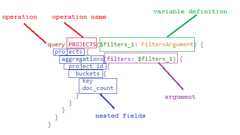
Anatomy of a graphQL request
The diagram below shows the anatomy of a graphQL request.
Representation in message flow of operation definitions
The parser implementation covers all aspects ofgraphQL syntax, including support for query and mutations. SeeMessage flow variable.
The message flow variables follows this convention:
graphql.(root-index).(root definition)[(sub-indices).(child-definitions)…]
where:
graphql: Static prefix indicating this is graphQL related message flow variablesroot-Index: based index indicating the root level query definitions index (default up to 4 per request)root-definition: Root level graphQL request message body, args, its valuessub-indices: Child indiceschild-definitions: Leaf level definitions that correlate to specific fields and its values
Representation in message flow variable of operation definitions
| Fields in message | Type | Description |
|---|---|---|
| name | String | Name of the graphQL operation. Note that this name is unrelated to the name in message flow. |
| definition | String - Operation | Indicates that this contains the main message body of the query request |
| operationType | query or mutation | The type of operation being performed. |
| variableDefinition | Integer | They work just like the argument definitions for a function in a typed language. It lists all of the variables, prefixed by $, followed by their type. |
| directives | Integer | @include and @skip are the two directives currently offered, that can filter based on dynamically passed values. |
| selectionSet | Integer | One level logical grouping of all attributes associated with an object. |
Representation in message flow of fragment definitions
| Message Flow Variable Name | Type | Description |
|---|---|---|
| name | String | Name of the fragment. |
| definition | String- fragment | Indicates that the body of the request is a fragment to the main request. |
| typeCondition | String | The condition under which the fragment gets invoked. |
| variableDefinition | Integer | The variables definition passed as arguments to the fragment. |
Examples of message flow variable representations
The following examples show the message flow variable representations for sample request payloads.
Sample query 1
This example shows a query made with arguments passed as input, which queries for three attributes for employees.
{ employee(id: 123) { id firstName lastName }}The table shows the corresponding message flow variable representations.
| Message flow variable | Value |
|---|---|
graphql.operation.operationType | QUERY |
graphql.fragment.count | 1 |
graphql.operation.selectionSet.count | 1 |
graphql.operation.variableDefinitions.count | 0 |
graphql.operation.selectionSet.1.name | employee |
graphql.operation.selectionSet.1.argument.count | 1 |
graphql.operation.selectionSet.1.argument.1.name | id |
graphql.operation.selectionSet.1.argument.1.value | IntValue{value=123} |
graphql.operation.selectionSet.1.directive.count | 0 |
graphql.operation.selectionSet.1.selectionSet.count | 3 |
graphql.operation.selectionSet.1.selectionSet.1.name | id |
graphql.operation.selectionSet.1.selectionSet.2.name | firstName |
graphql.operation.selectionSet.1.selectionSet.3.name | lastName |
Sample query 2
This example shows a query made with arguments passed as input, which queries for the names of friends.
query Characters($episode: Episode, $withFriends: Boolean!) { friends @include(if: $withFriends) { friendsName }}The table below shows the corresponding message flow variable representations.
| Message flow variable | Value |
|---|---|
graphql.operation.operationType | QUERY |
graphql.operation.selectionSet.count | 1 |
graphql.operation.name | Characters |
graphql.fragment.count | 0 |
graphql.operation.selectionSet.1.name | friends |
graphql.operation.variableDefinitions.count | 2 |
graphql.operation.variableDefinitions.1.name | episode |
graphql.operation.variableDefinitions.1.type | TypeName{name='Episode'} |
graphql.operation.variableDefinitions.2.name | withFriends |
graphql.operation.variableDefinitions.2.type | NonNullType{type=TypeName{name='Boolean'}} |
graphql.operation.selectionSet.1.argument.count | 0 |
graphql.operation.selectionSet.1.selectionSet.count | 1 |
graphql.operation.selectionSet.1.selectionSet.1.name | friendsName |
graphql.operation.selectionSet.1.directive.count | 1 |
graphql.operation.selectionSet.1.directive.1.argument.1.name | if |
graphql.operation.selectionSet.1.directive.1.argument.1.value | VariableReference{name='withFriends'} |
Sample query 3
This example has a variable definition with alias.
query getUsers { admins: users(role: ADMIN) { lastName } accountants: users(role: ACCOUNTANT) { firstName }}The table below shows the corresponding message flow variable representations.
| Message flow variable | Value |
|---|---|
graphql.operation.operationType | QUERY |
graphql.operation.selectionSet.count | 2 |
graphql.operation.selectionSet.1.name | users |
graphql.operation.selectionSet.1.alias | admins |
graphql.operation.variableDefinitions.count | 0 |
graphql.operation.selectionSet.1.argument.count | 1 |
graphql.operation.selectionSet.1.argument.1.name | role |
graphql.operation.selectionSet.1.argument.1.value | EnumValue{name='ADMIN'} |
graphql.operation.selectionSet.1.argument.2.name | null |
graphql.operation.selectionSet.1.argument.2.value | null |
graphql.operation.selectionSet.1.selectionSet.count | 1 |
graphql.operation.selectionSet.1.selectionSet.count | 1 |
graphql.operation.selectionSet.1.selectionSet.1.name | lastName |
graphql.operation.selectionSet.1.selectionSet.1.alias | null |
graphql.operation.selectionSet.1.selectionSet.2.name | null |
graphql.operation.selectionSet.1.selectionSet.2.alias | null |
graphql.operation.selectionSet.1.directive.count | 0 |
graphql.operation.selectionSet.1.directive.1.argument.1.name | null |
graphql.operation.selectionSet.1.directive.1.argument.1.value | null |
graphql.operation.selectionSet.2.name | users |
graphql.operation.selectionSet.2.alias | accountants |
graphql.operation.selectionSet.2.argument.count | 1 |
graphql.operation.selectionSet.2.argument.1.name | role |
graphql.operation.selectionSet.2.argument.1.value | EnumValue{name='ACCOUNTANT'} |
graphql.operation.selectionSet.2.selectionSet.count | 1 |
graphql.operation.selectionSet.2.selectionSet.1.name | firstName |
graphql.operation.selectionSet.2.directive.count | 0 |
graphql.operation.selectionSet.2.selectionSet.1.alias | null |
graphql.operation.selectionSet.2.selectionSet.2.name | null |
graphql.operation.selectionSet.2.selectionSet.2.alias | null |
graphql.operation.selectionSet.2.directive.count | 0 |
Related topics
Except as otherwise noted, the content of this page is licensed under theCreative Commons Attribution 4.0 License, and code samples are licensed under theApache 2.0 License. For details, see theGoogle Developers Site Policies. Java is a registered trademark of Oracle and/or its affiliates.
Last updated 2025-12-17 UTC.