

JavaScript object model
This pageapplies toApigee andApigee hybrid.
View Apigee Edge documentation.
This topic discusses the Apigee JavaScript Object Model. It's important to understand this model if you intend to use the JavaScript policy to add custom JavaScript to an API proxy.
About the JavaScript object model
The JavaScript object model defines objects with associated properties that are available to JavaScript code executing within an Apigee proxy flow. Use the JavaScript policy to attach this custom code to an API proxy flow.
The objects defined by this model havescope within the API proxy flow, which means that certain objects and properties are available only at specific points in the flow. When your JavaScript is executed, a scope is created for the execution. In that scope, these object references are created:
- context: An object that provides access to message context
- request: A shorthand that allows access to the request object
- response: A shorthand that allows access to the response object
- crypto: Provides various hash functions
- print: A function to emit output
- properties: Allows read access to the configuration properties on the policy
The context object
Thecontext object has global scope. It is available everywhere within the API proxy flow. It has four child objects:proxyRequest,proxyResponse,targetRequest,targetResponse. These child objects are scoped to the ambient request and response, either the proxy request and response or the target request and response. For example, if the JavaScript policy executes in the proxy endpoint part of the flow, then thecontext.proxyRequest andcontext.proxyResponse objects are in scope. If the JavaScript runs in a target flow, then thecontext.targetRequest andcontext.targetResponse objects are in scope.
Thecontext object also has properties and methods, which are described in detail in this topic. For example, the following JavaScript code example uses thecontext.flow property and calls the get/setVariable() methods oncontext.
if(context.flow=="PROXY_REQ_FLOW"){varusername=context.getVariable("request.formparam.user");context.setVariable("USER.name",username);}
These methods interact directly withflow variables. Thecontext.flow property value is the current flow scope. In the proxy request flow, it's set to the constantPROXY_REQ_FLOW. If in the target response flow, it's set toTARGET_RESP_FLOW. This constant is handy for executing scope-specific code. The getter lets you get flow variables and the setter lets you set flow variables. These variables are generally available in the proxy flow and can be consumed by other policies.
Seecontext object reference for more details and examples.
The crypto object
The crypto object adds basic, high performance cryptographic support to the JavaScript Object Model. Seecrypto object reference for more details and examples.
The request and response objects
Therequest andresponse objects areshorthand references to the ambient request and response, either the proxy request and response or the target request and response. The objects these variables refer to depend upon the context in which the JavaScript policy executes. If the JavaScript runs in the flow of a proxy endpoint, then the request and response variables refer tocontext.proxyRequest andcontext.proxyResponse. If the JavaScript runs in a target flow, then the variables refer to thecontext.targetRequest andcontext.targetResponse.
The print() function
The JavaScript object model includes a print() function that you can use to output debug information to the Apigee Debug tool. SeeDebug with JavaScript print() statements.
The properties object
When using aProperties element in the policy configuration, the JavaScript code can access the values of those properties using theproperties variable.
For example, if your JavaScript configuration contains:
<Javascriptname='JS-1'><Properties><Propertyname="number">8675309</Property><Propertyname="firstname">Jenny</Property></Properties><ResourceURL>jsc://my-code.js</ResourceURL></Javascript>
Then inmy-code.js, you can:
print(properties.firstname);// prints Jennyprint(properties.number);// 8675309
More practically, configuration can allow the code to behave differently when run in different environments, at different moments, or for any reason.
For example, the following specifies the "variable name" and the style of output that the JavaScript should emit information into:
<Javascriptname='JS-2'><Properties><Propertyname="output">my_output_variable</Property><Propertyname="prettyPrint">true</Property></Properties><ResourceURL>jsc://emit-results.js</ResourceURL></Javascript>
emit-results.js, the code could do this:varresult={prop1:"something",prop2:"something else"};if(properties.prettyPrint=="true"){context.setVariable(properties.output,JSON.stringify(result,null,2));}else{context.setVariable(properties.output,JSON.stringify(result));}
crypto object reference
The crypto object lets you perform basic cryptographic hashing functions in JavaScript.
Note: The crypto functions support hashing only -- there is no support for 2-way encryption.The crypto object has global scope. It is available everywhere within the API proxy flow. Crypto lets you work with these hash objects:
- SHA-1
- SHA256
- SHA512
- MD5
Working with SHA-1 objects
You can create SHA-1 objects, update them, and convert them to hex and base64 values.
Create a new SHA-1 object
var_sha1=crypto.getSHA1();
Update an SHA-1 object
Syntax
_sha1.update(value);
Parameters
- value - (String) Any string value.
Example
Update an SHA-1 object:
_sha1.update("salt_value");_sha1.update("some text");
Return the SHA-1 object as a hex string
var_hashed_token=_sha1.digest();
Return the SHA-1 object as a base64 string
var_hashed_token=_sha1.digest64();
Working with SHA-256 objects
You can create SHA-256 objects, update them, and convert them to hex and base64 values.
Create a new SHA-256 object
var_sha256=crypto.getSHA256();
Update an SHA-256 object
Syntax
_sha256.update(value);
Parameters
- value - (String) Any string value.
Example
Update an SHA-256 object:
_sha256.update("salt_value");_sha256.update("some text");
Return the SHA-256 object as a hex string
var_hashed_token=_sha256.digest();
Return the SHA-256 object as a base64 string
var_hashed_token=_sha256.digest64();
Working with SHA-512 objects
You can create SHA-512 objects, update them, and convert them to hex and base64 values.
Create a new SHA-512 object
var_sha512=crypto.getSHA512();
Update an SHA-512 object
Syntax
_sha512.update(value);
Parameters
- value - (String) Any string value.
Example
Update an SHA-512 object:
_sha512.update("salt_value");_sha512.update("some text");
Return the SHA-512 object as a hex string
var_hashed_token=_sha512.digest();
Return the SHA-512 object as a base64 string
var_hashed_token=_sha512.digest64();
Working with MD5 objects
You can create MD5 objects, update them, and convert them to hex and base64 values.
Create a new MD5 object
var_md5=crypto.getMD5();
Update an MD5 object
Syntax
_md5.update(value);
Parameters
- value - (String) Any string value.
Example
Update an MD5 object:
_md5.update("salt_value");_md5.update("some text");
Return the MD5 object as a hex string
var_hashed_token=_md5.digest();
Return the MD5 object as a base64 string
var_hashed_token=_md5.digest64();
Crypto date/time support
The crypto object supports date/time formatting patterns.
crypto.dateFormat()
Returns a date in string format.
Syntax
crypto.dateFormat(format,[timezone],[time])
Parameters
- format - (String) The underlying implementation for this parameter isjava.text.SimpleDateFormat. For example: 'YYYY-MM-DD HH:mm:ss.SSS'
- timezone - (String, optional) The underlying implementation for this parameter isjava.util.TimeZone. This parameter is the sameDefault: UTC
- time - (Number, optional) A Unix timestamp value to format. Default: current time
Examples
Note: Thejava.text.SimpleDateFormat documentation provides a complete list of all of the date/time formatting characters and character combinations, as well as detailed examples.Get the current time, down to milliseconds:
var_now=crypto.dateFormat('YYYY-MM-DD HH:mm:ss.SSS');
Get the current time for the Pacific Time Zone:
var_pst=crypto.dateFormat('YYYY-MM-DD HH:mm:ss.SSS','PST');
Get the value of ten seconds from now:
var_timeNow=Number(context.getVariable('system.timestamp'));vartenSeconds=crypto.dateFormat('YYYY-MM-DD HH:mm:ss.SSS','PST',_timeNow+10*1000);
Additional examples. See also thejava.text.SimpleDateFormat documentation.
var_pst=crypto.dateFormat('M');
var_pst=crypto.dateFormat('EEE, d MMM yyyy HH:mm:ss Z');
var_pst=crypto.dateFormat("yyyy-MM-dd'T'HH:mm:ss.SSSZ");
Secure SOAP documents using WS-Security with X.509 certificates
Secure SOAP documents using WS-Security with RSA/X.509 digital signature.
crypto.wsSecRsaSign()
Signs the SOAP document and returns the signed payload.
Syntax
crypto.wsSecRsaSign(payload,options)
Parameters
- payload - (String) SOAP document to sign.
- options - (Object) Configuration options for the digital signature. The following table lists the available configuration options. All option values can be literal strings or message templates, indicated by using the template characters
'{'and'}'.Name Required? Description certificateRequired Certificate matching the private key in PEM format. private_keyRequired Flow variable containing the private key in PEM format. c14_inclusive_elementsOptional Comma-separated list of namespace URIs (not prefixes) used to add an InclusiveElementselement to theCanonicalizationMethodelement.confirmationOptional One of the following: - List of signature values in
SignatureConfirmationelements to be signed. If aSignatureConfirmationelement with the specified value is not present, it will be injected. \*all\*string that indicates that any existingSignatureConfirmationelements in the source document will be signed.- Empty string that indicates to inject an empty
SignatureConfirmationelement.
elements-to-sign.digest_methodOptional Digest algorithm. Valid values are sha1orsha256. Defaults tosha256.ds_prefixOptional Simple string to be used as the prefix for the namespace. elements_to_signOptional Array of XPath expressions for elements to sign (such as, ["soapenv:Body"]).expiryOptional Values to inject in the Expireselement of theTimestamp. Enter values like 120s, 10m, and 4d to indicate 120 seconds, 10 minutes, and 4 days. Defaults to no expiration.ignore_security_header_placementOptional Boolean value that specifies whether to check the placement of any existing Securityheader in the unsigned payload. Provided for compatibility with some legacy systems. Setting totrueis not recommended because it can expose your API to signature wrapping attacks. Defaults tofalse.issuer_name_styleOptional Format of the issuer name. Valid values are CNorDN.key_identifier_typeOptional Key identifier type. Valid values are BinarySecurityToken,BST_DIRECT_REFERENCE,ISSUER_SERIAL,RSA_KEY_VALUE,THUMBPRINT,andX509_CERT_DIRECT. Defaults toBinarySecurityToken.private_key_passwordOptional Password key, if the private key is encrypted. signing_methodOptional Method used for signing. Valid values are rsa-sha1orrsa-sha256. Defaults torsa-sha1; however, setting torsa-sha256is highly recommended.soap_versionOptional SOAP version. Valid versions are 1.1 and 1.2. Defaults to 1.1. transform_inclusive_elementsOptional Comma-separated list of namespace URIs (not prefixes) used to add an InclusiveElementselement to theTransformelement. - List of signature values in
Example
The following example shows how to sign a SOAP document. It assumes that the private key and certificate are loaded into flow variables.
varsigned=crypto.wsSecRsaSign(request.content,{'private_key':'{private.key.pem}',// Flow variable name'certificate':'{public.cert.pem}',// Flow variable name'elements_to_sign: 'wsu:Timestamp,soap:Body,wsa:To,wsa:MessageID', 'signing_method': 'rsa-sha256', 'digest_method': 'sha256', expires_in':'180s'});
Validate SOAP documents using WS-Security with X.509 certificates
Validates the digital signature for a SOAP document using WS-Security with RSA/X.509. Gaambo performs validation to ensure that the arguments passed are valid.
crypto.wsSecRsaValidate()
Validates the digital signature for a SOAP document.
Syntax
crypto.wsSecRsaValidate(payload,options)
Parameters
- payload - (String) SOAP document with digital signature to validate.
- options - (Object) Configuration options for validation. The following table lists the available configuration options. All option values can be literal strings or message templates, indicated by using the template characters
'{'and''}'.Name Required? Description accept_subject_cnsOptional Comma-separated list of common names (CNs) for the subject that are acceptable signers. If any signature is from a CN that doesn't match one of the CNs specified, the verification fails. accept_thumbprintsOptional Comma-separated list of SHA-1 thumbprints of the certs that are acceptable signers. If any signature is from a cert that has a thumbprint that doesn't match one of the thumbprints specified, the verification fails. Specify only one of accept-thumbprintsoraccept-thumbprints-256. At least one of these options is required if thecertificateoption isn't provided.accept_thumbprints_256Optional Comma-separated list of SHA-256 thumbprints of the certs that are acceptable signers. If any signature is from a cert that has a thumbprint that doesn't match one of the thumbprints specified, the verification fails. Specify only one of accept-thumbprintsoraccept-thumbprints-256. At least one of these options is required if thecertificateoption isn't provided.certificateOptional Certificate that provides the public key to verify the signature. Required and used only if KeyInfoin the signed document doesn't explicitly provide the certificate.digest_methodOptional Supported digest method. Valid values are sha1orsha256. If omitted, the digest method isn't checked.ignore_certificate_expiryOptional Boolean value that specifies whether to ignore the validity dates on the provided certificate. Useful for testing. Defaults to false.ignore_expiryOptional Boolean value that specifies whether to ignore the Timestamp/Expiresfield when evaluating validity of the SOAP document. Defaults tofalse.ignore_security_header_placementOptional Boolean value that specifies whether to check the placement of the security header in the signed payload. Provided for compatibility with some legacy systems. Setting this to trueis not recommended because it can expose APIs to signature wrapping attacks. Defaults tofalse.issuer_name_dn_comparisonOptional Method yo use to determine whether two issuer names refer to the same entity. Applies only if the signed document includes KeyInfothat wrapsX509IssuerSerialand theissuer-name-styleisDN(the default). Value can be one of {string,normal,reverse,unordered}. Defaults tostring.issuer_name_dn_comparison_exclue_numeric_oidsOptional Method used to determine whether the two issuer names refer to the same entity. Applies only if the signed document includes KeyInfothat wrapsX509IssuerSerialand theissuer-name-styleisDN(the default), and theissuer-name-dn-comparisonis set tonormal,reverse, orunordered.issuer_name_styleOptional Format of the issuer name. Used only if the signed document includes a KeyInfothat wrapsX509IssuerSerial. Valid values includeCNorDN.max_lifetimeOptional Maximum lifetime of the signed document. Enter a value like 120s, 10m, and 4d to indicate 120 seconds, 10 minutes, and 4 days. This option requires the Timestampto include aCreatedand anExpireselement. Default to no maximum lifetime.require_expiryOptional Boolean value that specifies whether to required an expiry in the timestamp. We recommend that this value remain set to true. Defaults totrue.required_sign_elementsOptional Comma-separated or space-separated list of prefix:Tagforms indicating the elements that must be signed. Defaults tosoap:Body, wsu:Timestamp. To require only a signature on the timestamp and not the body when validating, set this towsu:Timestamp. To require only a signature on the body and not the timestamp when validating, set this tosoap:Body. The prefix and tag are case sensitive. We recommend leaving this value set to the default unless you have a specific reason to change it.signing_methodOptional Signing method that must match the signing method in the signed document. Valid values are rsa-sha1orrsa-sha256. If omitted, the signing method isn't checked.
Example
The following example shows how to validate the signed SOAP-based API. If the signature is invalid the flow variablewssec_error will be populated with the specific error.
VarisValid=crypto.wsSecRsaValidate(request.content,{MaxLifetime:'300s',RequiredSignedElements:['//*[local-name()=\'Body\']'],IgnoreCertificateExpiry:false,TrustStore:'{truststore.pem}'// Flow variable with trusted certs});if(!isValid){throw"invalid"}
Use getHash() to get any of the supported hash objects
Examples
var_hash1=crypto.getHash('MD5');var_hash2=crypto.getHash('SHA-1');var_hash3=crypto.getHash('SHA-256');var_hash4=crypto.getHash('SHA-512');
Sample with crypto
try{// get values to use with hash functionsvarsalt=context.getVariable("salt")||'SomeHardCodedSalt';varhost=context.getVariable("request.header.Host");varunhashedToken="";var_timeNow=Number(context.getVariable('system.timestamp'));varnow=crypto.dateFormat('YYYY-MM-DD HH:mm:ss.SSS','PST',_timeNow);unhashed_token="|"+now+"|"+host// generate a hash with the unhashedToken:varsha512=crypto.getSHA512();sha512.update(salt);sha512.update(unhashedToken);// convert to base64varbase64Token=sha512.digest64();// set headerscontext.setVariable("request.header.now",now);context.setVariable("request.header.token",base64Token);}catch(e){throw'Error in Javascript';}
context object reference
Acontext object is created for each request/response transaction executed by an API proxy. Thecontext object exposes methods to get, set, and remove variables related to each transaction.
Variables define properties specific to a transaction. The time of day, the locale of the requesting client, the user-agent of the requesting client, and the URL of the target service are all examples of variables that are available in thecontext. Therefore,context is useful for building logic that relies on these properties to execute custom behavior.
SeeFlow variables reference andExtractVariables policy.
context object summary
This table briefly describes the context object and its children, and lists the properties that are bound to each.
| Name | Description | Properties |
|---|---|---|
context | A wrapper for the message processing pipeline context and the request and response Flows that are executed by the ProxyEndpoint and TargetEndpoint. | flow, session |
context.proxyRequest | An object that represents the inbound request message to the ProxyEndpoint (from the requesting app to the API proxy) | headers, query parameters, method, body, url |
context.targetRequest | An object that represents the outbound request message from the TargetEndpoint (from the API proxy to the backend service). | headers, query parameters, method, body, url |
context.targetResponse | An object that represents the inbound target response message (from the backend service to the API proxy) | headers, content, status |
context.proxyResponse | An object that represents the outbound proxy response message (from the API proxy to the requesting app) | headers, content, status |
context.flow | The name of the current flow. | Seecontext.flow. |
context.session | A map of name/value pairs that you can use to pass objects between two different steps executing in the same context. For example:context.session['key'] = 123. | For more information on when and when not to use this object, seeWhat is the difference between context.session['hello'] = {} and context.setVariable("hello", {}). |
context object methods
context.getVariable()
Retrieves the value of a pre-defined or custom variable.
Syntax
context.getVariable("variable-name");
Example
To get the value for the current year:
varyear=context.getVariable('system.time.year');
context.setVariable()
Sets the value for a custom variable or for anywritablepre-defined variables.
Syntax
context.setVariable("variable-name",value);
Example
A common scenario for setting a variable is when an API proxy must dynamically write the target URL. The following JavaScript obtains the value of a variable called , appends that value as a query parameter to the URLhttp://mocktarget.apigee.net?user=, and then sets the pre-definedtarget.url to that value.
context.setVariable("target.url","http://mocktarget.apigee.net/user?user="+context.getVariable("USER.name"));
context.removeVariable()
Removes a variable from the context.
Syntax
context.removeVariable('variable-name');
context object properties
Theflow property is a string that identifies the current API proxy flow. This property is used to indicate the Flow to which the JavaScript is attached. Supported values are:
PROXY_REQ_FLOWPROXY_RESP_FLOWTARGET_REQ_FLOWTARGET_RESP_FLOW
Each Flow name encompasses the PreFlow, PostFlow, and any conditional Flows defined in the ProxyEndpoint(s) or TargetEndpoint(s).
This optional property is useful when common JavaScript is executed in more than one Flow, but might vary its behavior depending on the Flow in which it executes. Use the Flow property for JavaScript modules intended to be reused in multiple API proxies, in which the code is required to check the current Flow before executing logic.
Example
Set an HTTP header only on the targetRequest Flow:
if(context.flow=="TARGET_REQ_FLOW"){context.targetRequest.headers['TARGET-HEADER-X']='foo';}
Set the content only on the proxyResponse Flow:
if(context.flow=="PROXY_RESP_FLOW"){context.proxyResponse.content='bar';}
A map of name/value pairs that can be used to pass objects between two policies executing within the same message context.
Note: It is important to understand the difference between usingcontext.session to get/set variables versus usingcontext.getVariable() andcontext.setVariable(). See this Apigee Community discussion for more details.Example
Set a value in the session:
context.session['key']=123;
Get the value from the session:
varvalue=context.session['key'];// 123
context.session object see theAsynchronous callout sample API proxy.context object children
As shown below, a complete API proxy Flow encompasses four distinct phases, each of which has an associated message object that is a child of the context object:
context.proxyRequest: The inbound request message received from the requesting client.context.targetRequest: The outbound request message sent to the backend service.context.proxyResponse: The outbound response message returned to the requesting client.context.targetResponse: The inbound request message received from the backend service.
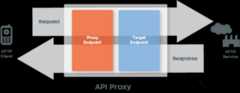
The following sections describe the methods and properties of these objects:
context.*Request child objects
For each HTTP transaction that executes in an API proxy, two request message objects are created: oneinbound (the request from the client) and oneoutbound (the request generated by the API proxy and submitted to the backend target.)
Thecontext object has child objects that represent these request messages:context.proxyRequest andcontext.targetRequest. These objects let you access properties within the request flow that is in scope when your JavaScript code executes.
request to access these properties in a request flow. Therequest object refers to eithercontext.proxyRequest orcontext.targetRequest, depending on where in the flow your JavaScript code executes.context.*Request child object properties
| Property name | Description |
|---|---|
url | The The complete URL of the request is composed of the following properties:
When getting
|
Examples: context.targetRequest.url='http://www.example.com/path?q1=1'context.targetRequest.protocol='https'; | |
headers | HTTP request headers as a mapping of |
Examples: For this HTTP request: POST/v1/blogsHTTP/1.1Host:api.example.comContent-Type:application/jsonAuthorization:BearerylSkZIjbdWybfs4fUQe9BqP0LH5Z will return the following values application/jsonBearerylSkZIjbdWybfs4fUQe9BqP0LH5Z | |
queryParams | The request message query parameters as a mapping of |
Examples: "?city=PaloAlto&city=NewYork"can be accessed as: context.proxyRequest.queryParams['city'];// == 'PaloAlto'context.proxyRequest.queryParams['city'][0]// == 'PaloAlto'context.proxyRequest.queryParams['city'][1];// == 'NewYork'context.proxyRequest.queryParams['city'].length();// == 2 | |
method | The HTTP verb (GET, POST, PUT, DELETE. PATCH, etc.) associated with the request |
Examples: For this request: POST/v1/blogsHTTP/1.1Host:api.example.comContent-Type:application/jsonAuthorization:BearerylSkZIjbdWybfs4fUQe9BqP0LH5Z The following #"true" translate="no" dir="ltr" is-upgraded syntax="JavaScript">context.proxyRequest.method; will return the following value POST | |
body | The message body (payload) of the HTTP request. The request body has the following members:
|
Examples: For an XML body: <customernumber='1'><name>Fred<name/><customer/> To access the elements of the XML object as follows: varname=context.targetRequest.body.asXML.name; To access XML attributes, use the varnumber=context.targetRequest.body.asXML.@number; For a JSON request body: {"a":1,"b":"2"} vara=context.proxyRequest.body.asJSON.a;// == 1varb=context.proxyRequest.body.asJSON.b;// == 2 To read form parameters: "vehicle=Car&vehicle=Truck"v0=context.proxyRequest.body.asForm['vehicle'][0];v1=context.proxyRequest.body.asForm['vehicle'][1]; |
context.*Response child objects
For each HTTP transaction the executes in an API proxy, two response message objects are created: oneinbound (the response from the backend service) and oneoutbound (the response sent back to the client.)
The context object has child objects that represent these response messages:context.proxyResponse andcontext.targetResponse. These objects let you access properties within the response flow that is in scope when your JavaScript code executes.
response to access these properties from a response flow. Theresponse object refers to eithercontext.proxyResponse orcontext.targetResponse, depending on where in the flow your JavaScript code executes.context.*Response object properties
| Property name | Description |
|---|---|
headers | The HTTP headers of the response message as a mapping of |
Example: varcookie=context.targetResponse.headers['Set-Cookie']; | |
status | The status code with status message as a property. Both status code and status message are available as properties. |
Example: varstatus=context.targetResponse.status.code;// 200varmsg=context.targetResponse.status.message;// "OK" | |
content | The HTTP body (payload content) of the response message. Response content has the following members: context.targetResponse.content.asXML;context.targetResponse.content.asJSON; |
Using .asXML notation
There is a handy way to walk through an XML document using the.asXML notation. This section describes how to use this notation, and how it differs fromrequest.content andcontext.proxyRequest.content.
For example:
request.content.asXML
or
context.proxyRequest.content.asXML
Both the*.content and*.content.asXML forms can be used in a string context, and JavaScript will coerce them to become strings. In the former case (*.content), the string includes all declarations as well as XML comments. In the latter case (*.content.asXML), the string value of the result is cleaned of declarations and comments.
Example
msg.content:
<?xmlversion="1.0"encoding="UTF-8"?><yahoo:errorxmlns:yahoo="http://yahooapis.com/v1/base.rng"xml:lang="en-US"><yahoo:description>Pleaseprovidevalidcredentials.OAuthoauth_problem="unable_to_determine_oauth_type",realm="yahooapis.com"</yahoo:description></yahoo:error><!--mg023.mail.gq1.yahoo.comuncompressed/chunkedSatDec1401:23:35UTC2013-->
msg.content.asXML:
<?xmlversion="1.0"encoding="UTF-8"?><yahoo:errorxmlns:yahoo="http://yahooapis.com/v1/base.rng"xml:lang="en-US"><yahoo:description>Pleaseprovidevalidcredentials.OAuthoauth_problem="unable_to_determine_oauth_type",realm="yahooapis.com"</yahoo:description></yahoo:error>
Furthermore, you can use the.asXML form to traverse the XML hierarchy, by specifying the names of elements and attributes. It is not possible to traverse the hierarchy using the other syntax.
Debug with JavaScript print() statements
If you're using the JavaScript policy to execute custom JavaScript code, note that you can use the print() function to output debug information to theDebug tool. This function is available directly through the JavaScript object model. For example:
if(context.flow=="PROXY_REQ_FLOW"){print("In proxy request flow");varusername=context.getVariable("request.queryparam.user");print("Got query param: "+username);context.setVariable("USER.name",username);print("Set query param: "+context.getVariable("USER.name"));}if(context.flow=="TARGET_REQ_FLOW"){print("In target request flow");varusername=context.getVariable("USER.name");varurl="http://mocktarget.apigee.net/user?"context.setVariable("target.url",url+"user="+username);print("Callout to URL: ",context.getVariable("target.url"));}
To see the output, selectOutput from all transactions at the bottom of the Debug window. You can also find output in the Debug property calledstepExecution-stdout.
Making JavaScript callouts with httpClient
UsehttpClient to make multiple, parallel, asynchronous HTTP requests to any URL from within custom JavaScript code executing in an API proxy flow. ThehttpClient object is exposed by theApigee Javascript object model.
About httpClient
ThehttpClient object is exposed to custom JavaScript code running on Apigee through the JavaScript object model. To attach custom JavaScript to an API proxy, you use theJavaScript policy. When the policy runs, the custom JavaScript code executes.
ThehttpClient object is useful for developing composite services or mashups. For example, you can consolidate multiple backend calls into a single API method.Note: One use case we don't recommend for theJavaScript policy is logging. TheMessageLogging policy is much better suited for logging to third-party logging platforms such as Splunk, Sumo, and Loggly, and you improve API proxy performance by executing theMessageLogging policy in the PostClientFlow, which executes after the response has been sent back to the client.
Here's a basic usage pattern. Instantiate a Request object, assign to it a URL (e.g., to a backend service you wish to call), and callhttpClient.send with that request object.
varmyRequest=newRequest();myRequest.url="http://www.example.com";varexchangeObj=httpClient.send(myRequest);
httpClient Reference
The HTTP Client exposes two methods:get() andsend().
httpClient.get()
A convenience method for simple HTTPGET requests, with no support for HTTP headers.
Usage
varexchangeObj=httpClient.get(url);
Returns
The method returns anexchange object. This object has no properties, and it exposes the following methods:
isError(): (Boolean) Returnstrueif the httpClient was unable to connect to the server. HTTP status codes4xxand5xxresult inisError()false, as the connection completed and a valid response code was returned. IfisError()returnstrue, then a call togetResponse()returns the JavaScriptundefined.isSuccess(): (Boolean) Returnstrueif the send was complete and successful.isComplete(): (Boolean) Returnstrueif the request is complete.waitForComplete(): Pauses the thread until the request is complete (by success or error).Antipattern:Use ofwaitForCompleteis not recommended and is considered to be an antipattern. We recommend using callbacks instead. For details, seeAntipattern: Use waitForComplete() in JavaScript code.getResponse(): (object) Returns the response object if thehttpClient.send()was complete and successful. The returned object has the identical methods and properties as the context.proxyResponse object. Seecontext object summary.getError(): (string) If the call tohttpClient.send()resulted in an error, returns the error message as a string.
Example
Send a fully configured Request object containing the properties of the HTTP request. Use a non-blocking callback to process the response.
Note:Use of callbacks to asynchronously process responses is a recommended best practice. The use of thewaitForComplete() function isnot recommended and is considered an antipattern. See alsoAntipattern: Use waitForComplete() in JavaScript code.// Add the required the headers for making a specific API requestvarheaders={'X-SOME-HEADER':'some value'};// Make a GET API request along with headersvarmyRequest=newRequest("http://www.example.com","GET",headers);// Define the callback function and process the response from the GET API requestfunctiononComplete(response,error){// Check if the HTTP request was successfulif(response){context.setVariable('example.status',response.status);}else{context.setVariable('example.error','Woops: '+error);}}// Specify the callback Function as an argumenthttpClient.get(myRequest,onComplete);
Using the JavaScript policy
Use the JavaScript policy to attach custom JavaScript code to a proxy flow. See JavaScript policy.
Related topics
Except as otherwise noted, the content of this page is licensed under theCreative Commons Attribution 4.0 License, and code samples are licensed under theApache 2.0 License. For details, see theGoogle Developers Site Policies. Java is a registered trademark of Oracle and/or its affiliates.
Last updated 2025-12-15 UTC.