

Developer portal solutions
This pageapplies toApigee andApigee hybrid.
View Apigee Edge documentation.
As an API provider, you have developed a set of APIs to provide access to your backend services. Your next step is to build yourdeveloper portal to enable app developers to:
- Learn about your data and service offerings
- Learn how to use your APIs by reviewing comprehensive documentation, including example use case, tutorials, and reference documentation
- Register using a self-service process in order to build apps that use your APIs
Apigee supports several developer portal solutions, summarized in the following table, ranging from simple turn-key to fully customizable and extensible. When choosing a solution, you need to balance your customization requirements against the time and knowledge required to implement your portal.
| Apigee solution | Features | Hosted by Apigee? | Support (Requires licensed subscription) |
|---|---|---|---|
| Apigee integrated portal | Simple self-service portal development. | Yes | Apigee 24/7 support |
| Drupal 10 modules | Fully customizable option, based on a powerful, open source CMS integrated with Apigee using modules. | No | Apigee 24/7 support forbreak-fix issues |
| Do-it-yourself (DIY) | Fully customizable portal development using Apigee APIs. | No | Apigee 24/7 support for Apigee APIs only |
Choose your developer portal solution
To help you decide which developer portal solution to choose, consider the following decision tree and review theComparison of developer portal features.
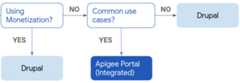
Consider building anApigee integrated portal if you plan to support common use cases for portal development, such as standard registration and app creation flows, and more stylistic than functional changes.
Comparison of developer portal features
The following table provides a comparison of features between the Apigeeintegrated portal and theDrupal-based developer portal.
Note: When building acustom developer portal using Apigee APIs, all features are do-it-yourself.| Feature | Integrated portal | Drupal |
|---|---|---|
| Portal content development using Markdown | ||
| Portal content development using HTML | ||
| API reference doc rendered from OpenAPI specifications | ||
| OpenAPI Specification version 3 support | ||
| Send live requests from your API reference | ||
| FedRAMP compliant | As a fully customizable, open-source CMS solution, it is possible to implement a Drupal portal that is FedRamp compliant. | |
| Custom theme | ||
| Custom menus | ||
| Third-party tags, like Google Analytics | ||
| Custom JavaScript code | ||
| Custom domain name | ||
| HTTPs enabled | ||
| Terms and conditions for account creation | ||
| Mobile device display optimization | ||
| Integration with custom scripts and script tags | ||
| SMTP configuration | ||
| Email template configuration | ||
| CAPTCHA to prevent spam | ||
| Roles and permissions for developer/consumer accounts | ||
| Federated login | ||
| Content management APIs | Using Drupal | |
| Monetization | ||
| Search configuration | * | |
| Blog and forums | ** | |
| Page templates for content creation | ||
| App analytics on the portal | ||
| Rules-based event management | ||
| Extensible with add-on modules | ||
| Custom app registration flows | ||
| Custom developer registration flows | ||
| Portal logs | ||
| Link checker | ||
| Microsoft Internet Explorer/Microsoft Edge support | Microsoft Edge only | |
| Regional hosting | us-west1 only | (As a custom solution, you can host a Drupal portal in the region or regions of your choice.) |
* At this time, the portal does provide a search solution out of the box; however, you can add aGoogle custom search engine to your portal.
** At this time, the portal isn't set up to include forums or blogs out-of-the-box; however, you can use services like Google Blogger, Google Groups, StackOverflow, or Medium, which have the advantage of being familiar to and already in use by many end users. (These services can be added using menus.)
Build an integrated portal
Create a lightweight developer portal quickly in the Apigee UI.
Go to theDistribution > Portals page in the Apigee in Cloud console:
For complete details, see Build your integrated portal.
The following figure shows the landing page for the integrated portal.

Build a Drupal-based portal
Using the Drupal portal development tools, you can build a fully customizable developer portal. Drupal provides a rich set of functionality and all the CMS capabilities of Drupal with additional Apigee-developed Drupal modules. However, implementing a Drupal-based portal requires more time and effort.
Apigee and hybrid support Drupal 10, which provides a reliable open-source, enterprise-level content management system (CMS). Because Drupal 10 is open-source, you can extend and contribute to the Drupal 10 portal development framework and leverage the knowledge of the Drupal community. For more information, seeBuild your portal using Drupal 10.
Build your own portal using Apigee APIs
Build your own, fully customized portal leveraging Apigee APIs summarized in the following table. For more information, refer to the sections outlined in the following table.
| Category | Apigee APIs | Description |
| Analytics | Stats | View analytics for your APIs. |
| API Keys | Developer App Keys | Manage API keys used to authorize the usage of APIs in apps. |
| API Products | API Products | Manage the API products that you publish to the developer portal. |
| Applications | Apps | Manage the applications registered by developers to consume your APIs. |
| Developers | Developers | Manage the developers that have registered on your developer portal. |
Simplify the integration of your portal client using theApigee Client Library for PHP. The SDK makes it easy to write PHP modules that use the Apigee APIs described in the previous table. For more information about the Apigee API Client Library for PHP, see:
Except as otherwise noted, the content of this page is licensed under theCreative Commons Attribution 4.0 License, and code samples are licensed under theApache 2.0 License. For details, see theGoogle Developers Site Policies. Java is a registered trademark of Oracle and/or its affiliates.
Last updated 2026-02-19 UTC.