

About environments and environment groups
This pageapplies toApigee andApigee hybrid.
View Apigee Edge documentation.
This section describes environments and environment groups.
Overview
An Apigeeenvironment is asoftware environment, within an organization, forcreating anddeploying API proxies. You must deploy an API proxy to an environment before it can be accessed. You can deploy an API proxy to a single environment or to multiple environments.
Each environment is subject to limits on the number of API proxies, shared flows, and other resources that can be deployed to it. These limits vary based on the Apigee organization type (Subscription, Pay-as-you-go, or hybrid) that uses the environment. For more detailed information, see theLimits documentation.
Anenvironment group (sometimes called anenvgroup in theApigee API) is the basic mechanism for defining the way requests are routed to individual environments. You define hostnames on your environment groups (not on individual environments), and Apigee routes requests to the environments within a group using those hostname definitions.
An environment must be a member of at least one environment group before you can access proxies deployed within it. In other words, you must assign an environment to a group before you can use it.
The logical grouping of environments by environment group provides the following benefits:
- Centralized hostname management: Environment groups provide a centralized place to manage hostnames.
- Aggregate insights: With groups, you can analyze errors by looking at reports for an entire environment group at once rather than individual environments.
- Conflict avoidance: By grouping environments, you can ensure that the base paths for your deployed proxies exist under the same hostname.
Supported deployment types
Apigee supports the following deployment types in an environment:
| Type | Description |
| Proxy | Develop and test your API proxies in your Apigee development environments, and then deploy them to Apigee integration test and production environments. SeeDeploying an API proxy. |
| Archive | Develop and test yourprogrammable API proxies using Apigee in VS Code. |
Summary of prevented actions with archive deployment
When you enable archive deployment in an Apigee environment, you will beprevented from performing the following actions within the environment to prevent conflicts:
- In the Apigee UI, youcannot view, confirm deployment status, or manage your archive deployments, as describedDeploying an API proxy, or use the Debug UI as described inUsing Debug. As a workaround, you can use gcloud or the API toList all archive deployments in an environment and use theDebug API.
- Youcannot create, update, or delete resource files or target servers using the Apigee UI, API, or gcloud.
- At this time, Google Authentication using Service Accounts is not supported.
If you attempt to perform any of the prevented actions listed above, the action will fail with the following error message:
FAILED_PRECONDITIONProxy deployment units
Proxy deployment units count proxies and shared flows deployed to environments per region.
These are the deployment unit types:
- Standard proxy deployment units count the number of currently deployed proxies that qualify asStandard proxies.
- Extensible proxy deployment units count the number of currently deployed proxies that qualify asExtensible proxies.
- Shared flow deployment units count the number of deployedshared flow.
Your usage might be subject todeployments quota, which is a limit on how many deployment units you can use at a time. See your entitlements (Pay-as-you-go orSubscription 2024) for details. For information on system limits, see Max proxy deployment units per instance.
For more information on viewing proxy deployment unit usage and deployments quota details for your organization, seeView proxy deployment usage.
Environment types
For Pay-as-you-go users, when you create an environment you will select the environment type:Base,Intermediate, orComprehensive. Features, functionality, and costs associated with the environment depend on the environment type. SeePay-as-you-go environment types andPay-as-you-go entitlements for more information.
For Subscription plans, your environment type is always Comprehensive and you do not need to know about environment types.
Forward proxying
Apigee supports forwarding traffic to a specified URI. This feature applies at the environment level and can be used to direct traffic to the internet after initial processing in a proxy.
Incoming requests to proxies in the configured environment process for any included policies (seeForward proxying feature support) and then forward using HTTP to the new URI.
Changes made to the forward proxy setting of an environment are effective immediately for new requests only. Requests already processing complete with the setting that was in place when the request was received.
For instructions to configure forward proxying, seeConfigure forward proxying in an environment.
Forward proxying feature support
Not all generally available proxy features have the same availability or applicability with forward proxying.
Apigee does not currently support Basic Authentication with forward proxying, except in Apigee Hybrid.
This table shows support for additional functionality:
| Feature or policy | Supported/applicable for forward proxying? |
| Target Endpoints | Yes |
| HTTP Health Check | Yes |
| Service Callouts | Yes |
| HTTP calls via JavaScript | Yes |
| Integration targets | Yes |
| Proxy chaining, via local loopbacks | No |
| Publishing messages | No |
| Cloud logging | No |
| Communication with Synchronizer | No |
| Message logging via Syslog | No |
Forward proxying limitations
GoogleToken via an external audience is currently not supported with forward proxying.
Key points
The following table lists important points to remember about environments, organizations, and environment groups:
| Element | Rules |
|---|---|
| Organizations |
|
| Environments |
|
| Environment Types |
(SeeEnvironment types.) |
| Environment Groups |
|
Examples
The following sections show common ways in which environments are structured within environment groups.
One environment group and one environment
The simplest structure is a single environment group with a single environment in it. This is common for organizations that are currently evaluating the product or have not yet set up testing or analytics infrastructure, nor have any proxies deployed in production.
Multiple environments in a single environment group
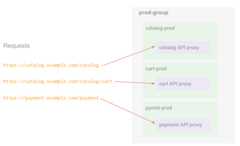
An environment group can contain multiple environments. For example, a single environment group,prod-group, can contain three environments,cart-prod,catalog-prod, andpayment-prod.
The environment group has a single hostname,example.com. You can use the hostname to route requests to a proxy deployed in any of the environments. Note that hostnames are defined on the environment group level: they do not route to a specific environment.
SeeWorking with environment groups to learn how to create this environment group.
Restricting routing to a single environment
In the previous example, requests can be routed to proxies in all three environments by a single hostname. If you want to restrict access to proxies in a single environment, saycatalog-prod, create another environment group that contains only the environmentcatalog-prod. Then a hostname defined for that environment group can only accesscatalog-prod.
For example, the hostnamecatalog.example.com, for the environment groupcatalog-prod-group, can only route requests to proxies in the environmentcatalog-prod.
Ready tocreate a group?
|
Tolearn more about environments:
|
Tolearn more about environment groups:
|
Routing and base paths
In a simple configuration, a request to a deployed API proxy is made up of a hostname, base path, and the name of an API resource; for example:
https://www.example.com/shopping/cart/addItem |_____________| |___________| |_____| | | | hostname basepath resource
You define hostnames on the environment group so that multiple environments can share them. Basepaths and API resources are defined on the API proxy.
Note: The environment and group names do not affect the URL of the API endpoint. They are meant only for you to organize and configure your environments, and are not exposed to the proxy's end users.For more information about base paths and API resources, start withUnderstanding routes. In addition, check out theFlow configuration reference andFlow variables reference to gain a greater understanding of how these pieces fit together.
Hostnames
When you create an environment group, you attach one or more hostnames to that group. For example, you might have the following environment groups, each with its own hostnames:
| Environment Group Name (Environments) | prod-group (catalog-prod cart-prod pymnt-prod) | dev-group (dev-env) | test-group (test-env) |
|---|---|---|---|
| Hostnames | catalog.example.com payment.example.com | dev.example.com | test.example.com |
You define base paths on the proxy when youcreate it.
When you deploy a proxy to an environment within the group, the hostname plus the base path and the resource name together define the endpoint of an API request to that proxy.
You can define more than one hostname on an environment group. They can all be used to call anyproxy deployed to any environment in the group. For example,catalog.example.com/proxy1andpayment.example.com/proxy1 will both call theproxy1 resource ifthe hostnamescatalog.example.com andpayment.example.com are defined onthe same environment group.
Routing example
For example:
The
prod-groupenvironment group contains the following environments:catalog-prodcart-prodpymnt-prod
The
prod-grouphas the following hostnames defined on it:catalog.example.compayment.example.com
The following proxies are deployed to these environments:
- The
catalogproxy oncatalog-prodwith a base path of/catalog - The
cartproxy oncart-prodwith a base path of/catalog/cart - The
paymentproxy onpymnt-prodwith a base path of/payment
- The
This creates the following endpoints:
catalog.example.com/catalogroutes to thecatalogproxy in thecatalog-prodenvironment.catalog.example.com/catalog/cartroutes to thecartproxy in thecart-prodenvironment.payment.example.com/paymentroutes to thepaymentproxy in thepymnt-prodenvironment.
The following example shows that the requests are routed to different proxies that are deployedto environments within the group, matching any of the hostnames and the base path:
The hostnames that you define on an environment group:
- Must be unique across all environment groups in an organization; they cannot be used by more than one group
- Do not support wildcards
- Base paths must be unique within an environment group (no two proxies can have the same base path within an environment group)
For more information, seeAdding hostnames to a group.
Shared environments and routing
An environment can belong to multiple environment groups. If you deploy a proxy to such anenvironment, the proxy will have a multiple addresses, one for each environment group theenvironment belongs to. This is useful if a customer has wildcard certificates (like *.example.com) for multiple partners.
For example:
shared-envbelongs to two environment groups:partner-1with host aliasapi.partner-1.compartner-2with host aliasapi.partner-2.com
- Proxy
foois deployed toshared-envwith a base path/foo. Becauseshared-envis shared by both environment groups,foohas two addresses:api.partner-1.com/fooapi.partner-2.com/foo
Note that both of the hostnames route to the same environment. This gives each environment group a unique domain name. For Apigee hybrid, this scenario can use mTLS with a different certificate for each partner.
About environment scope
The organization provides scope for some Apigee capabilities. For example, key-value-map (KVM) data can be made available at the organization level, meaning that API proxies deployed to any environment within that organization can access the same KVM data.
Similarly, some capabilities can be scoped to environments or environment groups within the organization. For example, Apigee analytics data is partitioned by a combination of organization, environment, and (eventually) environment group.
Considerations
Every deployment to an environment has the potential to affect the routing of traffic for every environment group to which that environment is attached. When new basepaths are added, they may start capturing entirely new traffic, or they may start capturing a subset of existing traffic already being handled by an existing deployment.
Similarly, when basepaths are removed, they may correspond to endpoints that no longer receive any traffic, or they may cause existing traffic to be rerouted to a different proxy. When traffic is rerouted, it may be to a proxy in the same environment, or when multiple environments share a single environment group, it may be to a proxy in a different environment.
The total number of API proxy basepaths added to an environment, or environment group, should also be considered. For optimal performance, Apigee recommends using no more than 3,000 API proxy basepaths per Apigee environment or environment group. Exceeding this recommendation can result in increased latency for all new and existing API proxy deployments.
Additional resources
The following information describes how to manage your environments and environment groups:
With the Apigee UI:
With the Apigee API:
Except as otherwise noted, the content of this page is licensed under theCreative Commons Attribution 4.0 License, and code samples are licensed under theApache 2.0 License. For details, see theGoogle Developers Site Policies. Java is a registered trademark of Oracle and/or its affiliates.
Last updated 2026-02-18 UTC.