

Deploying and managing archives in an Apigee environment
This pageapplies toApigee andApigee hybrid.
View Apigee Edge documentation.
Preview — Archive deployment
This feature is subject to the "Pre-GA Offerings Terms" in the General Service Terms section of theService Specific Terms. Pre-GA features are available "as is" and might have limited support. For more information, see thelaunch stage descriptions.
Develop and test yourprogrammable API proxies using Apigee in VS Code. Then, deploy anarchive of your API proxy configuration environment to your Apigee integration test and production environment as described in the following sections.
Note: To deploy an archive to an Apigee environment, you must be an Org Admin. To view archive deployments, you mustbe an Org Admin or Read Only Admin. For more information, seeApigee roles.Enabling archive deployment in an Apigee environment
Before you can deploy an archive, you must enable archive deployment in your Apigee environment.
Note: Review the following information about archive deployment before proceeding:- The name of the Apigee environment must match the name of the local development environment.
- When you enable archive deployment in an environment, to prevent conflicts with local development youwill be prevented from performing a subset of actions within the environment using the Apigee UI, API, or gcloud. For more information, seeSummary of prevented actions with archive deployment.
- After you create an environment, the deployment type cannot be changed.
- If you create an environment using the provisioning wizard, as described inCreate an environment and environment group, youwill not have the option of selecting archive as the deployment type for the environment.
- You must be anOrg Admin to create an environment.
Enable archive deployment as described in the following sections.
Apigee in Cloud console
In the Google Cloud console, go to theEnvironments page.
- Click+ Create Environment.
SelectArchive underDeployment type.

- ClickCreate.
Classic Apigee UI
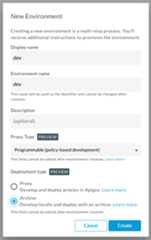
To enable archive deployment in your Apigee environment, whencreating an Apigee environment (outside of the provisioning wizard), selectArchive under Deployment type.
Apigee API
To enable archive deployment when creating an environment using the API, setdeploymentType toARCHIVE in the request body.
For example:
curl "https://apigee.googleapis.com/v1/organizations/$ORG/environments" \ -X POST \ -H "Authorization: Bearer $TOKEN" \ -H "Content-type: application/json" \ -d '{ "name": "integration-test", "description": "Integration test environment", "displayName" : "Integration test", "deploymentType" : "ARCHIVE" }'Where$TOKEN is set to your OAuth 2.0 access token, as described inObtaining an OAuth 2.0 access token. For information about thecurl options used in this example, seeUsing curl. For a description of environment variables you can use, seeSettingenvironment variables for Apigee API requests.
The following provides an example of the response:
{ "name": "organizations/$ORG/operations/11b1ad1c-2371-473d-bcd4-f621f8d98ef7", "metadata": { "@type": "type.googleapis.com/google.cloud.apigee.v1.OperationMetadata", "operationType": "INSERT", "targetResourceName": "organizations/$ORG/environments/integration-test", "state": "IN_PROGRESS" }}You can check the status of the operation. For example:
curl https://apigee.googleapis.com/v1/organizations/$ORG/operations/11b1ad1c-2371-473d-bcd4-f621f8d98ef7 / -H "Authorization: Bearer $TOKEN"
The following provides an example of the response. Note that the state of the operation isFINISHED and the state of the environment is set toACTIVE.
{ "name": "organizations/$ORG/operations/11b1ad1c-2371-473d-bcd4-f621f8d98ef7", "metadata": { "@type": "type.googleapis.com/google.cloud.apigee.v1.OperationMetadata", "operationType": "INSERT", "targetResourceName": "organizations/$ORG/environments/integration-test","state": "FINISHED" }, "done": true, "response": { "@type": "type.googleapis.com/google.cloud.apigee.v1.Environment", "name": "integration-test", "description": "Integration test environment", "createdAt": "1615553880084", "lastModifiedAt": "1615553881911", "displayName": "Integration test","state": "ACTIVE", "deploymentType": "ARCHIVE" }}For more information about the API, seeCreate environments API.
Deploying an archive to an Apigee environment
Notes:- In order to deploy an archive to an environment, it must beenabled for archive deployments.
- Apigee will not guarantee the retention of more than50 previously deployed archives in an Apigee environment.
- Deployment archive revisions that are not currently deployed will bedeleted after 30 days.
- Youcannot view or manage your archive deployments using the Apigee UI. For more information and workarounds, seeKnown issues for Apigee in VS Code.
To deploy an archive to an Apigee environment use the followinggcloud command:
gcloud beta apigee archives deploy \ --environment=$ENV \ [--organization=$ORG] \ [--source=$SOURCE] \ [--labels$KEY=$VALUE[,$KEY2=$VALUE2,$KEY3=$VALUE3,...]]
You must specify the Apigee environment in which you want to deploy the archive using the--environment flag. The Apigee environment must beenabled for archive deployments. For more information, seegcloud beta apigee archives deploy.
By default, the archive is deployed:
- To the organization associated with the current active project configured for
gcloud.To view the current gcloud configuration, run
gcloud config list. To specify the organization, use the--organizationflag. - From the current working directory.
If thesrc/main/apigeeroot directory of the archive is in a location other than the current working directory, use the--sourceflag to specify the location of the root directory of the archive. See alsoUnderstanding the structure of an Apigee workspace. Note: If you have previously deployed an archive to an Apigee environment, all API proxies are redeployed, creating new revisions, regardless ofthe changes included in the archive.
Optionally, you can add up to 64 custom label key/value pairs to an archive deployment using the--labels flag. For example, you might want to label an archive with a build number. The labels will display when youlist archive deployments. Key values must adhere to the following guidelines:
- Maximum length of 63 characters
- Maximum size of 128 bytes
- UTF-8 encoded
- Conform to the following Perl-compatible regular expression (PCRE):
[\p{Ll}\p{Lo}][\p{Ll}\p{Lo}\p{N}_-]{0,62}
Behind the scenes, thegcloud command performs the following steps when deploying to Apigee on Google Cloud:
- Creates a zip file of your
src/main/apigeeApigee workspace directory. For more information, seeUnderstanding the structure of an Apigee workspace.Note: When creating the zip file, only file types within thesrc/main/apigeedirectory and with the following extensions are included:.jar,.java,.js,.jsc,.json,.properties,.py,.wsdl,.xml,.xsdFiles without the extensions above will be excluded from the zip file.
- Deploys the archive to Apigee on Google Cloud, as follows:
- Generates a signed URL for the Google Cloud Storage bucket in the project associated with the current Apigee organization using thegenerateUploadUrl API.
- Uploads the archive zip file to the Cloud Storage bucket using the signed URL.
- Deploys the archive currently staged in the Cloud Storage bucket to Apigee on Google Cloud. using theArchive Deployments API.
Example requests
The following example creates a zip archive ofsrc/main/apigee in the current directory and deploys it to the specified Apigee environment:
gcloud beta apigee archives deploy --environment=$ENV
The following example shows how you can specify an organization that is not associated with the current active project configured forgcloud:
gcloud beta apigee archives deploy --environment=$ENV --organization=$ORG
The following example creates a zip archive of thesrc/main/apigee directory undermyarchive and deploys it to the specified Apigee environment:
gcloud beta apigee archives deploy --environment=$ENV --source=/myarchive
The following example adds thestatus andbuild_id labels to the archive deployment:
gcloud beta apigee archives deploy --environment=$ENV --labels=status=released,build=210315
Example response
The following provides an example of the response:
Using Apigee organization 'myorg'Waiting for operation [b64c2665-b5ac-43cc-9e2d-232e8895c2ed] to complete...done.
Checking the archive deployment status
To check the archive deployment status, use thegcloud alpha apigee operations command.
The following example shows the archive deployment status for the operation with revision ID439fa3f7-6aa4-42ad-8b12-3ca912c75d5c isIN_PROGRESS.
gcloud alpha apigee operations describe b64c2665-b5ac-43cc-9e2d-232e8895c2ed
The following provides an example of the response. Note thatstate is set toIN_PROGRESS.
Using Apigee organization 'myorg'done: truemetadata: '@type': type.googleapis.com/google.cloud.apigee.v1.OperationMetadata operationType: INSERTstate: IN_PROGRESS targetResourceName:uriname: organizations/myorg/operations/b64c2665-b5ac-43cc-9e2d-232e8895c2edorganization: myorgresponse: '@type': type.googleapis.com/google.cloud.apigee.v1.CanaryEvaluation control: 1-5-0-20210319-071117-ghq74 endTime: '2021-03-20T06:15:44.329363950Z' metricLabels: env: test location: us-central1 name:uri startTime: '2021-03-20T06:14:44.306534584Z' treatment: 1-5-0-20210319-190954-if0wk verdict: NONEuuid: b64c2665-b5ac-43cc-9e2d-232e8895c2ed
After the operation completes, thestate is set toFINISHED.
Listing all archive deployments in an environment
List all archive deployments in an environment as described in the following sections.
Note: API proxies and shared flows that are deployed as part of an archive deployment do not show up in the API proxies list.gcloud
To list all archive deployments in Apigee on Google Cloud, use the followinggcloud command:
gcloud beta apigee archives list --environment=$ENV
You must specify the Apigee environment in which you want to view archive deployments using the--environment flag. The Apigee environment must beViewing details for an archive deployment. For more information, seegcloud beta apigee archives list.
The following provides an example of the response:
Using Apigee organization 'myorg'ARCHIVE ID ENVIRONMENT DEPLOYED AT LABELS OPERATION STATUSpzfbs8uidbdv224joz myorg 2021-03-10 11:21:29 status=released,build=210315 Deployedfb4r8log2gm63r3gtu myorg 2021-03-05 13:40:30vrytwbhso558oil53m myorg 2021-03-03 21:20:53
Apigee API
To list the archive deployments in an environment, issue a GET request to the following API:https://apigee.googleapis.com/v1/organizations/$ORG/environments/$ENV/archiveDeployments.
For example:
curl "https://apigee.googleapis.com/v1/organizations/$ORG/environments/$ENV/archiveDeployments" \ -H "Authorization: Bearer $TOKEN"
Where$TOKEN is set to your OAuth 2.0 access token, as described inObtaining an OAuth 2.0 access token. For information about thecurl options used in this example, seeUsing curl. For a description of environment variables you can use, seeSettingenvironment variables for Apigee API requests.
The following provides an example of the response:
{ "archiveDeployments": [ { "name": "organizations/myorg/environments/integration-test/archiveDeployments/pzfbs8uidbdv224joz", "labels": { "status": "released", "build": "210315" }, "createdAt": "1615821232451727", "updatedAt": "1615821232451727", "operation": "organizations/apigee-docs-c/operations/b64c2665-b5ac-43cc-9e2d-232e8895c2ed" }, { "name": "organizations/myorg/environments/integration-test/archiveDeployments/fb4r8log2gm63r3gtu", "createdAt": "1615819281858447", "updatedAt": "1615819281858447", "operation": "organizations/apigee-docs-c/operations/71549b9c-4493-41b6-9838-c0ad5b1b3181" }, { "name": "organizations/myorg/environments/integration-test/archiveDeployments/vrytwbhso558oil53m", "createdAt": "1615578337832207", "updatedAt": "1615578337832207", "operation": "organizations/apigee-docs-c/operations/a2eb50b5-f276-4de4-96a3-72fac3d4c05e" } ]}Viewing details for an archive deployment
View details for an archive deployment as described in the following sections.
gcloud
To view details for an archive deployment in Apigee on Google Cloud, use the followinggcloud command:
gcloud beta apigee archives describe$ID --environment=$ENV
You must specify the following:
- ID of the archive deployment revision.
- Apigee environment in which you want to view archive deployments using the
--environmentflag. The Apigee environment must beenabled for archive deployments.
For more information, seegcloud beta apigee archives describe.
For example:
gcloud apigee archives describe pzfbs8uidbdv224joz --environment=$ENV
The following provides an example of the response:
Using Apigee organization 'myorg'createdAt: '1615578337832207'labels: status: 'released' build: '210315'name: organizations/myorg/environments/$ENV/archiveDeployments/pzfbs8uidbdv224jozoperation: organizations/myorg/operations/b64c2665-b5ac-43cc-9e2d-232e8895c2edoperationStatus: DeployedupdatedAt: '1615821232451727'
Apigee API
To view details for an archive deployment, issue a GET request to the following API:https://apigee.googleapis.com/v1/organizations/$ORG/environments/$ENV/archiveDeployments/$ID.
You must pass the ID of the archive deployment revision. To view the list of archive deployment revision IDs for an Apigee environment, seeListing all archive deployments in an environment.
For example:
curl "https://apigee.googleapis.com/v1/organizations/$ORG/environments/$ENV/archiveDeployments/pzfbs8uidbdv224joz" \ -X GET \ -H "Authorization: Bearer $TOKEN"
Where$TOKEN is set to your OAuth 2.0 access token, as described inObtaining an OAuth 2.0 access token. For information about thecurl options used in this example, seeUsing curl. For a description of environment variables you can use, seeSettingenvironment variables for Apigee API requests.
The following provides an example of the response:
{ "name": "organizations/myorg/environments/integration-test/archiveDeployments/pzfbs8uidbdv224joz", "labels": { "status": "released", "build": "210315" }, "createdAt": "1615578337832207", "updatedAt": "1615821232451727", "operation": "organizations/apigee-docs-c/operations/b64c2665-b5ac-43cc-9e2d-232e8895c2ed"}Updating labels for an archive deployment
Update labels for an archive deployment as described in the following sections.
gcloud
To update labels for an archive deployment in Apigee on Google Cloud, use the followinggcloud command:
gcloud beta apigee archives update [$ID] --environment=$ENV [--update-labels=$KEY=$VALUE[,$KEY2=$VALUE2...$KEYn=$VALUEn]], [--clear-labels | --remove-labels=$KEY[,$KEY2...$KEYn]]
You must specify the following:
- ID of the archive deployment revision
- Apigee environment in which you want to view archive deployments using the
--environmentflag. The Apigee environment must beenabled for archive deployments. - One or more of the following flags:
Note:$KEY must start with a lowercase character and contain only hyphens (-), underscores (_), lowercase characters, and numbers.$VALUE must contain only hyphens (-), underscores (_), lowercase characters, and numbers.Flag Description --clear-labelsRemoves all labels. If --update-labelsis also specified,--clear-labelsis applied first.Cannot be specified if
--remove-labelsis specified.--remove-labelsRemoves the specified labels. If --update-labelsis also specified, it is applied first.Cannot be specified if
--clear-labelsis specified.--update-labelsUpdate the labels. If a label exists, its value is modified; otherwise, a new label is created. Combine with --remove-labelsor--clear-labelsflags to remove a subset or all labels, respectively, before updating labels.
For more information, seegcloud beta apigee archives update.
For example:
gcloud apigee archives update pzfbs8uidbdv224joz --environment=$ENV \ --clear-labels --update-labels=status=released,build=210315,tier=1
The following provides an example of the response:
Using Apigee organization `myorg`createdAt: 2020-04-04T04:04:04.004Zlabels: status: released, build: 210315, tier: 1name: organizations/apigee-docs-c/environments/dev/archiveDeployments/pzfbs8uidbdv224jozoperation: organizations/apigee-docs-c/operations/bf587121-8b5c-4897-9d8f-9b1ef0cb06caupdatedAt: '1633450432067431'
Apigee API
To update labels for an archive deployment in Apigee on Google Cloud, issue a PATCH request to the following API:https://apigee.googleapis.com/v1/organizations/$ORG/environments/$ENV/archiveDeployments/$ID.
You must pass the ID of the archive deployment revision. To view the list of archive deploymentrevision IDs for an Apigee environment, seeListing all archive deployments in an environment.
Pass all of the labels you want to add to the archive in the request body. The labels that you passoverwrite the current set of labels, so you canremove labels by omitting them from the request body or remove all labels by passing an empty list.
For example:
curl "https://apigee.googleapis.com/v1/organizations/$ORG/environments/$ENV/archiveDeployments/$ID" \ -X PATCH \ -H "Authorization: Bearer $TOKEN" \ -d '{ "labels": { "status" : "released", "build" : "210315" } }'Where$TOKEN is set to your OAuth 2.0 access token, as described inObtaining an OAuth 2.0 access token. For information about thecurl options used in this example, seeUsing curl. For a description of environment variables you can use, seeSettingenvironment variables for Apigee API requests.
The following provides an example of the response:
{ "name": "organizations/myorg/environments/integration-test/archiveDeployments/pzfbs8uidbdv224joz", "labels": { "status": "released", "build": "210315" }, "createdAt": "1615578337832207", "updatedAt": "1615821232451727", "operation": "organizations/apigee-docs-c/operations/b64c2665-b5ac-43cc-9e2d-232e8895c2ed"}Deleting an Apigee environment with archive deployments
Note: In this release, you cannot undeploy an archive from an Apigee environment which is required before you can delete the environment. Instead, you need to deploy an archivewith no deployments defined before deleting the Apigee environment, as described in this section.To delete an Apigee environment with archive deployments:
- In a temporary folder, create the following directory structure where$ENV matches the name of the environment you want to delete. For example:
mkdir -p /$TEMP/archive/src/main/apigee/environments/$ENV
- Add the
deployments.jsonfile to the directory. For example:touch /$TEMP/archive/src/main/apigee/environments/$ENV/deployments.json
- Update the
deployments.jsonto include an emptyproxiesarray, as shown below.{"proxies" : []} - Change directory (cd) to the
$TEMP/archivefolder.cd$TEMP/archive
- Deploy the archive to the Apigee environment that you want to delete.
gcloud beta apigee archives deploy --environment=$ENV
- Delete the Apigee environment.
Deleting a revision of an archive deployment
Delete a revision of an archive deployment as described in the following section.
Note: You cannot delete an archive deployment revision that is currently deployed. You can check the deployment status of an archive deployment revision, as described inListing all archive deployments in an environment. To delete an archive deployment revision that is currently deployed, you mustdelete the environment.gcloud
To delete a revision of an archive deployment in Apigee on Google Cloud, use the followinggcloud command:
gcloud beta apigee archives delete$ID --environment=$ENV
You must specify the following:
- The ID of the revision that you want to delete.
- Apigee environment in which you want to view archive deployments using the
--environmentflag. The Apigee environment must beenabled for archive deployments.
For example:
gcloud apigee archives delete fb4r8log2gm63r3gtu --environment=dev
The following provides an example of the response:
Archive deployment revision "fb4r8log2gm63r3gtu" deleted
Apigee API
To delete a revision of an archive deployment in Apigee on Google Cloud, issue a DELETE request to the following API:https://apigee.googleapis.com/v1/organizations/$ORG/environments/$ENV/archiveDeployments/$ID.
You must pass the ID of the archive deployment revision that you want to delete. To view the list of archive deployment revisionIDs for an environment, seeListing all archive deployments in an environment.
For example:
curl "https://apigee.googleapis.com/v1/organizations/$ORG/environments/$ENV/archiveDeployments/$ID" \ -X DELETE \ -H "Authorization: Bearer $TOKEN" \
Where$TOKEN is set to your OAuth 2.0 access token, as described inObtaining an OAuth 2.0 access token. For information about thecurl options used in this example, seeUsing curl. For a description of environment variables you can use, seeSettingenvironment variables for Apigee API requests.
The following provides an example of the response:
{}Except as otherwise noted, the content of this page is licensed under theCreative Commons Attribution 4.0 License, and code samples are licensed under theApache 2.0 License. For details, see theGoogle Developers Site Policies. Java is a registered trademark of Oracle and/or its affiliates.
Last updated 2025-12-15 UTC.