
【科学技術計算講座ミニ】四分木と空間分割②
2021/7/2
前回の四分木と空間分割の続きです。
目次
四分木による空間分割のプログラム(続き)
四分木クラスのメソッド
四分木クラスにメソッドを追加していきます。次の5つのメソッドを作ります。
①四分木に粒子を挿入するメソッド
②ノードに粒子が含まれるかを判定するメソッド
③ノードを分割するメソッド
④粒子が所属するノードを見つけるメソッド
⑤四分木を走査するメソッド
四分木に粒子を挿入するメソッド
まず、四分木に粒子を挿入するメソッドinsertを作ります。
insert(p) { if (!this.include(p)) { return; } if (this.sw === null) { if (this.bucket.length < this.limit) { this.bucket.push(p); return; } else { this.divide(); } } this.sw.insert(p); this.se.insert(p); this.nw.insert(p); this.ne.insert(p); }引数pは粒子オブジェクトです。
まず、最初のif文、if (!this.include(p))でノードに粒子が含まれるかどうかを判定し、含まれない場合は何もせずにreturnしています。includeはノードに粒子が含まれるかの判定メソッドで、別途定義します。
次のif文ではthis.swがnull、つまり分割されているかどうかを判定しています。子ノードswがnullであれば分割されていない末端ノードを意味します。このとき、bucket配列の大きさがlimitより小さければ、bucketに粒子pを追加します。もし、limitを超えていれば、後で定義するdivideメソッドでノードを分割します。
最後に4つの子ノードにpを渡して再帰的に挿入操作を繰り返します。これで、末端のノードに粒子が格納されます。
※このプログラムでは隣り合う分割ノードのちょうど境界線上に粒子があると、どちらのノードにも粒子が格納されます。もし、どちらか一方のノードにのみ粒子を入れたい場合は、以下で説明するincludeメソッドの判定を変更するか、子ノードへの挿入部分に分岐を設けるなどの変更が必要です。
ノードに粒子が含まれるかを判定するメソッド
先程出てきたノードに粒子が含まれるかの判定メソッドincludeを定義します。
include(p) { return ( (this.region.left <= p.x && p.x <= this.region.right) && (this.region.bottom <= p.y && p.y <= this.region.top) ); }粒子pのx座標とy座標がノードの領域に入っていたらtrueが返ります。
ノードを分割するメソッド
ノードを分割するメソッドdivideです。
divide() { const x = this.region.left; const y = this.region.bottom; const width = 0.5 * this.region.width; const height = 0.5 * this.region.height; this.sw = new QuadTree(x, y, width, height, this.limit); this.se = new QuadTree(x + width, y, width, height, this.limit); this.nw = new QuadTree(x, y + height, width, height, this.limit); this.ne = new QuadTree(x + width, y + height, width, height, this.limit); for (let i = 0, n = this.bucket.length; i < n; i++) { const p = this.bucket[i]; this.sw.insert(p); this.se.insert(p); this.nw.insert(p); this.ne.insert(p); } this.bucket = []; }x、yはノードの左下角の座標を表し、width、heightはそれぞれ半分にして、新しくQuadTreeの四分木オブジェクトを子ノードに作成しています。
後半のfor文はノードに含まれる粒子に対するループで、各粒子を分割後の子ノードに振り分けています。振り分けたら、最後にbucketは空にしておきます。
粒子が所属するノードを見つけるメソッド
今回の問題ではマウスの位置のノードを見つける必要があります。そこで、ある位置のノードを返すメソッドfindを作ります。
find(p) { if (!this.include(p)) { return null; } if (this.sw === null) { return this; } return (this.sw.find(p) || this.se.find(p) || this.nw.find(p) || this.ne.find(p)); }引数pは粒子オブジェクトですが、ここではマウスカーソルの位置を表していると思ってください。
まず最初のif文でpが含まれなければnullを返すようにします。次のif文で末端ノードであれば、そのノードを返します。
最後に、子ノードがあれば再帰的にfindを繰り返します。ここで、各ノードのfindが||でつながれています。普通は、||はORを意味しますが、JavaScriptでは
a = 5 || null
の場合、aは5となります。つまり、pが含まれない子ノードからはnullが返ってきて、pが含まれる子ノードからはそのノードが返されるため、最終的にpが位置するノードが返されることになります。
四分木を走査するメソッド
最後に、四分木を走査して何かの処理をするメソッドtraverseを定義しておきます。
traverse(func) { if (this.sw === null) { func(this); } else { this.sw.traverse(func); this.se.traverse(func); this.nw.traverse(func); this.ne.traverse(func); } }ここでは処理は末端のノードでのみ行います。行う処理は引数funcとして関数で受け取ります。
if文は末端ノードかどうかの判定で、末端ノードならfuncにそのノードthisを渡して実行します。子ノードがあれば再帰的に走査していきます。
p5.jsのセットアップ
次にp5.js用にsetup関数を定義します。setup関数はp5.js内で最初に一度だけ呼ばれます。
function setup() { createCanvas(canvasWidth, canvasHeight); qtree = new QuadTree(0, 0, 1, 1, 5); randomSeed(1); p = new Array(2000); for (let i = 0, n = 2000; i < n; i++) { const r = 0.5 * random(); const t = 2 * Math.PI * random(); const x = r * Math.cos(t) + 0.5; const y = r * Math.sin(t) + 0.5; p[i] = new Particle(x, y); qtree.insert(p[i]); }}createCanvasで描画領域を定義します。
次に、qtreeに四分木オブジェクトを作成します。ここで、ルートノードは座標(0,0)に縦横1×1の大きさの空間を作っています。またノードの粒子数制限は5個までとします。
randomSeed(1)はp5.jsの関数ですが乱数発生のシードを設定しています(これを指定しない場合、実行のたびに乱数の結果が変わります)。
粒子pは配列として2000個粒子オブジェクトを定義します。粒子の座標$(x,y)$は
$$ x = r \cos(\theta)+0.5$$
$$y = r \sin(\theta)+0.5$$
とし、$r$と$\theta$をrandom()を使って乱数で計算しています。こうすると空間の中央に集中した分布を持つ粒子配置になります。
そしてqtree.insertで先程作成した四分木オブジェクトに挿入しています。
p5.jsの描画
次にp5.jsで画面に描画を行う関数drawを作成します。
function draw() { const scale = 600; background(220); // particle noStroke(); fill("blue"); drawParticle(p, scale); // tree node stroke("black"); noFill(); qtree.traverse(function(node) { drawNode(node, scale); }); // highlight particle on mouse const x = mouseX / scale; const y = (canvasHeight - mouseY) / scale; const pos = new Particle(x, y); const node = qtree.find(pos); if (node !== null) { stroke("red"); drawNode(node, scale); noStroke(); fill("red"); drawParticle(node.bucket, scale) }}draw関数の詳細は以前の粒子法の講座を参照してください。
drawParticleは粒子を描画する関数で後で説明します。
qtree.traverseの箇所は四分木の末端ノードの四角形を描画しています。drawNodeも後述します。
マウスカーソル位置のハイライト部分が最後にあります。マウスカーソルの位置は、p5.jsではmouseX、mouseYで画面ピクセルの座標として取得できます。これを元に空間座標(x,y)に変換しています。
空間座標でのマウス位置はposとして粒子オブジェクトを使って作成します。そしてqtree.find(pos)でその位置にある末端ノードを返しています。nodeがnullでなければ、赤色でそのノードとノードに含まれる粒子を描画してハイライト処理しています。
描画用の関数
最後に描画用の関数drawParticleとdrawNodeを説明します。
function drawParticle(p, scale) { for (let i = 0, n = p.length; i < n; i++) { const x = p[i].x * scale; const y = canvasHeight - p[i].y * scale; ellipse(x, y, 5); }}function drawNode(node, scale) { const x = node.region.left * scale; const y = canvasHeight - node.region.top * scale; const width = node.region.width * scale; const height = node.region.height * scale; rect(x, y, width, height);}drawParticleは粒子を描画する関数で、粒子配列pと空間座標をキャンバスのピクセル座標に変換する係数scaleを引数に受け取ります。座標変換を行って、ellipse関数で円を描きます。
drawNodeはノードの四角形を描く関数で、同じく座標変換を行ってrect関数で四角形を表示します。
ellipseとrectはp5.jsの関数です。
全体のプログラム
ここまで説明したプログラム全体を載せておきます。
"use strict";// global variables ***************************************************const canvasWidth = 600, canvasHeight = 600;let qtree;let p;// class *********************************************************class Rectangle { constructor(x, y, width, height) { this.width = width; this.height = height; this.left = x; this.right = x + width; this.bottom = y; this.top = y + height; }}class Particle { constructor(x, y) { this.x = x; this.y = y; }}class QuadTree { constructor(x, y, width, height, limit) { this.region = new Rectangle(x, y, width, height); this.sw = null; this.se = null; this.nw = null; this.ne = null; this.bucket = []; this.limit = limit; } insert(p) { if (!this.include(p)) { return; } if (this.sw === null) { if (this.bucket.length < this.limit) { this.bucket.push(p); return; } else { this.divide(); } } this.sw.insert(p); this.se.insert(p); this.nw.insert(p); this.ne.insert(p); } include(p) { return ( (this.region.left <= p.x && p.x <= this.region.right) && (this.region.bottom <= p.y && p.y <= this.region.top) ); } divide() { const x = this.region.left; const y = this.region.bottom; const width = 0.5 * this.region.width; const height = 0.5 * this.region.height; this.sw = new QuadTree(x, y, width, height, this.limit); this.se = new QuadTree(x + width, y, width, height, this.limit); this.nw = new QuadTree(x, y + height, width, height, this.limit); this.ne = new QuadTree(x + width, y + height, width, height, this.limit); for (let i = 0, n = this.bucket.length; i < n; i++) { const p = this.bucket[i]; this.sw.insert(p); this.se.insert(p); this.nw.insert(p); this.ne.insert(p); } this.bucket = []; } find(p) { if (!this.include(p)) { return null; } if (this.sw === null) { return this; } return (this.sw.find(p) || this.se.find(p) || this.nw.find(p) || this.ne.find(p)); } traverse(func) { if (this.sw === null) { func(this); } else { this.sw.traverse(func); this.se.traverse(func); this.nw.traverse(func); this.ne.traverse(func); } }}// functions ************************************************************function setup() { createCanvas(canvasWidth, canvasHeight); qtree = new QuadTree(0, 0, 1, 1, 5); randomSeed(1); p = new Array(2000); for (let i = 0, n = 2000; i < n; i++) { const r = 0.5 * random(); const t = 2 * Math.PI * random(); const x = r * Math.cos(t) + 0.5; const y = r * Math.sin(t) + 0.5; p[i] = new Particle(x, y); qtree.insert(p[i]); }}function draw() { const scale = 600; background(220); // particle noStroke(); fill("blue"); drawParticle(p, scale); // tree node stroke("black"); noFill(); qtree.traverse(function(node) { drawNode(node, scale); }); // highlight particle on mouse const x = mouseX / scale; const y = (canvasHeight - mouseY) / scale; const pos = new Particle(x, y); const node = qtree.find(pos); if (node !== null) { stroke("red"); drawNode(node, scale); noStroke(); fill("red"); drawParticle(node.bucket, scale) }}function drawParticle(p, scale) { for (let i = 0, n = p.length; i < n; i++) { const x = p[i].x * scale; const y = canvasHeight - p[i].y * scale; ellipse(x, y, 5); }}function drawNode(node, scale) { const x = node.region.left * scale; const y = canvasHeight - node.region.top * scale; const width = node.region.width * scale; const height = node.region.height * scale; rect(x, y, width, height);}プログラムの実行
プログラムの実行も以前の通りでindex.htmlを作ってブラウザで開いて実行します。
<!DOCTYPE html><html> <head> <meta charset="utf-8"> <title>Quad Tree</title> </head> <body> <script type="text/javascript" src="p5.min.js"></script> <script type="text/javascript" src="quad_tree.js"></script> </body></html>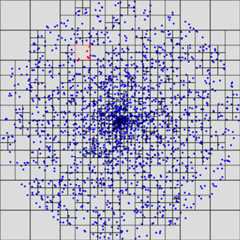
最後に
今回は四分木を使った空間分割について2回に分けて説明しました。このような空間分割法は実際様々な分野で使われています。
ここで説明した方法はオーソドックスな方法ですが、実際のアプリケーションではさらなる高速化が求められる場合があります。
例えばマウスが位置するノードを見つける箇所ですが、今回のプログラムでは四分木をルートノードからたどっています。これだとある程度の計算量が必要となります。そこで、指定した位置のノードをより少ない計算量で求めるアルゴリズム(例えば、Z階数曲線(Z-order curve))なども考えられています。ここでは詳しくは述べませんが、様々な改良を加えることにより、より高速に計算できるようになります。