It can be useful to fit a model to explore your data. One techniqueis to fit a linear model for each group in a dataset. For example, youcould fit a linear model for each key in the data.
brolgar provides a helper function to help with this,calledkey_slope().
key_slope() returns the intercept and slope estimate foreach key, given a linear model formula. We can get the number ofobservations, and slope information for each individual to identifythose that are decreasing over time.
key_slope(wages,ln_wages~xp)#># A tibble: 888 × 3#> id .intercept .slope_xp#><int><dbl><dbl>#> 1 31 1.41 0.101#> 2 36 2.04 0.0588#> 3 53 2.29 -0.358#> 4 122 1.93 0.0374#> 5 134 2.03 0.0831#> 6 145 1.59 0.0469#> 7 155 1.66 0.0867#> 8 173 1.61 0.100#> 9 206 1.73 0.180#>10 207 1.62 0.0884#># ℹ 878 more rowsWe can then join these summaries back to the data:
library(dplyr)wages_slope<-key_slope(wages,ln_wages~xp)%>%left_join(wages, by="id")wages_slope#># A tibble: 6,402 × 11#> id .intercept .slope_xp ln_wages xp ged xp_since_ged black hispanic#><int><dbl><dbl><dbl><dbl><int><dbl><int><int>#> 1 31 1.41 0.101 1.49 0.015 1 0.015 0 1#> 2 31 1.41 0.101 1.43 0.715 1 0.715 0 1#> 3 31 1.41 0.101 1.47 1.73 1 1.73 0 1#> 4 31 1.41 0.101 1.75 2.77 1 2.77 0 1#> 5 31 1.41 0.101 1.93 3.93 1 3.93 0 1#> 6 31 1.41 0.101 1.71 4.95 1 4.95 0 1#> 7 31 1.41 0.101 2.09 5.96 1 5.96 0 1#> 8 31 1.41 0.101 2.13 6.98 1 6.98 0 1#> 9 36 2.04 0.0588 1.98 0.315 1 0.315 0 0#>10 36 2.04 0.0588 1.80 0.983 1 0.983 0 0#># ℹ 6,392 more rows#># ℹ 2 more variables: high_grade <int>, unemploy_rate <dbl>And highlight those individuals with a negative slope usinggghighlight:
library(gghighlight)wages_slope%>%as_tibble()%>%# workaround for gghighlight + tsibbleggplot(aes(x=xp, y=ln_wages, group=id))+geom_line()+gghighlight(.slope_xp<0)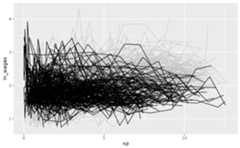
Find keys near other summaries withkeys_near()
We might want to further summarise our exploratory modelling byfinding those slopes that are near a five number summary values:
summary(wages_slope$.slope_xp)#> Min. 1st Qu. Median Mean 3rd Qu. Max. NA's#> -4.57692 -0.00189 0.04519 0.04490 0.08458 13.21569 38Finding those groups that are near these values can be surprisinglychallenging!
brolgar makes it easier by providing thekeys_near() function. You tell it what the key is, whatvariable you want to summarise by, and then by default it returns thosekeys near the five number summary. Let’s return the keys near the.slope_xp:
wages_slope%>%keys_near(key=id, var=.slope_xp)#># A tibble: 31 × 5#> id .slope_xp stat stat_value stat_diff#><int><dbl><fct><dbl><dbl>#> 12092 -0.00189 q_25 -0.00189 0#> 22092 -0.00189 q_25 -0.00189 0#> 32092 -0.00189 q_25 -0.00189 0#> 42092 -0.00189 q_25 -0.00189 0#> 52092 -0.00189 q_25 -0.00189 0#> 62092 -0.00189 q_25 -0.00189 0#> 76770 0.0846 q_75 0.0846 0#> 86770 0.0846 q_75 0.0846 0#> 96770 0.0846 q_75 0.0846 0#>106770 0.0846 q_75 0.0846 0#># ℹ 21 more rowsHere it returns theid, the.slope_xp, andthe statistic that it was closest to, and what the difference betweenthe slope_xp and the statistic.
You can visualise these summary keys by joining them back to thedata:
wages_slope%>%keys_near(key=id, var=.slope_xp)%>%left_join(wages, by="id")%>%ggplot(aes(x=xp, y=ln_wages, group=id, colour=stat))+geom_line()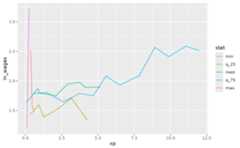
You can read more aboutkeys_near() in theIdentifyinginteresting observations vignette.