Download a copy of the vignette to follow along here:correlation_plots.Rmd
In this vignette, we go through how you can visualize associationsbetween the features included in your analyses.
Data set-up
library(metasnf)# We'll just use the first few columns for this democort_sa_minimal<-cort_sa[,1:5]# And one more mock categorical feature for demonstration purposescity<-fav_colourcity$"city"<-sample(c("toronto","montreal","vancouver"), size=nrow(city), replace=TRUE)city<-city|>dplyr::select(-"colour")# Make sure to throw in all the data you're interested in visualizing for this# data_list, including out-of-model measures and confounding features.dl<-data_list(list(cort_sa_minimal,"cortical_sa","neuroimaging","continuous"),list(income,"household_income","demographics","ordinal"),list(pubertal,"pubertal_status","demographics","continuous"),list(fav_colour,"favourite_colour","demographics","categorical"),list(city,"city","demographics","categorical"),list(anxiety,"anxiety","behaviour","ordinal"),list(depress,"depressed","behaviour","ordinal"), uid="unique_id")## ℹ 182 observations dropped due to incomplete data.summary(dl)## name type domain length width## 1 cortical_sa continuous neuroimaging 93 4## 2 household_income ordinal demographics 93 1## 3 pubertal_status continuous demographics 93 1## 4 favourite_colour categorical demographics 93 1## 5 city categorical demographics 93 1## 6 anxiety ordinal behaviour 93 1## 7 depressed ordinal behaviour 93 1# This matrix contains all the pairwise association p-valuesassoc_pval_matrix<-calc_assoc_pval_matrix(dl)assoc_pval_matrix[1:3,1:3]## mrisdp_303 mrisdp_304 mrisdp_305## mrisdp_303 0.0000000 0.6374024 0.4513919## mrisdp_304 0.6374024 0.0000000 0.2790341## mrisdp_305 0.4513919 0.2790341 0.0000000Heatmaps
Here’s what a basic heatmap looks like:
ap_heatmap<-assoc_pval_heatmap(assoc_pval_matrix)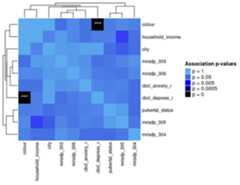
Most of this data was generated randomly, but the “colour” feature isreally just a categorical mapping of “cbcl_depress_r”.
You can draw attention to confounding features and/or any out ofmodel measures by specifying their names as shown below.
ap_heatmap2<-assoc_pval_heatmap(assoc_pval_matrix, confounders=list("Colour"="colour","Pubertal Status"="pubertal_status"), out_of_models=list("City"="city"))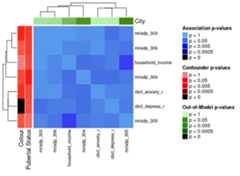
The ComplexHeatmap package offers functionality for splittingheatmaps into slices. One way to do the slices is by clustering theheatmap with k-means:
ap_heatmap3<-assoc_pval_heatmap(assoc_pval_matrix, confounders=list("Colour"="colour","Pubertal Status"="pubertal_status"), out_of_models=list("City"="city"), row_km=3, column_km=3)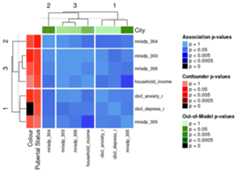
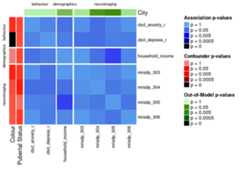
Another way to divide the heatmap is by feature domain. This can bedone by providing a data_list with all the features in theassoc_pval_matrix and settingsplit_by_domaintoTRUE.
ap_heatmap4<-assoc_pval_heatmap(assoc_pval_matrix, confounders=list("Colour"="colour","Pubertal Status"="pubertal_status"), out_of_models=list("City"="city"), dl=data_list, split_by_domain=TRUE)