js-sequence-diagrams
Turns text into UML sequence diagrams

Demo. Try editing me belowAndrew->China: Says HelloNote right of China: China thinks\nabout itChina-->Andrew: How are you?Andrew->>China: I am good thanks! | This should be a diagram! If you don't see it you need Javascript enabled |
A simple javascript library to turn text into vectorUML sequence diagrams. Heavily inspired bywebsequencediagrams.com, who offer a serverside solution. We useJison to parse the text, andSnap.svg to draw the image.
Title: Here is a titleA->B: Normal lineB-->C: Dashed lineC->>D: Open arrowD-->>A: Dashed open arrow | |
# Example of a comment.Note left of A: Note to the\n left of ANote right of A: Note to the\n right of ANote over A: Note over ANote over A,B: Note over both A and B | |
participant Cparticipant Bparticipant ANote right of A: By listing the participants\n you can change their order |
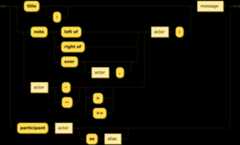
js-sequence-diagrams depends onSnap.svg andUnderscore.js (orlodash). You can download all these files manually, or use "bower install bramp/js-sequence-diagrams".
Then include the following HTML:
<script src="webfont.js"></script><script src="snap.svg-min.js"></script><script src="underscore-min.js"></script><script src="sequence-diagram-min.js"></script>and now you have two options. You can manually parse the text:
<div id="diagram"></div><script> var diagram = Diagram.parse("A->B: Message"); diagram.drawSVG("diagram", {theme: 'hand'});</script>or use jQuery to do all the work:<div class="diagram">A->B: Message</div><script>$(".diagram").sequenceDiagram({theme: 'hand'});</script>More documentation is in the officialREADME.md
