10.1 The functionknitr::kable()
Thekable() function inknitr is a very simple table generator, and is simple by design. It only generates tables for strictly rectangular data such as matrices and data frames. You cannot heavily format the table cells or merge cells. However, this function does have a large number of arguments for you to customize the appearance of tables:
kable(x, format,digits =getOption("digits"),row.names =NA,col.names =NA, align,caption = opts_current$get("tab.cap"),label =NULL,format.args =list(),escape =TRUE, ...)10.1.1 Supported table formats
In most cases,knitr::kable(x) may be enough if you only need a simple table for the data objectx. Theformat argument is automatically set according to theknitr source document format. Its possible values arepipe (tables with columns separated by pipes),simple (Pandoc’s simple tables),latex (LaTeX tables),html (HTML tables), andrst (reStructuredText tables). For R Markdown documents,kable() uses thepipe format for tables by default, which looks like this:
knitr::kable(head(mtcars[,1:4]),"pipe")| | mpg| cyl| disp| hp||:-----------------|----:|---:|----:|---:||Mazda RX4 | 21.0| 6| 160| 110||Mazda RX4 Wag | 21.0| 6| 160| 110||Datsun 710 | 22.8| 4| 108| 93||Hornet 4 Drive | 21.4| 6| 258| 110||Hornet Sportabout | 18.7| 8| 360| 175||Valiant | 18.1| 6| 225| 105|You can also generate simple tables, or tables in HTML, LaTeX, and reStructuredText:
knitr::kable(head(mtcars[,1:4]),"simple") mpg cyl disp hp------------------ ----- ---- ----- ----Mazda RX4 21.0 6 160 110Mazda RX4 Wag 21.0 6 160 110Datsun 710 22.8 4 108 93Hornet 4 Drive 21.4 6 258 110Hornet Sportabout 18.7 8 360 175Valiant 18.1 6 225 105knitr::kable(mtcars[1:2,1:2],"html")<table><thead><tr><thstyle="text-align:left;"></th><thstyle="text-align:right;"> mpg</th><thstyle="text-align:right;"> cyl</th></tr></thead><tbody><tr><tdstyle="text-align:left;"> Mazda RX4</td><tdstyle="text-align:right;"> 21</td><tdstyle="text-align:right;"> 6</td></tr><tr><tdstyle="text-align:left;"> Mazda RX4 Wag</td><tdstyle="text-align:right;"> 21</td><tdstyle="text-align:right;"> 6</td></tr></tbody></table>knitr::kable(head(mtcars[,1:4]),"latex")\begin{tabular}{l|r|r|r|r}\hline& mpg& cyl& disp& hp\\\hlineMazda RX4& 21.0& 6& 160& 110\\\hlineMazda RX4 Wag& 21.0& 6& 160& 110\\\hlineDatsun 710& 22.8& 4& 108& 93\\\hlineHornet 4 Drive& 21.4& 6& 258& 110\\\hlineHornet Sportabout& 18.7& 8& 360& 175\\\hlineValiant& 18.1& 6& 225& 105\\\hline\end{tabular}knitr::kable(head(mtcars[,1:4]),"rst")================= ==== === ==== ===\ mpg cyl disp hp================= ==== === ==== ===Mazda RX4 21.0 6 160 110Mazda RX4 Wag 21.0 6 160 110Datsun 710 22.8 4 108 93Hornet 4 Drive 21.4 6 258 110Hornet Sportabout 18.7 8 360 175Valiant 18.1 6 225 105================= ==== === ==== ===Please note that only the formatspipe andsimple are portable, i.e., they work for any output document format. Other table formats only work for specific output formats, e.g.,format = 'latex' only works for LaTeX output documents. Using a specific table format will give you more control, at the price of sacrificing portability.
If you only need one table format that is not the default format for a document, you can set the global R optionknitr.table.format, e.g.,
options(knitr.table.format ="latex")This option can also be a function that returns the format string orNULL. In the case ofNULL,knitr will try to automatically decide the appropriate format. For example, we can use thelatex format only when the output format is LaTeX:
options(knitr.table.format =function() {if (knitr::is_latex_output())"latex"else"pipe"})10.1.2 Change column names
The names of columns in a data frame may not be the same as what we want to display to readers. In R, the column names of data often do not use spaces to separate words but dots or underscores instead. This may not feel natural when we read them in a table. We can use thecol.names argument to replace the column names with a vector of new names. For example, we substitute the dots with spaces in the column names of theiris data:
iris2<-head(iris)knitr::kable(iris2,col.names =gsub("[.]"," ",names(iris)))| Sepal Length | Sepal Width | Petal Length | Petal Width | Species |
|---|---|---|---|---|
| 5.1 | 3.5 | 1.4 | 0.2 | setosa |
| 4.9 | 3.0 | 1.4 | 0.2 | setosa |
| 4.7 | 3.2 | 1.3 | 0.2 | setosa |
| 4.6 | 3.1 | 1.5 | 0.2 | setosa |
| 5.0 | 3.6 | 1.4 | 0.2 | setosa |
| 5.4 | 3.9 | 1.7 | 0.4 | setosa |
Thecol.names argument can take an arbitrary character vector (not necessarily the modified column names via functions likegsub()), as long as the length of the vector is equal to the number of columns of the data object, e.g.,
knitr::kable( iris,col.names =c('We','Need','Five','Names','Here'))10.1.3 Specify column alignment
To change the alignment of the table columns, you can use either a vector of values consisting of charactersl (left),c (center), andr (right) or a single multi-character string for alignment, sokable(..., align = c('c', 'l')) can be shortened tokable(..., align = 'cl'). By default, numeric columns are right-aligned, and other columns are left-aligned. Here is an example:
# left, center, center, right, rightknitr::kable(iris2,align ="lccrr")| Sepal.Length | Sepal.Width | Petal.Length | Petal.Width | Species |
|---|---|---|---|---|
| 5.1 | 3.5 | 1.4 | 0.2 | setosa |
| 4.9 | 3.0 | 1.4 | 0.2 | setosa |
| 4.7 | 3.2 | 1.3 | 0.2 | setosa |
| 4.6 | 3.1 | 1.5 | 0.2 | setosa |
| 5.0 | 3.6 | 1.4 | 0.2 | setosa |
| 5.4 | 3.9 | 1.7 | 0.4 | setosa |
10.1.4 Add a table caption
You can add a caption to the table via thecaption argument, e.g. (see Table10.1 for the output),
knitr::kable(iris2,caption ="An example table caption.")| Sepal.Length | Sepal.Width | Petal.Length | Petal.Width | Species |
|---|---|---|---|---|
| 5.1 | 3.5 | 1.4 | 0.2 | setosa |
| 4.9 | 3.0 | 1.4 | 0.2 | setosa |
| 4.7 | 3.2 | 1.3 | 0.2 | setosa |
| 4.6 | 3.1 | 1.5 | 0.2 | setosa |
| 5.0 | 3.6 | 1.4 | 0.2 | setosa |
| 5.4 | 3.9 | 1.7 | 0.4 | setosa |
As we mentioned in Section4.7, a table can be cross-referenced when it has a caption and the output format is frombookdown.
10.1.5 Format numeric columns
You can set the maximum number of decimal places via thedigits argument (which will be passed to theround() function), and other formatting arguments viaformat.args (to be passed to theformat() function in base R). First we show a few simple examples ofround() andformat() so you will understand how the arguments work later inkable():
round(1.234567,0)## [1] 1round(1.234567,digits =1)## [1] 1.2round(1.234567,digits =3)## [1] 1.235format(1000,scientific =TRUE)## [1] "1e+03"format(10000.123,big.mark =",")## [1] "10,000"Then we round and format numbers in a table:
d<-cbind(X1 =runif(3),X2 =10^c(3,5,7),X3 =rnorm(3,0,1000))# at most 4 decimal placesknitr::kable(d,digits =4)| X1 | X2 | X3 |
|---|---|---|
| 0.3539 | 1e+03 | -1542.5533 |
| 0.2397 | 1e+05 | 723.3763 |
| 0.5100 | 1e+07 | -571.9407 |
# round columns separatelyknitr::kable(d,digits =c(5,0,2))| X1 | X2 | X3 |
|---|---|---|
| 0.35389 | 1e+03 | -1542.55 |
| 0.23970 | 1e+05 | 723.38 |
| 0.50996 | 1e+07 | -571.94 |
# do not use the scientific notationknitr::kable(d,digits =3,format.args =list(scientific =FALSE))| X1 | X2 | X3 |
|---|---|---|
| 0.354 | 1000 | -1542.553 |
| 0.240 | 100000 | 723.376 |
| 0.510 | 10000000 | -571.941 |
# add commas to big numbersknitr::kable(d,digits =3,format.args =list(big.mark =",",scientific =FALSE))| X1 | X2 | X3 |
|---|---|---|
| 0.354 | 1,000 | -1,542.553 |
| 0.240 | 100,000 | 723.376 |
| 0.510 | 10,000,000 | -571.941 |
10.1.6 Display missing values
By default, missing values (i.e.,NA) are displayed as the character stringNA in the table. You can replace them with other values or choose not to display anything (i.e., leave theNA cells empty) with the global R optionknitr.kable.NA, e.g., we makeNA cells empty in the second table and display** in the third table below:
d[rbind(c(1,1),c(2,3),c(3,2))]<-NAknitr::kable(d)# NA is displayed by default| X1 | X2 | X3 |
|---|---|---|
| NA | 1e+03 | -1542.6 |
| 0.2397 | 1e+05 | NA |
| 0.5100 | NA | -571.9 |
# replace NA with empty stringsopts<-options(knitr.kable.NA ="")knitr::kable(d)| X1 | X2 | X3 |
|---|---|---|
| 1e+03 | -1542.6 | |
| 0.2397 | 1e+05 | |
| 0.5100 | -571.9 |
options(knitr.kable.NA ="**")knitr::kable(d)| X1 | X2 | X3 |
|---|---|---|
| ** | 1e+03 | -1542.6 |
| 0.2397 | 1e+05 | ** |
| 0.5100 | ** | -571.9 |
options(opts)# restore global R options10.1.7 Escape special characters
If you are familiar with HTML or LaTeX, you know that there are a few special characters in these languages. To generate safe output,kable() will escape these special characters by default via the argumentescape = TRUE, which means all characters will be generated verbatim, and special characters lose their special meanings. For example,> will be substituted with> for HTML tables, and_ will be escaped as\_ for LaTeX tables. If you are an expert and know how to use special characters properly, you may disable this argument viaescape = FALSE. In the second table below, we include a few LaTeX math expressions that contain special characters$,\, and_:
m<-lm(dist~ speed,data = cars)d<-coef(summary(m))knitr::kable(d)| Estimate | Std. Error | t value | Pr(>|t|) | |
|---|---|---|---|---|
| (Intercept) | -17.579 | 6.7584 | -2.601 | 0.0123 |
| speed | 3.932 | 0.4155 | 9.464 | 0.0000 |
# add a few math expressions to row and column namesrownames(d)<-c("$\\beta_0$","$\\beta_1$")colnames(d)[4]<-"$P(T > |t|)$"knitr::kable(d,escape =FALSE)| Estimate | Std. Error | t value | \(P(T > |t|)\) | |
|---|---|---|---|---|
| \(\beta_0\) | -17.579 | 6.7584 | -2.601 | 0.0123 |
| \(\beta_1\) | 3.932 | 0.4155 | 9.464 | 0.0000 |
Withoutescape = FALSE, special characters will either be escaped or substituted. For example,$ is escaped as\$,_ is escaped as\_, and\ is substituted with\textbackslash{}:
knitr::kable(d,format ="latex",escape =TRUE)\begin{tabular}{l|r|r|r|r}\hline& Estimate& Std. Error& t value&\$P(T > |t|)\$\\\hline\$\textbackslash{}beta\_0\$& -17.579& 6.7584& -2.601& 0.0123\\\hline\$\textbackslash{}beta\_1\$& 3.932& 0.4155& 9.464& 0.0000\\\hline\end{tabular}Other common special LaTeX characters include#,%,&,{, and}. Common special HTML characters include&,<,>, and". You need to be cautious when generating tables withescape = FALSE, and make sure you are using the special characters in the right way. It is a very common mistake to useescape = FALSE and include% or_ in column names or the caption of a LaTeX table without realizing that they are special.
If you are not sure how to properly escape special characters, there are helper functions inknitr andxfun. Below are some examples:
knitr:::escape_latex(c("100%","# a comment","column_name"))## [1] "100\\%" "\\# a comment" "column\\_name"xfun::html_escape(c("<address>","x =\"character\"","a & b"))## [1] "<address>" "x = \"character\""## [3] "a & b"10.1.8 Multiple tables side by side
You can pass a list of data frames or matrices tokable() to generate multiple tables side by side. For example, Table10.2 contains two tables generated from the code below:
d1<-head(cars,3)d2<-head(mtcars[,1:3],5)knitr::kable(list(d1, d2),caption ='Two tables placed side by side.',booktabs =TRUE,valign ='t')
|
|
Please note that this feature only works for HTML and PDF output.
If you want to be able to customize each table individually when placing them side by side, you may use thekables() function (the plural form ofkable()), and pass a list ofkable() objects to it. For example, we change the column names in the left table and set the number of decimal places to zero in the right table in Table10.3:
# data objects d1 and d2 are from the previous code chunkknitr::kables(list(# the first kable() to change column names knitr::kable( d1,col.names =c('SPEED','DISTANCE'),valign ='t' ),# the second kable() to set the digits option knitr::kable(d2,digits =0,valign ='t') ),caption ='Two tables created by knitr::kables().')
|
|
10.1.9 Generate multiple tables from afor-loop (*)
One common confusion aboutkable() is that it does not work insidefor-loops. This problem is not specific tokable() but exists in many other packages, too. The reason is a little complicated. In case you are interested in the technicality, it is explained in the blog post“The Ghost Printer behind Top-level R Expressions.”
You may expect the following code chunk to generate three tables, but it will not:
```{r}for (i in 1:3) { knitr::kable(head(iris))}```You have to explicitly print thekable() results, and apply the chunk optionresults = 'asis', e.g.,
```{r, results='asis'}for (i in 1:3) { print(knitr::kable(head(iris)))}```In general, when you generate output from afor-loop, we recommend that you add a few line breaks (\n) or an HTML comment (<!-- -->) after each output element to clearly separate all output elements, e.g.,
```{r, results='asis'}for (i in 1:3) { print(knitr::kable(head(iris), caption = 'A caption.')) cat('\n\n<!-- -->\n\n')}```Without the separators, Pandoc may be fail to detect the individual elements. For example, when a plot is followed immediately by a table, the table will not be recognized:
 mpg cyl disp hp------------------ ----- ---- ----- ----Mazda RX4 21.0 6 160 110Mazda RX4 Wag 21.0 6 160 110But it will be if there is a clear separation like this (note that we added an empty line below the image):
 mpg cyl disp hp------------------ ----- ---- ----- ----Mazda RX4 21.0 6 160 110Mazda RX4 Wag 21.0 6 160 110or
<!-- --> mpg cyl disp hp------------------ ----- ---- ----- ----Mazda RX4 21.0 6 160 110Mazda RX4 Wag 21.0 6 160 11010.1.10 Customize LaTeX tables (*)
If the only output format you need is LaTeX, there are a few extra options you can use inkable(). Note that these options will be ignored in other types of output such as HTML. Unless you have set the table format option globally (see Section10.1.1), you will have to use theformat argument ofkable() explicitly in the examples of this section, e.g.,
knitr::kable(iris2,format ="latex",booktabs =TRUE)When you assign a caption to a table (see Section10.1.4),kable() will use thetable environment to include the table, i.e.,
\begin{table}% the table body (usually the tabular environment)\end{table}You can change this environment via thetable.envir argument, e.g.,
knitr::kable(cars[1:2, ],format ="latex",table.envir ="figure")\begin{figure}\begin{tabular}{r|r}\hlinespeed& dist\\\hline4& 2\\\hline4& 10\\\hline\end{tabular}\end{figure}The floating position of the table is controlled by the argumentposition. For example, we can try to force a table to float to the bottom of a page viaposition = "!b":
knitr::kable(cars[1:2, ],format ="latex",table.envir ="table",position ="!b")\begin{table}[!b]\begin{tabular}{r|r}\hlinespeed& dist\\\hline4& 2\\\hline4& 10\\\hline\end{tabular}\end{table}When a table has a caption, you can also assign a short caption to it via thecaption.short argument, e.g.,
knitr::kable(iris2,caption ="A long long long caption!",caption.short ="A short one.")The short caption goes into the square brackets of the\caption[]{} command in LaTeX, and is often used in the List of Tables of the PDF output document (if the short caption is not provided, the full caption is displayed there).
If you are familiar with the LaTeX packagebooktabs for publication-quality tables, you can setbooktabs = TRUE, e.g.,
iris3<-head(iris,10)knitr::kable(iris3,format ="latex",booktabs =TRUE)\begin{tabular}{rrrrl}\topruleSepal.Length& Sepal.Width& Petal.Length& Petal.Width& Species\\\midrule5.1& 3.5& 1.4& 0.2& setosa\\4.9& 3.0& 1.4& 0.2& setosa\\4.7& 3.2& 1.3& 0.2& setosa\\4.6& 3.1& 1.5& 0.2& setosa\\5.0& 3.6& 1.4& 0.2& setosa\\\addlinespace5.4& 3.9& 1.7& 0.4& setosa\\4.6& 3.4& 1.4& 0.3& setosa\\5.0& 3.4& 1.5& 0.2& setosa\\4.4& 2.9& 1.4& 0.2& setosa\\4.9& 3.1& 1.5& 0.1& setosa\\\bottomrule\end{tabular}Please note that when you need additional LaTeX packages such asbooktabs for an R Markdown document, you have to declare these packages in YAML (see Section6.4 for how).
Depending on whether the argumentbooktabs isTRUE orFALSE (default), the table appearance is different. Forbooktabs = FALSE:
Table columns are separated by vertical lines. You can explicitly remove the vertical lines via the
vlineargument, e.g.,knitr::kable(iris, vline = "")(the default isvline = "|"). You can set this option as a global R option so you do not need to set it for every single table, e.g.,options(knitr.table.vline = "").The horizontal lines can be defined via arguments
toprule,midrule,linesep, andbottomrule. Their default values are all\hline.
Forbooktabs = TRUE:
There are no vertical lines in the table, but you can add these lines via the
vlineargument.The table only has horizontal lines for the table header and the bottom row. The default argument values are
toprule = "\\toprule",midrule = "\\midrule", andbottomrule = "\\bottomrule". A line space is added to every five rows by default. This is controlled by the argumentlinesep, which defaults toc("", "", "", "", "\\addlinespace"). If you want to add a space to every three rows, you can do this:knitr::kable(iris3,format ="latex",linesep =c("","","\\addlinespace"),booktabs =TRUE)\begin{tabular}{rrrrl}\topruleSepal.Length& Sepal.Width& Petal.Length& Petal.Width& Species\\\midrule5.1& 3.5& 1.4& 0.2& setosa\\4.9& 3.0& 1.4& 0.2& setosa\\4.7& 3.2& 1.3& 0.2& setosa\\\addlinespace4.6& 3.1& 1.5& 0.2& setosa\\5.0& 3.6& 1.4& 0.2& setosa\\5.4& 3.9& 1.7& 0.4& setosa\\\addlinespace4.6& 3.4& 1.4& 0.3& setosa\\5.0& 3.4& 1.5& 0.2& setosa\\4.4& 2.9& 1.4& 0.2& setosa\\\addlinespace4.9& 3.1& 1.5& 0.1& setosa\\\bottomrule\end{tabular}If you want to remove the line spaces altogether, you may use
linesep = ''.
Sometimes your table may be longer than a page. In this case, you can use the argumentlongtable = TRUE, which uses the LaTeX packagelongtable to span your table to multiple pages.
Tables are center-aligned by default when they are included in a table environment (i.e., when the table has a caption). If you do not want to center a table, use the argumentcentering = FALSE.
10.1.11 Customize HTML tables (*)
If you want to customize tables generated viaknitr::kable(format = "html"), there is only one extra argument besides the common arguments mentioned in previous sections:table.attr. This argument allows you to add arbitrary attributes to the<table> tag. For example:
knitr::kable(mtcars[1:2,1:2],table.attr ="class=\"striped\"",format ="html")<tableclass="striped"><thead><tr><thstyle="text-align:left;"></th><thstyle="text-align:right;"> mpg</th><thstyle="text-align:right;"> cyl</th></tr></thead><tbody><tr><tdstyle="text-align:left;"> Mazda RX4</td><tdstyle="text-align:right;"> 21</td><tdstyle="text-align:right;"> 6</td></tr><tr><tdstyle="text-align:left;"> Mazda RX4 Wag</td><tdstyle="text-align:right;"> 21</td><tdstyle="text-align:right;"> 6</td></tr></tbody></table>We added a classstriped to the table. However, a class name is not enough to change the appearance of a table. You have to define CSS rules for the class. For example, to make a striped table that has different colors for odd and even rows, you can add a light gray background to even or odd rows:
.striped tr:nth-child(even) {background:#eee; }The above CSS rule means all rows (i.e., the<tr> tags) with even row numbers (:nth-child(even)) that are children of an element with thestriped class will have a background color#eee.
A little bit of CSS can make a plain HTML table look decent. Figure10.1 is a screenshot of an HTML table to which the following CSS rules are applied:
table {margin:auto;border-top:1pxsolid#666;border-bottom:1pxsolid#666;}table thead th {border-bottom:1pxsolid#ddd; }th, td {padding:5px; }thead, tfoot, tr:nth-child(even) {background:#eee; }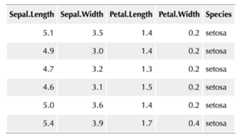
FIGURE 10.1: A striped table created with HTML and CSS.