14.7 Navigation and progress tracking
Eachlearnr tutorial includes a table of contents on the left that tracks student progress (see Figure14.5). Your browser will remember which sections of a tutorial a student has completed, and return a student to where he/she left off when the tutorial is reopened.
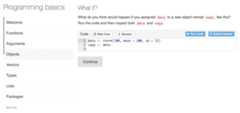
FIGURE 14.5: Keeping track of the student’s progress in a tutorial.
You can optionally reveal content by one sub-section at a time. You can use this feature to let students set their own pace, or to hide information that would spoil an exercise or question that appears just before it.
To use progressive reveal, set theprogressive option totrue in thelearnr::tutorial output format in the YAML metadata, e.g.,
---title:"Programming basics"output: learnr::tutorial:progressive:trueallow_skip:trueruntime: shiny_prerendered---Theallow_skip option above indicates that students can skip any sections, and move directly to the next section without completing exercises in the previous section.