12.1 Get started
You can install either the CRAN version or the development version on GitHub (https://github.com/rstudio/bookdown):
# install from CRANinstall.packages('bookdown')# or GitHubdevtools::install_github('rstudio/bookdown')If you use RStudio, you can start a new bookdown project from the menuFile -> New Project -> New Directory -> Book Project using bookdown.12 Open the R Markdown fileindex.Rmd, and click the buttonBuild Book on theBuild tab of RStudio. This will compile the book and display the HTML version within the RStudio Viewer, which looks like Figure12.1.
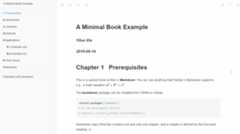
FIGURE 12.1: The HTML output of the bookdown template.
You may add or change the R Markdown files, and hit theKnit button again to preview the book. If you prefer not to use RStudio, you may also compile the book through the command line usingbookdown::render_book().
Alternatively, the command
bookdown:::bookdown_skeleton(getwd())will create a skeleton project in your current working directory.↩︎