⚙️ Math Breakdown: Anime Homing Missiles
I designed and prototyped the missile attack! The math was clever and I want to show-off!
Let’s talk aboutcubic bezier curves,perlin noise, androtation minimizing frames.
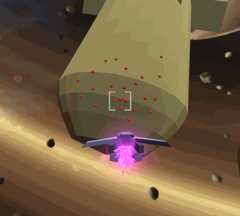
DoingIchirō Itano proud.
I’ll keep this article a little lighter on code. I really want to focus instead on the geometry. Many people are intimidated by math, but keep in mind that you don’t need to understand everything to use it.
Even if this is retreading topics you’ve already mastered, hopefully my own solution shows you some new ways you can combine these techniques creatively.
Iterative vs. Closed-Form Motion
Broadly speaking, there are two flavors of movement code.Iterative Code updates an object position incrementally one frame at a time, in a process college-professors callintegration. A common example of thisEuler’s Method where we compute the velocity of the object and then nudge the position in that direction over a timestep:
void Update(float DeltaTime ) {Vector3 Velocity = CalculateVelocity();Vector3 Position = GetPosition();SetPosition( Position + DeltaTime * Velocity );}Delta is just ‘math speak’ for “change in” as in “the change in time this Update()”.
This is the natural way to write character control, in which the player input varies every frame, or complex physics simulations where there is no known realtime analytical solution.
Alternatively, if you know the whole motion ahead of time, you can useClosed-Form Code where you plot the whole path from initial conditions (math heads call it aparametric curve), andsample the current time. A good example of this is the well-knownCubic Bezier Curve:
Vector3 CalcBezierPos( Vector3 P0, Vector3 P1, Vector3 P2, Vector3 P3,float t ) {float t_ =1 - t;return(t_ * t_ * t_) * P1 +(3 * t_ * t_ * t) * P2 +(3 * t_ * t * t) * P3 +(t * t * t) * P4 ;}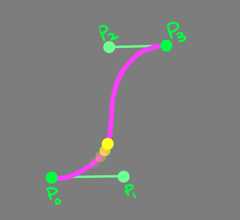
If you’ve ever used any vector graphics tool you probably recognize this. Beziers arecubic polynomials which is a fancy way of saying the simplest path with four degrees of freedom: the endpoints P0 and P3 and the “control points” P1 and P2 which affect the orientation and curvature.
The inputt is called theinput parameter and is a ratio on the range 0-1. So e.g. t=0.333 is about a third of the way through. To move a point, we simply take the elapsed time since the start of the motion, divided by the duration.
float StartTime;float Duration;void Update() {float CurrentTime = Time.time;float Elapsed = CurrentTime - StartTime;if( Elapsed >= Duration )SetPosition( P3 );// we're at the endelseSetPosition( CalcBezierPos( P0, P1, P2, P3, Elapsed / Duration ) );}In addition to the position, we can also use the bezier parameters to calculate thederivative at t, which is the rate of change. This vector is useful because we say it’stangent to the curve, i.e. it points in the direction of the motion. To convert this to speed, divide by the duration.
Vector3 CalcBezierDeriv( Vector3 P0, Vector3 P1, Vector3 P2, Vector3 P3,float t ) {float t_ =1 - t;return ((3 * t_ * t_ ) * ( P1 - P0 ) +(6 * t_ * t ) * ( P2 - P1 ) +(3 * t * t ) * ( P3 - P2 ) ;}float Velocity = CalcBezierDeriv( P0, P1, P2, P3, Elapsed / Duration ) / Duration;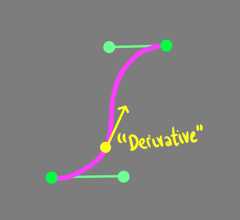
Speed = Meters Per Second = ( Meters Per T ) / ( Seconds Per T ) = Deriv / Duration
Simulating Homing Missiles
Because I know where the homing missile path starts (the launcher muzzle), and where it ends (the painted target), I chose to use a bezier curve as the base for the homing missile path.
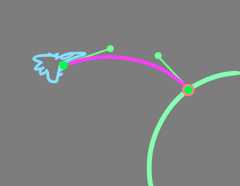
P1 is placed in front of the shooter, and P2 is projected out from the target surface.
Using a closed form kept things simple, because I didn’t have to solve a complicated “simulation” that hits the right point, and I can fine-tune the exact time between when you fire and when it hits, which is more intuitive than second-order physics units.
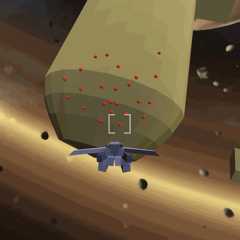
This was aperfectly cromulent effect, if a bit bland. We can do better.
Adding Noise
With a solid foundation, it’s time to start adding juice. Missile storm attacks in anime take erratic paths with more dynamism. We can simulate this by adding noise.
A common go-to for FX artists isPerlin Noise, a kind-of pseudorandom oscillation – it’s erratic, but also smooth. The code’s a little too long to post here, but it’s not hard to find samples online.
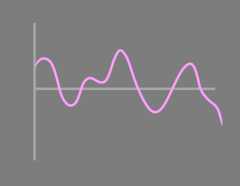
Search for “Simplex Noise” (the name of a common optimized variant).
An obvious problem here is that I need the offset to be zero at endpoints, so the missile lines up with the muzzle and the target. I achieved this by multiplying it by anenvelope which is zero at the ends and one in the middle.
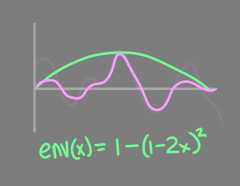
How do we turn a noise function into a 3D curve-deformed offset? We compute two independent noise values and use them as the X and Y components of an offset vector transformed by a rotation-frame that’s aligned to the bezier’s derivative (what a mouthful!).
Vector3 LocalOffset;float NoiseFreq =2f;// tuning value for wiggle frequencyfloat NoiseAmp =8;// tuning value for wiggle sizefloat Envelope =1 - (1 -2 * t) * (1 -2 * t);LocalOffset.x = NoiseAmp * Envelope * Noise( NoiseSeedX, NoiseFreq * Elapsed );LocalOffset.y = NoiseAmp * Envelope * Noise( NoiseSeedY, NoiseFreq * Elapsed );LocalOffset.z =0;Quaternion Frame = Quaternion.LookRotation( CalcBezierDeriv( P0, P1, P2, P3, t ) );SetPosition( CalcBezierPos( P0, P1, P2, P3, t ) + Frame * LocalOffset );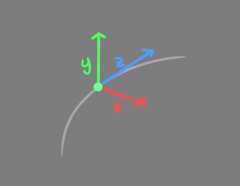
TL;DR We’re wiggling along the red and green arrows.
Thisalmost worked, but I saw some glitches. Vertically-Locked rotation frames calculated this way arealigned to the derivative, but twist a lot – especially when the path is vertical. Instead, we want so-calledRotation Minimizing Frames which have no instantaneous twist, just minimal swings between directions.
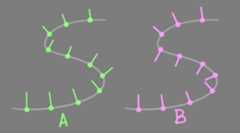
(A) Vertically-Locked Frames (B) Rotation Minimizing Frames
The method of computing minimizing frames is mathematically complex in general, but luckily a paper was published in 2006 which described ashockingly simple method for “nudging” a frame forward without twisting called theDouble Reflection Method. We don’t need to understand the derivation, we can just know that it’s cheap and it works.
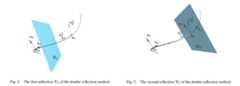
Shoutout toJasper St. Pierre for showing me this mathy-ass math.
Quaternion Frame;// Initialize to Quaternion.LookDirection( P1 - P0 );void UpdateFrame(float t ) {// starting "normal" and "tangent"var n0 = Frame * Vector3.up;var t0 = Frame * Vector3.forward;// target "tangent"var t1 = CalcBezierDeriv( P0, P1, P2, P3, t ).normalized;// first reflectionvar v1 = CalcBezierPos( P0, P1, P2, P3, t ) - GetPosition();var c1 = v1.sqrMagnitude;var n0_l = n0 - (2 / c1) * Vector3.Dot(v1, n0) * v1;var t0_l = t0 - (2 / c1) * Vector3.Dot(v1, t0) * v1;// second reflectionvar v2 = t1 - t0_l;var c2 = v2.sqrMagnitude;var n1 = n0_l - (2 / c2) * Vector3.Dot(v2, n0_l) * v2;// build rotation with target normal for "up"Frame = Quaternion.LookRotation( t1, n1 );}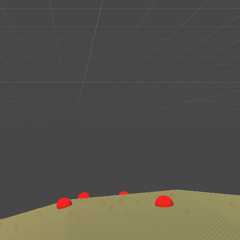
Et Voilà!
Thanks for reading! I promise I’ll do an art post next to give everyone a break from code 🙏