Getting Started with Blazor Signature Component
4 Sep 20255 minutes to read
This section briefly explains about how to includeBlazor Signature component in your Blazor WebAssembly App using Visual Studio and Visual Studio Code.
To get started quickly with Blazor Signature component, check on the following video:
Prerequisites
Create a new Blazor App in Visual Studio
You can create aBlazor WebAssembly App using Visual Studio viaMicrosoft Templates or theSyncfusion® Blazor Extension.
Install Syncfusion® Blazor Inputs and Themes NuGet in the App
To addBlazor Signature component in the app, open the NuGet package manager in Visual Studio (Tools → NuGet Package Manager → Manage NuGet Packages for Solution), search and installSyncfusion.Blazor.Inputs andSyncfusion.Blazor.Themes. Alternatively, you can utilize the following package manager command to achieve the same.
Install-PackageSyncfusion.Blazor.Inputs-Version32.1.19Install-PackageSyncfusion.Blazor.Themes-Version32.1.19NOTE
Syncfusion® Blazor components are available innuget.org. Refer toNuGet packages topic for available NuGet packages list with component details.
Prerequisites
Create a new Blazor App in Visual Studio Code
You can create aBlazor WebAssembly App using Visual Studio Code viaMicrosoft Templates or theSyncfusion® Blazor Extension.
Alternatively, you can create a WebAssembly application using the following command in the terminal(Ctrl+`).
dotnetnewblazorwasm-oBlazorAppcdBlazorAppInstall Syncfusion® Blazor Inputs and Themes NuGet in the App
- PressCtrl+` to open the integrated terminal in Visual Studio Code.
- Ensure you’re in the project root directory where your
.csprojfile is located. - Run the following command to install aSyncfusion.Blazor.Inputs andSyncfusion.Blazor.Themes NuGet package and ensure all dependencies are installed.
dotnetaddpackageSyncfusion.Blazor.Inputs-v32.1.19dotnetaddpackageSyncfusion.Blazor.Themes-v32.1.19dotnetrestoreNOTE
Syncfusion® Blazor components are available innuget.org. Refer toNuGet packages topic for available NuGet packages list with component details.
Register Syncfusion® Blazor Service
Open~/_Imports.razor file and import theSyncfusion.Blazor andSyncfusion.Blazor.Inputs namespace.
@using Syncfusion.Blazor@using Syncfusion.Blazor.InputsNow, register the Syncfusion® Blazor Service in the~/Program.cs file of your Blazor WebAssembly App.
usingMicrosoft.AspNetCore.Components.Web;usingMicrosoft.AspNetCore.Components.WebAssembly.Hosting;usingSyncfusion.Blazor;varbuilder=WebAssemblyHostBuilder.CreateDefault(args);builder.RootComponents.Add<App>("#app");builder.RootComponents.Add<HeadOutlet>("head::after");builder.Services.AddScoped(sp=>newHttpClient{BaseAddress=newUri(builder.HostEnvironment.BaseAddress)});builder.Services.AddSyncfusionBlazor();awaitbuilder.Build().RunAsync();....Add stylesheet and script resources
The theme stylesheet and script can be accessed from NuGet throughStatic Web Assets. Include the stylesheet and script references in the<head> section of the~/index.html file.
<head> ....<linkhref="_content/Syncfusion.Blazor.Themes/bootstrap5.css"rel="stylesheet"/><scriptsrc="_content/Syncfusion.Blazor.Core/scripts/syncfusion-blazor.min.js"type="text/javascript"></script></head>NOTE
Check out theBlazor Themes topic to discover various methods (Static Web Assets,CDN, andCRG) for referencing themes in your Blazor application. Also, check out theAdding Script Reference topic to learn different approaches for adding script references in your Blazor application.
Add Syncfusion® Blazor Signature component
Add the Syncfusion® Blazor Signature component in the~/Pages/Index.razor file.
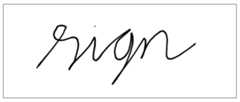
<SfSignature></SfSignature>- PressCtrl+F5 (Windows) or⌘+F5 (macOS) to launch the application. This will render the Syncfusion® Blazor Signature component in your default web browser.
NOTE
The Signature component will render default height and width of canvas (300 * 150), when the Signature height and width are not specified.
NOTE
See Also
- Getting Started with Syncfusion® Blazor for client side in .NET Core CLI
- Getting Started with Syncfusion® Blazor for server side in Visual Studio
- Getting Started with Syncfusion® Blazor for server side in .NET Core CLI
NOTE
You can also explore ourBlazor Signature example that shows you how to render and configure the Signature.
[8]ページ先頭