Getting Started with Blazor RadioButton Component
4 Nov 20254 minutes to read
This section explains how to include theBlazor RadioButton component in a Blazor WebAssembly app using Visual Studio and Visual Studio Code.
To get started quickly with the RadioButton component in Blazor, watch the following video or explore the RadioButton getting-started sample onGitHub.
Prerequisites
Create a new Blazor App in Visual Studio
Create aBlazor WebAssembly App using Visual Studio viaMicrosoft templates or theSyncfusion® Blazor Extension.
Install Syncfusion® Blazor Buttons and Themes NuGet in the App
To add theBlazor RadioButton component, open the NuGet Package Manager in Visual Studio (Tools → NuGet Package Manager → Manage NuGet Packages for Solution), search for, and installSyncfusion.Blazor.Buttons andSyncfusion.Blazor.Themes. Alternatively, run the following Package Manager commands:
Install-PackageSyncfusion.Blazor.Buttons-Version32.1.19Install-PackageSyncfusion.Blazor.Themes-Version32.1.19NOTE
Syncfusion® Blazor components are available onnuget.org. Refer to theNuGet packages topic for the list of available packages and component details.
Prerequisites
Create a new Blazor App in Visual Studio Code
Create aBlazor WebAssembly App using Visual Studio Code viaMicrosoft templates or theSyncfusion® Blazor Extension.
Alternatively, create a WebAssembly application using the following command in the terminal (Ctrl+`).
dotnetnewblazorwasm-oBlazorAppcdBlazorAppInstall Syncfusion® Blazor Buttons and Themes NuGet in the App
- PressCtrl+` to open the integrated terminal in Visual Studio Code.
- Ensure you are in the project root directory where the
.csprojfile is located. - Run the following commands to installSyncfusion.Blazor.Buttons andSyncfusion.Blazor.Themes, and restore packages.
dotnetaddpackageSyncfusion.Blazor.Buttons-v32.1.19dotnetaddpackageSyncfusion.Blazor.Themes-v32.1.19dotnetrestoreNOTE
Syncfusion® Blazor components are available onnuget.org. Refer to theNuGet packages topic for the list of available packages and component details.
Register Syncfusion® Blazor Service
Open~/_Imports.razor and import theSyncfusion.Blazor andSyncfusion.Blazor.Buttons namespaces.
@using Syncfusion.Blazor@using Syncfusion.Blazor.ButtonsNow, register the Syncfusion® Blazor service in~/Program.cs of the Blazor WebAssembly app.
usingMicrosoft.AspNetCore.Components.Web;usingMicrosoft.AspNetCore.Components.WebAssembly.Hosting;usingSyncfusion.Blazor;varbuilder=WebAssemblyHostBuilder.CreateDefault(args);builder.RootComponents.Add<App>("#app");builder.RootComponents.Add<HeadOutlet>("head::after");builder.Services.AddScoped(sp=>newHttpClient{BaseAddress=newUri(builder.HostEnvironment.BaseAddress)});builder.Services.AddSyncfusionBlazor();awaitbuilder.Build().RunAsync();....Add stylesheet
The theme stylesheet is provided viaStatic Web Assets. Include the stylesheet reference in the<head> section of~/index.html.
<head> ....<linkhref="_content/Syncfusion.Blazor.Themes/bootstrap5.css"rel="stylesheet"/></head>NOTE
ReviewBlazor Themes for options to reference themes (Static Web Assets,CDN, andCRG). Ensure the theme stylesheet is loaded before any custom styles.
Add Blazor RadioButton component
Add the Syncfusion® Blazor RadioButton component in~/Pages/Index.razor.
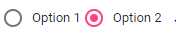
<SfRadioButtonLabel="Option 1"Name="options"Value="card"@bind-Checked="stringChecked"></SfRadioButton><SfRadioButtonLabel="Option 2"Name="options"Value="cash"@bind-Checked="stringChecked"></SfRadioButton>@code { private string stringChecked = "cash";}- PressCtrl+F5 (Windows) or⌘+F5 (macOS) to launch the application. This renders the Syncfusion® Blazor RadioButton component in the default web browser.
See Also
- Getting Started with Syncfusion® Blazor for Client-Side in .NET Core CLI
- Getting Started with Syncfusion® Blazor for Server-Side in Visual Studio
- Getting Started with Syncfusion® Blazor for Server-Side in .NET Core CLI
NOTE
Explore theBlazor Radio Button example that demonstrates rendering and configuration of the Radio Button.
[8]ページ先頭