Custom Resource Generator
19 Nov 20253 minutes to read
Syncfusion® provides theCustom Resource Generator (CRG) web tool to generate component-specific interop scripts and styles for Blazor. Using CRG reduces bundle size and improves load performance by including only the required resources instead of the full library.

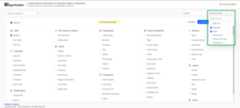
Search and select the component list
Select the required Syncfusion® Blazor components in CRG to generate a specific set of resources.
Follow these steps to choose components in CRG:
- Open theSyncfusion® Custom Resource Generator (CRG) app.
- Type the component name in the search box, then select its checkbox. CRG automatically resolves dependencies; manual selection of dependent components is not required.

- Select one or more built-in themes fromSelect Themes.
Download the selected component resources
After selecting the required components, download the custom interop script and styles from CRG.
Follow these steps to download the custom resources:
- Select theMinified option to generate the minified file output for production, then clickDOWNLOAD.

- Rename the file if needed, enter a valid email address, and clickGENERATE in the pop-up.
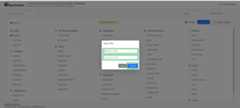
- The export request starts for the selected components. An email with a download link will arrive shortly (timing depends on the number of components and bundle type minified or unminified).

The output includes the custom interop script, styles, and animport.json file that stores the current settings.
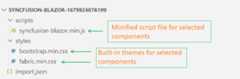
NOTE
When downloading Material or Tailwind themes (alone or with other themes), the package includes a ‘styles’ folder with CSS files and a ‘customized’ folder. The CSS files within the ‘customized’ folder do not include the online Google font dependencies associated with the Material and Tailwind themes. Seethemes documentation for details.
How to use custom resources in the Blazor application
- Copy and paste the downloaded custom resources into the application’s
~/wwwrootfolder. - Manually add the custom interop script and styles:
- For.NET 8, .NET 9 and .NET 10 Blazor Web App (any render mode: Server, WebAssembly, or Auto), reference the custom interop script in
~/Components/App.razorfile. - For aBlazor WebAssembly (standalone) app, reference the custom interop script in
~/wwwroot/index.htmlfile.
<head> .... ....<linkhref="material.css"rel="stylesheet"/><scriptsrc="syncfusion-blazor.min.js"type="text/javascript"></script></head> - For.NET 8, .NET 9 and .NET 10 Blazor Web App (any render mode: Server, WebAssembly, or Auto), reference the custom interop script in
- Run the application. The resources will load only the required components.
NOTE
Ensure the generated bundle version matches the installed Syncfusion Blazor NuGet package version. After upgrading packages, regenerate the CRG bundle. For reference on where to place script references, seeReference script files for Syncfusion Blazor.
Import previously generated settings into CRG
To add more components or update to the latest Syncfusion® Blazor resources, it is not necessary to start from scratch. Import the existingimport.json, make changes, and download it again from the CRG application.
Follow these steps to import previous settings in CRG:
- ClickIMPORT SETTINGS at the bottom of the page.

- Upload theimport.json file to restore the previous configuration. Add components as needed and export the resources again.

[8]ページ先頭