
サクサク読めて、
アプリ限定の機能も多数!
アプリで開く
Put YourMac on Autopilot You've alreadygot enough to think about, so Endurance automatically integrates with yourMac. When your battery hits the 70% charge level, you'll be prompted togo into low power mode. Or, are you a consistent user? You can have Endurance kick in automatically. Interested in a different trigger level?It's all customizable. You can even haveit start up the minute you un


What is a framework?A framework is a hierarchical directory that encapsulates a dynamic library, header files, and resources, such as storyboards, image files, and localized strings, into a single package. Apps using frameworks need toembed the framework in the app'sbundle. Adding A Framework TargetApps wishing to utilize frameworks to share code across different parts of their application, such
Using TimeMachine on unsupported volumes Apr 17, '14 07:00:00AM • Contributed by: thefaizsaleem I wanted to use TimeMachine on my exFAT hard drive, but turns out that these volumes aren't supported from TimeMachine! There is a verysimple way to use TimeMachines on unsupported hard drives, as long as you follow these instructions carefully you shouldn't have any issues at all. First, connect t
► 2025 (28) ► 10月 (2) ► 9月 (4) ► 8月 (2) ► 7月 (1) ► 5月 (6) ► 4月 (1) ► 3月 (4) ► 2月 (4) ► 1月 (4) ► 2024 (14) ► 10月 (3) ► 9月 (4) ► 8月 (2) ► 7月 (1) ► 6月 (1) ► 3月 (2) ► 2月 (1) ►2023 (28) ► 11月 (2) ► 10月 (11) ► 9月 (1) ► 8月 (1) ► 7月 (6) ► 3月 (2) ► 2月 (4) ► 1月 (1) ►2022 (8) ► 9月 (1) ► 6月 (1) ► 5月 (3) ► 4月 (2) ► 2月 (1) ► 2021 (24) ► 11月 (1) ► 10月 (3) ► 9月 (3) ► 8月 (2) ► 7月 (5) ► 6月 (4) ► 5月 (2) ► 4月 (3) ►
The Node features a cover that slides on to the unit a little awkwardly, butit does agood job of protecting the internals and providingairflow to the internals. Both the front and rear of the Node feature perforated panels to allow plenty of coolair to workits way throughout the case. With a graphics card inside, the Node is pretty heavy, almost like a smallPC case. The unit’s handle is obvi
![Hands-on: Turbo charge your MacBook Pro graphics performance with the Akitio Node eGPU over Thunderbolt 3 [Video] - 9to5Mac](/image.pl?url=https%3a%2f%2fcdn-ak-scissors.b.st-hatena.com%2fimage%2fsquare%2f52b9241911d6b4425b61da8f1d97f85360a1439a%2fheight%3d288%3bversion%3d1%3bwidth%3d512%2fhttps%253A%252F%252F9to5mac.com%252Fwp-content%252Fuploads%252Fsites%252F6%252F2017%252F01%252Fakitio-node-rx-480-gpu.jpg%253Fquality%253D82%2526strip%253Dall&f=jpg&w=240)
iPad As A Second MonitorRemote IntoMac OrPCCast iOS To YourMac OrPCSharedKeyboard & MouseiPad As A Drawing TabletAndroid As A MonitoriMac As A Second MonitorMirror To Another DeviceExtend To YourMac OrPCUse Your Device As The Only DisplayiPad As A Second Monitor Duet is the most trusted and flexible way to use your devices together and work from anywhere withMac,PC, iOS orAndroid.

AppleデバイスのTYPE-Cポートを拡張。 4K HDMIポートと、オーディオジャックも搭載。MacBook Pro定番のハイパードライブを、 あなたの新しいAppleにも。 既に世界的な定番となった、MacBook Pro用のHUB、HyperDrive。 新しいMacBookAirやiPad ProにもHyperDriveを。 各ポート最大5Gbpsデータ転送。接続したメディアは充電しながらの同時アクセスOK。 すべてのポートへの同時アクセスが可能です。 4K対応のHDMIポートも搭載。さらに、HyperDrive初のオーディオジャックも搭載しています。iPad Pro 2018でも様々な機能が使えます!外部ディスプレイへ HDMI 出力、SDカードなどから写真取り込み、USBキーボードも使用OK。イヤフォンジャックも復活できます! あなたの新しいAppleを、拡張します。
iTunes UserGuide Welcome HowiTunes is changing Additems toiTunes How to additems Streammusic fromAppleMusic Subscribe toAppleMusic Stream recommendedmusic and video Add and downloadmusic PlayAppleMusic radioCreate a profile to shareCreate anAppleMusic profile Sharemusic with friends See what friends are listening to CustomizeAppleMusic Getitems from theiTunes Store Intro to
MOONGIFTはオープンソース・ソフトウェアを紹介するブログです。2021年07月16日で更新停止しましたMacOSXにはスマートフォンのようにアプリストアが存在します。これを使うことでアプリケーションが探しやすくなったり、インストールが容易になると言ったメリットがあります。しかし問題はApp Storeアプリが重たく、使い勝手が悪いということです。 そこで使ってみたいのがmasです。CLIベースでアプリのインストールができるソフトウェアです。 masの使い方 masでlistコマンドを使うと購入済みのアプリがリストアップされます。 $ mas list 409203825 Numbers 478330793 Camtasia 2 403858460 EchofonLite 409201541 Pages 497799835 Xcode 585829637 Todoist 40918

MacのThunderbolt/USB-Cポート用のアダプタMacのThunderbolt 5ポート、Thunderbolt 4ポート、Thunderbolt 3ポート、またはUSB-Cポートで使える各種アダプタについてご紹介します。 この記事で紹介しているアダプタやケーブルは、Thunderbolt 5ポート、Thunderbolt 4ポート、Thunderbolt 3ポート、またはUSB-Cポートを搭載したMacコンピュータで使えます。ポートを1基しか搭載していないMacは、Thunderbolt接続には対応していません。 USB-CまたはThunderboltアダプタを使ってディスプレイを接続している場合は、そのアダプタがDisplayPort Alt Mode(オルタネートモード)、Thunderbolt 3、またはThunderbolt 4に対応している必要があります。 お使い
OS X El Capitan に Homebrew を使ってTeX Live 2015 をインストールする手順 はじめに このページは、TeX Wikiに書かれたことを読んで結城が試した手順メモです。まずはTeX Wikiを読むことをお勧めします。TeX Wiki -TeX Live/Mac 前提Mac OS X El Capitan はすでにインストールされているとする。 Homebrew はすでにインストールされているとする。 El CapitanでHomebrewが動かないときは、以下の記事を参考にする。 OS X El Capitanインストール後のエラー諸々の解決 手順 1.TeX Live 2015 (MacTeX-2015) をインストールする $ brew install caskroom/cask/brew-cask $ brew cask install m

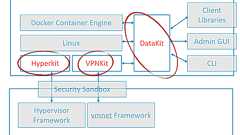
Docker、MacOS X対応の軽量な仮想化ツール「HyperKit」をオープンソースで公開。Docker forMacの仮想化機能を取り出したものDockerは、MacのOS Xに組み込まれている「Hypervisor Framework」に対応した軽量な仮想化ツール「HyperKit」などをオープンソースで公開しました。DockerはMacで仮想マシンを立ち上げ、そこで軽量なLinuxを起動することで、Macで手軽にDocker環境を構築できるソフトウェア「Docker forMac」を3月に公開しています。 このDocker forMacの仮想化機能は、MacのOS Xに組み込まれているHypervisor Frameworkを用いています。 今回オープンソースとして公開された「HyperKit」は、このDocker forMacの仮想化機能部分を取り出したもの。オープ
 maxserve blog: 【MacOSX 10.11.1編】MacでThunderbolt外付けBOXにGPGPUを認識させるには【El Capitan】
MacOSX 10.11.1 El CapitanにてGPUをThunderbolt経由で認識させる方法を記します。 El Capitanではkextファイルのようなシステムファイルを容易に書き換える事が厳しくなりました。 ここではその回避方法を記します。 ----必ずバックアップを取り作業については自己責任でおこなってください!---- Step.1) Command-Rを押しながらMac を再起動。 「ユーティリティ」メニューから「ターミナル」を起動し以下のコマンドを実行 csrutil disable 間違っていなければ『Successfully disabled SystemIntegrity Protection. 〜〜(略)」というようなメッセージが出るはずです。 その後再起動します。 Step.2) 開発モードを有効にします。sudo nvram boot-args=”k

PostgreSQLGUI tool formacOS PSequel provides a clean andsimple interface for you to perform common PostgreSQL tasks quickly. FAQWhy yet another PostgreSQLGUI client? Why notjust pgAdmin?Well, pgAdmin is great forits feature-richness. However, I founditsUI is clumsy and complicated. I know there is a list of PostgreSQLGUI Tools. However, they are either web-based,Java-based* or don't supp
リリース、障害情報などのサービスのお知らせ
最新の人気エントリーの配信
処理を実行中です
j次のブックマーク
k前のブックマーク
lあとで読む
eコメント一覧を開く
oページを開く


