
サクサク読めて、
アプリ限定の機能も多数!
アプリで開く
dnf / yum で プロキシを使いたい。 普通はプロキシを使うなら、次のコマンドをシェルでたたき環境変数を追加したら、シェル経由のネットワークコマンドははコレを使うんだけど。 環境変数だとうまくいかない。。 export http_proxy=http://proxy.example.com:8080/ #yum はこれを見てくれない debian / ubuntu の apt なんかはコレで行けたんですどねー yum / dnf は シェルの環境変数を考慮してくれない。 そうなんです。驚きました。プロキシを使うには /etc/{dnf,yum}.confに設定を書かないといけない /etc/{dnf,yum}.conf [main] proxy=http://proxy.example.com:8080/ このように書きます。 また、ユーザー名やパスワードが必要な場合は [main]
2023/04/29: これくらいの情報はググればすぐに出てくると思いいったん非公開にしましたが、意外とそうでもなかったので自分用メモとして再公開しました。 1. ソフトウェアのダウンロード元を変更してシステムをアップデートする (*) Super キー(=Windows キー)を押して、software と入力し、「ソフトウェアとアップデート」を選択します。 「設定...」ボタンを押して、「Ubuntu のソフトウェア」タブの「ダウンロード元:」から ftp.jaist.ac.jp などの国内ミラーサーバーを選択します。 アップデートが存在する場合は、表示されるウィンドウの指示にしたがってパッケージを更新し、Ubuntu を再起動します。 2. キーボードの CapsLock キーを Control へ置き換える /etc/default/keyboard を編集します。

今回の問題 (この問題が解決した旨を下に追記しました) 世界のどこかが4月21日のうちに、Ubuntu 22.04 LTSがリリースされます。 どのバージョンのUbuntuでも、せめてインプットメソッド(今回はIBusのこと、以下IM)が正しく動作するように気を配っているつもりではあるのですが、今回も不具合があるままリリースされることになっていました。 Waylandセッションでは特に問題ないのですが、ログイン時にX.Orgセッションを選択し、IBusで文字を入力すると候補ウィンドウが左下に表示されます。 候補ウィンドウが左下に表示される 原因 IBusの場合、GTKアプリケーションを使用していて候補ウィンドウが左下に表示されるということは、適切な設定が行われていないのが原因と考えて間違いないです。GTK2から、IMを動的に変更できるIMモジュールという仕組みが実装されました。原則として

はじめに 皆さん、お久しぶりです。ORENDAの営業です。今回は、リモートワークが当たり前となった時代での困りごとを解決する方法を説明したいと思います。 複数の端末を使う際にモニターやキーボード、マウスなどを沢山使う事になってしまうので、一つの端末から操作したいと思った事はありませんか? 実際に一つの端末から操作をする方法を調べて構築した際に躓いたポイントを書き残しておきますので参考にして頂ければ幸いです。 この記事の内容Windows10からRDPを使い、Ubuntu(Linux)を操作する方法について書きます。 1. Ubuntuをインストールしよう 2. Ubuntu側で接続の設定を行おう 3.Windowsから接続してみよう 準備Windows10がインストールされたPCUbuntuをインストールするPCUSBメモリ 4GB以上それぞれの端末にLAN回線を接続本編 Ubun
info: profile set to 'default' info: default host triple is x86_64-unknown-linux-gnu info: syncing channel updates for 'stable-x86_64-unknown-linux-gnu' info: latest update on 2020-04-23,rust version 1.43.0 (4fb7144ed 2020-04-20) info: downloading component 'cargo' info: downloading component 'clippy' info: downloading component 'rust-docs' info: downloading component 'rust-std' info: downloading

random_r 関数は glibc が提供しているリエントラントな擬似乱数生成APIです。 複数のスレッドで乱数を使いたい場合はこれを使うべきらしい。*1 複数のスレッドが random() を使うような状況では、この関数を使用すべきではない。 その場合には random_r(3) を使うこと。 http://linuxjm.sourceforge.jp/html/LDP_man-pages/man3/random.3.html ただ少なくともこのマニュアルが不十分で、man を読んだだけだと正しく使うことは出来ません。 以下に私の手元で 動いたように見える コードを示します。 /* * $ gcc -o test test.c && ./test */ #include <stdio.h> #include <stdlib.h> int main (int argc, char * a
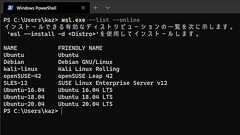
Microsoftは米国時間2020年10月29日、最新のWindows Insider Previewで自動的にLinuxディストリビューションをインストールする機能を追加したことを、公式ブログで明らかにした。同社はWSL 2をコマンドラインから有効化する「wsl.exe --install」を導入済みだが、Windows Insider Preview ビルド20246では新たな動作を追加。「wsl --install」を実行するとWSL 2だけではなく、既定でUbuntuがインストールされる。 また、オプション「-d」を使用することで、任意のLinuxディストリビューションをインストールすることも可能だ。たとえばDebian GNU/Linuxをインストールする場合は、「wsl --install -d Debian」と実行する。このLinuxディストリビューション名は「wsl --
オプション「--set-version」を使う 次のWindows 10であるWindows 10 バージョン2004では、WSL(Windows Subsystem forLinux)2が使用可能になる。Linuxカーネルを独自構築し、ファイルI/Oのパフォーマンスやシステムコールの互換性が向上しているのが特徴の1つ。Windows 10 Proをお使いの読者諸氏の中は、すでに好みのLinuxディストリビューションをWSL 1上にインストールしている方もいるかもしれないが、そのままではWSL 2の恩恵を受けることはできない。今回はWindows 10 Insider Preview上でLinuxディストリビューションのバージョン変更手順を紹介する。 「Win」+「X」キー→「A」キーと順に押すか、スタートを右クリック/長押しし、「Windows PowerShell」をクリック/タッ

____________________________________________________________________4.1 �� �� �� �� �����ޤǤ�����������Debian ������������������ˡ�� �ˤĤ������������Ǥ��ޤ����� ������������������������Ū���������� �������������ʤ����������������Ǥ���!!�� �������ޥ��Ǥ����� �ɤ����ʤ���������ʪ�������Ƥߤ��������ޤ� ����? �����Ǥ� Debian Developer �����ʤ����� Debian Developer ���������Ƥ��������������Ȥ�����Package Maintainer�� �� �

Dnsmasq providesnetwork infrastructure for smallnetworks:DNS,DHCP, router advertisement andnetwork boot.It is designed to be lightweight and have a small footprint, suitable for resource constrained routers and firewalls.It has also been widely used for tethering on smartphones and portable hotspots, and to support virtualnetworking in virtualisation frameworks. Supported platforms include
Latest Version: 4.98.2 Exim is a message transfer agent (MTA) originally developed at the University of Cambridge for use on Unix systems connected to the Internet.It is freely available under the terms of the GNU General Public Licence. In styleit issimilar to Smail 3, butits facilities are more general. There is a great deal of flexibility in the way mail can be routed, and there are extensi
This is deb.debian.org. This service providesmirrors for the following Debianarchive repositories: /debian/ /debian-debug/ /debian-ports/ /debian-security/ /debian-security-debug/ The server deb.debian.org does not have packagesitself, but the name has SRV records inDNS that lets apt in stretch and later find places. To useit with a sufficiently recent apt, you for instance can put deb http:/
FusionForge helps you manage the entire development life cycle FusionForge has tools to help your team collaborate, like message forums and mailing lists; tools tocreate and control access to Source Code Management repositories like CVS and Subversion. FusionForge automaticallycreates a repository and controls access toit depending on the role settings of the project. Additional Features: Manag
Ubuntu Weekly Recipe 第16回パッケージの使いこなし:必要なファイルの含まれるパッケージの探し方, Debianパッケージの流用 Ubuntuはパッケージによってソフトウェアを管理しています。今回は、必要なファイルが含まれるパッケージの探し方と、どうしても使いたいソフトウェアが存在しない場合の「裏技」を紹介します。 必要なファイルの含まれるパッケージの探し方 packages.ubuntu.comの利用 あるファイルが含まれているパッケージを探したい場合(たとえば、「libssl.soがどのパッケージに含まれているのか知りたい」場合)、http://packages.ubuntu.com/を利用するのが手軽です。 このサイトのトップページ中程にある、"Search the contents of packages"という検索ボックスを利用してください。このページに

Table of Contents Introduction Initial Configuration Repository LayoutCreating a New Package PackagingWorkflow Handling Repacked Upstream Backporting Debian and Upstream Combined Git Cheat Sheet Converting to Git Introduction There are abunch of other pages out there on the web, and this doesn't attempt to be a comprehensiveguide. Instead, this is an opinionated description of the tools I pers
GNUKhataA Free & Open Source Business Accounting SoftwareLiberate your accounting with GNUKhata! Certified byGovernment of Kerala. Adapted in commerce curriculum of Maharshtra State. Try GNUKhata Install We are excited to announce the major version GNUKhata v8.0. Please check the following link to know about the major features coming with this release - ReleaseNotes
リリース、障害情報などのサービスのお知らせ
最新の人気エントリーの配信
処理を実行中です
j次のブックマーク
k前のブックマーク
lあとで読む
eコメント一覧を開く
oページを開く


