The future of notebooks: Ars reviews the 11″ MacBook Air
Steve Jobs called the new MacBook Air models "the future of notebooks." We …

Apple CEO Steve Jobs is no stranger to superlatives. Every product Apple makes is “insanely great,” “amazing,” or even “magical.” So when heunveiled the latest MacBook Air models, declaring them to be the “future of notebooks,” it was easy to dismiss his claims as nothing more than the usual Apple marketing. After spending some quality time with an 11″ MacBook Air, however, it’s hard not to hope he’s right. The new MacBook Air is a great package, but there is one glaring weakness in it that will keep many potential buyers away: the CPU.
When the new machine’s hardware specs were announced, we had concerns about its performance given Apple’s decision to stick with older Core 2 Duo processors—let’s face it, a 1.4GHz Core 2 Duo is laughably behind the performance curve of current mobile processors from Intel. Given the tiny space inside the 11″ MacBook Air’s case, Apple chose slower ultra-low voltage processors, and, as you’ll see in our benchmarks, this decision has a real impact. Though we canappreciate the design tradeoffs, that doesn’t mean we’re necessarily ready to accept subpar performance. We also wanted to know if Apple’s battery life claims would prove accurate under use outside of a laboratory.
We alreadyanswered a number of your specific questions about the 11″ MacBook Air last week. Read on to find out more of what we learned after putting it through its paces in real-world settings.
Design

If there’s any doubt that the MacBook Air is the new hotness, merely pull one out in public. In a coffee shop, a local hipster watering hole, on a train—no matter where I was while working on this review, everyone asked about it. Most were curious about the speed—there has been some handwringing about Apple’s decision to use “slow” ULV Core 2 Duo processors. Everyone was impressed with the size, weight, and its positively solid feel.
“It’s like an iPad with a hinge and a keyboard,” a colleague exclaimed when looking at the machine for the first time. That description isn’t too far from the truth—the 11.6″ aluminum unibody frame is about the same width and approximately 2″ longer than the iPad. At its thickest point, the MacBook Air is 0.68″ inches, while the iPad is 0.5″ at its thickest point. And at 2.3 pounds, the MacBook Air is less than a pound heavier than the iPad—if you add an Apple Wireless Keyboard to your iPad then the MacBook Air actually has a weight advantage.

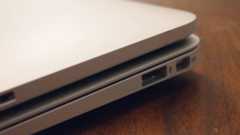
Compared to the previous 13″ MacBook Air, which was 0.76″ thick at the widest point and weighed in at 3 pounds, the 11″ MacBook Air (like its new 13″ brother) is both thinner and significantly lighter. Its footprint isn’t a whole lot smaller—11.8″ x 7.6″ versus 12.8″ x 8.9″—partially due to the 11″ model having a 16:9 display compared to the 13″ model’s slightly squarer 16:10 proportions. However, the difference is noticeable when carrying it under your arm—or putting it into a 13″ case. Screen real estate, despite the smaller size, is roughly the same, with the 11.6″ 1366 x 768 pixel screen offering 25,000 more pixels than the 13.3″ 1280 x 800 pixel display of the older generation Air. (The new 13″ MacBook Airs are now equipped with a 1440 x 900 pixel display.)
The aluminum unibody is extremely solid despite its thinness. The LED-backlit display is bright and sharp, and as we noted above, it has the same amount of screen real estate as the 13″ MacBook Pro, but type tends to look a little small with the increased pixel density. Anyone who has used any Apple keyboard of recent vintage will feel right at home using the MacBook Air keyboard. And the large glass trackpad is smooth, with a solid click.
The hinge closes with minimal pressure, but it does take more than one finger to open comfortably. The design is in line with Apple’s recent devices carved out of aluminum, including MacBook Pros, LED Cinema Displays, and iPads. Our only complaint in the sculpting is that there’s a sharp edge on the cutout from the bottom half of the body meant to allow lifting the screen. In practice, it hasn’t been an issue, but it seems it could have been cut with a slightly smooth curve to eliminate the chance that it could be a problem.
Two other issues bothered us a bit as well. Like the iPhone and iPad, the new MacBook Airs use a “standby” mode. As such, Apple left off the usual sleep indicator light, likely to save a little space and battery life. Apple says it will last up to 30 days in standby mode, but there’s no way to check the condition of the battery, or even if the machine is still on or off, without opening it and checking. If you’ve been in standby for a few weeks, opening up and powering on the screen might be enough to drain most of what’s left of the battery.

Finally, several readers lamented that Apple eliminated the backlit keyboard from the Air. Apple’s official response is that users who need a backlit keyboard would best be served by the MacBook Pro line. However, noting how everything is packed tightly into the 0.68″ max width body of the machine, Apple seems to be betting that more customers would want the thinnest possible ultrportable over having a backlit keyboard. Given that Apple tends to be priced a little higher on average than competing computers, depending on configuration and design, this might prove the riskiest design tradeoff and might turn off some would-be buyers.
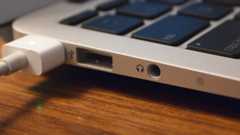
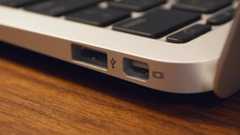
Along the left side is a MagSafe connector, a USB port, a headphone-out port with audio-in capabilities (with a three-ring plug such as that on the iPhone headphones with mic), and built-in microphone. Along the right is a Mini DIsplayport and another USB port. Stereo speakers are hidden below the keyboard, with sound coming up from between the keys. An iSight camera, rebranded as a “FaceTime” camera by Apple’s marketing, is right above the display (it works just as expected with the FaceTime beta).
Our review unit is an entry-level, 1.4GHz model with 2GB of RAM and upgraded to a 128GB SSD module. Included in the small, iPad-like box is a 45W power adapter, extension cable, a small manual, and a tiny USB flash drive with a software restore image on it.
Battery Life
Just as I received this review unit from our senior Apple editor, Jacqui Cheng, my primary (and only) Mac—an aging, 2006 white MacBook—had to take a trip to Apple’s notebook repair facility. That meant I would have no choice but to use the MacBook Air as I worked on this review and other writing assignments. This gave me ample opportunity to test Apple’s claims about the new MacBook Air’s battery life.
Apple gives the 11″ MacBook Air a five-hour runtime rating, based on light Web use over a WiFi connection, which we found to be pretty spot on during testing. This involved using the Air regularly during a normal work day, with iChat, Colloquy, Tweetie, NetNewsWire, Mail, Safari, Pixelmator, and TextEdit constantly running, as well as a lot of alternating between browsing the Web and writing. Brightness of the LED-backlit display was set to just one notch under half (or seven pips). Under these conditions, the MacBook Air consistently ran slightly more than five hours, for an average of about 5:30.
We did find (quite by accident) that Apple may have more reasons behind not installing Flash by default other than the stated reason of ensuring that users always have the most up-to-date version. Having Flash installed can cut battery runtime considerably—as much as 33 percent in our testing. With a handful of websites loaded in Safari, Flash-based ads kept the CPU running far more than seemed necessary, and the best time I recorded with Flash installed was just 4 hours. After deleting Flash, however, the MacBook Air ran for 6:02—with the exact same set of websites reloaded in Safari, and with static ads replacing the CPU-sucking Flash versions.
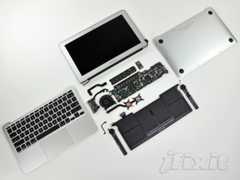
Apple was able to achieve 5+ hours of runtime on just 4500mAh (previous MacBook Air models had roughly 5100mAh batteries, yet were only rated for the same 5 hours) in a few ways. The Air’s logic board is tiny, minimized as much as possible to make room for thesix Li-ion cells stowed underneath the keyboard and trackpad. The combination of a ULV Core 2 Duo processor with a TDP of 10 watts and an efficient NVIDIA 320M also sips juice from the battery at a slower rate than previous generation MacBook Airs.
Your use may differ from our own, but if you stick to mainly light Web surfing, e-mail, and word processing, you can get nearly a full workday from a fully charged 11″ MacBook Air. If you play lots of video, games, or run CPU-intensive tasks like video encoding, expect to have to find a power outlet well within four hours.
For those trying to decide if an 11″ model will cut it for mobile needs, we feel like battery life will likely be the deciding factor. If you’re hoping for something that can run a full day without charging, the 13″ model will likely be the better choice. The larger size is mostly taken up by a larger capacity battery, which Apple says is good for two hours more runtime. We haven’t yet had a chance to evaluate a 13″ MacBook Air (you can be sure we’ll post the results if we do), but in our experience with the 11″ version we feel confident that it should offer most Mac users a full day of use in the most minimal package.
(For comparison, the 13″ MacBook Air uses four larger Li-ion cells totaling 6500mAh, though it also has a higher resolution, larger screen, and its CPU is rated at 17W TDP.)
In addition to raw runtime, though, the new MacBook Airs boast an added benefit of “up to 30 days of standby time.” “Standby” is more or less equivalent to sleep, but because of the MacBook Air’s architecture it works more like hitting the standby button on an iPad.
We obviously couldn’t test Apple’s claim in just over a week, but we did make an attempt to characterize the power drain while in standby. We charged the battery up to full, closed the lid, disconnected the power, and left it sitting for 14 hours overnight. That ran down the battery 108mAh, a little more than two percent of the max 4640mAh capacity reported by System Profiler. By our calculations, and assuming the power drain is linear, that is equivalent to about 25 days of standby time—certainly within reach of Apple’s stated 30 days.
Finally, we have to note that we experienced two kernel panics during our battery testing. In both cases, it appears as if the kernel panic was triggered by putting the machine into standby mode when the battery was close to running out. Both times the machine appeared unresponsive after opening, and the display wouldn’t come on. Pressing the power button to boot the machine didn’t work; instead, we had to hold down the power button to power the machine off first, and then power it back on (this is a case where some sort of independent battery indicator would have helped figure out what was happening).
We discussed the issue with Apple, and provided them with crash logs, though at press time the company was unable to determine the exact cause of the problem. To our knowledge, no other reviewers have noted similar issues, and Apple said that our report was the first to detail such a problem. However, Cult of Mac noted over the weekend that at least one staffer hasexperienced kernel panics with a new MacBook Air. Some users have also been reporting issues with video, though we did not encounter this in our testing.
Performance
Ultraportable notebooks aren’t about raw performance, and the MacBook Air—especially the 11″ version—is no exception. That said, the infamous return rate on early netbooks showed that users don’t like to be unpleasantly surprised by sluggishness, even in a very cheap portable, so this will be doubly true in for users who spring for a $1,000 laptop.
With the new MacBook Air, Apple made important tradeoffs designed to minimize size and weight and maximize runtime, and one of these tradeoffs was to stick with low-clock speed, ultra low-voltage Core 2 Duo processors. From a raw CPU performance standpoint, the 1.4GHz U9400 in our review unit is no match for the Arrandale-based Core i-series processors used in some ultraportables or Apple’s current 15″ and 17″ MacBook Pros. In fact, it’s not even really a match for the 2.13GHz Core 2 Duo processors in the previous-generation MacBook Air.
Apple did manage to mitigate the CPU downgrade a bit by boosting the speed of the GPU and the SSD—these changes definitely helped, but is it enough? Let’s find out.
We used three different benchmarks to look at the raw performance of the 11″ MacBook Air. Geekbench strictly examines CPU and memory performance. Xbench, while targeting a range of hardware all the way back to PPC-based Macs, covers a lot more ground, looking at disk performance, graphics performance, and other OS operations. And Cinebench looks at both raw CPU rendering as well as GPU-based OpenGL rendering. For comparison purposes, we also included a previous-generation 13″ 2.13GHz MacBook Air and a recent vintage 2.53GHz Core i5-base 15″ MacBook Pro.
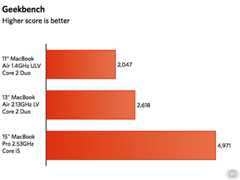
Looking at the Geekbench scores, the 11″ MacBook Air clearly isn’t winning any speed contests. The 1.4GHz ULV CPU is further limited by an 800MHz front-side bus, so memory access is also slower compared to the 13″ MacBook Air’s 1066MHz FSB. With a faster bus and a 50 percent faster CPU, the previous-gen Air manages a 28 percent better score. It’s not even a fair fight with the Core i5 MacBook Pro, though—with the capability of running four threads simultaneously anddirect connection between CPU and RAM, it easily stomps the 11″ MacBook Air.
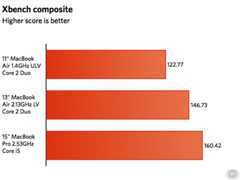
Xbench paints a more interesting picture. The 11″ MacBook Air manages a mediocre 123 points composite score, but the 13″ only tops that score by 20 percent. The 15″ MacBook Pro only turns in a 30 percent better score, despite having about double the raw CPU power. Taking one look at the disk test reveals exactly what an equalizer the newly designed SSD modules are for the new Air models. The 11″ MacBook Air had about three times the performance of the SSD in last year’s 13″ MacBook Air, and close to five times the performance of the spinning platter in the 15″ MacBook Pro.
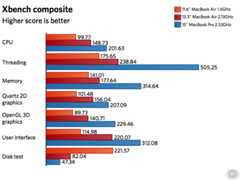
The SSD seems to speed up nearly everything that usually seems annoyingly slow on a notebook with a conventional hard drive. A cold boot takes just a scant 14 seconds from button press to login screen. Most applications launch nearly instantaneously. Files open and save in the blink of an eye. Even when pushing the limits of RAM, paging virtual memory is literally unnoticeable. And waking from sleep isalmost as “instant-on” as the iPad.
The OpenGL test in Xbench doesn’t do much to really tax the GPU hardware, but the OpenGL scene rendering test in Cinebench R11.5 shows the NVIDIA 320M turning in performance much closer to the 15″ MacBook Pro than the 9400M in the previous generation MacBook Air. Given Mac OS X’s reliance on the GPU for much of its eye candy, as well as Apple increasingly leveraging the GPU for its software, the decision to stick with the 320M over better CPU performance shows some dividends here.
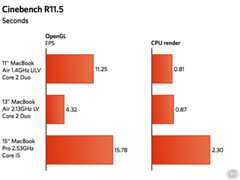
So, while the CPU is clocked much lower and based on an older Intel architecture, the speedy SSD and capable NVIDIA GPU make for an overall snappy package. Objectively, on paper, the 11″ MacBook Air is just plain wimpy, but in practice, on a day-to-day basis, it feels plenty fast—I don’t recall seeing a single beachball or experiencing any noticeable slowdown in nearly 10 full days. (Then again, I spent most of the time without Flash installed.)
While we didn’t spend much time playing games or encoding video, it’s clear from our use and benchmark testing that such applications should be acceptably fast on an occasional basis, but the 11″ MacBook Air definitely isn’t the machine to get if these are primary concerns. Things like writing, programming, photo editing, even playing with GarageBand were no problem at all, however.
Conclusions
The 11″ MacBook Air is svelte, solid, and performs many common tasks without breaking a sweat. But whether the new laptop is right for you depends on your willingness to trade poor performance and a high price tag for this new MacBook Air’s signature combination of style and battery life. In this one respect, the new MacBook Air harks back to the original iMac—an eye-catching piece of cutting-edge industrial design wrapped around a feeble, long-in-the-tooth microprocessor.
(Note: Several readers asked about the performance-robbing CPU stepping that can be an issue for some older 13″ MacBook Airs, but we never experienced that issue even while maxing the CPUs with the Cinebench render test.)
Under the day-to-day use described above, the MacBook Air stayed quiet and never got more than barely warm. Even with the CPUs maxed, the fan was virtually silent and the bottom of the machine got warm but not hot. You could certainly use it for general work without worrying about scorching your legs.
The lack of FireWire ports and a built-in optical drive may limit the MacBook Air’s usefulness for some users, but this is nothing new to the Air. The addition of an extra USB 2.0 port is helpful, especially when downloading images from a camera (either directly or via a card reader) to an attached external hard drive. A portable external DVD-R/W drive can be had for around $100, and one I had on hand worked just fine to play DVDs, rip CDs to iTunes, and burn a few gigabytes of images to a DVD-R.
Depending on the amount of data you work with and the applications you use on a regular basis, the 11″ MacBook Air can easily serve as a primary machine, with the caveat that you may want an external optical drive and possibly some external storage. For someone who travels fairly regularly, it can also be a great portable machine when you’re away from your desk. Anyone hoping an iPad could serve as a portable productivity center (I admit I was guilty of this kind of wishful thinking) will likely be far happier with an 11″ MacBook Air—you’re essentially trading battery life for a built-in keyboard and full Mac OS X.
In the extended week we spent with the 11″ MacBook Air, we found it very easy to carry and very easy to get accustomed to using. For anyone involved in writing in particular, it’s hardnot to recommend it as a true spiritual successor to the venerable 12″ PowerBook G4. It also packs a lot of the of the performance of the 13″ MacBook Pro in a package that is half the weight and a couple hundred dollars less.
Still, for many users, the 11″ MacBook Air is going to seem like a really nice, but really expensive netbook. Granted, performance should beat Atom-based solutions, and the keyboard is full-sized, but that’s not going to be a great value prospect for users who really need the full power of a current-generation laptop.
If Intel’s promised OpenCL-compatibility shows up in the IGPs in mobile Sandy Bridge parts, it’s possible that Apple can revise the current current logic board to swap out the Core 2 Duo and NVIDIA 320M for a single-chip solution with a much faster architecture—that would make a much more attractive package for a much wider audience.
Those with portable performance needs that go beyond the basics—writing, e-mail, iChat, (Flash-less) Web surfing, etc.—should definitely look towards the larger MacBook Pro models. But if you’re looking for the ability to do a full day’s work in the most portable package, then the 13″ MacBook Air, with its longer battery life, should do the trick.
Besides the CPU issue (particularly on the 11″ model), our only major gripe with Apple’s design tradeoffs for the new generation Airs is the 2GB of RAM on the entry level models. Apple at least offers a 4GB option, but we feel that this much RAM should be standard (especially given the CPU situation). Since the RAM is soldered to the motherboard, you have to tack it on extra to the purchase price when buying upfront—despite therumors, upgrading later isn’t an option.
After spending some quality time with the 11″ MacBook Air, it’s easy to see where Apple is headed, marrying several aspects of the iPad experience with its notebooks. We can’t help but wonder, given features like auto-suspend and resume that arecoming in Mac OS X 10.7, if the new MacBook Air wasn’t built with Lion in mind. The combination of fast, SSD-based app loading, better automated memory management, ostensibly improved task management with Mission Control—this combination would be formidable for getting things done on the go.
Steve Jobs hinted during the press event announcing the new MacBook Air models that they represent the direction for future MacBook models—and even notebooks in general. If shaving weight and maximizing battery life is the future Apple is hinting at—and assuming that comes with some sorely needed CPU upgrades—it seems like a bright future for mobile computing.

 Loading comments...