This article describes the various data object types supplied byarrow, and documents how these objects are structured.
The arrow package supplies several object classes that are used torepresent data.RecordBatch,Table, andDataset objects are two-dimensional rectangular datastructures used to store tabular data. For columnar, one-dimensionaldata, theArray andChunkedArray classes areprovided. Finally,Scalar objects represent individualvalues. The table below summarizes these objects and shows how you cancreate new instances using theR6 class object, as wellas convenience functions that provide the same functionality in a moretraditional R-like fashion:
| Dim | Class | How to create an instance | Convenience function |
|---|---|---|---|
| 0 | Scalar | Scalar$create(value, type) | |
| 1 | Array | Array$create(vector, type) | as_arrow_array(x) |
| 1 | ChunkedArray | ChunkedArray$create(..., type) | chunked_array(..., type) |
| 2 | RecordBatch | RecordBatch$create(...) | record_batch(...) |
| 2 | Table | Table$create(...) | arrow_table(...) |
| 2 | Dataset | Dataset$create(sources, schema) | open_dataset(sources, schema) |
Later in the article we’ll look at each of these in more detail. Fornow we note that each of these object classes corresponds to a class ofthe same name in the underlying Arrow C++ library.
In addition to these data objects, arrow defines the followingclasses for representing metadata:
- A
Schemais a list ofFieldobjects usedto describe the structure of a tabular data object; where - A
Fieldspecifies a character string name and aDataType; and - A
DataTypeis an attribute controlling how values arerepresented
These metadata objects play an important role in making sure data arerepresented correctly, and all three of the tabular data object types(Record Batch, Table, and Dataset) include explicit Schema objects usedto represent metadata. To learn more about these metadata classes, seethemetadata article.
Scalars
A Scalar object is simply a single value that can be of any type. Itmight be an integer, a string, a timestamp, or any of the differentDataType objects that Arrow supports. Most users of thearrow R package are unlikely to create Scalars directly, but shouldthere be a need you can do this by calling theScalar$create() method:
Scalar$create("hello")## Scalar## helloArrays
Array objects are ordered sets of Scalar values. As with Scalars mostusers will not need to create Arrays directly, but if the need arisesthere is anArray$create() method that allows you to createnew Arrays:
integer_array<-Array$create(c(1L,NA,2L,4L,8L))integer_array## Array## <int32>## [## 1,## null,## 2,## 4,## 8## ]string_array<-Array$create(c("hello","amazing","and","cruel","world"))string_array## Array## <string>## [## "hello",## "amazing",## "and",## "cruel",## "world"## ]An Array can be subset using square brackets as shown below:
string_array[4:5]## Array## <string>## [## "cruel",## "world"## ]Arrays are immutable objects: once an Array has been created itcannot be modified or extended.
Chunked Arrays
In practice, most users of the arrow R package are likely to useChunked Arrays rather than simple Arrays. Under the hood, a ChunkedArray is a collection of one or more Arrays that can be indexedasif they were a single Array. The reasons that Arrow provides thisfunctionality are described in thedata object layoutarticle but for the present purposes it is sufficient to notice thatChunked Arrays behave like Arrays in regular data analysis.
To illustrate, let’s use thechunked_array()function:
chunked_string_array<-chunked_array(string_array,c("I","love","you"))Thechunked_array() function is just a wrapper aroundthe functionality thatChunkedArray$create() provides.Let’s print the object:
chunked_string_array## ChunkedArray## <string>## [## [## "hello",## "amazing",## "and",## "cruel",## "world"## ],## [## "I",## "love",## "you"## ]## ]The double bracketing in this output is intended to highlight thefact that Chunked Arrays are wrappers around one or more Arrays.However, although comprised of multiple distinct Arrays, a Chunked Arraycan be indexed as if they were laid end-to-end in a single “vector-like”object. This is illustrated below:

We can usechunked_string_array to illustrate this:
chunked_string_array[4:7]## ChunkedArray## <string>## [## [## "cruel",## "world"## ],## [## "I",## "love"## ]## ]An important thing to note is that “chunking” is not semanticallymeaningful. It is an implementation detail only: users should nevertreat the chunk as a meaningful unit. Writing the data to disk, forexample, often results in the data being organized into differentchunks. Similarly, two Chunked Arrays that contain the same valuesassigned to different chunks are deemed equivalent. To illustrate thiswe can create a Chunked Array that contains the same four same fourvalues aschunked_string_array[4:7], but organized into onechunk rather than split into two:
cruel_world<-chunked_array(c("cruel","world","I","love"))cruel_world## ChunkedArray## <string>## [## [## "cruel",## "world",## "I",## "love"## ]## ]Testing for equality using== produces an element-wisecomparison, and the result is a new Chunked Array of four (boolean type)true values:
cruel_world==chunked_string_array[4:7]## ChunkedArray## <bool>## [## [## true,## true,## true,## true## ]## ]In short, the intention is that users interact with Chunked Arrays asif they are ordinary one-dimensional data structures without ever havingto think much about the underlying chunking arrangement.
Chunked Arrays are mutable, in a specific sense: Arrays can be addedand removed from a Chunked Array.
Record Batches
A Record Batch is tabular data structure comprised of named Arrays,and an accompanying Schema that specifies the name and data typeassociated with each Array. Record Batches are a fundamental unit fordata interchange in Arrow, but are not typically used for data analysis.Tables and Datasets are usually more convenient in analyticcontexts.
These Arrays can be of different types but must all be the samelength. Each Array is referred to as one of the “fields” or “columns” ofthe Record Batch. You can create a Record Batch using therecord_batch() function or by using theRecordBatch$create() method. These functions are flexibleand can accept inputs in several formats: you can pass a data frame, oneor more named vectors, an input stream, or even a raw vector containingappropriate binary data. For example:
rb<-record_batch( strs=string_array, ints=integer_array, dbls=c(1.1,3.2,0.2,NA,11))rb## RecordBatch## 5 rows x 3 columns## $strs <string>## $ints <int32>## $dbls <double>This is a Record Batch containing 5 rows and 3 columns, and itsconceptual structure is shown below:
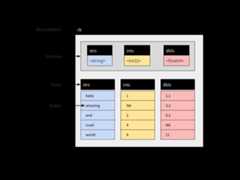
The arrow package supplies a$ method for Record Batchobjects, used to extract a single column by name:
rb$strs## Array## <string>## [## "hello",## "amazing",## "and",## "cruel",## "world"## ]You can use double brackets[[ to refer to columns byposition. Therb$ints array is the second column in ourRecord Batch so we can extract it with this:
rb[[2]]## Array## <int32>## [## 1,## null,## 2,## 4,## 8## ]There is also[ method that allows you to extractsubsets of a record batch in the same way you would for a data frame.The commandrb[1:3, 1:2] extracts the first three rows andthe first two columns:
rb[1:3,1:2]## RecordBatch## 3 rows x 2 columns## $strs <string>## $ints <int32>Record Batches cannot be concatenated: because they are comprised ofArrays, and Arrays are immutable objects, new rows cannot be added toRecord Batch once created.
Tables
A Table is comprised of named Chunked Arrays, in the same way that aRecord Batch is comprised of named Arrays. Like Record Batches, Tablesinclude an explicit Schema specifying the name and data type for eachChunked Array.
You can subset Tables with$,[[, and[ the same way you can for Record Batches. Unlike RecordBatches, Tables can be concatenated (because they are comprised ofChunked Arrays). Suppose a second Record Batch arrives:
new_rb<-record_batch( strs=c("I","love","you"), ints=c(5L,0L,0L), dbls=c(7.1,-0.1,2))It is not possible to create a Record Batch that appends the datafromnew_rb to the data inrb, not withoutcreating entirely new objects in memory. With Tables, however, wecan:
df<-arrow_table(rb)new_df<-arrow_table(new_rb)We now have the two fragments of the data set represented as Tables.The difference between the Table and the Record Batch is that thecolumns are all represented as Chunked Arrays. Each Array from theoriginal Record Batch is one chunk in the corresponding Chunked Array inthe Table:
rb$strs## Array## <string>## [## "hello",## "amazing",## "and",## "cruel",## "world"## ]df$strs## ChunkedArray## <string>## [## [## "hello",## "amazing",## "and",## "cruel",## "world"## ]## ]It’s the same underlying data – and indeed the same immutable Arrayis referenced by both – just enclosed by a new, flexible Chunked Arraywrapper. However, it is this wrapper that allows us to concatenateTables:
concat_tables(df,new_df)## Table## 8 rows x 3 columns## $strs <string>## $ints <int32>## $dbls <double>The resulting object is shown schematically below:
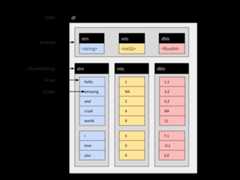
Notice that the Chunked Arrays within the new Table retain thischunking structure, because none of the original Arrays have beenmoved:
df_both<-concat_tables(df,new_df)df_both$strs## ChunkedArray## <string>## [## [## "hello",## "amazing",## "and",## "cruel",## "world"## ],## [## "I",## "love",## "you"## ]## ]Datasets
Like Record Batch and Table objects, a Dataset is used to representtabular data. At an abstract level, a Dataset can be viewed as an objectcomprised of rows and columns, and just like Record Batches and Tables,it contains an explicit Schema that specifies the name and data typeassociated with each column.
However, where Tables and Record Batches are data explicitlyrepresented in-memory, a Dataset is not. Instead, a Dataset is anabstraction that refers to data stored on-disk in one or more files.Values stored in the data files are loaded into memory as a batchedprocess. Loading takes place only as needed, and only when a query isexecuted against the data. In this respect Arrow Datasets are a verydifferent kind of object to Arrow Tables, but the dplyr commands used toanalyze them are essentially identical. In this section we’ll talk abouthow Datasets are structured. If you want to learn more about thepractical details of analyzing Datasets, see the article onanalyzing multi-file datasets.
The on-disk data files
Reduced to its simplest form, the on-disk structure of a Dataset issimply a collection of data files, each storing one subset of the data.These subsets are sometimes referred to as “fragments”, and thepartitioning process is sometimes referred to as “sharding”. Byconvention, these files are organized into a folder structure called aHive-style partition: seehive_partition() for details.
To illustrate how this works, let’s write a multi-file dataset todisk manually, without using any of the Arrow Dataset functionality todo the work. We’ll start with three small data frames, each of whichcontains one subset of the data we want to store:
df_a<-data.frame(id=1:5, value=rnorm(5), subset="a")df_b<-data.frame(id=6:10, value=rnorm(5), subset="b")df_c<-data.frame(id=11:15, value=rnorm(5), subset="c")Our intention is that each of the data frames should be stored in aseparate data file. As you can see, this is a quite structuredpartitioning: all data wheresubset = "a" belong to onefile, all data wheresubset = "b" belong to another file,and all data wheresubset = "c" belong to the thirdfile.
The first step is to define and create a folder that will hold allthe files:
ds_dir<-"mini-dataset"dir.create(ds_dir)The next step is to manually create the Hive-style folderstructure:
ds_dir_a<-file.path(ds_dir,"subset=a")ds_dir_b<-file.path(ds_dir,"subset=b")ds_dir_c<-file.path(ds_dir,"subset=c")dir.create(ds_dir_a)dir.create(ds_dir_b)dir.create(ds_dir_c)Notice that we have named each folder in a “key=value” format thatexactly describes the subset of data that will be written into thatfolder. This naming structure is the essence of Hive-stylepartitions.
Now that we have the folders, we’ll usewrite_parquet()to create a single parquet file for each of the three subsets:
write_parquet(df_a,file.path(ds_dir_a,"part-0.parquet"))write_parquet(df_b,file.path(ds_dir_b,"part-0.parquet"))write_parquet(df_c,file.path(ds_dir_c,"part-0.parquet"))If we had wanted to, we could have further subdivided the dataset. Afolder could contain multiple files (part-0.parquet,part-1.parquet, etc) if we wanted it to. Similarly, thereis no particular reason to name the filespart-0.parquetthis way at all: it would have been fine to call these filessubset-a.parquet,subset-b.parquet, andsubset-c.parquet if we had wished. We could have writtenother file formats if we wanted, and we don’t necessarily have to useHive-style folders. You can learn more about the supported formats byreading the help documentation foropen_dataset(), andlearn about how to exercise fine-grained control withhelp("Dataset", package = "arrow").
In any case, we have created an on-disk parquet Dataset usingHive-style partitioning. Our Dataset is defined by these files:
list.files(ds_dir, recursive=TRUE)## [1] "subset=a/part-0.parquet" "subset=b/part-0.parquet"## [3] "subset=c/part-0.parquet"To verify that everything has worked, let’s open the data withopen_dataset() and callglimpse() to inspectits contents:
ds<-open_dataset(ds_dir)glimpse(ds)## FileSystemDataset with 3 Parquet files## 15 rows x 3 columns## $ id<int32> 1, 2, 3, 4, 5, 6, 7, 8, 9, 10, 11, 12, 13, 14, 15## $ value<double> -1.400043517, 0.255317055, -2.437263611, -0.005571287, 0.62155~## $ subset<string> "a", "a", "a", "a", "a", "b", "b", "b", "b", "b", "c", "c", "c~## Call `print()` for full schema detailsAs you can see, theds Dataset object aggregates thethree separate data files. In fact, in this particular case the Datasetis so small that values from all three files appear in the output ofglimpse().
It should be noted that in everyday data analysis work, you wouldn’tneed to do write the data files manually in this fashion. The exampleabove is entirely for illustrative purposes. The exact same datasetcould be created with the following command:
ds|>group_by(subset)|>write_dataset("mini-dataset")In fact, even ifds happens to refer to a data sourcethat is larger than memory, this command should still work because theDataset functionality is written to ensure that during a pipeline suchas this the data is loaded piecewise in order to avoid exhaustingmemory.
The Dataset object
In the previous section we examined the on-disk structure of aDataset. We now turn to the in-memory structure of the Dataset objectitself (i.e.,ds in the previous example). When the Datasetobject is created, arrow searches the dataset folder looking forappropriate files, but does not load the contents of those files. Pathsto these files are stored in an active bindingds$files:
ds$files## [1] "/build/r/vignettes/mini-dataset/subset=a/part-0.parquet"## [2] "/build/r/vignettes/mini-dataset/subset=b/part-0.parquet"## [3] "/build/r/vignettes/mini-dataset/subset=c/part-0.parquet"The other thing that happens whenopen_dataset() iscalled is that an explicit Schema for the Dataset is constructed andstored asds$schema:
ds$schema## Schema## id: int32## value: double## subset: string#### See $metadata for additional Schema metadataBy default this Schema is inferred by inspecting the first file only,though it is possible to construct a unified schema after inspecting allfiles. To do this, setunify_schemas = TRUE when callingopen_dataset(). It is also possible to use theschema argument toopen_dataset() to specifythe Schema explicitly (see theschema() function fordetails).
The act of reading the data is performed by a Scanner object. Whenanalyzing a Dataset using the dplyr interface you never need toconstruct a Scanner manually, but for explanatory purposes we’ll do ithere:
scan<-Scanner$create(dataset=ds)Calling theToTable() method will materialize theDataset (on-disk) as a Table (in-memory):
scan$ToTable()## Table## 15 rows x 3 columns## $id <int32>## $value <double>## $subset <string>#### See $metadata for additional Schema metadataThis scanning process is multi-threaded by default, but if necessarythreading can be disabled by settinguse_threads = FALSEwhen callingScanner$create().
Querying a Dataset
When a query is executed against a Dataset a new scan is initiatedand the results pulled back into R. As an example, consider thefollowing dplyr expression:
### A tibble: 6 x 3## id subset new_value##<int><chr><dbl>##1 2 a 26##2 5 a 62##3 6 b 115##4 12 c 63##5 13 c 207##6 15 c 51We can replicate this using the low-level Dataset interface bycreating a new scan by specifying thefilter andprojection arguments toScanner$create(). Touse these arguments you need to know a little about Arrow Expressions,for which you may find it helpful to read the help documentation inhelp("Expression", package = "arrow").
The scanner defined below mimics the dplyr pipeline shown above,
scan<-Scanner$create( dataset=ds, filter=Expression$field_ref("value")>0, projection=list( id=Expression$field_ref("id"), subset=Expression$field_ref("subset"), new_value=Expression$create("round",100*Expression$field_ref("value"))))and if we were to callas.data.frame(scan$ToTable()) itwould produce the same result as the dplyr version, though the rows maynot appear in the same order.
To get a better sense of what happens when the query executes, whatwe’ll do here is callscan$ScanBatches(). Much like theToTable() method, theScanBatches() methodexecutes the query separately against each of the files, but it returnsa list of Record Batches, one for each file. In addition, we’ll convertthese Record Batches to data frames individually:
lapply(scan$ScanBatches(),as.data.frame)## [[1]]## id subset new_value## 1 2 a 26## 2 5 a 62#### [[2]]## id subset new_value## 1 6 b 115#### [[3]]## id subset new_value## 1 12 c 63## 2 13 c 207## 3 15 c 51If we return to the dplyr query we made earlier, and usecompute() to return a Table rather usecollect() to return a data frame, we can see the evidenceof this process at work. The Table object is created by concatenatingthe three Record Batches produced when the query executes against threedata files, and as a consequence of this the Chunked Array that definesa column of the Table mirrors the partitioning structure present in thedata files:
tbl<-ds|>filter(value>0)|>mutate(new_value=round(100*value))|>select(id,subset,new_value)|>compute()tbl$subset## ChunkedArray## <string>## [## [## "a",## "a"## ],## [## "b"## ],## [## "c",## "c",## "c"## ]## ]Additional notes
A distinction ignored in the previous discussion is between
FileSystemDatasetandInMemoryDatasetobjects.In the usual case, the data that comprise a Dataset are stored in fileson-disk. That is, after all, the primary advantage of Datasets overTables. However, there are cases where it may be useful to make aDataset from data that are already stored in-memory. In such cases theobject created will have typeInMemoryDataset.The previous discussion assumes that all files stored in theDataset have the same Schema. In the usual case this will be true,because each file is conceptually a subset of a single rectangulartable. But this is not strictly required.
For more information about these topics, seehelp("Dataset", package = "arrow").
Further reading
- To learn more about the internal structure of Arrays, see thearticle ondata objectlayout.
- To learn more about the different data types used by Arrow, see thearticle ondata types.
- To learn more about how Arrow objects are implemented, see theArrowspecification page.