Reference
Digital IO
Pin numbers in Arduino correspond directly to the ESP8266 GPIO pinnumbers.pinMode,digitalRead, anddigitalWrite functionswork as usual, so to read GPIO2, calldigitalRead(2).
Digital pins 0—15 can beINPUT,OUTPUT, orINPUT_PULLUP. Pin16 can beINPUT,OUTPUT orINPUT_PULLDOWN_16. At startup,pins are configured asINPUT.
Pins may also serve other functions, like Serial, I2C, SPI. Thesefunctions are normally activated by the corresponding library. Thediagram below shows pin mapping for the popular ESP-12 module.
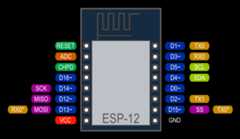
Pin Functions
Digital pins 6—11 are not shown on this diagram because they are used toconnect flash memory chip on most modules. Trying to use these pins asIOs will likely cause the program to crash.
Note that some boards and modules (ESP-12ED, NodeMCU 1.0) also break outpins 9 and 11. These may be used as IO if flash chip works in DIO mode(as opposed to QIO, which is the default one).
Pin interrupts are supported throughattachInterrupt,detachInterrupt functions. Interrupts may be attached to any GPIOpin, except GPIO16. Standard Arduino interrupt types are supported:CHANGE,RISING,FALLING.
Analog input
ESP8266 has a single ADC channel available to users. It may be usedeither to read voltage at ADC pin, or to read module supply voltage(VCC).
To read external voltage applied to ADC pin, useanalogRead(A0).Input voltage range is 0 — 1.0V.
To read VCC voltage, useESP.getVcc() and ADC pin must be keptunconnected. Additionally, the following line has to be added to thesketch:
ADC_MODE(ADC_VCC);
This line has to appear outside of any functions, for instance rightafter the#include lines of your sketch.
Analog output
analogWrite(pin,value) enables software PWM on the given pin. PWMmay be used on pins 0 to 16. CallanalogWrite(pin,0) to disable PWMon the pin.value may be in range from 0 toPWMRANGE, which isequal to 1023 by default. PWM range may be changed by callinganalogWriteRange(new_range).
PWM frequency is 1kHz by default. CallanalogWriteFreq(new_frequency) to change the frequency.
Timing and delays
millis() andmicros() return the number of milliseconds andmicroseconds elapsed after reset, respectively.
delay(ms) pauses the sketch for a given number of milliseconds andallows WiFi and TCP/IP tasks to run.delayMicroseconds(us) pausesfor a given number of microseconds.
Remember that there is a lot of code that needs to run on the chipbesides the sketch when WiFi is connected. WiFi and TCP/IP libraries geta chance to handle any pending events each time theloop() functioncompletes, OR whendelay is called. If you have a loop somewhere inyour sketch that takes a lot of time (>50ms) without callingdelay,you might consider adding a call todelay function to keep the WiFistack running smoothly.
There is also ayield() function which is equivalent todelay(0). ThedelayMicroseconds function, on the other hand,does not yield to other tasks, so using it for delays more than 20milliseconds is not recommended.
Serial
Serial object works much the same way as on a regular Arduino. Apartfrom hardware FIFO (128 bytes for TX and RX)Serial hasadditional 256-byte TX and RX buffers. Both transmit and receive isinterrupt-driven. Write and read functions only block the sketchexecution when the respective FIFO/buffers are full/empty. Note thatthe length of additional 256-bit buffer can be customized.
Serial uses UART0, which is mapped to pins GPIO1 (TX) and GPIO3(RX). Serial may be remapped to GPIO15 (TX) and GPIO13 (RX) by callingSerial.swap() afterSerial.begin. Callingswap again mapsUART0 back to GPIO1 and GPIO3.
Serial1 uses UART1, TX pin is GPIO2. UART1 can not be used toreceive data because normally it’s RX pin is occupied for flash chipconnection. To useSerial1, callSerial1.begin(baudrate).
IfSerial1 is not used andSerial is not swapped - TX for UART0can be mapped to GPIO2 instead by callingSerial.set_tx(2) afterSerial.begin or directly withSerial.begin(baud,config,mode,2).
By default the diagnostic output from WiFi libraries is disabled whenyou callSerial.begin. To enable debug output again, callSerial.setDebugOutput(true). To redirect debug output toSerial1instead, callSerial1.setDebugOutput(true).
You also need to useSerial.setDebugOutput(true) to enable outputfromprintf() function.
The methodSerial.setRxBufferSize(size_tsize) allows to define thereceiving buffer depth. The default value is 256.
BothSerial andSerial1 objects support 5, 6, 7, 8 data bits,odd (O), even (E), and no (N) parity, and 1 or 2 stop bits. To set thedesired mode, callSerial.begin(baudrate,SERIAL_8N1),Serial.begin(baudrate,SERIAL_6E2), etc.
A new method has been implemented on bothSerial andSerial1 toget current baud rate setting. To get the current baud rate, callSerial.baudRate(),Serial1.baudRate(). Return aint ofcurrent speed. For example
//SetBaudrateto57600Serial.begin(57600);//Getcurrentbaudrateintbr=Serial.baudRate();//Willprint"Serial is 57600 bps"Serial.printf("Serial is%d bps",br);
Serial andSerial1 objects are both instances of theHardwareSerial class.Progmem
The Program memory features work much the same way as on a regularArduino; placing read only data and strings in read only memory andfreeing heap for your application. The important difference is that onthe ESP8266 the literal strings are not pooled. This means that the sameliteral string defined inside aF("") and/orPSTR("") will takeup space for each instance in the code. So you will need to manage theduplicate strings yourself.
There is one additional helper macro to make it easier to passconstPROGMEM strings to methods that take a__FlashStringHelpercalledFPSTR(). The use of this will help make it easier to poolstrings. Not pooling strings…
Stringresponse1;response1+=F("http:");...Stringresponse2;response2+=F("http:");
using FPSTR would become…
constcharHTTP[]PROGMEM="http:";...{Stringresponse1;response1+=FPSTR(HTTP);...Stringresponse2;response2+=FPSTR(HTTP);}