In this tutorial we will walk you through the basics of routing withtheshiny.router library.
In a web application, routing is the process of using URLs to drivethe user interface. Routing adds more possibilities and flexibilitywhile building a complex and advanced web application, offering dividingapp into separated sections.
Let’s build together a simple app that has two subpages and capturesthe data from url parameters.
We start by importing the packages.
Next, we create the content of our subpages: “home” and“another”.
home_page<-div(titlePanel("Home page"),p("This is the home page!"),uiOutput("power_of_input"))another_page<-div(titlePanel("Another page"),p("This is the another page!"),)Optionally, we can create a menu to easier navigate on ourwebapp:
menu<-tags$ul(tags$li(a(class="item", href=route_link("/"),"Main")),tags$li(a(class="item", href=route_link("another"),"Another page")),)Now, we create an output for our router in main UI of Shiny app. Wealso addsliderInput to test its functionality.
ui<-fluidPage(menu,tags$hr(),router_ui(route("/",home_page),route("another",another_page)),sliderInput("int","Choose integer:",-10,10,1,1),)Then, we plug router into Shiny server (note:router_server() at the beginning).
server<-function(input,output,session){router_server()}In theory that would be it, but additionally we can also introducethe mechanism of catching the parameters from the URL. We will useget_query_param function. Our modified Server code may looklike this:
server<-function(input,output,session){router_server()component<-reactive({if(is.null(get_query_param()$add)){return(0)}as.numeric(get_query_param()$add)})output$power_of_input<-renderUI({HTML(paste("I display input increased by <code>add</code> GET parameter from app url and pass result to <code>output$power_of_input</code>: ",as.numeric(input$int)+component()))})}It’s time to run it.
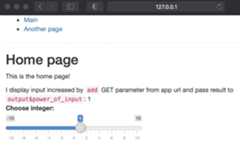
shinyApp(ui,server)Here you can see the final result:
Feel free to copy the code of this example and test it on yourown!