2021年12月12日AM、TensorFlow、機械学習
TensorFlow Recommenderで映画のレコメンダーシステムを構築

この記事はGMOアドマーケティング Advent Calendar 2021 12日目の記事です。
こんにちは、GMOアドマーケティングのS.Rです。 機械学習エンジニアとしてよくある開発はレコメンダーシステムの構築になります。今日は皆さんへTensorFlow Recommenderで簡単に映画レコメンダーシステムを構築する方法を紹介します。
下記のコードで学習データを読み込みます。
ユーザー38を入力します。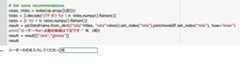 評価の点数はTOP10の映画を出ます。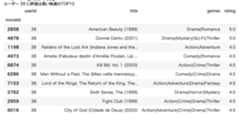
レコメンダーシステムはよく使われているものですので、もし今回のブログが皆さんの日本語のNLP の開発にお役に立てば幸いです。
明日はT.Nさんによる「JavaのSealed Classesについて」について紹介します。
引き続き、GMOアドマーケティング Advent Calendar 2021 をお楽しみください!
■エンジニア採用ページ ~福利厚生や各種制度のご案内はこちら~
https://note.gmo-ap.jp/n/n02cbeb6edb0d
■noteページ ~ブログや採用、イベント情報を公開中!~
https://note.gmo-ap.jp/

こんにちは、GMOアドマーケティングのS.Rです。 機械学習エンジニアとしてよくある開発はレコメンダーシステムの構築になります。今日は皆さんへTensorFlow Recommenderで簡単に映画レコメンダーシステムを構築する方法を紹介します。
TensorFlow Recommenderとは
TensorFlow Recommender(TFRS)は、レコメンダー システムを構築するためのライブラリです。 TensorFlow Recommenderで学習データの準備、モデルのトレーニングと評価まで簡単に作業が行えます。モデルの簡単な説明
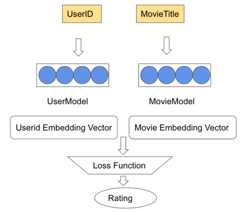
TensorFlow Recommender の基本モデルはユーザーが商品を購入する履歴を利用してレコメンド結果を作成することです。 ColabのInstanceを作る
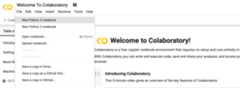
今回はGoogleのMachine Learning Cloud ServiceというColabを利用して説明します。Colabの公式サイトからColabのPython3のInstanceを作ります。環境を構築
Tensorflow RecommendersとTensorflow Datasetsをインストールしましょう。1 2 3 | !pipinstall-qtensorflow-recommenders !pipinstall-q--upgradetensorflow-datasets !pipinstalltfds-nightly |
学習データを読み込む
今回はユーザーが公開された映画を評価するMovieLens のデータセットを利用します。下記のコードで学習データを読み込みます。
Python
1 2 3 4 5 6 7 8 9 10 11 12 13 14 15 16 17 18 19 20 21 22 | fromtypingimportDict,Text importnumpyasnp importtensorflowastf importtensorflow_datasetsastfds importtensorflow_recommendersastfrs importpandasaspd !wgethttps://files.grouplens.org/datasets/movielens/ml-25m.zip !unzipml-25m.zip # Ratings data. ratings=tfds.load('movielens/100k-ratings',split="train") # Features of all the available movies. movies=tfds.load('movielens/100k-movies',split="train") # Select the basic features. ratings=ratings.map(lambdax:{ "movie_title":x["movie_title"], "user_id":x["user_id"] }) movies=movies.map(lambdax:x["movie_title"]) movieDF=pd.read_csv("ml-25m/movies.csv") rateDF=pd.read_csv("ml-25m/ratings.csv") |
TensorFlowを処理できる様にReformatする
Python
1 2 3 4 | user_ids_vocabulary=tf.keras.layers.StringLookup(mask_token=None) user_ids_vocabulary.adapt(ratings.map(lambdax:x["user_id"])) movie_titles_vocabulary=tf.keras.layers.StringLookup(mask_token=None) movie_titles_vocabulary.adapt(movies) |
Usermodelを定義する
1 2 3 4 | user_model=tf.keras.Sequential([ user_ids_vocabulary, tf.keras.layers.Embedding(user_ids_vocabulary.vocab_size(),64) ]) |
Moviemodelを定義する
Python
1 2 3 4 | movie_model=tf.keras.Sequential([ movie_titles_vocabulary, tf.keras.layers.Embedding(movie_titles_vocabulary.vocab_size(),64) ]) |
学習の目標関数を定義する
Python
1 2 3 4 | task=tfrs.tasks.Retrieval(metrics=tfrs.metrics.FactorizedTopK( movies.batch(128).map(movie_model) ) ) |
モデルを定義する
Python
1 2 3 4 5 6 7 8 9 10 11 12 13 14 15 16 17 18 19 20 21 22 23 24 25 | classMovieLensModel(tfrs.Model): # We derive from a custom base class to help reduce boilerplate. Under the hood, # these are still plain Keras Models. def__init__( self, user_model:tf.keras.Model, movie_model:tf.keras.Model, task:tfrs.tasks.Retrieval): super().__init__() # Set up user and movie representations. self.user_model=user_model self.movie_model=movie_model # Set up a retrieval task. self.task=task defcompute_loss(self,features:Dict[Text,tf.Tensor],training=False)->tf.Tensor: # Define how the loss is computed. user_embeddings=self.user_model(features["user_id"]) movie_embeddings=self.movie_model(features["movie_title"]) returnself.task(user_embeddings,movie_embeddings) |
モデルを学習する
Python
1 2 3 4 5 6 7 8 9 | # Create a retrieval model. model=MovieLensModel(user_model,movie_model,task) model.compile(optimizer=tf.keras.optimizers.Adagrad(0.5)) # Train for 3 epochs. model.fit(ratings.batch(4096),epochs=3) # Use brute-force search to set up retrieval using the trained representations. index=tfrs.layers.factorized_top_k.BruteForce(model.user_model) index.index_from_dataset( movies.batch(100).map(lambdatitle:(title,model.movie_model(title)))) |
ユーザーへレコメンドする結果を試す
指定されたユーザーへレコメンドする映画TOP10を出してみましょうPython
1 2 3 4 5 6 7 8 9 10 11 12 13 14 15 16 17 18 19 | index=tfrs.layers.factorized_top_k.BruteForce(model.user_model) index.index_from_dataset( movies.batch(100).map(lambdatitle:(title,model.movie_model(title))) ) UID=input("ユーザーのIDを入力してください:") rateUser=rateDF[rateDF["userId"]==38] rateUser=rateUser.set_index(["movieId"]).join(movieDF.set_index(["movieId"]),how="inner") print("ユーザー %s に評価は高い映画のTOP10"%UID) df=rateUser[["userId","title","genres","rating"]].sort_values(by="rating",ascending=False).head(10) display(df) # Get some recommendations. rates,titles=index(np.array([UID])) titles=[i.decode('UTF-8')foriintitles.numpy().flatten()] rates=[rforrinrates.numpy().flatten()] result=pd.DataFrame.from_dict({"title":titles,"rate":rates}).set_index("title").join(movieDF.set_index("title"),how="inner") print("ユーザー:%sへお勧め映画は下記です:"% UID) result=result[["rate","genres"]] result |
評価の点数はTOP10の映画を出ます。まとめ
今回はTensorFlow Recommender で簡単に映画レコメンダーシステムを構築する方法を紹介しました。レコメンダーシステムはよく使われているものですので、もし今回のブログが皆さんの日本語のNLP の開発にお役に立てば幸いです。
明日はT.Nさんによる「JavaのSealed Classesについて」について紹介します。
引き続き、GMOアドマーケティング Advent Calendar 2021 をお楽しみください!
■エンジニア採用ページ ~福利厚生や各種制度のご案内はこちら~
https://note.gmo-ap.jp/n/n02cbeb6edb0d
■noteページ ~ブログや採用、イベント情報を公開中!~
https://note.gmo-ap.jp/