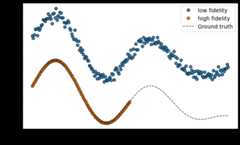
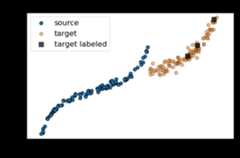
adapt.parameter_based.RegularTransferNN
- classadapt.parameter_based.RegularTransferNN(task=None,Xt=None,yt=None,lambdas=1.0,regularizer='l2',verbose=1,copy=True,random_state=None,**params)[source]
Regular Transfer with Neural Network
RegularTransferNN is a parameter-based domain adaptation method.
The method is based on the assumption that a good target estimatorcan be obtained by adapting the parameters of a pre-trained sourceestimator using a few labeled target data.
The approach consist in fitting a neural network on target dataaccording to an objective function regularized by the euclideandistance between source and target parameters:
\[\beta_T = \underset{\beta=(\beta_1, ... , \beta_D)}{\text{argmin}}\, ||f(X_T, \beta) - y_T||^2 + \sum_{i=1}^{D}\lambda_i ||\beta_i - {\beta_S}_i||^2\]Where:
\(f\) is a neural network with\(D\) layers.
\(\beta_T\) are the parameters of the target neural network.
\(\beta_S = \underset{\beta}{\text{argmin}}\, ||f(X_S,\beta) - y_S||^2\) are the source neural network parameters.
\((X_S, y_S), (X_T, y_T)\) are respectively the source andthe target labeled data.
\(\lambda_i\) is the trade-off parameter of layer\(i\).
Different trade-off can be given to the layer of the neural network through the
lambdasparameter.- Parameters
- tasktensorflow Model (default=None)
Task netwok. If
None, a two layers network with 10neurons per layer and ReLU activation is used as task network.- Xtnumpy array (default=None)
Target input data.
- ytnumpy array (default=None)
Target output data.
- lambdasfloat or list of float, optional (default=1.0)
Trade-off parameters.If a list is given, values from
lambdasare assignedsuccessively to the list ofnetworklayers with weights parameters going from the last layer to the first one.If the length oflambdasis smaller than the length ofnetworklayers list, the last trade-off value will beasigned to the remaining layers.- copyboolean (default=True)
Whether to make a copy of
estimatoror not.- verboseint (default=1)
Verbosity level.
- random_stateint (default=None)
Seed of random generator.
- paramskey, value arguments
Arguments given at the different level of the adapt object.It can be, for instance, compile or fit parameters of theestimator or kernel parameters etc…Accepted parameters can be found by calling the method
_get_legal_params(params).
- Yields
- optimizerstr or instance of tf.keras.optimizers (default=”rmsprop”)
Optimizer for the task. It should be aninstance of tf.keras.optimizers as:
tf.keras.optimizers.SGD(0.001)ortf.keras.optimizers.Adam(lr=0.001,beta_1=0.5).A string can also be given as"adam".Default optimizer isrmsprop.- lossstr or instance of tf.keras.losses (default=”mse”)
Loss for the task. It should be aninstance of tf.keras.losses as:
tf.keras.losses.MeanSquaredError()ortf.keras.losses.CategoricalCrossentropy().A string can also be given as"mse"orcategorical_crossentropy.Default loss ismse.- metricslist of str or list of tf.keras.metrics.Metric instance
List of metrics to be evaluated by the model during trainingand testing. Typically you will use
metrics=['accuracy'].- optimizer_encstr or instance of tf.keras.optimizers
If the Adapt Model has an
encoderattribute,a specific optimizer for theencodernetwork canbe given. Typically, this parameter can be used togive a smaller learning rate to the encoder.If not specified,optimizer_enc=optimizer.- optimizer_discstr or instance of tf.keras.optimizers
If the Adapt Model has a
discriminatorattribute,a specific optimizer for thediscriminatornetwork canbe given. If not specified,optimizer_disc=optimizer.- kwargskey, value arguments
Any arguments of the
fitmethod from the TensorflowModel can be given, asepochsandbatch_size.Specific arguments fromoptimizercan also be givenaslearning_rateorbeta_1forAdam.This allows to performGridSearchCVfrom scikit-learnon these arguments.
See also
References
- 1
[1] C. Chelba and A. Acero. “Adaptation of maximum entropy classifier: Little data can help a lot”. In EMNLP, 2004.
Examples
>>>fromadapt.utilsimportmake_regression_da>>>fromadapt.parameter_basedimportRegularTransferNN>>>Xs,ys,Xt,yt=make_regression_da()>>>src_model=RegularTransferNN(loss="mse",lambdas=0.,random_state=0)>>>src_model.fit(Xs,ys,epochs=100,verbose=0)>>>print(src_model.score(Xt,yt))1/1 [==============================] - 0s 127ms/step - loss: 0.27440.27443504333496094>>>model=RegularTransferNN(src_model.task_,loss="mse",lambdas=1.,random_state=0)>>>model.fit(Xt[:3],yt[:3],epochs=100,verbose=0)>>>model.score(Xt,yt)1/1 [==============================] - 0s 109ms/step - loss: 0.08320.08321201056241989
- Attributes
- task_tensorflow Model
Network.
- history_dict
history of the losses and metrics across the epochsof the network training.
Methods
__init__([task, Xt, yt, lambdas, ...])compile([optimizer, loss, metrics, ...])Configures the model for training.
fit([Xt, yt])Fit RegularTransferNN.
get_params([deep])Get parameters for this estimator.
load_weights(filepath[, skip_mismatch, ...])Loads all layer weights from a saved files.
predict(x[, batch_size, verbose, steps, ...])Generates output predictions for the input samples.
predict_disc(X)Not used.
predict_task(X)Return predictions of the task on the encoded features.
save_weights(filepath[, overwrite, ...])Saves all layer weights.
score(X, y[, sample_weight])Return the evaluation of the model on X, y.
set_params(**params)Set the parameters of this estimator.
transform(X)Return X
unsupervised_score(Xs, Xt)Return unsupervised score.
- __init__(task=None,Xt=None,yt=None,lambdas=1.0,regularizer='l2',verbose=1,copy=True,random_state=None,**params)[source]
- compile(optimizer=None,loss=None,metrics=None,loss_weights=None,weighted_metrics=None,run_eagerly=None,steps_per_execution=None,**kwargs)[source]
Configures the model for training.
- Parameters
- optimizer: str or `tf.keras.optimizer` instance
Optimizer
- loss: str or `tf.keras.losses.Loss` instance
Loss function. A loss function is any callablewith the signatureloss = fn(y_true, y_pred),wherey_true are the ground truth values, andy_pred are the model’s predictions.y_true should have shape(batch_size, d0, .. dN) (except in the case ofsparse loss functions such assparse categorical crossentropy which expects integer arrays of shape(batch_size, d0, .. dN-1)).y_pred should have shape(batch_size, d0, .. dN).The loss function should return a float tensor.If a customLoss instance isused and reduction is set toNone, return value has shape(batch_size, d0, .. dN-1) i.e. per-sample or per-timestep lossvalues; otherwise, it is a scalar. If the model has multiple outputs,you can use a different loss on each output by passing a dictionaryor a list of losses. The loss value that will be minimized by themodel will then be the sum of all individual losses, unlessloss_weights is specified.
- metrics: list of str or list of `tf.keras.metrics.Metric` instance
List of metrics to be evaluated by the model during trainingand testing. Typically you will usemetrics=[‘accuracy’]. Afunction is any callable with the signatureresult = fn(y_true,y_pred). To specify different metrics for different outputs of amulti-output model, you could also pass a dictionary, such asmetrics={‘output_a’: ‘accuracy’, ‘output_b’: [‘accuracy’, ‘mse’]}.You can also pass a list to specify a metric or a list of metricsfor each output, such asmetrics=[[‘accuracy’], [‘accuracy’, ‘mse’]]ormetrics=[‘accuracy’, [‘accuracy’, ‘mse’]]. When you pass thestrings ‘accuracy’ or ‘acc’, we convert this to one oftf.keras.metrics.BinaryAccuracy,tf.keras.metrics.CategoricalAccuracy,tf.keras.metrics.SparseCategoricalAccuracy based on the lossfunction used and the model output shape. We do a similarconversion for the strings ‘crossentropy’ and ‘ce’ as well.
- loss_weights: List or dict of floats
Scalars to weight the loss contributions of different modeloutputs. The loss value that will be minimized by the model will thenbe theweighted sum of all individual losses, weighted by theloss_weights coefficients.If a list, it is expected to have a 1:1 mapping to the model’soutputs. If a dict, it is expected to map output names (strings)to scalar coefficients.
- weighted_metrics: list of metrics
List of metrics to be evaluated and weighted bysample_weight orclass_weight during training and testing.
- run_eagerly: bool (default=False)
IfTrue, thisModel’s logic will not be wrappedin atf.function. Recommended to leavethis asNone unless yourModel cannot be run inside atf.function.run_eagerly=True is not supported when usingtf.distribute.experimental.ParameterServerStrategy.
- steps_per_execution: int (default=1)
The number of batches to run during eachtf.function call. Running multiple batchesinside a singletf.function call can greatly improve performanceon TPUs or small models with a large Python overhead.At most, one full epoch will be run eachexecution. If a number larger than the size of the epoch is passed,the execution will be truncated to the size of the epoch.Note that ifsteps_per_execution is set toN,Callback.on_batch_begin andCallback.on_batch_end methodswill only be called everyN batches(i.e. before/after eachtf.function execution).
- **kwargs: key, value arguments
Arguments supported for backwards compatibility only.
- Returns
- None: None
- fit(Xt=None,yt=None,**fit_params)[source]
Fit RegularTransferNN.
- Parameters
- Xtnumpy array (default=None)
Target input data.
- ytnumpy array (default=None)
Target output data.
- fit_paramskey, value arguments
Arguments given to the fit method of the model(epochs, batch_size, callbacks…).
- Returns
- selfreturns an instance of self
- get_params(deep=True)[source]
Get parameters for this estimator.
- Parameters
- deepbool, default=True
Not used, here for scikit-learn compatibility.
- Returns
- paramsdict
Parameter names mapped to their values.
- load_weights(filepath,skip_mismatch=False,by_name=False,options=None)[source]
Loads all layer weights from a saved files.
The saved file could be a SavedModel file, a.keras file (v3 savingformat), or a file created viamodel.save_weights().
By default, weights are loaded based on the network’stopology. This means the architecture should be the same as when theweights were saved. Note that layers that don’t have weights are nottaken into account in the topological ordering, so adding or removinglayers is fine as long as they don’t have weights.
Partial weight loading
If you have modified your model, for instance by adding a new layer(with weights) or by changing the shape of the weights of a layer,you can choose to ignore errors and continue loadingby settingskip_mismatch=True. In this case any layer withmismatching weights will be skipped. A warning will be displayedfor each skipped layer.
Weight loading by name
If your weights are saved as a.h5 file createdviamodel.save_weights(), you can use the argumentby_name=True.
In this case, weights are loaded into layers only if they sharethe same name. This is useful for fine-tuning or transfer-learningmodels where some of the layers have changed.
Note that only topological loading (by_name=False) is supported whenloading weights from the.keras v3 format or from the TensorFlowSavedModel format.
- Args:
- filepath: String, path to the weights file to load. For weight files
in TensorFlow format, this is the file prefix (the same as waspassed tosave_weights()). This can also be a path to aSavedModel or a.keras file (v3 saving format) savedviamodel.save().
- skip_mismatch: Boolean, whether to skip loading of layers where
there is a mismatch in the number of weights, or a mismatch inthe shape of the weights.
- by_name: Boolean, whether to load weights by name or by topological
order. Only topological loading is supported for weight files inthe.keras v3 format or in the TensorFlow SavedModel format.
- options: Optionaltf.train.CheckpointOptions object that specifies
options for loading weights (only valid for a SavedModel file).
- predict(x,batch_size=None,verbose=0,steps=None,callbacks=None,max_queue_size=10,workers=1,use_multiprocessing=False)[source]
Generates output predictions for the input samples.
Computation is done in batches. This method is designed for performance inlarge scale inputs. For small amount of inputs that fit in one batch,directly using__call__() is recommended for faster execution, e.g.,model(x), ormodel(x, training=False) if you have layers such astf.keras.layers.BatchNormalization that behaves differently duringinference. Also, note the fact that test loss is not affected byregularization layers like noise and dropout.
- Parameters
- x: array
Input samples.
- batch_size: int (default=`None`)
Number of samples per batch.If unspecified,batch_size will default to 32.Do not specify thebatch_size if your data is in theform of dataset, generators, orkeras.utils.Sequence instances(since they generate batches).
- verbose: int (default=0)
Verbosity mode, 0 or 1.
- steps: int (default=None)
Total number of steps (batches of samples)before declaring the prediction round finished.Ignored with the default value ofNone. If x is atf.datadataset andsteps is None,predict() willrun until the input dataset is exhausted.
- callbacks: List of `keras.callbacks.Callback` instances.
List of callbacks to apply during prediction.See [callbacks](/api_docs/python/tf/keras/callbacks).
- max_queue_size: int (default=10)
Used for generator orkeras.utils.Sequenceinput only. Maximum size for the generator queue.If unspecified,max_queue_size will default to 10.
- workers: int (default=1)
Used for generator orkeras.utils.Sequence inputonly. Maximum number of processes to spin up when usingprocess-based threading. If unspecified,workers will defaultto 1.
- use_multiprocessing: bool (default=False)
Used for generator orkeras.utils.Sequence input only.IfTrue, use process-basedthreading. If unspecified,use_multiprocessing will default toFalse. Note that because this implementation relies onmultiprocessing, you should not pass non-picklable arguments tothe generator as they can’t be passed easily to children processes.
- Returns
- y_predarray
Numpy array(s) of predictions.
- predict_task(X)[source]
Return predictions of the task on the encoded features.
- Parameters
- Xarray
input data
- Returns
- y_taskarray
predictions of task network
- save_weights(filepath,overwrite=True,save_format=None,options=None)[source]
Saves all layer weights.
Either saves in HDF5 or in TensorFlow format based on thesave_formatargument.
- When saving in HDF5 format, the weight file has:
- layer_names (attribute), a list of strings
(ordered names of model layers).
- For every layer, agroup namedlayer.name
- For every such layer group, a group attributeweight_names,
a list of strings(ordered names of weights tensor of the layer).
- For every weight in the layer, a dataset
storing the weight value, named after the weight tensor.
When saving in TensorFlow format, all objects referenced by the networkare saved in the same format astf.train.Checkpoint, including anyLayer instances orOptimizer instances assigned to objectattributes. For networks constructed from inputs and outputs usingtf.keras.Model(inputs, outputs),Layer instances used by the networkare tracked/saved automatically. For user-defined classes which inheritfromtf.keras.Model,Layer instances must be assigned to objectattributes, typically in the constructor. See the documentation oftf.train.Checkpoint andtf.keras.Model for details.
While the formats are the same, do not mixsave_weights andtf.train.Checkpoint. Checkpoints saved byModel.save_weights shouldbe loaded usingModel.load_weights. Checkpoints saved usingtf.train.Checkpoint.save should be restored using the correspondingtf.train.Checkpoint.restore. Prefertf.train.Checkpoint oversave_weights for training checkpoints.
The TensorFlow format matches objects and variables by starting at aroot object,self forsave_weights, and greedily matching attributenames. ForModel.save this is theModel, and forCheckpoint.savethis is theCheckpoint even if theCheckpoint has a model attached.This means saving atf.keras.Model usingsave_weights and loadinginto atf.train.Checkpoint with aModel attached (or vice versa)will not match theModel’s variables. See the[guide to training checkpoints](https://www.tensorflow.org/guide/checkpoint) for details onthe TensorFlow format.
- Args:
- filepath: String or PathLike, path to the file to save the weights
to. When saving in TensorFlow format, this is the prefix usedfor checkpoint files (multiple files are generated). Note thatthe ‘.h5’ suffix causes weights to be saved in HDF5 format.
- overwrite: Whether to silently overwrite any existing file at the
target location, or provide the user with a manual prompt.
- save_format: Either ‘tf’ or ‘h5’. Afilepath ending in ‘.h5’ or
‘.keras’ will default to HDF5 ifsave_format isNone.Otherwise,None becomes ‘tf’. Defaults toNone.
- options: Optionaltf.train.CheckpointOptions object that specifies
options for saving weights.
- Raises:
- ImportError: Ifh5py is not available when attempting to save in
HDF5 format.
- score(X,y,sample_weight=None)[source]
Return the evaluation of the model on X, y.
Callevaluate on tensorflow Model.
- Parameters
- Xarray
input data
- yarray
output data
- sample_weightarray (default=None)
Sample weights
- Returns
- scorefloat
Score.
- set_params(**params)[source]
Set the parameters of this estimator.
- Parameters
- **paramsdict
Estimator parameters.
- Returns
- selfestimator instance
Estimator instance.