Toy Regression


You will find here the application of DA methods from the ADAPT package on a simple one dimensional DA regression problem.
First we import packages needed in the following. We will usematplotlibAnimation tools in order to get a visual understanding of the selected methods:
[1]:
importnumpyasnpimportmatplotlib.pyplotaspltimportmatplotlib.animationasanimationfrommatplotlibimportrcrc('animation',html='jshtml')
Experimental Setup
We now set the synthetic regression DA problem using themake_regression_da function fromadapt.utils.
[2]:
fromadapt.utilsimportmake_regression_daXs,ys,Xt,yt=make_regression_da()tgt_index_lab_=np.random.choice(100,3)Xt_lab=Xt[tgt_index_lab_];yt_lab=yt[tgt_index_lab_]
We define here ashow function which we will use in the following to visualize the algorithms performances on the toy problem.
[3]:
defshow(ax,y_pred=None,X_src=Xs,weights_src=50,weights_tgt=100):ax.scatter(X_src,ys,s=weights_src,label="source",edgecolor="black")ax.scatter(Xt,yt,s=50,alpha=0.5,label="target",edgecolor="black")ax.scatter(Xt_lab,yt_lab,s=weights_tgt,c="black",marker="s",alpha=0.7,label="target labeled")ify_predisnotNone:ax.plot(np.linspace(-0.7,0.6,100),y_pred,c="red",lw=3,label="predictions")index_=np.abs(Xt-np.linspace(-0.7,0.6,100)).argmin(1)score=np.mean(np.abs(yt-y_pred[index_]))score=" -- Tgt MAE =%.2f"%scoreelse:score=""ax.set_xlim((-0.7,0.6))ax.set_ylim((-1.3,2.2))ax.legend(fontsize=16)ax.set_xlabel("X",fontsize=16)ax.set_ylabel("y = f(X)",fontsize=16)ax.set_title("Toy regression DA issue"+score,fontsize=18)returnax
[4]:
fig,ax=plt.subplots(1,1,figsize=(8,5))show(ax=ax)plt.show()
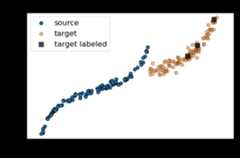
As we can see in the figure above (plotting the output datay with respect to the inputsX), source and target data define two distinct domains. We have modeled here a classical supervised DA issue where the goal is to build a good model on orange data knowing only the labels (y) of the blue and black points.
We now define the base model used to learn the task. We use here a neural network with two hidden layer. We also define aSavePrediction callback in order to save the prediction of the neural network at each epoch.
[5]:
importtensorflowastffromtensorflow.kerasimportSequentialfromtensorflow.keras.layersimportInput,Dense,Reshapefromtensorflow.keras.optimizersimportAdamdefget_model():model=Sequential()model.add(Dense(100,activation='elu',input_shape=(1,)))model.add(Dense(100,activation='relu'))model.add(Dense(1))model.compile(optimizer=Adam(0.01),loss='mean_squared_error')returnmodel
[6]:
fromtensorflow.keras.callbacksimportCallbackclassSavePrediction(Callback):""" Callbacks which stores predicted labels in history at each epoch. """def__init__(self):self.X=np.linspace(-0.7,0.6,100).reshape(-1,1)self.custom_history_=[]super().__init__()defon_epoch_end(self,batch,logs={}):"""Applied at the end of each epoch"""predictions=self.model.predict_on_batch(self.X).ravel()self.custom_history_.append(predictions)
TGT Only
First, let’s fit a network only on the three labeled target data. As we could have guessed, this is not sufficient to build an efficient model on the whole target domain.
[7]:
np.random.seed(0)tf.random.set_seed(0)model=get_model()save_preds=SavePrediction()model.fit(Xt_lab,yt_lab,callbacks=[save_preds],epochs=100,batch_size=64,verbose=0);
[8]:
defanimate(i,*fargs):ax.clear()y_pred=save_preds.custom_history_[i].ravel()iflen(fargs)<1:show(ax,y_pred)else:show(ax,y_pred,**fargs[0])
[12]:
fig,ax=plt.subplots(1,1,figsize=(8,5))ani=animation.FuncAnimation(fig,animate,frames=100,interval=60,blit=False,repeat=True)
[11]:
ani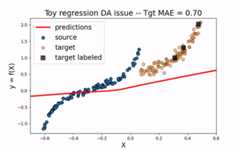
Src Only
We would like to use the large amount of labeled source data to improve the training of the neural network on the target domain. However, as we can see on the figure below, using only the source dataset fails to provide an efficient model.
[11]:
np.random.seed(0)tf.random.set_seed(0)model=get_model()save_preds=SavePrediction()model.fit(Xs,ys,callbacks=[save_preds],epochs=100,batch_size=100,verbose=0);
[2]:
fig,ax=plt.subplots(1,1,figsize=(8,5))ani=animation.FuncAnimation(fig,animate,frames=100,blit=False,repeat=True)
[2]:
ani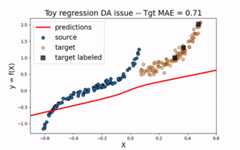
All
Same thing happen when using both source and target labeled data. As the source sample ovewhelms the target one, the model is not fitted enough on the target domain.
[14]:
np.random.seed(0)tf.random.set_seed(0)model=get_model()save_preds=SavePrediction()model.fit(np.concatenate((Xs,Xt_lab)),np.concatenate((ys,yt_lab)),callbacks=[save_preds],epochs=100,batch_size=110,verbose=0);
[3]:
fig,ax=plt.subplots(1,1,figsize=(8,5))ani=animation.FuncAnimation(fig,animate,frames=100,blit=False,repeat=True)
[4]:
ani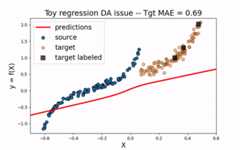
CORAL
Let’s now consider the domain adaptation methodCORAL This “two-stage” method first perfroms a feature alignment on source data and then fit an estimator on the new feature space.
[13]:
fromadapt.feature_basedimportCORALsave_preds=SavePrediction()model=CORAL(get_model(),lambda_=1e-3,random_state=0)model.fit(Xs.reshape(-1,1),ys,Xt,callbacks=[save_preds],epochs=100,batch_size=110,verbose=0);
Fit transform...Previous covariance difference: 0.024858New covariance difference: 0.000624Fit Estimator...
[4]:
fig,ax=plt.subplots(1,1,figsize=(8,5))X_transformed=model.transform(Xs.reshape(-1,1),domain="src").ravel()ani=animation.FuncAnimation(fig,animate,frames=100,blit=False,repeat=True,fargs=(dict(X_src=X_transformed),))
[5]:
ani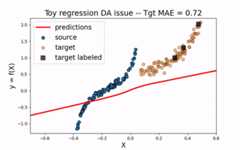
As we can see. when using CORAL method, source input data are translated closer to target data. However, for this example, this is not enough to obtain a good model on the target domain.
TrAdaBoostR2
We now consider an instance-based method:TrAdaBoostR2. This method consists in a reverse boosting algorithm decreasing the weights of source data poorly predicted at each boosting iteraton.
[27]:
fromadapt.instance_basedimportTrAdaBoostR2model=TrAdaBoostR2(get_model(),n_estimators=30,random_state=0)save_preds=SavePrediction()model.fit(Xs.reshape(-1,1),ys.reshape(-1,1),Xt_lab.reshape(-1,1),yt_lab.reshape(-1,1),callbacks=[save_preds],epochs=100,batch_size=110,verbose=0);
Iteration 0 - Error: 0.5000Iteration 1 - Error: 0.5000Iteration 2 - Error: 0.5000Iteration 3 - Error: 0.5000Iteration 4 - Error: 0.5000Iteration 5 - Error: 0.5000Iteration 6 - Error: 0.5000Iteration 7 - Error: 0.5000Iteration 8 - Error: 0.5000Iteration 9 - Error: 0.5000Iteration 10 - Error: 0.5000Iteration 11 - Error: 0.4864Iteration 12 - Error: 0.4768Iteration 13 - Error: 0.4701Iteration 14 - Error: 0.4296Iteration 15 - Error: 0.3781Iteration 16 - Error: 0.3584Iteration 17 - Error: 0.3212Iteration 18 - Error: 0.2908Iteration 19 - Error: 0.2293Iteration 20 - Error: 0.1284Iteration 21 - Error: 0.0371Iteration 22 - Error: 0.0335Iteration 23 - Error: 0.0259Iteration 24 - Error: 0.0281Iteration 25 - Error: 0.0275Iteration 26 - Error: 0.0230Iteration 27 - Error: 0.0200Iteration 28 - Error: 0.0167Iteration 29 - Error: 0.0191
[37]:
defanimate_tradaboost(i):ax.clear()i*=10j=int(i/100)y_pred=save_preds.custom_history_[i].ravel()weights_src=10000*model.sample_weights_src_[j]weights_tgt=10000*model.sample_weights_tgt_[j]show(ax,y_pred,weights_src=weights_src,weights_tgt=weights_tgt)
[47]:
fig,ax=plt.subplots(1,1,figsize=(8,5))ani=animation.FuncAnimation(fig,animate_tradaboost,frames=299,interval=120,blit=False,repeat=True)
[46]:
ani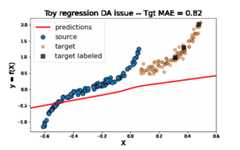
[ ]:
ani.save('tradaboost.gif',writer="imagemagick")
As we can see on the figure above,TrAdaBoostR2 perfroms very well on this toy DA issue! The importance weights are described by the size of data points. We observe that the weights of source instances close to 0 are decreased as the weights of target instances increase. This source instances indeed misleaded the fitting of the network on the target domain. Decreasing their weights helps then a lot toobtain a good target model.
RegularTransferNN
Finally, we consider here the paremeter-based methodRegularTransferNN. This method fits the target labeled data with a regularized loss. During training, the mean squared error on target data is regularized with the euclidean distance between the target model parameters and the ones of a pre-trained source model.
[41]:
fromadapt.parameter_basedimportRegularTransferNNnp.random.seed(0)tf.random.set_seed(0)save_preds=SavePrediction()model_0=get_model()model_0.fit(Xs.reshape(-1,1),ys,callbacks=[save_preds],epochs=100,batch_size=110,verbose=0);model=RegularTransferNN(model_0,lambdas=1.0,random_state=0)model.fit(Xt_lab,yt_lab,callbacks=[save_preds],epochs=100,batch_size=110,verbose=0);
[45]:
fig,ax=plt.subplots(1,1,figsize=(8,5))ani=animation.FuncAnimation(fig,animate,frames=200,interval=60,blit=False,repeat=True)
[44]:
ani