Developer Guide
This page is dedicated to developers who want to contribute to the ADAPT library.
The guide is divided is three parts:
Opening a pull request in ADAPT
Implementing a new Domain Adaptation method
Contributing to the documentation
1. Opening a pull request in ADAPT
First go on GitHub athttps://github.com/adapt-python/adapt and fork the repository:

On your labtop, open a command prompt and clone your fork with the following command line:
gitclonehttps://github.com/<yourGitHubname>/adapt.git
Or:
gitclonegit@github.com:<yourGitHubname>/adapt.git
Make changes in the cloned repository on your labtop. When you have finished, commit your changes and push them to your GitHub fork with the following command lines:
gitadd.
gitcommit-m"Mychanges"
gitpush
Finally,open a pull request on the main repository by selecting “Contribute” and “Open pull request” on your GitHub fork:
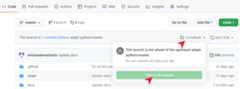
You can give a title to your pull request and a description of your changes. Your pull request will be reviewed and merged to the main repository if your code complies with the ADAPT library.
2. Implementing a new Domain Adaptation method
This part explains how to implement a novel DA method in the ADAPT style. Your implementation can be done in the cloned repository on your labtop (see previous part).
2.1 Implementing a classic DA method
If your proposed approach does not use deep learning, you should subclass theBaseAdaptEstimator object.
Let’s say you want to develop a simple feature-based approach which learns the PCA of the source domain and applies it to the target domain. The only thing you have to do is to implement the__init__,transform andfit_transform methods.
[22]:
fromadapt.baseimportBaseAdaptEstimatorfromsklearn.decompositionimportPCAclassSrcPCA(BaseAdaptEstimator):# Write a description of the algorithm, parameters and attributes.""" SrcPCA : Source PCA SrcPCA learns the PCA on the source domain and applies it on the target domain Parameters ---------- estimator : sklearn estimator or Tensorflow Model The task estimator. Xt : array The target input data. n_components : int (default=2) Number of principal components Attributes ---------- estimator_ : sklearn estimator or Tensorflow Model The fitted estimator """def__init__(self,estimator=None,Xt=None,n_components=2):super().__init__(estimator=estimator,Xt=Xt)self.n_components=n_componentsdeffit_transform(self,Xs,Xt,**kwargs):""" Fit embeddings. Parameters ---------- Xs : array Input source data. Xt : array Input target data. kwargs : key, value argument Not used, present here for adapt consistency. Returns ------- Xs_emb : embedded source data """self.pca_=PCA(self.n_components)Xs_emb=self.pca_.fit_transform(Xs)returnXs_embdeftransform(self,X,**kwargs):""" Return aligned features for X. Parameters ---------- X : array Input data. Returns ------- X_emb : array Embeddings of X. """returnself.pca_.transform(X)
You can now test your method on a simple case. For example you can use themake_classification_da function fromadapt.utils
[42]:
fromadapt.utilsimportmake_classification_daimportmatplotlib.pyplotaspltXs,ys,Xt,yt=make_classification_da()plt.plot(Xs[ys==1,0],Xs[ys==1,1],"o",c="C0")plt.plot(Xs[ys==0,0],Xs[ys==0,1],"*",c="C0")plt.plot(Xt[yt==1,0],Xt[yt==1,1],"o",c="C1")plt.plot(Xt[yt==0,0],Xt[yt==0,1],"*",c="C1")plt.show()
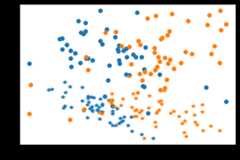
Take one estimator from sklearn and test your novel DA algorithm. Note that thefit andscore methods will call your implementedfit_transform andtransform methods.
[41]:
fromsklearn.linear_modelimportLogisticRegressionmodel=SrcPCA(LogisticRegression(penalty="none"),Xt=Xt,n_components=1)model.fit(Xs,ys)print("Score:%.3f"%model.score(Xt, yt))
Fit transform...Fit Estimator...Score: 0.930
Now, add your source code forSrcPCA to a file named_srcpca.py that you place in the adapt/feature_based folder. Modify the__init__.py file in the folder to add your method in the__all__ list.
Finally, you have to create a test file to perform some unit tests on your method. For this, create a file namedtest_scrpca.py in the tests folder. In this file, you can write the following code for example:
[ ]:
fromadapt.feature_basedimportSrcPCAfromadapt.utilsimportmake_classification_dafromsklearn.linear_modelimportLogisticRegressiondeftest_srcpca():Xs,ys,Xt,yt=make_classification_da()model=SrcPCA(LogisticRegression(penalty="none"),Xt=Xt,n_components=1)model.fit(Xs,ys)score=model.score(Xt,yt)
If you want to be sure that your tests are working, you can install thepytest package and run the tests:
pipinstallpytestpytest-cov
In the adapt folder
pytesttests/test_srcpca.py
2.2 Implementing a deep DA method
If your proposed approach is deep learning specific, you should subclass theBaseAdaptDeep object.
Let’s say you want to develop a feature-based approach which learns a deep representation where the source and target domains are both centered with variance close to one. The only think you have to do is to implement the__init__ andtrain_step methods.
[99]:
importtensorflowastffromadapt.baseimportBaseAdaptDeepclassCenterDomains(BaseAdaptDeep):# Write a description of the algorithm, parameters and attributes.""" CenterDomains : Centering domains CenterDomains learns a deep representation where the source and target domains are both centered with variance close to one. Parameters ---------- encoder : tensorflow Model (default=None) Encoder netwok. task : tensorflow Model (default=None) Task netwok. Xt : array Target input data. lambda_ : float (default=1.) Trade-off between task and domain closeness. Attributes ---------- encoder_ : tensorflow Model Fitted encoder network. task_ : tensorflow Model Fitted task network. """def__init__(self,encoder=None,task=None,lambda_=1.,Xt=None):super().__init__(encoder=encoder,task=task,Xt=Xt)self.lambda_=lambda_deftrain_step(self,data):# Unpack the data.Xs,Xt,ys,yt=self._unpack_data(data)# losswithtf.GradientTape()astask_tape,tf.GradientTape()asenc_tape:# Forward passXs_enc=self.encoder_(Xs,training=True)ys_pred=self.task_(Xs_enc,training=True)Xt_enc=self.encoder_(Xt,training=True)# Reshapeys_pred=tf.reshape(ys_pred,tf.shape(ys))# Compute the loss valuetask_loss=self.task_loss_(ys,ys_pred)mean_src=tf.reduce_mean(Xs_enc,axis=0)var_src=tf.math.reduce_variance(Xs_enc,axis=0)mean_tgt=tf.reduce_mean(Xt_enc,axis=0)var_tgt=tf.math.reduce_variance(Xt_enc,axis=0)enc_loss=tf.square(mean_src)+tf.square(mean_tgt)enc_loss+=tf.square(1-var_src)+tf.square(1-var_tgt)task_loss=tf.reduce_mean(task_loss)enc_loss=tf.reduce_mean(enc_loss)enc_loss=task_loss+self.lambda_*enc_losstask_loss+=sum(self.task_.losses)enc_loss+=sum(self.encoder_.losses)# Compute gradientstrainable_vars_task=self.task_.trainable_variablestrainable_vars_enc=self.encoder_.trainable_variablesgradients_task=task_tape.gradient(task_loss,trainable_vars_task)gradients_enc=enc_tape.gradient(enc_loss,trainable_vars_enc)# Update weightsself.optimizer.apply_gradients(zip(gradients_task,trainable_vars_task))self.optimizer_enc.apply_gradients(zip(gradients_enc,trainable_vars_enc))# Update metricsself.compiled_metrics.update_state(ys,ys_pred)self.compiled_loss(ys,ys_pred)# Return a dict mapping metric names to current valuelogs={m.name:m.result()forminself.metrics}returnlogs
You can now test your method on a simple case. For example you can use themake_classification_da function fromadapt.utils
[100]:
fromadapt.utilsimportmake_classification_daimportmatplotlib.pyplotaspltXs,ys,Xt,yt=make_classification_da()plt.plot(Xs[ys==1,0],Xs[ys==1,1],"o",c="C0")plt.plot(Xs[ys==0,0],Xs[ys==0,1],"*",c="C0")plt.plot(Xt[yt==1,0],Xt[yt==1,1],"o",c="C1")plt.plot(Xt[yt==0,0],Xt[yt==0,1],"*",c="C1")plt.show()
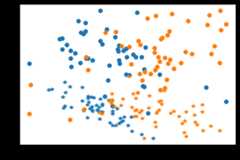
Create simple neural networks and test your novel deep DA algorithm.
[102]:
encoder=tf.keras.Sequential()encoder.add(tf.keras.layers.Dense(100,activation="relu"))encoder.add(tf.keras.layers.Dense(2))task=tf.keras.Sequential()task.add(tf.keras.layers.Dense(1,activation="sigmoid"))model=CenterDomains(encoder=encoder,task=task,Xt=Xt,lambda_=1.)model.compile(loss="binary_crossentropy",optimizer="adam")model.fit(Xs,ys,epochs=100,verbose=0)print("Score:%.3f"%model.score(Xt, yt))
1/1 [==============================] - 0s 118ms/step - loss: 0.2461Score: 0.246
You can also check that your encoded space behave as expected
[106]:
Xs_enc=model.transform(Xs)Xt_enc=model.transform(Xt)print(Xs_enc.mean(0),Xt_enc.mean(0))print(Xs_enc.var(0),Xt_enc.var(0))
[-0.02707285 0.00268192] [-0.03096193 -0.06729582][0.9326022 0.9280451] [1.08319 1.0991981]
Finally, follow the instructions in 2.1 to add your implementation in the adapt folder and make the tests.
3. Contributing to the documentation
If you want to add examples of ADAPT usage to the documentation, this can be done by modifying thesrc_docs folder.
First, install all the packages you need for documentation:
sudoaptinstallpandoc orcondainstallpandoc
And,
pipinstalljinja2==3.0.3sphinx==4.4.0numpydoc==1.2nbsphinx==0.8.8sphinx_gallery==0.10.1sphinx_rtd_theme==1.0.0ipython==8.0.1
Then, make your example in a jupyter notebook and add it to thesrc_docs/examples folder
To make your example appear in the content page, add the path to your example in eithersrc_docs/synthetic_examples.rst orsrc_docs/real_examples.rst file depending on which kind of example you have made.
You can check the rendering of your example by compiling the documentation with the following command line (executed in the adapt folder):
makehtml
You can now open the folderdocs/html/ you will find a file namedcontents.html. When you open this file you will find the path to your example in the examples sections.