Rightfully so, theData tab is the initial landingpage for thetidyCDISC app. It’s a place where you canfind, upload, and view your data before proceeding to the analysis tabs,which are disabled until aADSL sas7bdat file isuploaded.
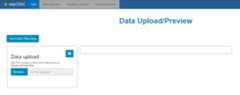
Upload requirements
This application was designed for quick analysis of ADaM-ish data, sosince preparing sas7bdat files are apart of that process,tidyCDISC only accepts SAS data sets for upload. Thus,inside the window titled “Data Upload”, you’ll notice the followingtext: “ADSL file is mandatory and BDS/ OCCDS files areoptional. Upload sas7bdat files.”
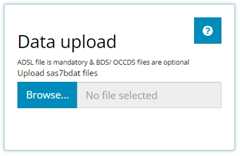
With anADSL alone, you can explore all the tabs of thisapplication, although, uploading more data with other data types isencouraged for optimized exploration. ThetidyCDISCapplication was designed to analyze ADaM data of the following types,each having a unique purpose in the application:
ADSL: demographic and trial info - one row persubjectBDS: or “basic data structure” contains variables suchasPARAMCD,AVAL, andAVISITorsome other visit variable that reports on metric values over time foreach patient.OCCDS: Occurrence style data, reporting on adverseevents, con-meds, or medical history, for example.TTE: Time-to-event data, identified by the presence ofthe requiredCNSRvariable.
Identifying these data types, the app includes precise upload rulesfor each, accessible via the small button with a question mark:

Upon clicking, what we define as “ADaM-ish” upload rules will pop upin a new window. There are several sets of rules. Some rules are“Required” and others are“Recommended”. In general,“required” rules are absolutely foundational to the app’s function.Conversely, “recommended” rules are only suggestions to get the mostfeature-rich experience in the app. More on this later, but first, andquite plainly, our first and most pervasive rule is that all uploadeddata must contain aUSUBJID variable. Without this field,data portrayed in one data set simply cannot be linked to data inanother, so this is a foundational rule and one that CDISC alsoimposes.
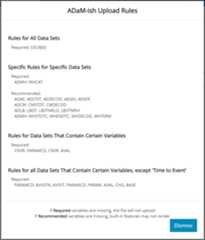
As depicted above, there exist different rule sets for specific datasets. Here, you can interpret the first rule as follows: “If you uploadanADMH, it’srequired that it contains a variablecalledMHCAT.” This is so that core features in the appwill work appropriately. Directly beneath, read the next rule as: “ifyou upload anADAE, it’srecommended that it havevariablesAESTDT,AEDECOD,AESEV,andAESER be present.” Even though some of those variablesmay be required according to CDISC, they are only recommended here,hence the label “ADaM-ish”. In the absence of the recommended variables,some features of the app may be voided, but the app will still functionjust fine without them.
The final two sets of upload rules exist to make sure certain thatdata sets containing certain variables are treated appropriately. Firstif the data containsCNSR (i.e. TTE typedata), it should also containPARAMCD andAVAL. And finally, rules that apply to non-TTEtype data: if the data containsPARAMCD (BDSdata) it must also containAVISITN,AVISIT,PARAM,AVAL,CHG, andBASE.
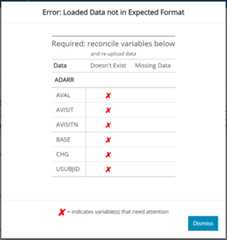
If any of these rules are violated, a prompt error or warning messagewill appear when attempting to upload the faulty data. If the uploadeddata is missing a required variable (or if the variable exists, but ispopulated will only missing values), an error will be issued and yourdata will not upload to the application. If a recommended variable ismissing, a warning is issued but the data source can still be usedwithin the application. Here is an example of an attempt to upload anerroneous data set, anADARR, with a litany of problems.Notice how the app checks that the variable both (1) exists and (2) isnon-missing below. A redX indicates the area(s) that needattention and led to the failed test.
If you are having trouble uploading your data, and you think you havesignificant grounds to alter these upload rules, pleasecontact uswith your request.
Use CDISC Pilot Data
Press this button if you are not interested in usingtidyCDISC with your study data yet, but want to explore allthe app’s features. Upon clicking, you’ll see five data sets are loaded:anADSL,ADVS,ADAE,ADLBC, andADTTE. All these data sources camefrom the PHUSETestData Factory’s public GitHub. Note that some adjustments were madeto the raw data in order to best suit the needs of the application. Thatis, in some cases, variables were created and imputed with values thatwere applicable for the trial. For the sake of data security, we’ll usethis data thoroughly throughout this guide.
Browse
When not using the CDISC pilot data, select “Browse” to navigatethrough your computer’s file system and locate your study’s data. If younormallydo not have permissions to a certain folder,you will stillnot have permission to that folder whileusingtidyCDISC. You may select one file at a time ormultiple files at once. Just note (as mentioned previously) that anADSL is required for any analysis, so make sure one isloaded from your study. Since the application is designed for ADaM-ishdata, only sas7bdat files are accepted.
Once selected, the file names will show up below the browse widgetand populate the data preview window.
Data Preview
The data preview exists to give users a perfunctory view of theirdata to make sure it uploaded correctly. Thus, the viewing window wasintentionally designed to be small and hard to navigate! Just make sureyour data is there and intact, then head over to the other tabs todissect and analyze it.

Specifically, try out the…
TableGenerator to quickly and easily create submission compliant tablesand listings
PopulationExplorer to plot trends in your treatment groups over time (amongother things)
IndividualExplorer to learn more about outlier patients or patients withcertain adverse events, etc.