


ggcorrplot: Visualization of a correlation matrix using ggplot2
The easiest way to visualize acorrelation matrix in R is to use the packagecorrplot.
In our previous article we also provided aquick-start guide for visualizing a correlation matrix using ggplot2.
Another solution is to use the functionggcorr() inggally package. However, the ggally package doesn’t provide any option for reordering the correlation matrix or for displaying the significance level.
In this article, we’ll describe the R packageggcorrplot for displaying easily a correlation matrix using ‘ggplot2’.
ggcorrplot main features
It provides a solution forreordering the correlation matrix and displays thesignificance level on the correlogram. It includes also a function for computing a matrix ofcorrelation p-values. It’s inspired from the packagecorrplot.
Installation and loading
ggcorrplot can be installed from CRAN as follow:
install.packages("ggcorrplot")Or, install the latest version from GitHub:
# Installif(!require(devtools)) install.packages("devtools")devtools::install_github("kassambara/ggcorrplot")Loading:
library(ggcorrplot)Getting started
Compute a correlation matrix
Themtcars data set will be used in the following R code. The functioncor_pmat() [inggcorrplot] computes a matrix of correlation p-values.
# Compute a correlation matrixdata(mtcars)corr<- round(cor(mtcars), 1)head(corr[, 1:6])## mpg cyl disp hp drat wt## mpg 1.0 -0.9 -0.8 -0.8 0.7 -0.9## cyl -0.9 1.0 0.9 0.8 -0.7 0.8## disp -0.8 0.9 1.0 0.8 -0.7 0.9## hp -0.8 0.8 0.8 1.0 -0.4 0.7## drat 0.7 -0.7 -0.7 -0.4 1.0 -0.7## wt -0.9 0.8 0.9 0.7 -0.7 1.0# Compute a matrix of correlation p-valuesp.mat<- cor_pmat(mtcars)head(p.mat[, 1:4])## mpg cyl disp hp## mpg 0.000000e+00 6.112687e-10 9.380327e-10 1.787835e-07## cyl 6.112687e-10 0.000000e+00 1.803002e-12 3.477861e-09## disp 9.380327e-10 1.803002e-12 0.000000e+00 7.142679e-08## hp 1.787835e-07 3.477861e-09 7.142679e-08 0.000000e+00## drat 1.776240e-05 8.244636e-06 5.282022e-06 9.988772e-03## wt 1.293959e-10 1.217567e-07 1.222311e-11 4.145827e-05Correlation matrix visualization
# Visualize the correlation matrix# --------------------------------# method = "square" (default)ggcorrplot(corr)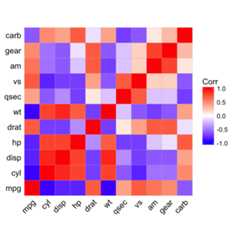
# method = "circle"ggcorrplot(corr, method = "circle")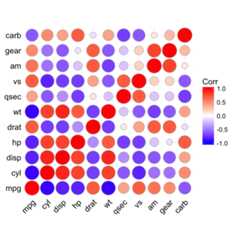
# Reordering the correlation matrix# --------------------------------# using hierarchical clusteringggcorrplot(corr, hc.order = TRUE, outline.col = "white")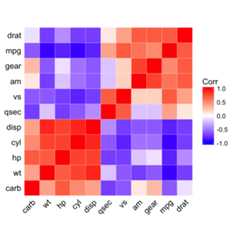
# Types of correlogram layout# --------------------------------# Get the lower triangleggcorrplot(corr, hc.order = TRUE, type = "lower", outline.col = "white")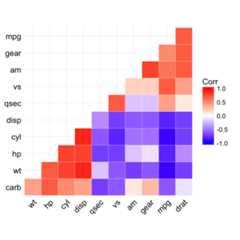
# Get the upeper triangleggcorrplot(corr, hc.order = TRUE, type = "upper", outline.col = "white")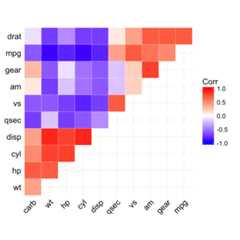
# Change colors and theme# --------------------------------# Argument colorsggcorrplot(corr, hc.order = TRUE, type = "lower", outline.col = "white", ggtheme = ggplot2::theme_gray, colors = c("#6D9EC1", "white", "#E46726"))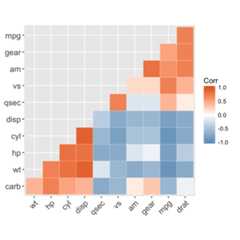
# Add correlation coefficients# --------------------------------# argument lab = TRUEggcorrplot(corr, hc.order = TRUE, type = "lower", lab = TRUE)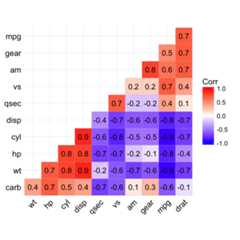
# Add correlation significance level# --------------------------------# Argument p.mat# Barring the no significant coefficientggcorrplot(corr, hc.order = TRUE, type = "lower", p.mat = p.mat)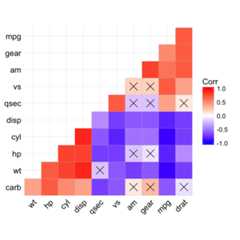
# Leave blank on no significant coefficientggcorrplot(corr, p.mat = p.mat, hc.order = TRUE, type = "lower", insig = "blank")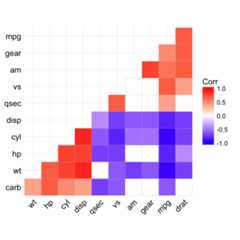
Show me some love with the like buttons below... Thank you and please don't forget to share and comment below!!
Montrez-moi un peu d'amour avec les like ci-dessous ... Merci et n'oubliez pas, s'il vous plaît, de partager et de commenter ci-dessous!
Recommended for You!




Recommended for you
This section contains the best data science and self-development resources to help you on your path.
Books - Data Science
Our Books
- Practical Guide to Cluster Analysis in R by A. Kassambara (Datanovia)
- Practical Guide To Principal Component Methods in R by A. Kassambara (Datanovia)
- Machine Learning Essentials: Practical Guide in R by A. Kassambara (Datanovia)
- R Graphics Essentials for Great Data Visualization by A. Kassambara (Datanovia)
- GGPlot2 Essentials for Great Data Visualization in R by A. Kassambara (Datanovia)
- Network Analysis and Visualization in R by A. Kassambara (Datanovia)
- Practical Statistics in R for Comparing Groups: Numerical Variables by A. Kassambara (Datanovia)
- Inter-Rater Reliability Essentials: Practical Guide in R by A. Kassambara (Datanovia)
Others
- R for Data Science: Import, Tidy, Transform, Visualize, and Model Data by Hadley Wickham & Garrett Grolemund
- Hands-On Machine Learning with Scikit-Learn, Keras, and TensorFlow: Concepts, Tools, and Techniques to Build Intelligent Systems by Aurelien Géron
- Practical Statistics for Data Scientists: 50 Essential Concepts by Peter Bruce & Andrew Bruce
- Hands-On Programming with R: Write Your Own Functions And Simulations by Garrett Grolemund & Hadley Wickham
- An Introduction to Statistical Learning: with Applications in R by Gareth James et al.
- Deep Learning with R by François Chollet & J.J. Allaire
- Deep Learning with Python by François Chollet
Click tofollow us onFacebook :
Comment this article by clicking on "Discussion" button (top-right position of this page)